Work environment
| Questions | Answers
|---------------------------|--------------------
| Type of issue | Bug
| OS version (server) | Ubuntu 18.04
| PHP version | 7.2
| MISP version / git hash | 2.4.0396cc5cb3725336c6f3d0ab0097fd238ef7a9f9
Expected behavior
Misp workers should be running.
Actual behavior
The workers are failing to start. It appears to be because the php code in /var/www/MISP/app/Vendor/kamisama/php-resque-ex-scheduler/bin/resque-scheduler.php.
It tries to call $logger->getInstance()->addInfo where the logger is $logger = new MonologInit\MonologInit($LOG_HANDLER, $LOG_HANDLER_TARGET);.
The new major version of Monolog doesn't have this function anymore. It should be in /var/www/MISP/app/Vendor/monolog/monolog/src/Monolog/Logger.php.
Steps to reproduce the behavior
Blank install misp using provided installer INSTALL.sh -c -M.
Logs, screenshots, configuration dump, ...
/var/www/MISP/app/tmp/logs/resque-worker-error.log
Error: Call to undefined method Monolog\Logger::addInfo()
#0 /var/www/MISP/app/Vendor/kamisama/php-resque-ex/lib/Resque/Worker.php(360): Resque_Worker->log('Starting worker...', 200)
#1 /var/www/MISP/app/Vendor/kamisama/php-resque-ex/lib/Resque/Worker.php(194): Resque_Worker->startup()
#2 /var/www/MISP/app/Vendor/kamisama/php-resque-ex/bin/resque(109): Resque_Worker->work('5')
#3 /var/www/MISP/app/Vendor/kamisama/php-resque-ex/bin/resque(100): startWorker('email', 1, Object(MonologInit\MonologInit), '5')
#4 {main}
Monolog launched a new major version 3 days ago which appears to be the reason that the workers are failing to run.
https://github.com/Seldaek/monolog/releases
I will try to get more info and see if there is an easy way this could be updated to work with the latest version. I would like if the MISP install pinned to a particular version of these dependencies to make the install more stable.
I know that this code is from the app/Vendor path which is in the gitignore so maybe I should report this elsewhere. If there is somewhere more relevant then I would appreciate being pointed in the right direction.
 colbyprior
All 10 comments
It looks like the resque-scheduler comes from here https://github.com/wa0x6e/php-resque-ex
The composer.json in that project is set to require monolog >= 1.2.0.
https://github.com/wa0x6e/php-resque-ex/blob/master/composer.json#L22
A quick fix would be to set monolog == 1.24.0 in a fork of that project. I don't fully understand the process in which the installer pulls down the php-resque-ex code.
colbyprior
on 2 Sep 2019
As a workaround I've downgraded monolog version using composer.
/var/www/MISP/app$ php ./composer.phar require monolog/monolog=1.24.0
And the workers started succesfully.
 wiredrat
on 2 Sep 2019
wiredrat
on 2 Sep 2019
@wiredrat - I can confirm that doing the same on Misp-Docker resolved the issue too.
 swedishmike
on 2 Sep 2019
swedishmike
on 2 Sep 2019
Argh. Thanks for the bug hunt, will have a look tomorrow how we can do this cleanly.
 iglocska
on 2 Sep 2019
iglocska
on 2 Sep 2019
Como solución, he degradado la versión de monolog usando composer.
/var/www/MISP/app$ php ./composer.phar require monolog/monolog=1.24.0
Y los trabajadores comenzaron con éxito.
Hello
I am presenting the same problem that the workers do not initiate me and I already did the two steps but I still have the same difficulty it will be that someone can help me to solve it
thank you.
 albertomaturana
on 4 Sep 2019
albertomaturana
on 4 Sep 2019
If anyone runs into this as well the command to downgrade monlog is:
$ su -s /bin/bash www-data -c 'php /var/www/MISP/app/composer.phar require monolog/monolog=1.24.0'
 GelosSnake
on 4 Sep 2019
GelosSnake
on 4 Sep 2019
If anyone runs into this as well the command to downgrade monlog is:
$ su -s /bin/bash www-data -c 'php /var/www/MISP/app/composer.phar require monolog/monolog=1.24.0'
Hello
When I give you the command you indicated, I get: su: Authentication failure
albertomaturana
on 4 Sep 2019
Your install might be different, which user owns the /var/www/MISP folder?
GelosSnake
on 5 Sep 2019
I have the same issue for resolve it. I have change my path for /var/www/MISP/app and after launch su -s /bin/bash www-data -c 'php /var/www/MISP/app/composer.phar require monolog/monolog=1.24.0'
Issue resolved and work fine (_thanks to FafnerKeyZee for the tips_)
 marcfredG
on 10 Sep 2019
marcfredG
on 10 Sep 2019
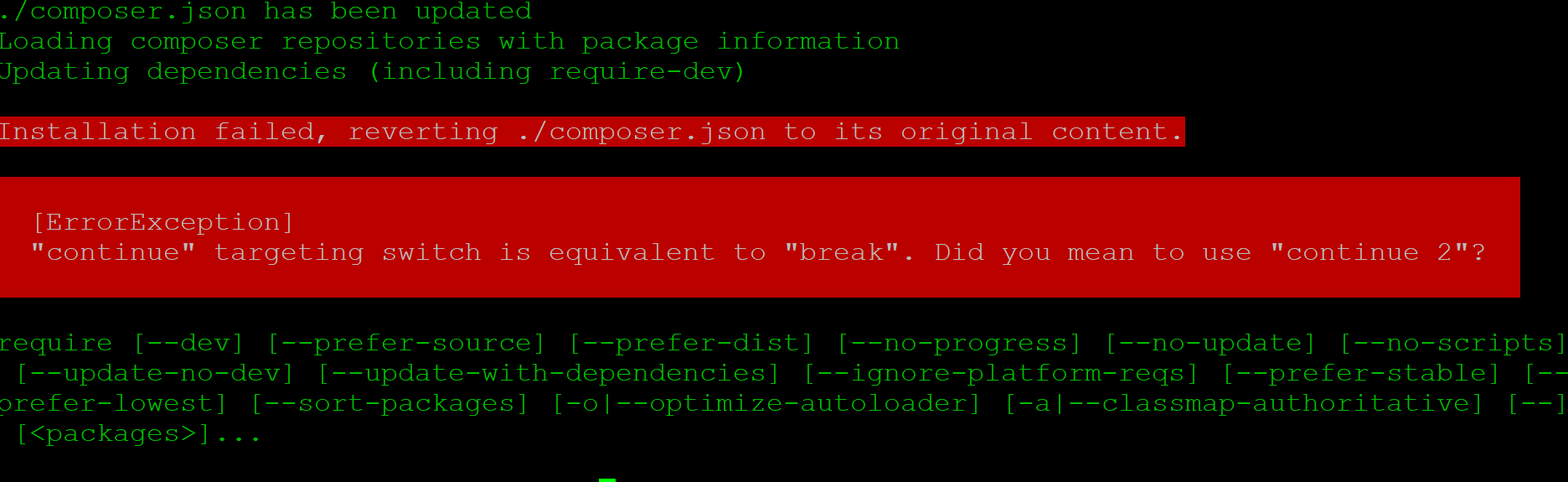
Im getting this
 darthsyaz
on 29 Oct 2019
darthsyaz
on 29 Oct 2019
Related issues
 ufo0531
·
4Comments
ufo0531
·
4Comments
 honey4free
·
3Comments
honey4free
·
3Comments
 RichieB2B
·
7Comments
RichieB2B
·
7Comments
 fl0x2208
·
4Comments
fl0x2208
·
4Comments
 Rafiot
·
3Comments
Rafiot
·
3Comments
Most helpful comment
As a workaround I've downgraded monolog version using composer.
/var/www/MISP/app$ php ./composer.phar require monolog/monolog=1.24.0And the workers started succesfully.