Misp: No Clear Documentation/Process for External Authentication Configuration
Checking through the MISP book and the various pieces of documentation and issues listed here in Github, I can't find any clear directions on enabling external authentication in MISP. The various settings documented in the example configuration file provided don't seem to work as expected, the GUI configuration menus don't offer any pointers, and there does not appear to be any useful logs of note to help with troubleshooting.
I'd assume using external authentication (OpenLDAP, Active Directory, whatever) is a pretty standard practice for a tool of this type. While it might be obvious to developers and/or people who have spent an amount of time working with MISP, securing the tool is likely one of the first steps someone will do when deploying MISP, so any level of knowledge outside of what is documented cannot be assumed.
Ultimately, I believe documentation related to authentication configuration, as well as other significant portions of the tool, should be documented clearly and concisely, in such a way that a 'smart newbie' can follow them and be successful.
 ropetin
All 8 comments
Any news about this issue?
I'm trying to configure MISP using external authentication through a LDAP server, but with no success yet.
This is my Apache configuration:
<VirtualHost *:443>
ServerAdmin [email protected]
ServerName mymisp.mydomain
DocumentRoot /var/www/MISP/app/webroot
<Directory /var/www/MISP/app/webroot>
Options -Indexes
AllowOverride all
AuthType Basic
AuthBasicProvider ldap
AuthName "LDAP Auth"
AuthUserFile /dev/null
AuthLDAPURL "ldap://mydomain/OU=myou,O=test,C=local?mail"
AuthLDAPBindDN "CN=myuser,OU=myou,O=test,C=local"
AuthLDAPBindPassword "mypassword"
require valid-user
RewriteEngine On
RewriteCond %{LA-U:REMOTE_USER} (.+)
RewriteRule .* - [E=RU:%1]
RequestHeader set REMOTE_USER %{RU}e
#RequestHeader set X-Remote-User %{REMOTE_USER}s ---> Maybe this is has to be used in Apache 2.4.x ????????
</Directory>
SSLEngine On
SSLCertificateFile /etc/ssl/private/misp.crt
SSLCertificateKeyFile /etc/ssl/private/misp.key
#SSLCertificateChainFile /etc/ssl/private/misp-chain.crt
LogLevel debug
ErrorLog /var/log/apache2/misp_ssl_error.log
CustomLog /var/log/apache2/misp_ssl_access.log combined
ServerSignature Off
</VirtualHost>
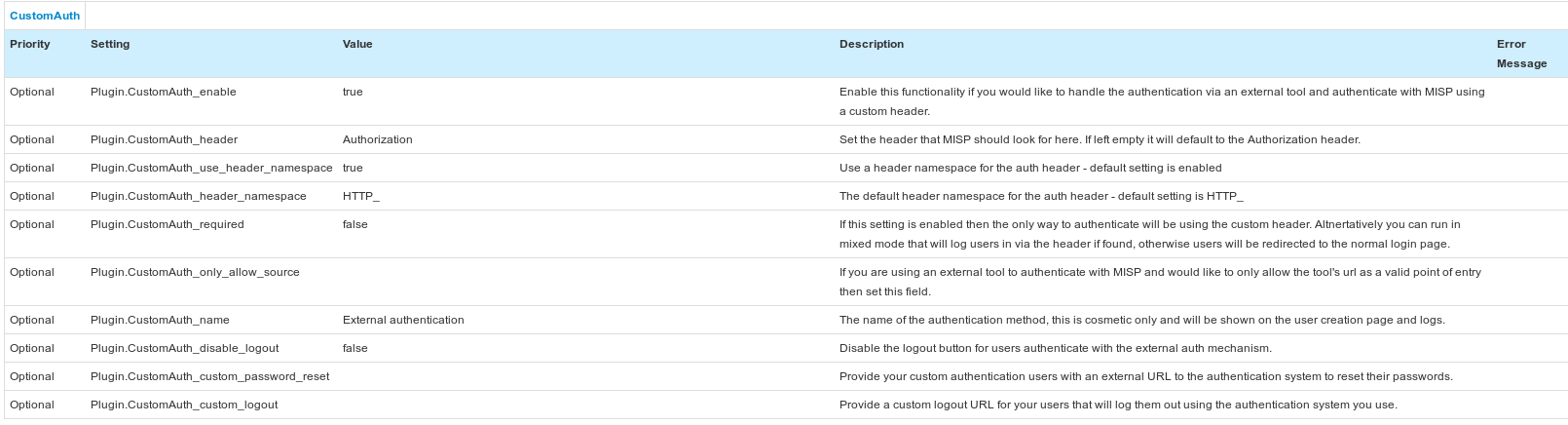
Below, just the CustomAuth Plugin enabled (no specific configuration adopted so far, since I don't know what I need to change):
Eventually, I created a simple user with external authentication checkbox selected.
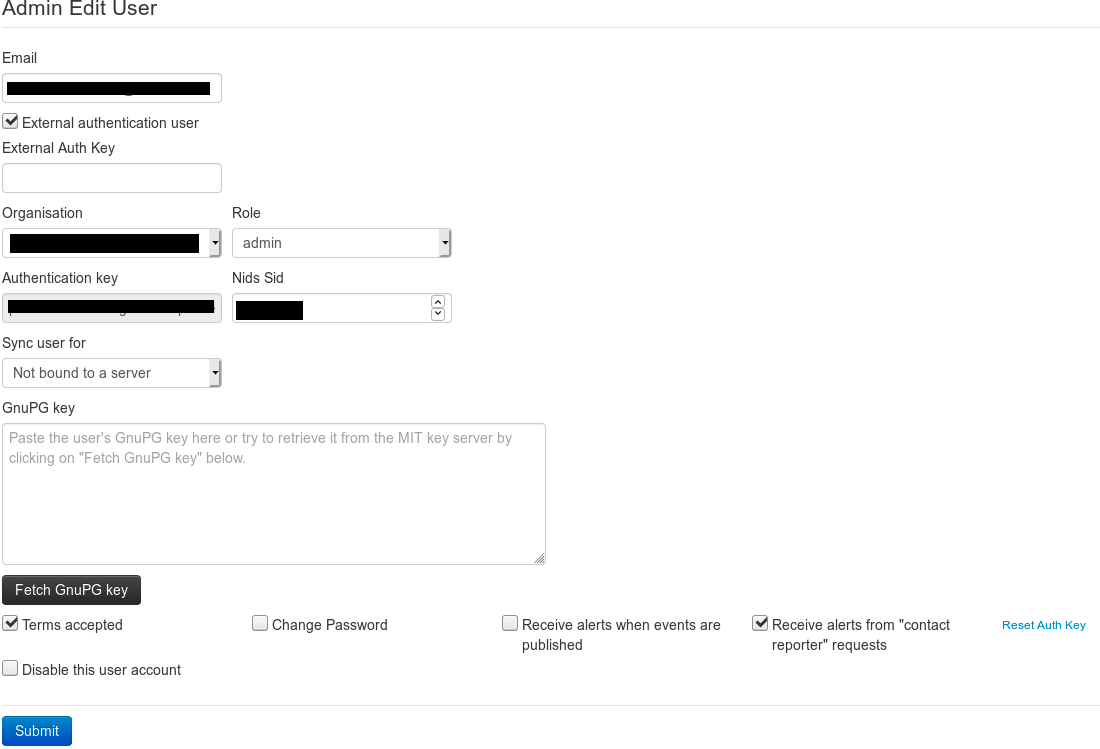
The issue
When visiting MISP, a basic authentication appears and, after entering my credentials, the LDAP user is granted. However, after the basic authentication succeeded, the MISP login page (/users/login) appears, asking for login.
 francesco-ficarola
on 1 Mar 2019
francesco-ficarola
on 1 Mar 2019
Ok, after debugging all the authentication code, finally I understood as to configure the External Authentication.
SYSTEM CONFIGURATION
Ubuntu 18.04.1 LTS
MISP v2.4.103
Apache v2.4.29
APACHE CONFIGURATION
~# vim /etc/apache2/sites-enabled/default-ssl.conf

<VirtualHost *:443>
        ServerAdmin [email protected]
        ServerName yourserver.yourdomain.com
        DocumentRoot /var/www/MISP/app/webroot
        <Directory /var/www/MISP/app/webroot>
                Options -Indexes
                AllowOverride all
        </Directory>
        <Location /users/login>
                AuthType Basic
                AuthBasicProvider ldap
                AuthName "LDAP Authentication"
                AuthUserFile /dev/null
                AuthLDAPURL "ldap://url_ldap/OU=your_ou_if_exists,O=your_O_if_exists,C=your_C?username_field"
                Require valid-user
                RequestHeader set X-Remote-User %{REMOTE_USER}
        </Location>
        SSLEngine On
        SSLCertificateFile /etc/ssl/private/misp.crt
        SSLCertificateKeyFile /etc/ssl/private/misp.key
        #SSLCertificateChainFile /etc/ssl/private/misp-chain.crt
        LogLevel debug
        ErrorLog /var/log/apache2/misp_ssl_error.log
        CustomLog /var/log/apache2/misp_ssl_access.log combined
        ServerSignature Off
</VirtualHost>
Please note that username_field can be one of the following: uid, mail (if exists), samaccountname (if your authenticator system is an Active Directory), and so on... That depends on which field you want to map the credentials the user must enter.
CUSTOMAUTH PLUGIN
Plugin.CustomAuth_enable                  true
Plugin.CustomAuth_header                  X_REMOTE_USER
Plugin.CustomAuth_use_header_namespace    true
Plugin.CustomAuth_header_namespace        HTTP_
...
USER CONFIGURATION
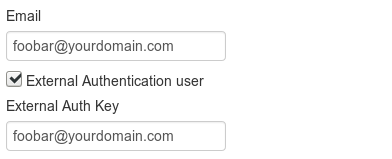
1) Enable _External Authentication user_ checkbox
2) Copy and paste the username_field you have mapped on HTTP_X_REMOTE_USER into _External Auth Key_ input field. For instance, as shown above, the _External Auth Key_ can be the email address since my username_field mapped by the LDAP url is mail.
SECURITY ENHANCEMENT
If you leave _External Auth Key_ as clear text, that could be a security issue, since an attacker could send an HTTP request with the victim username into HTTP_X_REMOTE_USER to access to his MISP platform.
This could be solved by mapping a hashed value to HTTP_X_REMOTE_USER. For instance:
RequestHeader set X-Remote-User expr=%{md5:%{REMOTE_USER}_saltpassword}
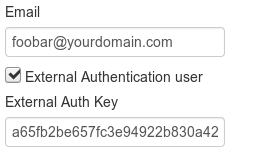
Obviously, you should replicate the same hashed value in the _External Auth Key_ input field. To obtain that value you could use OS utils, for instance:
~$ echo -n [email protected]_saltpassword | md5sum | awk '{print $1}'
a65fb2be657fc3e94922b830a42dfc30
francesco-ficarola
on 11 Mar 2019
Hi @francesco-ficarola,
can you please describe all the steps for setting LDAP authentication?
I'm trying to replicate what you did but with no luck.
I'm stuck on this error:
Unrecognized header format %
 pietrogu
on 12 Aug 2020
pietrogu
on 12 Aug 2020
Some documentation in #6189 related to LDAP/Active Directory
 trolldbois
on 14 Aug 2020
trolldbois
on 14 Aug 2020
Hi @francesco-ficarola,
can you please describe all the steps for setting LDAP authentication?
I'm trying to replicate what you did but with no luck.
I'm stuck on this error:Unrecognized header format %
Hi @pietrogu,
in order to help you, please describe step-by-step what you did. The configuration is described in my previous post.
Best,
Francesco
francesco-ficarola
on 24 Aug 2020
Hi @francesco-ficarola,
can you please describe all the steps for setting LDAP authentication?
I'm trying to replicate what you did but with no luck.
I'm stuck on this error:
Unrecognized header format %Hi @pietrogu,
in order to help you, please describe step-by-step what you did. The configuration is described in my previous post.
Best,
Francesco
I solved the problem, I need to add an "e" to %{REMOTE_USER}
Now i'm facing this issue: after inserting credentials in a popup, i see the login page and I been asked to login again. If i insert the LDAP user and password, it gives me a wrong credentials error.
Did you face this problem and solved it?
Thank you
pietrogu
on 9 Sep 2020
I solved the problem, I need to add an "e" to %{REMOTE_USER}
Now i'm facing this issue: after inserting credentials in a popup, i see the login page and I been asked to login again. If i insert the LDAP user and password, it gives me a wrong credentials error.
Did you face this problem and solved it?
Thank you
The login page should not appear. You have to login by using BASIC AUTH only. Did you properly set the authentication plugin in MISP?
francesco-ficarola
on 9 Sep 2020
Problem solved! sorry for the spam, i had to rename X-Remote-User in X_REMOTE_USER
pietrogu
on 11 Sep 2020
Related issues
 Rafiot
·
3Comments
Rafiot
·
3Comments
 yannw
·
5Comments
yannw
·
5Comments
 ufo0531
·
4Comments
ufo0531
·
4Comments
 WakandaKing
·
5Comments
WakandaKing
·
5Comments
 open-source-rs
·
6Comments
open-source-rs
·
6Comments
Most helpful comment
Ok, after debugging all the authentication code, finally I understood as to configure the External Authentication.
SYSTEM CONFIGURATION
Ubuntu 18.04.1 LTS
MISP v2.4.103
Apache v2.4.29
APACHE CONFIGURATION
Please note that
username_fieldcan be one of the following:uid,mail(if exists),samaccountname(if your authenticator system is an Active Directory), and so on... That depends on which field you want to map the credentials the user must enter.CUSTOMAUTH PLUGIN
USER CONFIGURATION

1) Enable _External Authentication user_ checkbox
2) Copy and paste the
username_fieldyou have mapped onHTTP_X_REMOTE_USERinto _External Auth Key_ input field. For instance, as shown above, the _External Auth Key_ can be the email address since myusername_fieldmapped by the LDAP url ismail.SECURITY ENHANCEMENT
If you leave _External Auth Key_ as clear text, that could be a security issue, since an attacker could send an HTTP request with the victim username into
HTTP_X_REMOTE_USERto access to his MISP platform.This could be solved by mapping a hashed value to
HTTP_X_REMOTE_USER. For instance:Obviously, you should replicate the same hashed value in the _External Auth Key_ input field. To obtain that value you could use OS utils, for instance: