I would like to see an option to "Allow only one instance." This option
would subsequently suck all new terminal sessions into a new tab in the
same window.  The user could then switch tabs with a customizable key
combination, that would default to something reasonable like Ctrl+Tab.
Original issue reported on code.google.com by [email protected] on 30 Dec 2008 at 4:45
 GoogleCodeExporter
All 80 comments
I wondered how long it would take for this issue to show up. :)

I'm afraid there's no chance of me implementing tabs though. They don't go with
MinTTY's basic approach of keeping things small and simple. More generally, I
think
multiple document interfaces and tabs are a Bad Idea™, and even Microsoft
themselves
are moving away from them in Office. The problem that tabs try to address needs
to be
solved at the window manager level, and not separately in every app. Windows 7
is
meant to make progress in this area. WinTabber from http://www.wintabber.com
will
aggregate any application windows into tabbed windows, although unfortunately
it's
not free for Cygwin apps (or PuTTY).

Stepping off the soapbox, tabs would be a big job to implement, as they would
require
a major redesign of both the Windows frontend and the pty backend. See also
http://www.chiark.greenend.org.uk/~sgtatham/putty/wishlist/multiple-connections.
html
Original comment by andy.koppe on 31 Dec 2008 at 7:50
- Changed state: WontFix
- Added labels: Difficulty-Hard
GoogleCodeExporter
on 4 Jun 2015
Ah, fair enough, mate.  Thanks for your explanation.

...never hurts to ask, right ;)
Original comment by [email protected] on 31 Dec 2008 at 12:48
GoogleCodeExporter
on 4 Jun 2015
Reopened with priority "None", so that it appears in the list of open issues,
in the
hope of avoiding duplicates.
Original comment by andy.koppe on 2 Jan 2009 at 7:14
- Changed state: Accepted
- Added labels: Priority-None
GoogleCodeExporter
on 4 Jun 2015
While I know that tabs/multi-document interfaces are an emotive issue, I do like
tabbed designs too, even if they make the application larger.

However I do find that GNU screen at the server end mitigates the problem to
some extent.

I'd like to see it as a feature but accept that I probably wont get it!

Good program BTW.
Original comment by [email protected] on 13 Feb 2009 at 1:21
GoogleCodeExporter
on 4 Jun 2015
tabs would be great.
wintabber is quite buggy with mintty.. it doesn't resize the window
Original comment by [email protected] on 5 Mar 2009 at 4:10
GoogleCodeExporter
on 4 Jun 2015
Issue 72 has been merged into this issue.
Original comment by andy.koppe on 26 Mar 2009 at 6:06
GoogleCodeExporter
on 4 Jun 2015
_if_ someone really needs tabs for shell-environments, then using GNU screen
would imho
be an way better idea.

its just meant to be controlled by keyboard, wheras graphical tabs are designed
for
mice.
Original comment by drazraeltod on 26 Mar 2009 at 9:30
GoogleCodeExporter
on 4 Jun 2015
The resizing problem with WinTabber seems to have been sorted by the fix for
issue 76
in 0.3.9.
Original comment by andy.koppe on 26 Apr 2009 at 12:08
GoogleCodeExporter
on 4 Jun 2015
I couldn't agree more with comment 1.  I was very surprised to hear this from
someone
other than myself.  Wintabber looks good at first glance.  I'll try it... but
it
can't force my favorite editor to use 1 window per document unfortunately.
Original comment by [email protected] on 28 Apr 2009 at 4:25
GoogleCodeExporter
on 4 Jun 2015
I stumbled across a utility that blows WinTabber out of the water: WindowTabs,
available from http://www.windowtabs.com.

It can group any windows, with Google Chrome-style tabs on top of the window,
and it
seems to work well with MinTTY. See also attached screenshot.

Unfortunately it's not Free either, but there's a free trial that allows up to
three
tabs.
Original comment by andy.koppe on 30 May 2009 at 7:19
Attachments:
GoogleCodeExporter
on 4 Jun 2015
Here's a project that shows how to make a tabbed wrapper for MinTTY (and much
more
besides): http://mobaxterm.mobatek.net. And it's GPLed, although written in
Delphi.
Original comment by andy.koppe on 20 Jun 2009 at 10:24
GoogleCodeExporter
on 4 Jun 2015
I came to the issue tracker only to find this feature request, confident it
would
exist. I was surprised to Comment #1, but after some thought I have to agree.
This
*is* the sort of thing that should be solved at the window manager level. In an
ideal
world, anyway.

I've just never had any confidence that a window manager will ever do it right,
which
is why I'm used to seeing this solved over and over again at the application
level.
Thanks for the fresh injection of optimism and idealism. Best of luck!

In the mean time I'll try WindowTabs.
Original comment by [email protected] on 21 Oct 2009 at 9:33
GoogleCodeExporter
on 4 Jun 2015
I just found "screen" is actually a better choice, if hardstatus is set well,
and
bindkey function keys as prev/next. MinTTY is supposed to be light and robust.
Original comment by maxiangjiang on 11 Jan 2010 at 12:45
GoogleCodeExporter
on 4 Jun 2015
Issue 164 has been merged into this issue.
Original comment by andy.koppe on 21 Feb 2010 at 6:57
GoogleCodeExporter
on 4 Jun 2015
Just as a comment while looking at this issue and the discussion at the putty
site.
Im struck by some of the similarities in problems between tabbed browsing
windows &
tabbed ssh sessions, in terms of security as well as robustness/isolation
requirements.

On the surface it seems the model advocated by chrome/chromium as well as some
of the
underlying infrastructure might be a good fit for code leverage or ideas.

MultiProcessArchitecture -
http://www.chromium.org/developers/design-documents/multi-process-architecture
ChromeViews - http://www.chromium.org/developers/design-documents/chromeviews

Me personally, Id love a chromesque mintty...
Original comment by [email protected] on 7 Apr 2010 at 7:06
GoogleCodeExporter
on 4 Jun 2015
I agree that Chrome has tabs about right, including the multi-process model.
Yet I
also remain convinced that those are better implemented in a desktop-wide
solution
such as WindowTabs rather than separately in each application. And it's not
just the
tabs themselves (which in the case of Chrome require custom window frame
painting),
but also stuff like ripping tabs off a window and dropping them into another
one,
thumbnails, saving and restoring sets of tabs ...

In any case, I have neither the interest, skills, or additional spare time to
work on
this. Here are the ground rules in case someone else wants to have a go: I
won't
accept patches that implement tabs within mintty.exe, but I'd be happy to make
reasonably-sized changes to help with embedding mintty.exe into a container
app, as
long as those changes don't hinder tabless operation.
Original comment by andy.koppe on 12 Apr 2010 at 5:59
GoogleCodeExporter
on 4 Jun 2015
To help a little bit with handling multiple mintty windows, I've implemented
Ctrl+Tab
and Ctrl+Shift+Tab shortcuts for switching between them. This is in r881 on
trunk, to
appear in 0.7-beta2.
Original comment by andy.koppe on 5 May 2010 at 7:50
GoogleCodeExporter
on 4 Jun 2015
Andy, I updated mintty to pick up your multi-window changes and they're great.
One
minor enhancement to this and I think it'll be there.  When I pretty ALT-F2 to
create
a new window it uses the default window size.  I pretty much always maximize my
console windows, though, and there doesn't seem to be a way to specify that you
want
the new mintty to start maximized.  Maybe I've just missed it.  If it already
exists,
mind sharing how to do it; if not, any chance of having an option to start the
new
window either maximized or, preferably, using the same window size (including
maximized or full screen) as the window from which it was launched?
Original comment by [email protected] on 24 May 2010 at 8:51
GoogleCodeExporter
on 4 Jun 2015
You can start mintty maximized by setting the 'Run' field of an Explorer
shortcut
accordingly, or by invoking it through cygstart with the --maximize option.
Unfortunately the maxiticity doesn't get inherited by new mintties invoked via
Alt+F2
though. I've entered issue 189 for that.
Original comment by andy.koppe on 27 May 2010 at 4:15
GoogleCodeExporter
on 4 Jun 2015
I see KDE introduced tabs at window manager level with version 4.4 earlier this
year. Neat. Redmond, please copy that.
Original comment by andy.koppe on 18 Sep 2010 at 7:06
- Changed title: Tabs
GoogleCodeExporter
on 4 Jun 2015
mintty seems to run fine in conemu from the far3 project which creates a tabbed
window interface for windows consoles.  Conemu is under a bsd license and the
source is available http://code.google.com/p/conemu-maximus5/
Original comment by [email protected] on 6 Mar 2012 at 6:51
GoogleCodeExporter
on 4 Jun 2015
See also

http://ttyplus.com/multi-tabbed-putty/ideas.html
Original comment by [email protected] on 3 May 2013 at 7:46
GoogleCodeExporter
on 4 Jun 2015
puttytabmanager ?

http://sites.google.com/site/macdsite/utilidades/puttytabmanager
Original comment by [email protected] on 6 May 2013 at 12:53
GoogleCodeExporter
on 4 Jun 2015
Puttytabmanager might help, but the site is in spanish, hence close to
unusable, at least for me.
Original comment by [email protected] on 18 Jul 2013 at 9:15
GoogleCodeExporter
on 4 Jun 2015
configure puttytabmanager:

https://sites.google.com/site/macdsite/foro?place=msg%2Fmacdsoft%2Fz0Tu2bU9M9w%2
FVhEk48ePtGYJ

Unfortunately  popup menu not work
Original comment by [email protected] on 11 Jan 2014 at 6:58
GoogleCodeExporter
on 4 Jun 2015
While Ctrl-tab to switch between mintty windows is nice, my preference for
tab-based UIs is to reduce clutter. If I have several terminals open, I don't
want them to take up the entire taskbar (and while I can and do use screen,
having different applications with different configurations for switching
between documents/frames/windows/tabs/whatever is somewhat less than optimal).

Referring back to comment #1, the argument that MDI should be the business of
the window manager would work better if the application actually let the window
manager do so. mintty (at least when used with Cygwin) doesn't combine entries
in the Windows 7 taskbar, when the taskbar is set to "always combine".
Original comment by [email protected] on 6 Feb 2014 at 5:56
GoogleCodeExporter
on 4 Jun 2015
Has any one looked at the work being done on Con-emu?
http://code.google.com/p/conemu-maximus5/
It looks like it seems to work with cygwin and minnty alright, with some minor
exceptions that I have already filed bugs on..  I think with a little bit of
work, it could be what every one on this board is asking for and more.
Original comment by [email protected] on 21 Feb 2014 at 9:51
GoogleCodeExporter
on 4 Jun 2015
Conemu actually runs into a number of problems with using Cygwin.

* Using 256 colors requires a hack that makes things slightly slower
* Using 256 colors with vim requires even more hackery
* Using 256 colors over ssh is impossible
* Using tmux (at least over ssh, and possibly locally) causes issues - namely,
due to some butchered handling of escape codes between mintty and Conemu, you
can't use split window (in tmux, or in vim once in tmux).

For a while I thought conemu was the answer, but there's still this area where
Conemu gets some things right that mintty doesn't, and vice versa.
Original comment by [email protected] on 1 Nov 2014 at 9:48
GoogleCodeExporter
on 4 Jun 2015
@mintty since the original _wont-fix_ comment is from 2010 -- Is your opinion still the same or will we see tabs in the future?
 laktak
on 9 Mar 2016
laktak
on 9 Mar 2016
Well, “your” isn’t exactly the same person as it used to be... but I share Andy’s opinion about where and how Tabs should be implemented, see https://github.com/mintty/mintty/issues/8#issuecomment-108886260 and https://github.com/mintty/mintty/issues/8#issuecomment-108886297.
An implementation intertwined with the current code is not acceptable because it might compromise the stability of the terminal.
If at all, there could be some kind of add-on that runs multiple instances of the terminal code in widely decoupled processes.
 mintty
on 10 Mar 2016
mintty
on 10 Mar 2016
In that case, would officially supporting ConEmu be an option?
I'm using it with mintty at the moment and it appears to work quite well.
laktak
on 15 Mar 2016
I’ve had another look at ConEmu on this occasion and I don’t currently have the nerve to investigate its configuration which isn’t quite - too intuitive.
If you’d like to contribute a mintty-specific pre-configuration for ConEmu, that would indeed be appreciated. Something like a ConEmu configuration file and a desktop shortcut to start an instance of ConEmu with mintty, any maybe another demo shortcut showing how to start two instances...
mintty
on 15 Mar 2016
It's actually quite easy:
- Download ConEmu Stable, Portable
- Start ConEmu and set the _startup task_ to
{Bash::Git bash}on the first dialog that appears (I have Git installed, I didn't test with cygwin)
You'll get a window with mintty/bash running and can create more tabs with <win> + w or by clicking on +.
TERM is set to cygwin ... I think I had some issues with that as I set mine to xterm.
laktak
on 18 Mar 2016
If TERM=cygwin, you have been starting a Cygwin Console in ConEmu, not a Cygwin Terminal (i.e. mintty).
mintty
on 18 Mar 2016
IMO, considering Tabs only makes sense after #56 is resolved. With the current state of affairs using a terminal muxer like tmux or screen aligns better with mintty's goals; that is, being a lightweight terminal emulator (Even more so since personally I can use most of the few Windows CLI tools I need within mintty/tmux).
Also, with today's ever increasing screen estate; I'm tempted to claim that the majority uf users prefer more terminal windows per screen, instead of Tabs.
 roeme
on 2 May 2016
roeme
on 2 May 2016
Wow... I'm really amazed at how far mintty has come recently... True color. Sixel. WSL.
I've been using ConEmu and Tmux for a long time, but:
1) Tmux doesn't have Sixel support, and doesn't plan on adding it
2) ConEmu has developed their own Cygwin wrapper that I think they're most focused on as opposed to "child window" support... And ConEmu support of mintty for resizing windows, pressing Alt+Enter don't work properly.
 ryanerwin
on 23 Apr 2017
ryanerwin
on 23 Apr 2017
Also neither ConEmu nor tmux are themselves terminals.
mintty
on 23 Apr 2017
I had some intuition how to conciliate the issue and implemented "Virtual Tabs". A proof of concept demo is available for download. A menu displays a switching list of all mintty windows.
For the demo, it's attached to the context menu and also reachable with Ctrl+Shift+I.
Other keys might be desirable, and probably it should not be in the default context menu, but maybe a separate one, to open with some modifier+mouse.
mintty
on 12 Oct 2017
Thanks.
"Available for download" is a bit misleading IMHO. You mean one should download a snapshot of master and build oneself? Or am I missing some snapshot build link?
Anyway, for me, the main benefit of tabs would be to notice when another terminal's window title (which should obvioulsy be used as tab title) changes. I.e. I'd immediatley notice when another shell is back at the prompt after a long running command. So "tabs" hidden in a popup menu unfortunately don't cut it for me.
(Since I usually have only two or three minttys open, the focus switching aspect of tabs is already handled decently with Ctrl+Tab. Or most often, I prefer some Autohotkey shortcuts.)
Could you maybe add an option that makes the mintty window title show all other minttys' titles too (with fixed positions in launch order)?
+-+---------------------------------------------------------------+----+
|·|·launched·1st··|·launched·2nd··|·focussed·3rd··|·last·launched·|―[]X|
+-+-------------------------------^^^^^^^^^^^^^^^^^---------------+----+
|······································································|
|·/tmp·>·ls_···························································|
|······································································|
|······································································|
+----------------------------------------------------------------------+
(The dots should be spaces, but multiple consecutive spaces where not displayed correctly.)
The focussed windows's title should somehow be highlighted. Is underlining possible in a title bar?
I think I'd prefer when non-focussed windows retained their original titles. But if it's all or nothing, changing all windows would be ok, too.
 mkq
on 14 Oct 2017
mkq
on 14 Oct 2017
Here's the challenge: It is not possible to set any style in the title bar. It is possible to detect mouse clicks, but it is hardly possible to correlate them to the proper field because there is no control about the font of the window title (and accordingly the spacing).
Maybe, speculating, it could be possible to mirror the title layout by fiddling out the font and size being used and render a copy of the title in memory to detect the effective proportions and handle the border positions. Maybe it would be even easier to self-draw the title, which is the ultimate alternative for applications that want to run their own thing here.
mintty
on 15 Oct 2017
Released 2.8.0.
mintty
on 23 Oct 2017
immediatley notice when another shell is back at the prompt
How about making the foreground window flash (e.g. when invoking a bell)?
mintty
on 24 Oct 2017
How about making the foreground window flash (e.g. when invoking a bell)?
Nice, I had forgotten about that. I made an Autohotkey DllCall "FlashWindow" based hack which I can now retire. Thanks!
mkq
on 25 Oct 2017
Actually, the foreground flash is not yet implemented, I was just asking. You could of course send either a BEL or a title setting sequence to the tty of the foreground terminal, but then you'd need to find out which...
mintty
on 25 Oct 2017
You could also send a BEL to the own session after running a command, and configure BellPopup=yes,
but I guess that's not what you want (immediate popup and having to send something explicitly).
mintty
on 25 Oct 2017
You could of course send either a BEL or a title setting sequence to the tty of the foreground terminal, but then you'd need to find out which...
Sorry, I don't understand why I would need to find out which terminal. But anyway...
You could also send a BEL to the own session after running a command
... that's what I did if I understand you correctly. I.e. I do print -Pn '\a' in zsh's precmd function (echo -ne '\a' in $PS1 in bash should have the same effect).
With mintty option "Highlight in taskbar" on (BellTaskbar=yes), the taskbar button gets highlighted only when not focussed, which is what I wanted. Thanks!
mkq
on 25 Oct 2017
If that's sufficient for you, the better, and there's no inter-session communication needed.
I had assumed you would wish the current foreground session to become somehow indicative, and that would need to introduce an inter-session notification mechanism.
mintty
on 25 Oct 2017
Yes and no :-) Sorry I wasn't clear on that. I meant and still think, to make mintty feel like a tabbed terminal, some inter-session notification would be required. And that notification should be apparent, not just in a context menu. Thanks for the hint to redirect a title setting sequence to another terminal device. I hadn't thought about that. Maybe I'll experiment with that later.
OTOH, starting with your "Here's the challenge..." answer, I was talking about the "workaround" to make separate windows more background-friendly.
mkq
on 26 Oct 2017
OK, here's the deal: If someone provides a graphical tab bar implementation (e.g. using winsearch.c as a pattern), I will provide the functional background including any inter-session communication as needed.
mintty
on 26 Oct 2017
Cool. Though that someone is not me, as I suck at C programming.
mkq
on 26 Oct 2017
I'm closing this issue now that Virtual Tabs are available.
For remaining enhancements, see the follow-up issue #699.
For implementation constraints, see also https://github.com/mintty/mintty/issues/600#issuecomment-344165427.
mintty
on 14 Nov 2017
Released 3.0.3 with title-bar session switcher (Ctrl+right-click) which is the prototype of an optical tab bar.
mintty
on 26 Sep 2019
@mintty I'm trying to implement a tab bar based by adding a component like the search bar on the top. And now I can more or less display it.
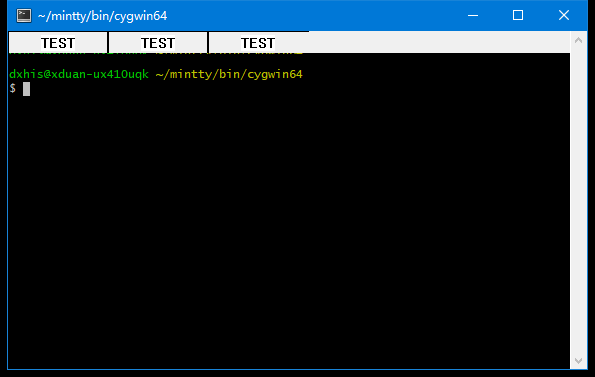
Now I have some questions:
- Any suggestions on selecting the colors? Also, is there a suggested way to get the background and foreground color of the terminal?
- Should the tabs in the bar have a fixed width or dynamic width when a tab has a very long title? If a fixed width is wanted, which part of the title should I display?
- What kind of interactions more than switching tab should be supported by tabs?
- What kind of low level implementation is preferred? Just paint on the bar or add tabs as buttons?
 dxhisboy
on 16 Nov 2019
dxhisboy
on 16 Nov 2019
- Within mintty, a number of configured colours are available: cfg.fg_colour, cfg.bg_colour, cfg.cursor_colour, cfg.search_fg_colour, cfg.search_bg_colour, cfg.search_current_colour, cfg.sel_fg_colour, cfg.sel_bg_colour. New entries could be defined, perhaps with a fallback to some of the above if not configured (-1).Within mintty, a number of configured colours are available: cfg.fg_colour, cfg.bg_colour, cfg.cursor_colour, cfg.search_fg_colour, cfg.search_bg_colour, cfg.search_current_colour, cfg.sel_fg_colour, cfg.sel_bg_colour. New entries could be defined, perhaps with a fallback to some of the above if not configured (-1).
- Other applications (e.g. browsers) vary width with the number of tabs but not with the length of contents. They usually display the initial part; considering that a terminal title will often display the working directory, it may be a useful option to display the end instead.
- The tab set and contents should be updated if terminal windows are created/closed/change title. A framework for this interaction is already available, as used by the "session switcher", but it may not yet be complete for active updates; I would contribute missing functionality.
- Typically you would expect a set of tabs in one bar. As a general alternative to an inline tab bar, a tab bar could be displayed above the window. I had once thought about a separate process that adjusts its window position accordingly and might be implemented as a special mode of mintty. You are aware that something similar is already available, just not always displayed but to be shown with Ctrl+click on the title bar?
mintty
on 16 Nov 2019
Yes, I found the code and I'm currently forcing geomsync to let the window notify each other.
dxhisboy
on 16 Nov 2019
I currently use first letter + "*" + suffix as long as possible for too long titles and the background and foreground color is set to ansi_colours[10] and ansi_colours[0]. Will this be okay?
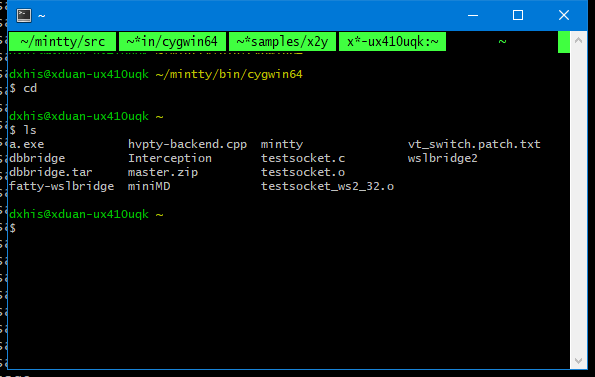
Then I will process the dynamic tab length, and necessary interactions.
dxhisboy
on 18 Nov 2019
In this screenshot, the tab looks almost like normal terminal output from an application.
This may be confusing. Style should be clearly distinctive. More decent colours, perhaps, maybe a thin separator bar, and a smaller font (it looks even larger than the text above, should be the other way).
mintty
on 18 Nov 2019
I think some system colours should be used for the tab display, e.g. the title bar colour for the active tab and a dimmed version for the others, or the title colour for others and some menu or info colour for the active tab background. Colour values can be retrieved with GetSysColor.
mintty
on 18 Nov 2019
I think you are right, I found this looks like a tmux tabbar.
dxhisboy
on 18 Nov 2019

I think I can follow this color scheme, but they do not look alike even they have same RGB value...
dxhisboy
on 18 Nov 2019
I currently use first letter + "*" + suffix as long as possible for too long titles
Would be better to use an ellipsis character (below) instead of*:
… U+02026 HORIZONTAL ELLIPSIS
⋯ U+022EF MIDLINE HORIZONTAL ELLIPSIS
 BrianInglis
on 18 Nov 2019
BrianInglis
on 18 Nov 2019
@BrianInglis … U+02026 HORIZONTAL ELLIPSIS works.
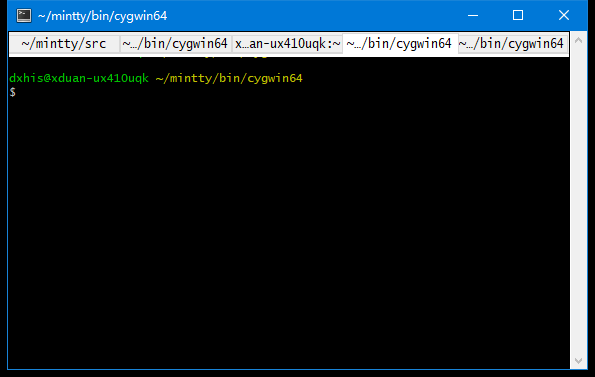
But a potential problem is the ⋯ U+022EF MIDLINE HORIZONTAL ELLIPSIS is missing in my font:
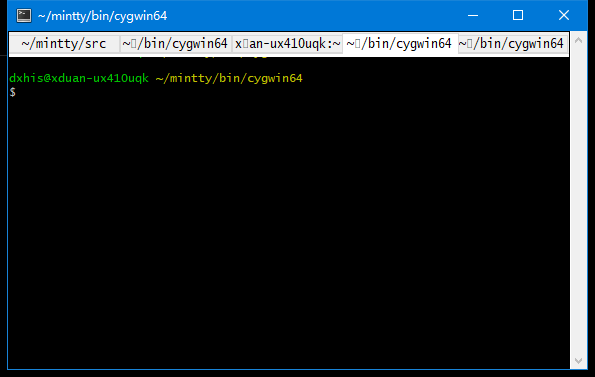
Then how could we ensure the user is using a supported font become a problem.
A workaround should be we check for the existence of these two characters, then use * if both are missing.
dxhisboy
on 19 Nov 2019
Most fonts should support the standard publishing marks:
․ U+02024 ONE DOT LEADER
‥ U+02025 TWO DOT LEADER
… U+02026 HORIZONTAL ELLIPSIS aka 3 dot leader
⋮U+022EE VERTICAL ELLIPSIS
but perhaps not some of the others.
BrianInglis
on 19 Nov 2019
It is now almost working. Just one question:
Use windows' tab control as the graphics component or paint it by myself?
I have both code working.
What's more, the highlight of tabs is not a REAL focusing, I just highlight the tab corresponding to current window. I think this may be enough when we use GeomSync. Will this be OK?

dxhisboy
on 20 Nov 2019
Don't see what you mean by "graphics" versus "paint". Maybe I should try it out...
mintty
on 20 Nov 2019
@mintty I've pushed to https://github.com/dxhisboy/mintty/tree/dev
git diff output is here: diff.txt
Add ShowTabBar=yes to minttyrc to enable it.
Code still needs heavy polishing.
dxhisboy
on 20 Nov 2019
This seems to work well at first glance, amazing how you got the session framework integrated without specific support...
I have some initial formal review, mainly concerning code layout, which I'll add as a commit comment.
Tabbar layout can also do with some tweaking, I suppose. The Tab separation is currently not very visible, the font could be smaller, I think.
mintty
on 20 Nov 2019
I'm using the my version of mintty.exe in wsltty for a afternoon.
The trick of session update is that: I always set the tabinfo[i].wnd == wnd tab focused. Because if there is GeomSync, no one cares how background window shows their tabbar.
I also have a consideration: when a tab is clicked, should I move the corresponding window to the position of current window?
What does tab separation mean? The "separation between the tabbar and terminal" or "the separation between adjacent tabs"?
dxhisboy
on 20 Nov 2019
How the tab feature work here? I have to create a new window to see a new tab. Should it not be just one window and multiple tab?
Some points about patch file:
- file permissions are changed from
644to755. - patch contains tab and space both.
- add a space b/w
)and{. e.g.if (x ==0) {andvoid func(int x) {. - device contexts are not released after used.
 Biswa96
on 20 Nov 2019
Biswa96
on 20 Nov 2019
How the tab feature work here? I have to create a new window to see a new tab. Should it not be just one window and multiple tab?
Following the consideration of "Virtual Tabs", this is a "Virtual Tabbar". Actually one window and multiple tab will be very complex.
dxhisboy
on 20 Nov 2019
A newer version is available: https://github.com/dxhisboy/mintty/tree/dev and diff.txt.
Also an experimental feature is if we click the tab for window B in window A, then window B will be moved to the position of window A.
dxhisboy
on 20 Nov 2019
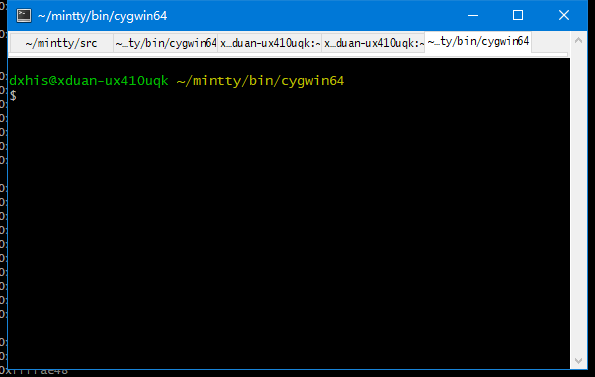
I'm trying a smaller font (0.8*cell_height), but it looks strange.
dxhisboy
on 20 Nov 2019
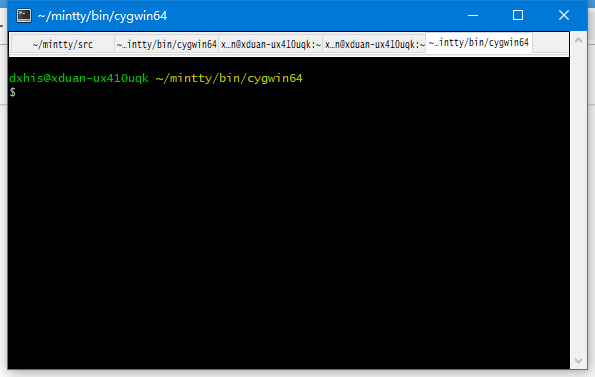
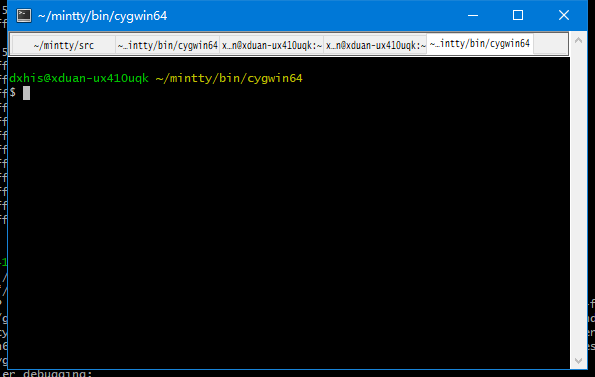
Are these two border styles better?
dxhisboy
on 20 Nov 2019
Border style looks nicer, thanks.
Tabbar text is placed higher for active tab, for me that looks distracting.
For the active tab, I would try to use the same colour is in the title bar, because these are related; don't know whether it'll look good.
mintty
on 20 Nov 2019
Also an experimental feature is if we click the tab for window B in window A, then window B will be moved to the position of window A.
That is actually SessionGeomSync=1 or higher already and shouldn't be implied without setting SessionGeomSync. We can later talk about unifying options.
mintty
on 20 Nov 2019
It is now almost working. Just one question:
Use windows' tab control as the graphics component or paint it by myself?
I have both code working.
Always let Windows do it so they are responsible for matching style changes.
BrianInglis
on 20 Nov 2019
I'm trying a smaller font (
0.8*cell_height), but it looks strange.
Might also want to skip display of characters after "…" before "/"; if no "/" displayed but "-", then after "…" before "-"; if neither "/" nor "-" displayed but "_", then after "…" before "_"; unless the number of characters skipped would equal or exceed the number of characters remaining
BrianInglis
on 20 Nov 2019
How about creating a new WIP PR instead of keep discussing in an already closed issue?
 k-takata
on 20 Nov 2019
k-takata
on 20 Nov 2019
Could have been a separate issue, yes. Up to @dxhisboy whether to create a new issue, doesn't need to be a PR while being developed and reviewed.
Unfortunately, github does not seem to have a feature to split an issue / move comments (I sent them a request).
mintty
on 20 Nov 2019
Would be nice to support git operations on issues - branch, fork, cherry-pick, stash, merge, migrate
BrianInglis
on 20 Nov 2019
Related issues
 MoSal
·
7Comments
BrianInglis
·
14Comments
MoSal
·
7Comments
BrianInglis
·
14Comments
 Trismegistos84
·
13Comments
Trismegistos84
·
13Comments
 JohanVandeplas
·
15Comments
JohanVandeplas
·
15Comments
 Jekotia
·
13Comments
Jekotia
·
13Comments
Most helpful comment
@mintty I'm trying to implement a tab bar based by adding a component like the search bar on the top. And now I can more or less display it.

Now I have some questions: