Minimal-mistakes: Staticman v2 doesn't appear on pages
Description
I wanted to add staticman comment section on my website, but after all of the time configuring it I still can't get it working.
Environment
- Minimal Mistakes version: 4.12.1
- Ruby gem or remote theme version:
- Jekyll version:
- Git repository URL: https://github.com/megascrapper/megascrapper.github.io
- Operating system: macOS 10.13.6
- GitHub Pages hosted (if yes provide URL to site): yes (https://megascrapper.github.io)
Expected behavior
Staticman comment section should appear on pages that have comments enabled (ie. comments: true).
Steps to reproduce the behavior
- I added
staticmanappas a collaborator on the site repo (and received OK message on https://api.staticman.net/v2/connect/megascrapper/megascrapper.github.io) - I left the
staticman.ymlfile mostly on default, except for the reCaptcha stuff which is disabled in the meantime. - before submitting this issue I also updated the theme to make sure that wasn't the problem.
Even after all of that, the staticman form still wouldn't appear, and I have confirmed that comments have been enabled. So is there anything that I left behind or did I screwed up something?
Example page: https://megascrapper.github.io/test/
also, https://api.staticman.net/v2/entry/megascrapper/megascrapper.github.io/master says this:
Cannot GET /v2/entry/megascrapper/megascrapper.github.io/master
 megascrapper
All 17 comments
As per the documentation, you haven't completely filled out all the required fields in _config.yml.
Look's like you're missing repository.
 mmistakes
on 8 Aug 2018
mmistakes
on 8 Aug 2018
The form now shows up, but I cannot post anything. it errors out saying Sorry, there was an error with your submission. Please make sure all required fields have been completed and try again. even though I filled everything and ticked the Captcha.
Also, the POST link (https://api.staticman.net/v2/entry/megascrapper/megascrapper.github.io/master) still says Cannot GET /v2/entry/megascrapper/megascrapper.github.io/master. Does it matter though?
megascrapper
on 8 Aug 2018
Not sure, I don't really know the inner workings of Staticman.
There's really only two possibilities I can think of.
- You're still missing some configs or they don't match what Staticman expects. Could be in
_config.ymlorstaticman.yml. When you see missing required fields it means there are ones marked required in the config but the form isn't passing data for them on submit. - Staticman could be down.
mmistakes
on 8 Aug 2018
And hitting the API link directly will give that error. Trying that with the MM demo site does the same error.
mmistakes
on 8 Aug 2018
Yeah, there seems to be something wrong with my config.
Anyway, I managed to submit comments on my other site, but no comments are showing up even though I merged the pull request. Example
megascrapper
on 9 Aug 2018
Path of the comment data is wrong. That's why it's not showing up.
It should be in a subfolder that matches the page slug it goes with. That's how they're associated and pulled in to the appropriate post or page.
Not sure why it's not working for you. It works on the demo site. Only other thing I can suggest is compare against that to see what is off with your repo. I'm fairly certain it's a bad config.
mmistakes
on 9 Aug 2018
Re: comment files. You should have something like this. Your repo is dumping all of the comment .yml files directly into /comments.
mmistakes
on 9 Aug 2018
I really don't know what I did wrong here.
The feedback page has a permalink as /feedback. Even after adding a folder on _data/comments staticman still dumps everything onto /comments.
megascrapper
on 9 Aug 2018
Not sure, but whatever is going on the logic in the comment form that should add in the relevant value for page.slug isn't working.
You can confirm that by looking at the hidden input field named options[slug]. The value is blank when it should be "feedback", which instructs Staticman where to place the data file.
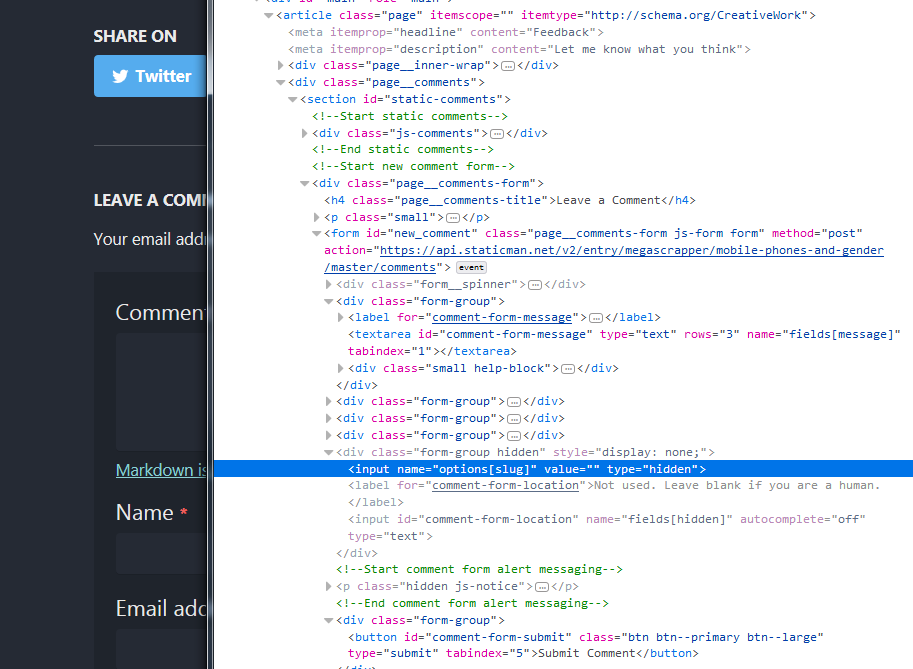
The logic in the theme is correct, but perhaps because you're setting a permalink in the page Jekyll doesn't render page.slug correctly.
To be honest I've never tried comments on anything other than _posts... and even then I've never tried to override their permalinks. That could be the other difference. I've never tried this with a page, just _posts.
mmistakes
on 9 Aug 2018
@megascrapper
your reCaptcha secret have mistake you have to use encrypt in the staticman.
After fix you can try again.
 llovvoll
on 13 Aug 2018
llovvoll
on 13 Aug 2018
@llovvoll
FIxed it now. Does it matter though if reCaptcha is disabled?
megascrapper
on 14 Aug 2018
@megascrapper
But your reCaptcha not disabled in the page, _config.yml also need to correct
you can refer to my activation steps Enable Staticman Comments System
llovvoll
on 14 Aug 2018
Let's say that I don't want to turn on reCaptcha, do I remove the reCaptcha entry in _config.yml?
megascrapper
on 14 Aug 2018
@megascrapper
Yes you need to remove the reCaptcha in _config.yml and flase in staticman.yml
that can be disabled.
llovvoll
on 14 Aug 2018
@megascrapper
I received the same error and was able to resolve it.
Not sure if you have already looked, but you can get details on the error by examining the console in the developer tools of your browser. My error indicated that my staticman.yml file had a problem with indentation. Once I fixed it, my comments posted correctly.
 thedavecarroll
on 20 Aug 2018
thedavecarroll
on 20 Aug 2018
Hi @mmistakes ,
Well, I finally managed to get staticman working. Apparently, it only works with posts and not pages. Thanks for the help anyway.
megascrapper
on 28 Aug 2018
any idea about to have comments on pages?
 servedois
on 24 Aug 2020
servedois
on 24 Aug 2020
Related issues
 r614
·
3Comments
r614
·
3Comments
 QuantLab
·
5Comments
QuantLab
·
5Comments
 halirutan
·
4Comments
halirutan
·
4Comments
 asarkar
·
4Comments
asarkar
·
4Comments
 wilsonmar
·
3Comments
wilsonmar
·
3Comments