Minikube: Increase vm-driver detection timeout from 2s to 4s for hyperV
The exact command to reproduce the issue: minikube start --vm-driver=hyperv
The full output of the command that failed:
- minikube v1.7.2 on Microsoft Windows 10 Pro 10.0.17763 Build 17763
- Using the hyperv driver based on user configuration
! 'hyperv' driver reported an issue: C:\WINDOWS\System32\WindowsPowerShell\v1.0\powershell.exe Get-WindowsOptionalFeature -FeatureName Microsoft-Hyper-V-All -Online failed:
- Suggestion: Start PowerShell as Administrator, and run: 'Enable-WindowsOptionalFeature -Online -FeatureName Microsoft-Hyper-V -All'
- Documentation: https://minikube.sigs.k8s.io/docs/reference/drivers/hyperv/
X hyperv does not appear to be installed
The output of the minikube logs command:
*
X Error getting config: cluster "minikube" does not exist
*
- minikube is exiting due to an error. If the above message is not useful, open an issue:
The operating system version: Windows 10 Pro
Hyper-V is installed, enabled, and works fine for docker desktop:
Output of Get-WindowsOptionalFeature -FeatureName Microsoft-Hyper-V-All -Online:
FeatureName : Microsoft-Hyper-V-All
DisplayName : Hyper-V
Description : Provides services and management tools for creating and running virtual machines and their resources.
RestartRequired : Possible
State : Enabled
CustomProperties :
 ajjensen13
All 18 comments
Note: I have tried rebooting
ajjensen13
on 11 Feb 2020
@ajjensen13 If you really has hyperv configured correctly, you might have the same problem as I had
For me the problem was the hyperv driver timed out during state check (Get-WindowsOptionalFeature -FeatureName Microsoft-Hyper-V-All -Online).
It has a fix 2sec timeout (see #6422) and for me it need 3-4sec to return.
To confirm this please run this command in powershell and copy the output here:
measure-command {Get-WindowsOptionalFeature -FeatureName Microsoft-Hyper-V-All -Online | out-host}
For example my output to this command:
FeatureName      : Microsoft-Hyper-V-All
DisplayName      : Hyper-V
Description      : Provides services and management tools for creating and running virtual machines and their resources                    .
RestartRequired  : Possible
State            : Enabled
CustomProperties :

Days              : 0
Hours             : 0
Minutes           : 0
Seconds           : 3
Milliseconds      : 182
Ticks             : 31827615
TotalDays         : 3,68375173611111E-05
TotalHours        : 0,000884100416666667
TotalMinutes      : 0,053046025
TotalSeconds      : 3,1827615
TotalMilliseconds : 3182,7615
So it takes 3sec to run the command for me.
If you also see that more than 2sec (or close to 2sec) in TotalSeconds you probably has the timeout problem.
 vhx64
on 11 Feb 2020
vhx64
on 11 Feb 2020
I'm running into the same issue, and my results for the Powershell command are as stated. I did measure the timing and mine is running at 2 sec and 9 ms so technically over by just a hair. PR #6422 looks like it was a recent add, can we extend the timeout to 3 or 4 sec?
Also a note that for now adding a '--force' to your start command got me around it.
 dpiessens
on 11 Feb 2020
dpiessens
on 11 Feb 2020
I'm away from my computer so I can't verify, but I strongly suspect that is
the same issue for me. I successfully installed minikube on Hyper-V on the
same machine about 2 weeks ago (and had to remove it temporarily). Now it
is failing to start.
On Tue, Feb 11, 2020, 12:10 PM Dan Piessens notifications@github.com
wrote:
I'm running into the same issue, and my results for the Powershell command
are as stated. I did measure the timing and mine is running at 2 sec and 9
ms so technically over by just a hair. PR #6422
https://github.com/kubernetes/minikube/pull/6422 looks like it was a
recent add, can we extend the timeout to 3 or 4 sec?—
You are receiving this because you were mentioned.
Reply to this email directly, view it on GitHub
https://github.com/kubernetes/minikube/issues/6579?email_source=notifications&email_token=AA5N5EKCJQUYSMWDHPQBM73RCLSZBA5CNFSM4KSYHLTKYY3PNVWWK3TUL52HS4DFVREXG43VMVBW63LNMVXHJKTDN5WW2ZLOORPWSZGOELNPENQ#issuecomment-584774198,
or unsubscribe
https://github.com/notifications/unsubscribe-auth/AA5N5EJ6HEKITUQDUR3VZZLRCLSZBANCNFSM4KSYHLTA
.
ajjensen13
on 11 Feb 2020
@dpiessens I agree timeout may be extended by few sec.
But the main problem is when timeout happens, there is no meaningful error message about it, so the user has no clue about what happened.
Also the timeout should be enabled to set by user.
As a summary I promote these changes:
- default driver state timeout is 5sec
- able to change default timeout with
--vm-driver-timeoutflag (duration) - when timeout happens during getting driver state, "timeout error" should be printed to the console and also a hint is given how timeout can be increased
IMHO these should be changed for all #6422 related drivers, not just hyperv for the sake of consistency
Edit: as @dpiessens mentioned with --force flag the command run successfully even when timeout happen, so able to change timeout might be needless
vhx64
on 12 Feb 2020
My machine clocks in at about 3.7 seconds. @dpiessens --force suggestion also works for me.
PS C:\WINDOWS\system32> measure-command {Get-WindowsOptionalFeature -FeatureName Microsoft-Hyper-V-All -Online | out-host}

FeatureName      : Microsoft-Hyper-V-All
DisplayName      : Hyper-V
Description      : Provides services and management tools for creating and running virtual machines and their
                   resources.
RestartRequired  : Possible
State            : Enabled
CustomProperties :


Days              : 0
Hours             : 0
Minutes           : 0
Seconds           : 3
Milliseconds      : 766
Ticks             : 37666679
TotalDays         : 4.3595693287037E-05
TotalHours        : 0.00104629663888889
TotalMinutes      : 0.0627777983333333
TotalSeconds      : 3.7666679
TotalMilliseconds : 3766.6679
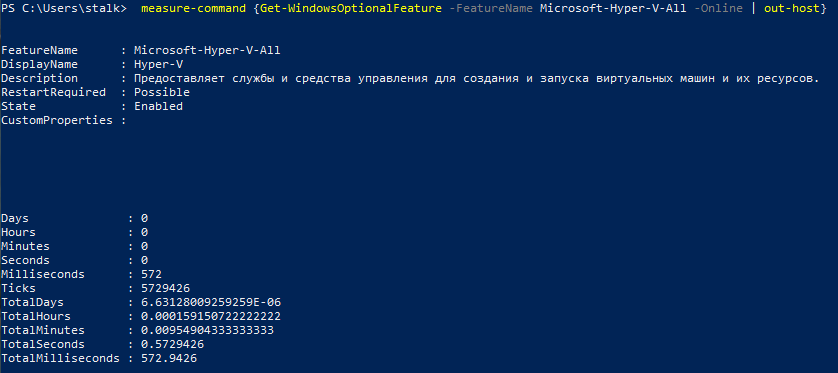
flag --force doesn't help

 dlopatin-v
on 14 Feb 2020
dlopatin-v
on 14 Feb 2020
I'm running into the same issue, and my results for the Powershell command are as stated. I did measure the timing and mine is running at 2 sec and 9 ms so technically over by just a hair. PR #6422 looks like it was a recent add, can we extend the timeout to 3 or 4 sec?
Also a note that for now adding a '--force' to your start command got me around it.
The "--force" worked for me.
For me, the HyperV response is taking more than 5 Sec.
the command "_minikube start --vm-driver=hyperv --force_" resolve it.
 rafiq-ahmed
on 15 Feb 2020
rafiq-ahmed
on 15 Feb 2020
Earlier in the day minikube was starting and stopping and deleting fine. And then
C:\WINDOWS\system32>minikube start --vm-driver=hyperv
* minikube v1.7.2 on Microsoft Windows 10 Enterprise 10.0.18363 Build 18363
* Using the hyperv driver based on user configuration

! 'hyperv' driver reported an issue: C:\WINDOWS\System32\WindowsPowerShell\v1.0\powershell.exe Get-WindowsOptionalFeature -FeatureName Microsoft-Hyper-V-All -Online failed:
Running the recommended Powershell did nothing.
I am failing the 2 second barrier.
I tried to feel the --force and after 18m nothing has happened.
Is there another way?
update
Hyperv is successfully detected in 1.5. Reverting to minikube 1.5.0 as a temporary fix. Thanks
 snow6oy
on 15 Feb 2020
snow6oy
on 15 Feb 2020
I have exactly the same issue, however my command returns in 0.35 seconds, so well within the 2s barrier. This worked fine before I upgraded minikube just this morning.
 DevOpsFu
on 17 Feb 2020
DevOpsFu
on 17 Feb 2020
I had the exact same issue and --force worked, command takes around 8 seconds. Looking at others reported times, 2 seconds may be too short. And the error message is misleading.
 mmrath
on 19 Feb 2020
mmrath
on 19 Feb 2020
I think we could definitely increase the timeout to 4s if people are seeing this issue. Passing in the flag --vm-driver=hyperv should solve this issue, since auto-detection won't happen. Has anyone tried adding this flag and still this bug?
Also, if anyone would be interested in opening a PR to increase the timeout, I'd be happy to review it.
 priyawadhwa
on 19 Feb 2020
priyawadhwa
on 19 Feb 2020
@priyawadhwa I have opened a PR for this, could you please take a look? Thanks
 sshukun
on 20 Feb 2020
sshukun
on 20 Feb 2020
--force resolved the issue for me
 ledgrejr
on 20 Feb 2020
ledgrejr
on 20 Feb 2020
This is really strange. On my machine, it takes roughly 0.3 seconds to return the result.
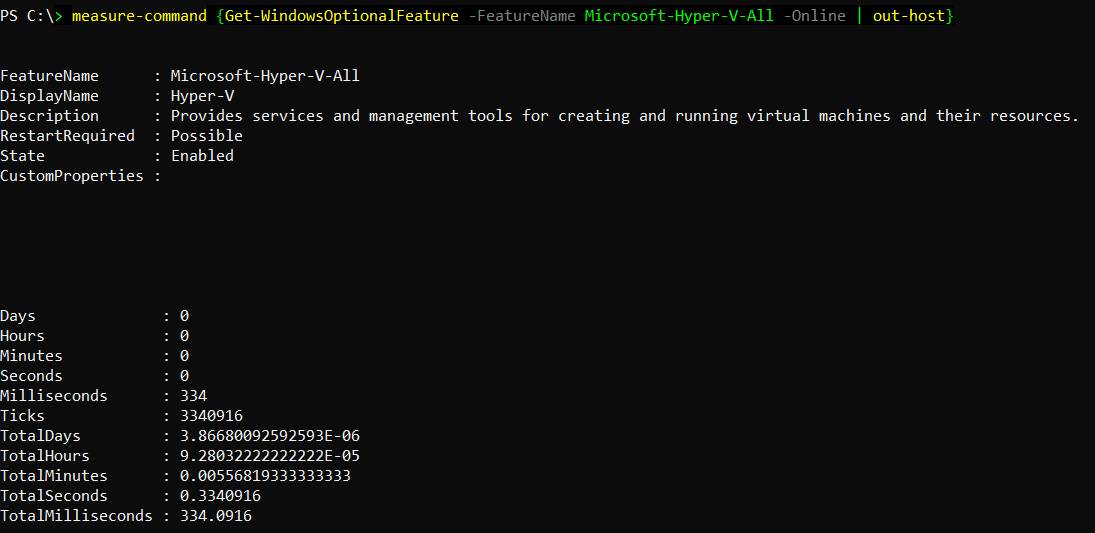
Just for the sake of it, could you please try updating your cache by following this link?
 blueelvis
on 23 Feb 2020
blueelvis
on 23 Feb 2020
I Am stuck here. Someone please help.
PS C:\WINDOWS\system32> minikube start --vm-driver hyperv --hyperv-virtual-switch "MiniKube Switch" --force
- minikube v1.7.3 on Microsoft Windows 10 Pro 10.0.18363 Build 18363
- Using the hyperv driver based on user configuration
! 'hyperv' driver reported an issue: C:\WINDOWS\System32\WindowsPowerShell\v1.0\powershell.exe Get-WindowsOptionalFeature -FeatureName Microsoft-Hyper-V-All -Online failed:
- Suggestion: Start PowerShell as Administrator, and run: 'Enable-WindowsOptionalFeature -Online -FeatureName Microsoft-Hyper-V -All'
Documentation: https://minikube.sigs.k8s.io/docs/reference/drivers/hyperv/
Downloading VM boot image ...
minikube-v1.7.3.iso.sha256: 65 B / 65 B [--------------] 100.00% ? p/s 0s
minikube-v1.7.3.iso: 167.39 MiB / 167.39 MiB [-] 100.00% 7.10 MiB p/s 24s- Creating hyperv VM (CPUs=2, Memory=2000MB, Disk=20000MB) ...
*
X Unable to start VM. Please investigate and run 'minikube delete' if possible: creating host: create host timed out in 120.000000 seconds
* - minikube is exiting due to an error. If the above message is not useful, open an issue:
- https://github.com/kubernetes/minikube/issues/new/choose
PS C:\WINDOWS\system32>
- https://github.com/kubernetes/minikube/issues/new/choose
 lmurali89
on 27 Feb 2020
lmurali89
on 27 Feb 2020
running into this all morning - ended up having to:
minikube delete
Get-Service vmms | Restart-Service
minikube start --force
Still received the message about Hyper-V, but all tasks finished and I was able to create a deployment.
 byrontuckett
on 29 Feb 2020
byrontuckett
on 29 Feb 2020
Hi am I am getting the same error below
even after trying out the mentioned commands above as admin.
- minikube v1.11.0 on Microsoft Windows 10 Pro 10.0.18362 Build 18362
- Unable to pick a default driver. Here is what was considered, in preference order:
- docker: Not healthy: docker container type is windows
- hyperv: Not installed: C:\WINDOWS\System32\WindowsPowerShell\v1.0\powershell.exe @(Get-Wmiobject Win32_ComputerSystem).HypervisorPresent returned "Get-Wmiobject : The specified service does not exist as an installed service.\r\nAt line:1 char:3\r\n+ @(Get-Wmiobject Win32_ComputerSystem).HypervisorPresent\r\n+
~~~~~~~~~~\r\n + CategoryInfo : InvalidOperation: (:) [Get-WmiObject], COMException\r\n + FullyQualifiedErrorId : GetWMICOMException,Microsoft.PowerShell.Commands.GetWmiObjectCommand\r\n \r\n" - podman: Not installed: exec: "podman": executable file not found in %PATH%
- virtualbox: Not installed: unable to find VBoxManage in $PATH
- vmware: Not installed: exec: "docker-machine-driver-vmware": executable file not found in %PATH%
- Try specifying a --driver, or see https://minikube.sigs.k8s.io/docs/start/
I have seen this error on multiple sites but no fix. Does anyone know what's going on?
 badrulhussain
on 12 Jun 2020
badrulhussain
on 12 Jun 2020
Related issues
 kphatak
·
3Comments
kphatak
·
3Comments
 mdkess
·
3Comments
mdkess
·
3Comments
 tstromberg
·
3Comments
tstromberg
·
3Comments
 tnine
·
3Comments
tnine
·
3Comments
 vainikkaj
·
3Comments
vainikkaj
·
3Comments
Most helpful comment
I'm running into the same issue, and my results for the Powershell command are as stated. I did measure the timing and mine is running at 2 sec and 9 ms so technically over by just a hair. PR #6422 looks like it was a recent add, can we extend the timeout to 3 or 4 sec?
Also a note that for now adding a '--force' to your start command got me around it.