Minikube: Document how to run minikube in China
Crazy workarounds and all. Known issues:
- gcr.io isn't available
- kubectl can't be downloaded
- ISO can't be downloaded
 tstromberg
All 18 comments
Help wanted!
tstromberg
on 20 Sep 2019
Hi, I can try and help out. I found this resource (though of course it should be up to the user whether they trust some random mirror online, even if it is run by MS):
https://github.com/Azure/container-service-for-azure-china/blob/master/aks/README.md#22-container-registry-proxy
That covers the first two points. Not sure about the ISO
 dylmye
on 24 Oct 2019
dylmye
on 24 Oct 2019
@dylmye - anything you can do to help document this would be much appreciated.
tstromberg
on 30 Oct 2019
Tomorrow is the last day of Hacktoberfest so I'll try to open a PR soon :)
dylmye
on 30 Oct 2019
Anyone have been working on that?
Seems like Aliyun forked minikube https://github.com/AliyunContainerService/minikube
Here are the solutions so far I've been reading about :
- setup and use an HTTP proxy
- download and tag all containers image (https://github.com/chunchill/minikube-startup-china)
- use a different registry when you start, (like https://registry.docker-cn.com)
 davidbonachera
on 12 Dec 2019
davidbonachera
on 12 Dec 2019
I haven't, apologies.
dylmye
on 12 Dec 2019
@dylmye @davidbonachera
We appreciate any help on this item, this is still an important issue on our roadmap.
 medyagh
on 16 Dec 2019
medyagh
on 16 Dec 2019
@dylmye @davidbonachera
We appreciate any help on this item, this is still an important issue on our roadmap.
I temporarily solved the problem by using a VPN since it was quite difficult to find a quick fix,
I will try different ways to solve it and document those.
davidbonachera
on 17 Dec 2019
Issues go stale after 90d of inactivity.
Mark the issue as fresh with /remove-lifecycle stale.
Stale issues rot after an additional 30d of inactivity and eventually close.
If this issue is safe to close now please do so with /close.
Send feedback to sig-testing, kubernetes/test-infra and/or fejta.
/lifecycle stale
 fejta-bot
on 16 Mar 2020
fejta-bot
on 16 Mar 2020
@davidbonachera would you be able to help with this? I've got no free time for the foreseeable future unfortunately.
/remove-lifecycle stale as @medyagh has described this as important. (is that how that works?)
dylmye
on 24 Mar 2020
Stale issues rot after 30d of inactivity.
Mark the issue as fresh with /remove-lifecycle rotten.
Rotten issues close after an additional 30d of inactivity.
If this issue is safe to close now please do so with /close.
Send feedback to sig-testing, kubernetes/test-infra and/or fejta.
/lifecycle rotten
fejta-bot
on 23 Apr 2020
@dylmye I'm deploying a new instance in shanghai next month and will document that.
davidbonachera
on 24 Apr 2020
@davidbonachera are you still interested to share your experience and add documentation for that ?
medyagh
on 20 May 2020
@SataQiu Any help is much appreciated.
/assign @SataQiu
 RA489
on 20 May 2020
RA489
on 20 May 2020
I am in Beijing, China, and I can start a cluster with the following command without any other special setup:
$ ./minikube start --image-repository registry.aliyuncs.com/google_containers
😄  Darwin 10.15.4 上的 minikube v1.10.1
✨  Automatically selected the hyperkit driver. Other choices: docker, parallels
💾  正在下载驱动 docker-machine-driver-hyperkit:
    > docker-machine-driver-hyperkit.sha256: 65 B / 65 B [---] 100.00% ? p/s 0s
    > docker-machine-driver-hyperkit: 10.90 MiB / 10.90 MiB  100.00% 68.58 KiB
🔑  The 'hyperkit' driver requires elevated permissions. The following commands will be executed:

    $ sudo chown root:wheel /Users/shida/.minikube/bin/docker-machine-driver-hyperkit
    $ sudo chmod u+s /Users/shida/.minikube/bin/docker-machine-driver-hyperkit


Password:
✅  正在使用镜像存储库 registry.aliyuncs.com/google_containers
💿  正在下载 VM boot image...
    > minikube-v1.10.0.iso.sha256: 65 B / 65 B [-------------] 100.00% ? p/s 0s
    > minikube-v1.10.0.iso: 174.99 MiB / 174.99 MiB  100.00% 1.84 MiB p/s 1m35s
👍  Starting control plane node minikube in cluster minikube
🔥  Creating hyperkit VM (CPUs=2, Memory=4000MB, Disk=20000MB) ...
🐳  正在 Docker 19.03.8 中准备 Kubernetes v1.18.2…
    > kubelet.sha256: 65 B / 65 B [--------------------------] 100.00% ? p/s 0s
    > kubeadm.sha256: 65 B / 65 B [--------------------------] 100.00% ? p/s 0s
    > kubectl.sha256: 65 B / 65 B [--------------------------] 100.00% ? p/s 0s
    > kubectl: 41.99 MiB / 41.99 MiB [---------------] 100.00% 2.35 MiB p/s 18s
    > kubeadm: 37.97 MiB / 37.97 MiB [---------------] 100.00% 1.71 MiB p/s 23s
    > kubelet: 108.03 MiB / 108.03 MiB [-------------] 100.00% 2.34 MiB p/s 47s
🔎  Verifying Kubernetes components...
🌟  Enabled addons: default-storageclass, storage-provisioner
🏄  完成!kubectl 已经配置至 "minikube"

❗  /usr/local/bin/kubectl is version 1.14.7, which may be incompatible with Kubernetes 1.18.2.
💡  You can also use 'minikube kubectl -- get pods' to invoke a matching version
$ kubectl get pod -A
NAMESPACE     NAME                               READY   STATUS    RESTARTS   AGE
kube-system   coredns-7ff77c879f-n964v           1/1     Running   0          8s
kube-system   coredns-7ff77c879f-rpgk9           1/1     Running   0          8s
kube-system   etcd-minikube                      1/1     Running   0          14s
kube-system   kube-apiserver-minikube            1/1     Running   0          14s
kube-system   kube-controller-manager-minikube   1/1     Running   0          14s
kube-system   kube-proxy-ljhnz                   1/1     Running   0          9s
kube-system   kube-scheduler-minikube            1/1     Running   0          14s
kube-system   storage-provisioner                1/1     Running   1          14s
 SataQiu
on 24 May 2020
SataQiu
on 24 May 2020
./minikube start --registry-mirror=https://registry.docker-cn.com --image-repository=registry.cn-hangzhou.aliyuncs.com/google_containers --vm-driver=docker --alsologtostderr -v=8 --base-image registry.cn-hangzhou.aliyuncs.com/google_containers/kicbase:v0.0.10
0630 19:19:17.995075   20379 ssh_runner.go:148] Run: sudo ls /var/lib/minikube/binaries/v1.18.3
I0630 19:19:18.006715   20379 binaries.go:46] Didn't find k8s binaries: didn't find preexisting kubelet
Initiating transfer...
I0630 19:19:18.006785   20379 ssh_runner.go:148] Run: sudo mkdir -p /var/lib/minikube/binaries/v1.18.3
I0630 19:19:18.017669   20379 download.go:73] Downloading: https://storage.googleapis.com/kubernetes-release/release/v1.18.3/bin/linux/amd64/kubectl?checksum=file:https://storage.googleapis.com/kubernetes-release/release/v1.18.3/bin/linux/amd64/kubectl.sha256 -> /home/dd/.minikube/cache/linux/v1.18.3/kubectl
I0630 19:19:18.018230   20379 download.go:73] Downloading: https://storage.googleapis.com/kubernetes-release/release/v1.18.3/bin/linux/amd64/kubelet?checksum=file:https://storage.googleapis.com/kubernetes-release/release/v1.18.3/bin/linux/amd64/kubelet.sha256 -> /home/dd/.minikube/cache/linux/v1.18.3/kubelet
I0630 19:19:18.018419   20379 download.go:73] Downloading: https://storage.googleapis.com/kubernetes-release/release/v1.18.3/bin/linux/amd64/kubeadm?checksum=file:https://storage.googleapis.com/kubernetes-release/release/v1.18.3/bin/linux/amd64/kubeadm.sha256 -> /home/dd/.minikube/cache/linux/v1.18.3/kubeadm
want to know , how to mirror/proxy https://storage.googleapis.com?
 ddatsh
on 30 Jun 2020
ddatsh
on 30 Jun 2020
Hi @SataQiu minikube start --image-repository registry.aliyuncs.com/google_containers works.
However, after I run something like kubectl apply -f k8s on, for example, an Udemy course's "complex" project folder.
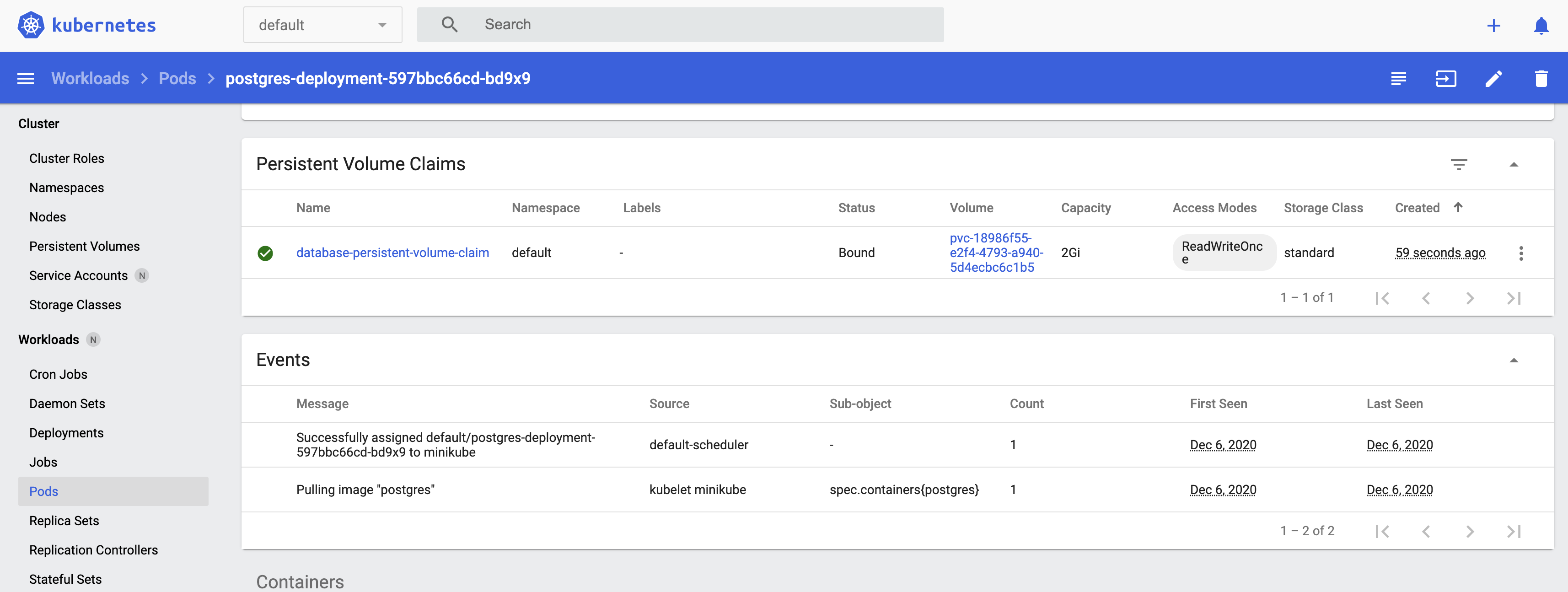
Pulling image takes forever until timeout. In reality, there is no downloading speed as I use Little Snitch to monitor my network.
Would you mind sharing some insights about how you handle this? Thanks
 Hongbo-Miao
on 5 Dec 2020
Hongbo-Miao
on 5 Dec 2020
Finally made it. Here are the detailed steps for macOS:
Step 1 - Download the Aliyun version minikube
curl -Lo minikube https://kubernetes.oss-cn-hangzhou.aliyuncs.com/minikube/releases/v1.14.2/minikube-darwin-amd64 && chmod +x minikube && sudo mv minikube /usr/local/bin/
Note: You can find if there is a new version to replace v1.14.2 in the command above at https://github.com/AliyunContainerService/minikube/wiki#%E5%AE%89%E8%A3%85minikube
Step 2 - Start the minikube
minikube start --image-mirror-country cn \
 --driver=hyperkit \
 --iso-url=https://kubernetes.oss-cn-hangzhou.aliyuncs.com/minikube/iso/minikube-v1.15.0.iso \
 --registry-mirror=https://xxxxxxxx.mirror.aliyuncs.com
Note 1: You can find latest minikube version at https://github.com/kubernetes/minikube/blob/master/CHANGELOG.md, then replace v1.15.0 in the command above to newer version.
However, Aliyun's minikube version is a little behind. To verify if a new version exists, you can replace the version in the URL of https://kubernetes.oss-cn-hangzhou.aliyuncs.com/minikube/iso/minikube-v1.15.0.iso to different new versions, such as v1.15.1, and then open it in the browser.
Note 2: For the xxxxxxxx in the command above, you can find yours at
https://cr.console.aliyun.com/cn-hangzhou/instances/mirrors
(Need register an Aliyun account first)
Note 3: You can pass more parameters to this Aliyun version minikube start, check at https://github.com/AliyunContainerService/minikube/wiki#%E5%90%AF%E5%8A%A8
In my case, I am using the driver hyperkit on macOS, and Aliyun's iso-url, registry-mirror to speed up.
Hongbo-Miao
on 5 Dec 2020
Related issues
 hank-cp
·
3Comments
hank-cp
·
3Comments
 ahmetb
·
3Comments
ahmetb
·
3Comments
 dkoston
·
3Comments
dkoston
·
3Comments
 xmnlab
·
3Comments
xmnlab
·
3Comments
 tnine
·
3Comments
tnine
·
3Comments