Minikube: Minikube looks for config.json in wrong place on Windows
This is a BUG REPORT
Environment: Windows 10, build 1803
Minikube version : v0.31.0
first config.json
{
    "MachineConfig": {
        "MinikubeISO": "https://storage.googleapis.com/minikube/iso/minikube-v0.31.0.iso",
        "Memory": 2048,
        "CPUs": 2,
        "DiskSize": 20000,
        "VMDriver": "hyperv",
        "ContainerRuntime": "",
        "HyperkitVpnKitSock": "",
        "HyperkitVSockPorts": [],
        "XhyveDiskDriver": "ahci-hd",
        "DockerEnv": null,
        "InsecureRegistry": null,
        "RegistryMirror": null,
        "HostOnlyCIDR": "192.168.99.1/24",
        "HypervVirtualSwitch": "minikube",
        "KvmNetwork": "default",
        "DockerOpt": null,
        "DisableDriverMounts": false,
        "NFSShare": [],
        "NFSSharesRoot": "/nfsshares",
        "UUID": "",
        "GPU": false
    },
    "KubernetesConfig": {
        "KubernetesVersion": "",
        "NodeIP": "",
        "NodeName": "",
        "APIServerName": "",
        "APIServerNames": null,
        "APIServerIPs": null,
        "DNSDomain": "",
        "ContainerRuntime": "",
        "CRISocket": "",
        "NetworkPlugin": "",
        "FeatureGates": "",
        "ServiceCIDR": "",
        "ExtraOptions": null,
        "ShouldLoadCachedImages": false
    }
}
Second config.json:
{
    "ConfigVersion": 3,
    "Driver": {
        "IPAddress": "",
        "MachineName": "minikube",
        "SSHUser": "docker",
        "SSHPort": 0,
        "SSHKeyPath": "",
        "StorePath": "C:\\Users\\asampaleanu\\.minikube",
        "SwarmMaster": false,
        "SwarmHost": "",
        "SwarmDiscovery": "",
        "Boot2DockerURL": "file://C:/Users/asampaleanu/.minikube/cache/iso/minikube-v0.31.0.iso",
        "VSwitch": "minikube",
        "DiskSize": 20000,
        "MemSize": 2048,
        "CPU": 2,
        "MacAddr": "",
        "VLanID": 0,
        "DisableDynamicMemory": false
    },
    "DriverName": "hyperv",
    "HostOptions": {
        "Driver": "",
        "Memory": 0,
        "Disk": 0,
        "EngineOptions": {
            "ArbitraryFlags": null,
            "Dns": null,
            "GraphDir": "",
            "Env": null,
            "Ipv6": false,
            "InsecureRegistry": [
                "10.96.0.0/12"
            ],
            "Labels": null,
            "LogLevel": "",
            "StorageDriver": "",
            "SelinuxEnabled": false,
            "TlsVerify": false,
            "RegistryMirror": null,
            "InstallURL": ""
        },
        "SwarmOptions": {
            "IsSwarm": false,
            "Address": "",
            "Discovery": "",
            "Agent": false,
            "Master": false,
            "Host": "",
            "Image": "",
            "Strategy": "",
            "Heartbeat": 0,
            "Overcommit": 0,
            "ArbitraryFlags": null,
            "ArbitraryJoinFlags": null,
            "Env": null,
            "IsExperimental": false
        },
        "AuthOptions": {
            "CertDir": "C:\\Users\\asampaleanu\\.minikube",
            "CaCertPath": "C:\\Users\\asampaleanu\\.minikube\\certs\\ca.pem",
            "CaPrivateKeyPath": "C:\\Users\\asampaleanu\\.minikube\\certs\\ca-key.pem",
            "CaCertRemotePath": "",
            "ServerCertPath": "C:\\Users\\asampaleanu\\.minikube\\machines\\server.pem",
            "ServerKeyPath": "C:\\Users\\asampaleanu\\.minikube\\machines\\server-key.pem",
            "ClientKeyPath": "C:\\Users\\asampaleanu\\.minikube\\certs\\key.pem",
            "ServerCertRemotePath": "",
            "ServerKeyRemotePath": "",
            "ClientCertPath": "C:\\Users\\asampaleanu\\.minikube\\certs\\cert.pem",
            "ServerCertSANs": null,
            "StorePath": "C:\\Users\\asampaleanu\\.minikube"
        }
    },
    "Name": "minikube"
}
What happened:
I tried running the following in Powershell:
New-VMSwitch –Name "minikube" –AllowManagement $True –NetAdapterName "Ethernet" - succeeded
PS C:\WINDOWS\system32> minikube start --vm-driver=hyperv --hyperv-virtual-switch=minikube
Starting local Kubernetes v1.10.0 cluster...
Starting VM...
Downloading Minikube ISO
 178.87 MB / 178.87 MB [============================================] 100.00% 0s
After the second command, there was some processing showing some progress for a while, but the prompt never returned. Hyper-V manager showed the VM to be running. Then, from another promp I tried:
PS C:\Users\asampaleanu> minikube status
host:
kubelet:
apiserver:
kubectl:
PS C:\Users\asampaleanu> minikube dashboard
minikube is not currently running so the service cannot be accessed
PS C:\Users\asampaleanu>
With a file search tool, I see the files generated during installation:
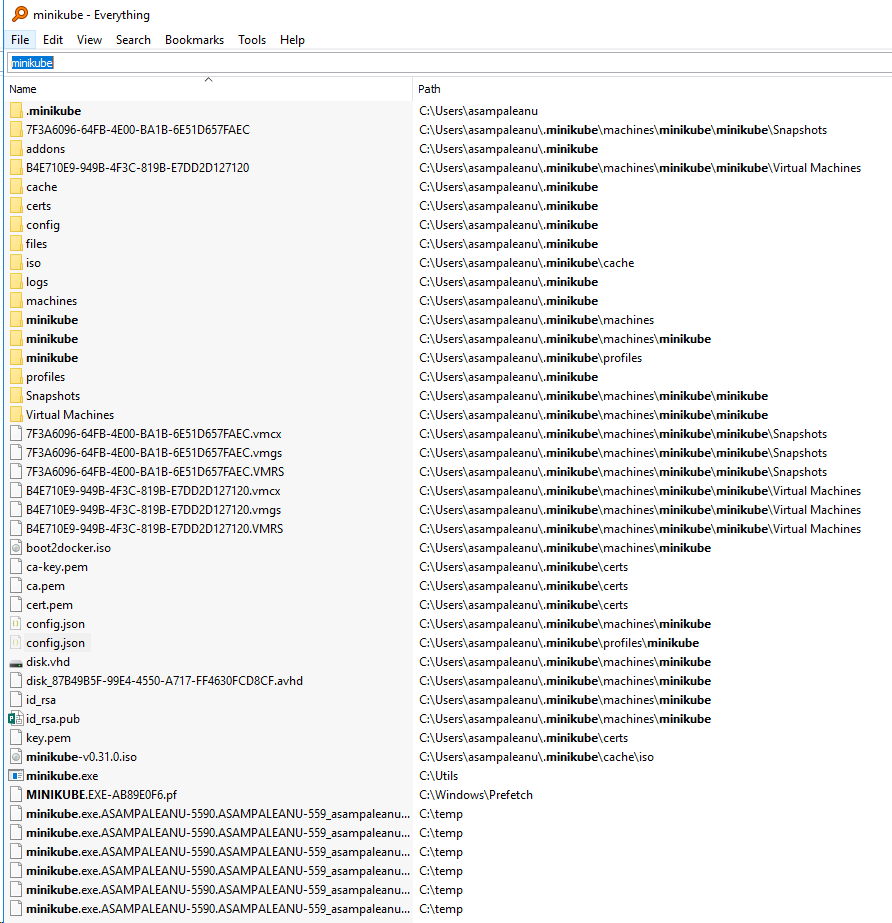
This sequence of operations was the second attempt to install minikube. The first time, along with the above files, there were two additional files generated (probably because I attempted some additional minikube commands).
minikube.exe.WARNING showed:
Log file created at: 2018/12/18 10:28:00
Running on machine: ASAMPALEANU-5590
Binary: Built with gc go1.10.1 for windows/amd64
Log line format: [IWEF]mmdd hh:mm:ss.uuuuuu threadid file:line] msg
W1218 10:28:00.328210    2184 root.go:146] Error reading config file at C:\Users\asampaleanu\.minikube\config\config.json: open C:\Users\asampaleanu\.minikube\config\config.json: The system cannot find the path specified.
minikube.exe.INFO showed:
Log file created at: 2018/12/18 10:28:00
Running on machine: ASAMPALEANU-5590
Binary: Built with gc go1.10.1 for windows/amd64
Log line format: [IWEF]mmdd hh:mm:ss.uuuuuu threadid file:line] msg
W1218 10:28:00.328210    2184 root.go:146] Error reading config file at C:\Users\asampaleanu\.minikube\config\config.json: open C:\Users\asampaleanu\.minikube\config\config.json: The system cannot find the path specified.
I1218 10:28:00.340210    2184 notify.go:121] Checking for updates...
I1218 10:28:00.431212    2184 cluster.go:69] Machine does not exist... provisioning new machine
I1218 10:28:00.431212    2184 cluster.go:70] Provisioning machine with config: {MinikubeISO:https://storage.googleapis.com/minikube/iso/minikube-v0.31.0.iso Memory:2048 CPUs:2 DiskSize:20000 VMDriver:hyperv ContainerRuntime: HyperkitVpnKitSock: HyperkitVSockPorts:[] XhyveDiskDriver:ahci-hd DockerEnv:[] InsecureRegistry:[] RegistryMirror:[] HostOnlyCIDR:192.168.99.1/24 HypervVirtualSwitch:minikube KvmNetwork:default Downloader:{} DockerOpt:[] DisableDriverMounts:false NFSShare:[] NFSSharesRoot:/nfsshares UUID: GPU:false}
As you can see from comparing the location of the two config.json files to what minikube expected (based on the INFO and WARNING output), it seems that config.json is being looked for at a different path location than where either of the two config.json files are found (not sure which one is being sought).
What you expected to happen:
I expected minikube to properly install, and start up a cluster, with control returning to the command prompt.
How to reproduce it (as minimally and precisely as possible):
1 - put minikube.exe on the path
2 - from an administrative Powershell console, run the command mentioned above for creating the network switch and then running kubernetes.
 asampal
All 9 comments
Had some trouble upgrading minikube to v0.31.0 myself and found the following steps helped.
- Do
miinkube deletefirst - Delete (backup) the
.minikubedirectory from home folder - Delete (backup) the
.kubedirectory from home folder - Create new empty
.kubedirectory in home folder - Upgrade Minikube (I used Chocolatey v10.11 to do this rather than a manual install.)
- Create network switch called "minikube" just as you did
- Run
ipconfig /flushdns(or just reboot) to clear the dns cache - Do
minikube start --vm-driver=hyperv --hyperv-virtual-switch minikube - Stop minikube (this of course was done using
minikube ssh(or connecting using hyperv) and$ shutdown)
After doing above I restored the backed-up .kube directory (backing up the new one to be safe).
Not sure if this is necessary and what good it might have done though it did ensure any existing Docker configuration in the .kube/config.json was restored. You might skip doing this.
- Start minikube again as usual and then checkout everything is okay including Docker (
minikube docker-env | Invoke-Expressionas I used PowerShell )
I know all this seems pretty messy and pedantic yet after stumbling around for some time, and failing, with a venial Chocolatey upgrade of Minikube it seemed to get things going for me. I suspect there must be a much easier way to do thing.
 AlanCarlyle
on 23 Dec 2018
AlanCarlyle
on 23 Dec 2018
@AlanCarlyle in my case I had started with a clean system wrt minikube.
asampal
on 24 Dec 2018
Can someone advise whether or not v0.33.1 has this problem? Some path code has changed recently that may affect this.
 tstromberg
on 23 Jan 2019
tstromberg
on 23 Jan 2019
33.1 has the same issue but I don't think its minikube and I'm not sure my issue is the same as the OP.
My minikube cluster started no issue and the prompt returned. Minikube commands worked in the same shell just fine. The problem I had was opening a new shell minikube commands like minikube dashboard reported minikube is not currently running so the service cannot be accessed. This kinda stumped me for a minute as I am used to running minikube on MacOS that does not see this issue.
The 'obvious' solution:
Hyper-v commands must be run as Administrator so when minikube was started it was from an Administrator Shell. Running minikube from a non-Administrator Shell does not see it as running. Start an Administrator Shell and viola all works as expected.
 daxgames
on 3 Feb 2019
daxgames
on 3 Feb 2019
I have a similar issue. I initially installed minikube with choco and ran it using:
minikube start --vm-driver hyperv --hyperv-virtual-switch=MyMinikubeSwitch --alsologtostderr -v=8
When I did that everything worked fine. Then I somehow hosed my cluster so I deleted the VM in hyperv, the .kube and .minikube directories. When I restarted it, everything succeeded but it doesn't create the config.json file in the config directory of .minikube. It does generate the config.json files in "profiles" and "machines".
kubectl works fine and the cluster is otherwise ok but minikube commands don't work.
I get things like:
when trying to run mount:
! Error loading api: filestore: Docker machine "minikube" does not exist. Use "docker-machine ls" to list machines. Use "docker-machine create" to add a new one.
when trying to run minikube ssh:
! Error getting host: Machine does not exist for api.Exists(minikube)
Edit: I used
minikube profile <clustername>
and that solved my problem.
 trunderw
on 11 Mar 2019
trunderw
on 11 Mar 2019
Issues go stale after 90d of inactivity.
Mark the issue as fresh with /remove-lifecycle stale.
Stale issues rot after an additional 30d of inactivity and eventually close.
If this issue is safe to close now please do so with /close.
Send feedback to sig-testing, kubernetes/test-infra and/or fejta.
/lifecycle stale
 fejta-bot
on 16 Oct 2019
fejta-bot
on 16 Oct 2019
Stale issues rot after 30d of inactivity.
Mark the issue as fresh with /remove-lifecycle rotten.
Rotten issues close after an additional 30d of inactivity.
If this issue is safe to close now please do so with /close.
Send feedback to sig-testing, kubernetes/test-infra and/or fejta.
/lifecycle rotten
fejta-bot
on 15 Nov 2019
/close
asampal
on 16 Nov 2019
@asampal: Closing this issue.
In response to this:
/close
Instructions for interacting with me using PR comments are available here. If you have questions or suggestions related to my behavior, please file an issue against the kubernetes/test-infra repository.
 k8s-ci-robot
on 16 Nov 2019
k8s-ci-robot
on 16 Nov 2019
Related issues
 mrtkp9993
·
3Comments
mrtkp9993
·
3Comments
 StasPerekrestov
·
3Comments
StasPerekrestov
·
3Comments
 mdkess
·
3Comments
mdkess
·
3Comments
 tnine
·
3Comments
tnine
·
3Comments
 alber70g
·
3Comments
alber70g
·
3Comments
Most helpful comment
I have a similar issue. I initially installed minikube with choco and ran it using:
minikube start --vm-driver hyperv --hyperv-virtual-switch=MyMinikubeSwitch --alsologtostderr -v=8When I did that everything worked fine. Then I somehow hosed my cluster so I deleted the VM in hyperv, the .kube and .minikube directories. When I restarted it, everything succeeded but it doesn't create the config.json file in the config directory of .minikube. It does generate the config.json files in "profiles" and "machines".
kubectl works fine and the cluster is otherwise ok but minikube commands don't work.
I get things like:
when trying to run mount:
when trying to run minikube ssh:
Edit: I used
minikube profile <clustername>and that solved my problem.