minikube start does not respect --kubernetes-version flag
Bug Report
Environment:
- Minikube version (use
minikube version): minikube version: v0.30.0 - OS (e.g. from /etc/os-release): macOS High Sierra v10.13.6
- VM Driver (e.g.
cat ~/.minikube/machines/minikube/config.json | grep DriverName): "DriverName": "virtualbox" - ISO version (e.g.
cat ~/.minikube/machines/minikube/config.json | grep -i ISOorminikube ssh cat /etc/VERSION): "Boot2DockerURL": "file:///Users/[me]/.minikube/cache/iso/minikube-v0.30.0.iso" - Install tools: brew
What happened:
ran minikube start --kubernetes-version v1.9.11, but it started kubernetes v1.10.0
What you expected to happen:
I expected it to start kubernetes v1.9.11
How to reproduce it (as minimally and precisely as possible):
$ minikube start --kubernetes-version v1.9.11
Starting local Kubernetes v1.10.0 cluster...
Starting VM...
Getting VM IP address...
Moving files into cluster...
Setting up certs...
Connecting to cluster...
Setting up kubeconfig...
Starting cluster components...
Setting up hostmount on /Users/[me]/[cert directory]:/etc/docker/certs.d/[cert path]...
Kubectl is now configured to use the cluster.
Loading cached images from config file.

$ kubectl version
Client Version: version.Info{Major:"1", Minor:"9", GitVersion:"v1.9.11", GitCommit:"1bfeeb6f212135a22dc787b73e1980e5bccef13d", GitTreeState:"clean", BuildDate:"2018-09-28T21:47:08Z", GoVersion:"go1.9.3", Compiler:"gc", Platform:"darwin/amd64"}
Server Version: version.Info{Major:"1", Minor:"10", GitVersion:"v1.10.0", GitCommit:"fc32d2f3698e36b93322a3465f63a14e9f0eaead", GitTreeState:"clean", BuildDate:"2018-03-26T16:44:10Z", GoVersion:"go1.9.3", Compiler:"gc", Platform:"linux/amd64"}
Output of minikube logs (if applicable):
N/A and/or see above
Anything else do we need to know:
I was able to start minikube with v1.9.11 by explicitly setting kubernetes-version in minikube config.
$ minikube config get kubernetes-version
Error: specified key could not be found in config
$ minikube config set kubernetes-version v1.9.11
$ minikube config get kubernetes-version
v1.9.11
$ minikube start
Starting local Kubernetes v1.9.11 cluster...
Starting VM...
Getting VM IP address...
Moving files into cluster...
Downloading kubeadm v1.9.11
Downloading kubelet v1.9.11
Finished Downloading kubeadm v1.9.11
Finished Downloading kubelet v1.9.11
Setting up certs...
Connecting to cluster...
Setting up kubeconfig...
Starting cluster components...
Setting up hostmount on /Users/[me]/[cert directory]:/etc/docker/certs.d/[certs path]...
Kubectl is now configured to use the cluster.
Loading cached images from config file.

$ kubectl version
Client Version: version.Info{Major:"1", Minor:"9", GitVersion:"v1.9.11", GitCommit:"1bfeeb6f212135a22dc787b73e1980e5bccef13d", GitTreeState:"clean", BuildDate:"2018-09-28T21:47:08Z", GoVersion:"go1.9.3", Compiler:"gc", Platform:"darwin/amd64"}
Server Version: version.Info{Major:"1", Minor:"9", GitVersion:"v1.9.11", GitCommit:"1bfeeb6f212135a22dc787b73e1980e5bccef13d", GitTreeState:"clean", BuildDate:"2018-09-28T21:35:22Z", GoVersion:"go1.9.3", Compiler:"gc", Platform:"linux/amd64"}
 bobo333
All 7 comments
Run latest codes in master, there will be a warning
Kubernetes version downgrade is not supported. Using version: v1.10.0
in the console, which seems downgrade is not officially supported yet.
 jeffwubj
on 30 Nov 2018
jeffwubj
on 30 Nov 2018
I suspect this may be a case where the command line is only respected the first time "start" is run. We should be showing a warning if nothing else.
 tstromberg
on 4 Dec 2018
tstromberg
on 4 Dec 2018
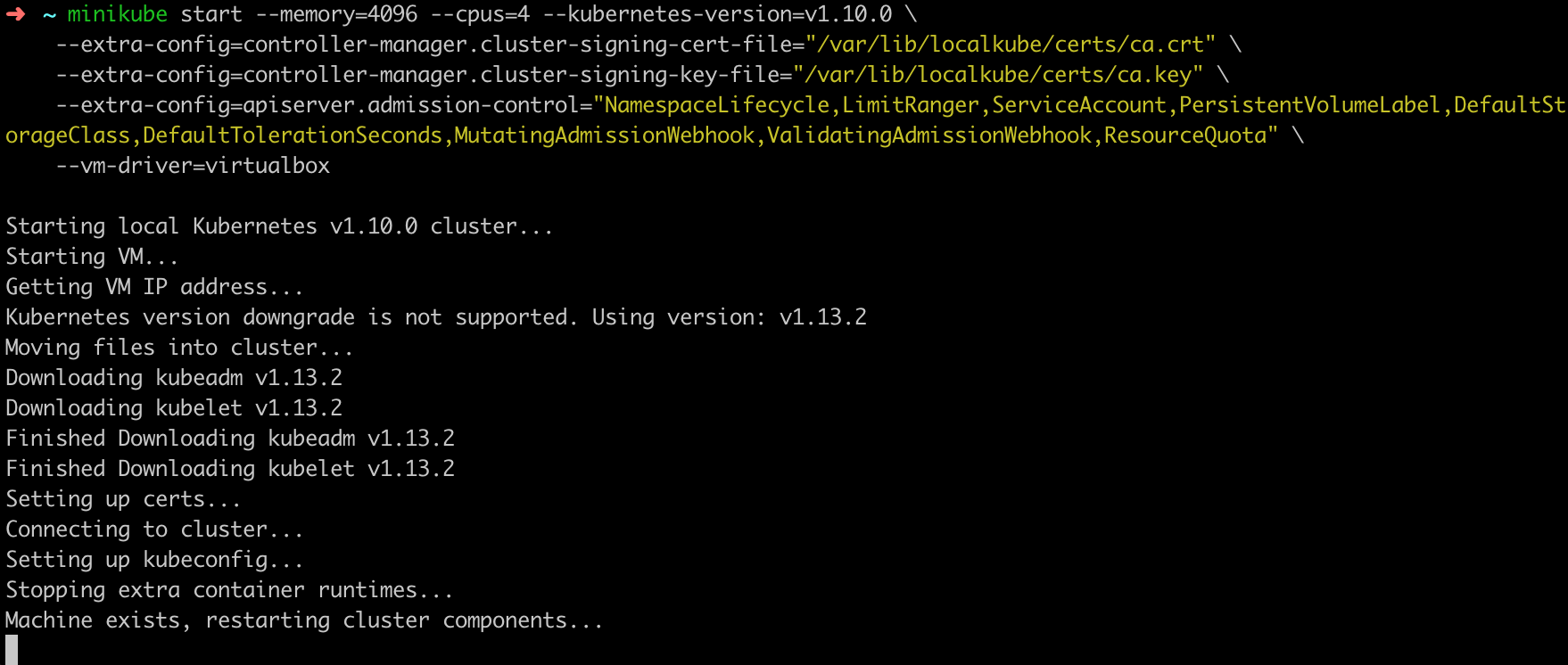
v1.13.2 still has this issue..
 muratzorer
on 24 Jan 2019
muratzorer
on 24 Jan 2019
I got the "Kubernetes version downgrade is not supported" message when I tried to run an older version of Kubernetes with minikube version v0.33.1.
The problem went away when I did a minikube delete and then ran the start command again.
When I had a closer look at the docs the message makes more sense.
The
minikube stopcommand can be used to stop your cluster. This command shuts down the Minikube Virtual Machine, but preserves all cluster state and data. Starting the cluster again will restore it to it’s previous state.
The problem was that I had previously run a start without a version so it started the latest Kubernetes and I then only stopped it but did not delete that instance.
The current behaviour seems correct as it just seems unlikely you would be able to do a successful downgrade from a newer version of Kubernetes to an older version and maintain all the state.
I think the only problem here is that the error message could be a little clearer and instruct the user to delete any stopped clusters that have previously been started.
 kevinhcross
on 12 Feb 2019
kevinhcross
on 12 Feb 2019
@kevinhcross you are absolutely right. After some time playing with it I realized that it only rejects downgrade for previously created node.
I think the only problem here is that the error message could be a little clearer and instruct the user to delete any stopped clusters that have previously been started
This will lead newcomers in the right direction.
muratzorer
on 12 Feb 2019
v0.34.x now does a better job of handling --kubernetes-version, so I think this bug is obsolete:
- noticeable warning if a downgrade is attempted.
- output always includes the version being used
Please re-open if you think there is still an issue here. Thanks for all of your insights!
tstromberg
on 20 Feb 2019
running minikube delete worked for me. -Nathan Aw (Singapore)
 nathanawmk
on 3 Jun 2020
nathanawmk
on 3 Jun 2020
Related issues
 Starefossen
·
3Comments
Starefossen
·
3Comments
 ahmetb
·
3Comments
ahmetb
·
3Comments
 StasPerekrestov
·
3Comments
StasPerekrestov
·
3Comments
 vainikkaj
·
3Comments
vainikkaj
·
3Comments
 cherish3620
·
3Comments
cherish3620
·
3Comments
Most helpful comment
I got the "Kubernetes version downgrade is not supported" message when I tried to run an older version of Kubernetes with minikube version
v0.33.1.The problem went away when I did a
minikube deleteand then ran the start command again.When I had a closer look at the docs the message makes more sense.
The problem was that I had previously run a
startwithout a version so it started the latest Kubernetes and I then only stopped it but did not delete that instance.The current behaviour seems correct as it just seems unlikely you would be able to do a successful downgrade from a newer version of Kubernetes to an older version and maintain all the state.
I think the only problem here is that the error message could be a little clearer and instruct the user to delete any stopped clusters that have previously been started.