Minikube: iso download: write udp client->dns_server:53: write: host is down (little snitch)
Is this a BUG REPORT or FEATURE REQUEST? (choose one):
Please provide the following details:
Environment:
Minikube version (use minikube version):
╰─ minikube version
minikube version: v0.25.2
OS (e.g. from /etc/os-release):
MacOS High Sierra, v 10.13.4 (17E199), MacBook ProVM Driver (e.g.
cat ~/.minikube/machines/minikube/config.json | grep DriverName):
 cat ~/.minikube/machines/minikube/config.json | grep DriverName
    "DriverName": "virtualbox",
- ISO version (e.g.
cat ~/.minikube/machines/minikube/config.json | grep -i ISOorminikube ssh cat /etc/VERSION):
 cat ~/.minikube/machines/minikube/config.json | grep -i ISO
        "Boot2DockerURL": "file:///Users/wenlock/.minikube/cache/iso/minikube-v0.25.1.iso"
- Install tools:
- Others:
The above can be generated in one go with the following commands (can be copied and pasted directly into your terminal):
minikube version
echo "";
echo "OS:";
cat /etc/os-release
echo "";
echo "VM driver":
grep DriverName ~/.minikube/machines/minikube/config.json
echo "";
echo "ISO version";
grep -i ISO ~/.minikube/machines/minikube/config.json
What happened:
Tried a fresh install of minikube, so I ran minikube delete and cleared ~/.minikube. I thin upgraded to the latest version of minikube:
curl -Lo minikube https://storage.googleapis.com/minikube/releases/v0.25.2/minikube-darwin-amd64 && chmod +x minikube && sudo mv minikube /usr/local/bin/
  % Total    % Received % Xferd  Average Speed   Time    Time     Time  Current
                                 Dload  Upload   Total   Spent    Left  Speed
100 41.3M  100 41.3M    0     0  7221k      0  0:00:05  0:00:05 --:--:-- 8685k
I thin tried minikube start command, and got the message:
minikube start
Starting local Kubernetes v1.9.4 cluster...
Starting VM...
Downloading Minikube ISO
E0406 20:21:23.795988   44294 start.go:159] Error starting host: Error attempting to cache minikube ISO from URL: Error downloading Minikube ISO: failed to download: failed to download to temp file: download failed: 5 error(s) occurred:

* Temporary download error: Get https://storage.googleapis.com/minikube/iso/minikube-v0.25.1.iso: dial tcp: lookup storage.googleapis.com on 192.168.1.1:53: write udp 192.168.1.223:53450->192.168.1.1:53: write: host is down
* Temporary download error: Get https://storage.googleapis.com/minikube/iso/minikube-v0.25.1.iso: dial tcp: lookup storage.googleapis.com on 192.168.1.1:53: write udp 192.168.1.223:54668->192.168.1.1:53: write: host is down
* Temporary download error: Get https://storage.googleapis.com/minikube/iso/minikube-v0.25.1.iso: dial tcp: lookup storage.googleapis.com on 192.168.1.1:53: write udp 192.168.1.223:55012->192.168.1.1:53: write: host is down
* Temporary download error: Get https://storage.googleapis.com/minikube/iso/minikube-v0.25.1.iso: dial tcp: lookup storage.googleapis.com on 192.168.1.1:53: write udp 192.168.1.223:64663->192.168.1.1:53: write: host is down
* Temporary download error: Get https://storage.googleapis.com/minikube/iso/minikube-v0.25.1.iso: dial tcp: lookup storage.googleapis.com on 192.168.1.1:53: write udp 192.168.1.223:58013->192.168.1.1:53: write: host is down.

 Retrying.
E0406 20:21:23.796476   44294 start.go:165] Error starting host:  Error attempting to cache minikube ISO from URL: Error downloading Minikube ISO: failed to download: failed to download to temp file: download failed: 5 error(s) occurred:

* Temporary download error: Get https://storage.googleapis.com/minikube/iso/minikube-v0.25.1.iso: dial tcp: lookup storage.googleapis.com on 192.168.1.1:53: write udp 192.168.1.223:53450->192.168.1.1:53: write: host is down
* Temporary download error: Get https://storage.googleapis.com/minikube/iso/minikube-v0.25.1.iso: dial tcp: lookup storage.googleapis.com on 192.168.1.1:53: write udp 192.168.1.223:54668->192.168.1.1:53: write: host is down
* Temporary download error: Get https://storage.googleapis.com/minikube/iso/minikube-v0.25.1.iso: dial tcp: lookup storage.googleapis.com on 192.168.1.1:53: write udp 192.168.1.223:55012->192.168.1.1:53: write: host is down
* Temporary download error: Get https://storage.googleapis.com/minikube/iso/minikube-v0.25.1.iso: dial tcp: lookup storage.googleapis.com on 192.168.1.1:53: write udp 192.168.1.223:64663->192.168.1.1:53: write: host is down
* Temporary download error: Get https://storage.googleapis.com/minikube/iso/minikube-v0.25.1.iso: dial tcp: lookup storage.googleapis.com on 192.168.1.1:53: write udp 192.168.1.223:58013->192.168.1.1:53: write: host is down
================================================================================
An error has occurred. Would you like to opt in to sending anonymized crash
information to minikube to help prevent future errors?
To opt out of these messages, run the command:
    minikube config set WantReportErrorPrompt false
================================================================================
Please enter your response [Y/n]:
Y
E0406 20:21:36.128311   44294 util.go:151] Error uploading error message: : Post https://clouderrorreporting.googleapis.com/v1beta1/projects/k8s-minikube/events:report?key=AIzaSyACUwzG0dEPcl-eOgpDKnyKoUFgHdfoFuA: dial tcp: lookup clouderrorreporting.googleapis.com on 192.168.1.1:53: write udp 192.168.1.223:56816->192.168.1.1:53: write: host is down
Also, trying to download the ISO manually had issues.
curl -O https://storage.googleapis.com/minikube/iso/minikube-v0.25.1.iso > ~/.minikube/cache/iso/minikube-v0.25.1.iso
  % Total    % Received % Xferd  Average Speed   Time    Time     Time  Current
                                 Dload  Upload   Total   Spent    Left  Speed
100  142M  100  142M    0     0  6055k      0  0:00:24  0:00:24 --:--:-- 7234k
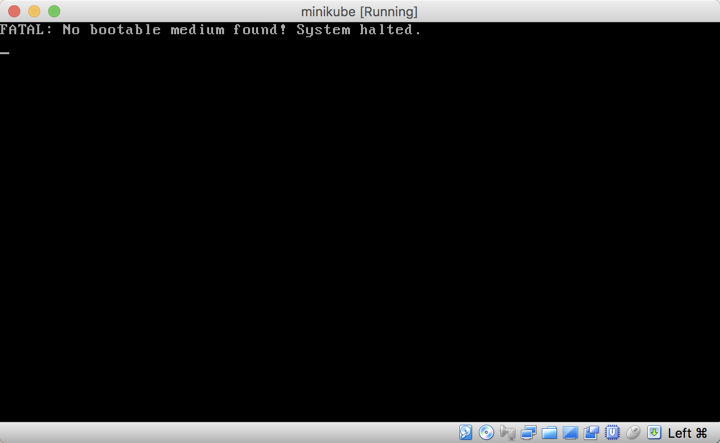
However when you run minikube start, the ISO is not bootable:
What you expected to happen:
minikube start should start a new minikube instance.
How to reproduce it (as minimally and precisely as possible):
Reset minikube and download latest version, perform a fresh install.
Output of minikube logs (if applicable):
No logs available
Anything else do we need to know:
 wenlock
All 9 comments
Ignore the second part about downloading the iso
curl -O https://storage.googleapis.com/minikube/iso/minikube-v0.25.1.iso > ~/.minikube/cache/iso/minikube-v0.25.1.iso
  % Total    % Received % Xferd  Average Speed   Time    Time     Time  Current
                                 Dload  Upload   Total   Spent    Left  Speed
100  142M  100  142M    0     0  6055k      0  0:00:24  0:00:24 --:--:-- 7234k
Turns out I was downloading the image wrong, should be
curl https://storage.googleapis.com/minikube/iso/minikube-v0.25.1.iso > ~/.minikube/cache/iso/minikube-v0.25.1.iso
However, when I try to start this time, I get another error
minikube start
Starting local Kubernetes v1.9.4 cluster...
Starting VM...
Getting VM IP address...
Moving files into cluster...
E0406 20:54:48.417825   46691 start.go:234] Error updating cluster:  Error updating localkube from uri: Error creating localkube asset from url: Error opening file asset: /Users/wenlock/.minikube/cache/localkube/localkube-v1.9.4: open /Users/wenlock/.minikube/cache/localkube/localkube-v1.9.4: no such file or directory
E0406 20:54:48.419377   46691 util.go:151] Error uploading error message: : Post https://clouderrorreporting.googleapis.com/v1beta1/projects/k8s-minikube/events:report?key=AIzaSyACUwzG0dEPcl-eOgpDKnyKoUFgHdfoFuA: dial tcp: lookup clouderrorreporting.googleapis.com on 192.168.1.1:53: write udp 192.168.1.223:52552->192.168.1.1:53: write: host is down
Also tried updating context and trying again:
minikube status
minikube: Running
cluster: Stopped
kubectl: Misconfigured: pointing to stale minikube-vm.
To fix the kubectl context, run minikube update-context


minikube update-context
Reconfigured kubeconfig IP, now pointing at 192.168.99.104


minikube status
minikube: Running
cluster: Stopped
kubectl: Correctly Configured: pointing to minikube-vm at 192.168.99.104


minikube start
Starting local Kubernetes v1.9.4 cluster...
Starting VM...
Getting VM IP address...
Moving files into cluster...
E0406 20:55:54.972915   46879 start.go:234] Error updating cluster:  Error updating localkube from uri: Error creating localkube asset from url: Error opening file asset: /Users/wenlock/.minikube/cache/localkube/localkube-v1.9.4: open /Users/wenlock/.minikube/cache/localkube/localkube-v1.9.4: no such file or directory
E0406 20:55:54.973792   46879 util.go:151] Error uploading error message: : Post https://clouderrorreporting.googleapis.com/v1beta1/projects/k8s-minikube/events:report?key=AIzaSyACUwzG0dEPcl-eOgpDKnyKoUFgHdfoFuA: dial tcp: lookup clouderrorreporting.googleapis.com on 192.168.1.1:53: write udp 192.168.1.223:50219->192.168.1.1:53: write: host is down
Experiencing the same thing since updating from .25 to .25.2. Looks like IP categorically is failing. When I get the ISO downloaded it claims it can't SSH into the image, when I can easily netcat/ssh to the exact same IP it shows me.
 ravenium
on 10 Apr 2018
ravenium
on 10 Apr 2018
Experiencing the same issue....
 DeepakkumarArumugam
on 15 May 2018
DeepakkumarArumugam
on 15 May 2018
I found a possible solution - it turns out Little Snitch (host firewall) was blocking minikube silently because it didn't have a code signature. If you have anything of that nature, try disabling it for a second then trying to start.
ravenium
on 15 May 2018
Can confirm @ravenium as well, it was also little snitch for me. Disabling/changing the rules fixed it.
 fatih
on 25 May 2018
fatih
on 25 May 2018
Issues go stale after 90d of inactivity.
Mark the issue as fresh with /remove-lifecycle stale.
Stale issues rot after an additional 30d of inactivity and eventually close.
If this issue is safe to close now please do so with /close.
Send feedback to sig-testing, kubernetes/test-infra and/or fejta.
/lifecycle stale
 fejta-bot
on 23 Aug 2018
fejta-bot
on 23 Aug 2018
OS window 10
minikube version minikube version: v0.28.2
the same problem
 edidada
on 26 Aug 2018
edidada
on 26 Aug 2018
Agreed, the issue here seems to be a local firewall: likely little snitch in this case.
 tstromberg
on 20 Sep 2018
tstromberg
on 20 Sep 2018
Hmm.. having same issue with Minikube v0.30.0 on Mac OS X. Turned off littlesnitch with no change. What did you guys change in little snitch to make it work?
 DPerkunas
on 29 Oct 2018
DPerkunas
on 29 Oct 2018
Related issues
 mrtkp9993
·
3Comments
mrtkp9993
·
3Comments
 wudongyin
·
3Comments
wudongyin
·
3Comments
 hank-cp
·
3Comments
hank-cp
·
3Comments
 vainikkaj
·
3Comments
vainikkaj
·
3Comments
 tnine
·
3Comments
tnine
·
3Comments
Most helpful comment
I found a possible solution - it turns out Little Snitch (host firewall) was blocking minikube silently because it didn't have a code signature. If you have anything of that nature, try disabling it for a second then trying to start.