Minikube: Can't connect to any pods using Windows 10 with Hyper-V
I'm running into what I believe are networking problems using Minikube. I don't exactly know what the right place is to ask for help, but since I believe there are a lot of people with a lot of knowledge about Minikube watching this repository, I'll try here. If this isn't the place, feel free to direct me to the right place :)
My problem
I can't connect to any of my pods or services. The only method I've seen working is through the proxy. Here's a PowerShell log of what I do:
PS C:\WINDOWS\system32> kubectl run kubernetes-bootcamp --image=docker.io/jocatalin/kubernetes-bootcamp:v1 --port=8080
deployment "kubernetes-bootcamp" created
PS C:\WINDOWS\system32> kubectl get deployments
NAME                  DESIRED   CURRENT   UP-TO-DATE   AVAILABLE   AGE
kubernetes-bootcamp   1         1         1            0           10s
PS C:\WINDOWS\system32> kubectl get pods
NAME                                   READY     STATUS    RESTARTS   AGE
kubernetes-bootcamp-5d7f968ccb-wmgd7   1/1       Running   0          31s
PS C:\WINDOWS\system32> kubectl logs kubernetes-bootcamp-5d7f968ccb-wmgd7
Kubernetes Bootcamp App Started At: 2018-02-12T09:38:07.965Z | Running On:  kubernetes-bootcamp-5d7f968ccb-wmgd7

Running On: kubernetes-bootcamp-5d7f968ccb-wmgd7 | Total Requests: 1 | App Uptime: 5.838 seconds | Log Time: 2018-02-12T09:38:13.803Z
PS C:\WINDOWS\system32> kubectl expose deployment/kubernetes-bootcamp --type="NodePort" --port 8080
service "kubernetes-bootcamp" exposed
PS C:\WINDOWS\system32> kubectl get services
NAME                  TYPE        CLUSTER-IP      EXTERNAL-IP   PORT(S)          AGE
kubernetes            ClusterIP   10.96.0.1       <none>        443/TCP          33d
kubernetes-bootcamp   NodePort    10.96.210.212   <none>        8080:30907/TCP   6s
PS C:\WINDOWS\system32> kubectl describe pod kubernetes-bootcamp-5d7f968ccb-wmgd7
Name:           kubernetes-bootcamp-5d7f968ccb-wmgd7
Namespace:      default
Node:           minikube/172.19.34.211
Start Time:     Mon, 12 Feb 2018 10:37:37 +0100
Labels:         pod-template-hash=1839524776
                run=kubernetes-bootcamp
Annotations:    <none>
Status:         Running
IP:             172.17.0.3
Controlled By:  ReplicaSet/kubernetes-bootcamp-5d7f968ccb
Containers:
  kubernetes-bootcamp:
    Container ID:   docker://753e8ea8bc8fbc3a985ead4850cc2906536a39df107d0169c1c6655e2ba43e29
    Image:          docker.io/jocatalin/kubernetes-bootcamp:v1
    Image ID:       docker-pullable://jocatalin/kubernetes-bootcamp@sha256:0d6b8ee63bb57c5f5b6156f446b3bc3b3c143d233037f3a2f00e279c8fcc64af
    Port:           8080/TCP
    State:          Running
      Started:      Mon, 12 Feb 2018 10:38:07 +0100
    Ready:          True
    Restart Count:  0
    Environment:    <none>
    Mounts:
      /var/run/secrets/kubernetes.io/serviceaccount from default-token-l4mcq (ro)
Conditions:
  Type           Status
  Initialized    True
  Ready          True
  PodScheduled   True
Volumes:
  default-token-l4mcq:
    Type:        Secret (a volume populated by a Secret)
    SecretName:  default-token-l4mcq
    Optional:    false
QoS Class:       BestEffort
Node-Selectors:  <none>
Tolerations:     <none>
Events:
  Type    Reason                 Age   From               Message
  ----    ------                 ----  ----               -------
  Normal  Scheduled              4m    default-scheduler  Successfully assigned kubernetes-bootcamp-5d7f968ccb-wmgd7 to minikube
  Normal  SuccessfulMountVolume  4m    kubelet, minikube  MountVolume.SetUp succeeded for volume "default-token-l4mcq"
  Normal  Pulling                4m    kubelet, minikube  pulling image "docker.io/jocatalin/kubernetes-bootcamp:v1"
  Normal  Pulled                 4m    kubelet, minikube  Successfully pulled image "docker.io/jocatalin/kubernetes-bootcamp:v1"
  Normal  Created                4m    kubelet, minikube  Created container
  Normal  Started                4m    kubelet, minikube  Started container
PS C:\WINDOWS\system32>
I've had a kubectl proxy opened in another PowerShell window the entire time.
The results:
- The pod has been successfully created and is running.
- localhost:8080 refused to connect.
- 172.17.0.3:8080 took to long to respond.
- Connecting through the proxy works.
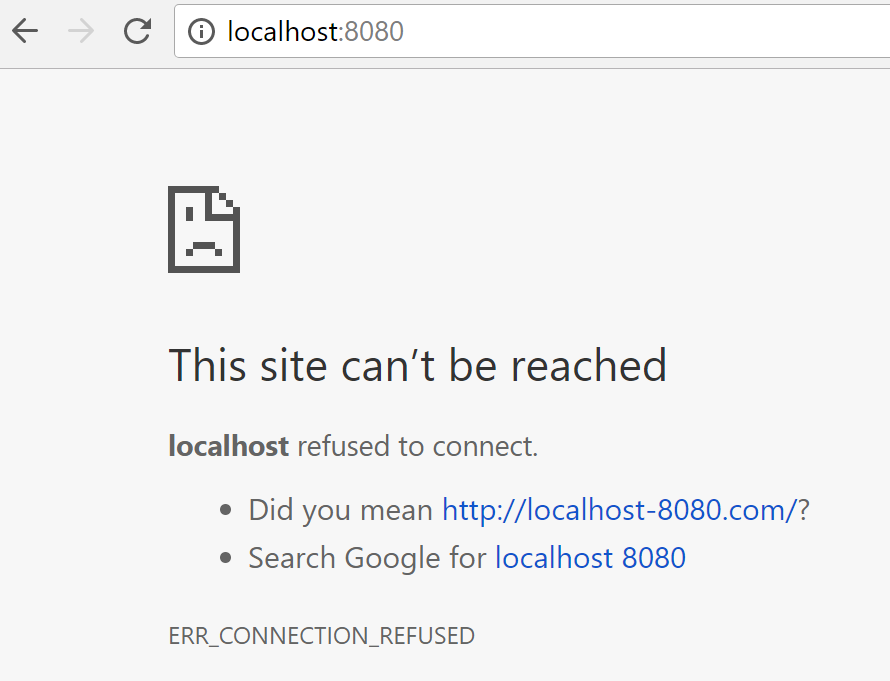


Here's what I already tried:
- Firewall turned off completely (for Private, Public and Domain profiles).
- AV-software turned off.
- Turned off Hyper-V dynamic memory allocation.
- Starting over with a basic nginx image, using the Kubernetes tutorial (since I can repro with this image, I'll use that as an example here).
- Rebooting/restarting minikube & the computer several times.
Other info:
Minikube start command:
minikube start --vm-driver=hyperv --hyperv-virtual-switch=vSwitch
Minikube:
minikube version: v0.25.0
Docker:
Client:
 Version:       17.12.0-ce
 API version:   1.35
 Go version:    go1.9.2
 Git commit:    c97c6d6
 Built: Wed Dec 27 20:05:22 2017
 OS/Arch:       windows/amd64

Server:
 Engine:
  Version:      17.12.0-ce
  API version:  1.35 (minimum version 1.12)
  Go version:   go1.9.2
  Git commit:   c97c6d6
  Built:        Wed Dec 27 20:12:29 2017
  OS/Arch:      linux/amd64
  Experimental: true
ipconfig:
Ethernet adapter vEthernet (vSwitch):

   Connection-specific DNS Suffix  . : hidden :)
   Description . . . . . . . . . . . : Hyper-V Virtual Ethernet Adapter #5
   Physical Address. . . . . . . . . : A0-CE-C8-05-AF-08
   DHCP Enabled. . . . . . . . . . . : Yes
   Autoconfiguration Enabled . . . . : Yes
   Link-local IPv6 Address . . . . . : fe80::912a:27be:1b15:1663%21(Preferred)
   IPv4 Address. . . . . . . . . . . : 172.19.32.85(Preferred)
   Subnet Mask . . . . . . . . . . . : 255.255.252.0
   Lease Obtained. . . . . . . . . . : Monday, February 12, 2018 9:32:59 AM
   Lease Expires . . . . . . . . . . : Tuesday, February 13, 2018 9:32:57 AM
   Default Gateway . . . . . . . . . : 172.19.32.1
   DHCP Server . . . . . . . . . . . : 172.19.32.1
   DHCPv6 IAID . . . . . . . . . . . : 1067503304
   DHCPv6 Client DUID. . . . . . . . : 00-01-00-01-1F-62-92-94-9C-B6-D0-10-F5-ED
   DNS Servers . . . . . . . . . . . : 192.168.3.206
                                       192.168.3.207
                                       195.35.227.61
   NetBIOS over Tcpip. . . . . . . . : Enabled
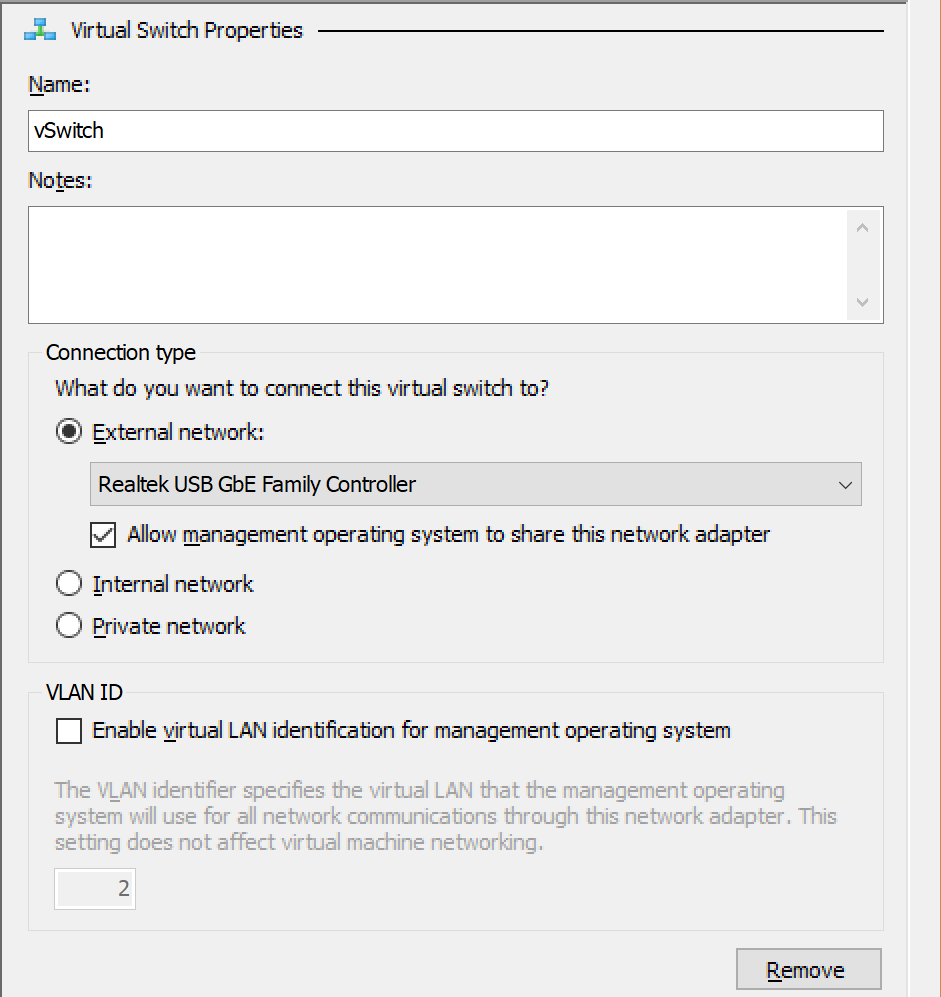
What steps do I take next to find out what the issue is? Does anyone happen to know any settings I should double-check?
If more info is needed, let me know. I've tried to add as much information as I can.
 HB-2012
All 4 comments
Issues go stale after 90d of inactivity.
Mark the issue as fresh with /remove-lifecycle stale.
Stale issues rot after an additional 30d of inactivity and eventually close.
If this issue is safe to close now please do so with /close.
Send feedback to sig-testing, kubernetes/test-infra and/or fejta.
/lifecycle stale
 fejta-bot
on 3 Jun 2018
fejta-bot
on 3 Jun 2018
Stale issues rot after 30d of inactivity.
Mark the issue as fresh with /remove-lifecycle rotten.
Rotten issues close after an additional 30d of inactivity.
If this issue is safe to close now please do so with /close.
Send feedback to sig-testing, kubernetes/test-infra and/or fejta.
/lifecycle rotten
/remove-lifecycle stale
fejta-bot
on 3 Jul 2018
Rotten issues close after 30d of inactivity.
Reopen the issue with /reopen.
Mark the issue as fresh with /remove-lifecycle rotten.
Send feedback to sig-testing, kubernetes/test-infra and/or fejta.
/close
fejta-bot
on 2 Aug 2018
Hi @HB-2012 , do you manage to solve this problem? I am currently experiencing the same problem
 williamliangwl
on 15 Feb 2019
williamliangwl
on 15 Feb 2019
Related issues
 olalonde
·
3Comments
olalonde
·
3Comments
 djschny
·
3Comments
djschny
·
3Comments
 tstromberg
·
3Comments
tstromberg
·
3Comments
 hank-cp
·
3Comments
hank-cp
·
3Comments
 StasPerekrestov
·
3Comments
StasPerekrestov
·
3Comments