Minikube: hyperv failure: sudo systemctl -f restart crio err : Process exited with status 1
If this is a BUG REPORT, please:
- Fill in as much of the template below as you can. If you leave out
information, we can't help you as well.
Please provide the following details:
Environment:
minikube version: v0.24.1
OS: Windows 10
VM driver: hyperv
ISO version "Boot2DockerURL": "file://C:/Users/Andreas Höhmann/.minikube/cache/iso/minikube-v0.23.6.iso",
What happened:
I'm not be able to try a "minimal, default" minikube scenario ... I read some blogs/howtos ... It should be really easy (in theory) ...
$ minikube start --vm-driver=hyperv --hyperv-virtual-switch=minikube --disk-size=10g --memory=2048 --alsologtostderr --v=3
I0102 12:41:22.266728 8496 notify.go:109] Checking for updates...
I0102 12:41:22.635729 8496 cache_images.go:290] Attempting to cache image: gcr.io/google_containers/kubernetes-dashboard-amd64:v1.6.3 at C:\Users\Andreas Höhmann.minikube\cache\images\gcr.io\google_containers\kubernetes-dashboard-amd64_v1.6.3
Starting local Kubernetes v1.8.0 cluster...
I0102 12:41:22.635729 8496 cache_images.go:290] Attempting to cache image: gcr.io/k8s-minikube/storage-provisioner:v1.8.0 at C:\Users\Andreas Höhmann.minikube\cache\images\gcr.io\k8s-minikube\storage-provisioner_v1.8.0
Starting VM...
I0102 12:41:22.635729 8496 cache_images.go:290] Attempting to cache image: gcr.io/google_containers/pause-amd64:3.0 at C:\Users\Andreas Höhmann.minikube\cache\images\gcr.io\google_containers\pause-amd64_3.0
I0102 12:41:22.635729 8496 cache_images.go:290] Attempting to cache image: gcr.io/google_containers/k8s-dns-dnsmasq-nanny-amd64:1.14.5 at C:\Users\Andreas Höhmann.minikube\cache\images\gcr.io\google_containers\k8s-dns-dnsmasq-nanny-amd64_1.14.5
I0102 12:41:22.635729 8496 cache_images.go:290] Attempting to cache image: gcr.io/google_containers/k8s-dns-sidecar-amd64:1.14.5 at C:\Users\Andreas Höhmann.minikube\cache\images\gcr.io\google_containers\k8s-dns-sidecar-amd64_1.14.5
I0102 12:41:22.635729 8496 cache_images.go:290] Attempting to cache image: gcr.io/google-containers/kube-addon-manager:v6.4-beta.2 at C:\Users\Andreas Höhmann.minikube\cache\images\gcr.io\google-containers\kube-addon-manager_v6.4-beta.2
I0102 12:41:22.635729 8496 cache_images.go:290] Attempting to cache image: gcr.io/google_containers/k8s-dns-kube-dns-amd64:1.14.5 at C:\Users\Andreas Höhmann.minikube\cache\images\gcr.io\google_containers\k8s-dns-kube-dns-amd64_1.14.5
I0102 12:41:22.636729 8496 cluster.go:70] Machine does not exist... provisioning new machine
I0102 12:41:22.637731 8496 cache_images.go:78] Successfully cached all images.
I0102 12:41:22.637731 8496 cluster.go:71] Provisioning machine with config: {MinikubeISO:https://storage.googleapis.com/minikube/iso/minikube-v0.23.6.iso Memory:2048 CPUs:2 DiskSize:10000 VMDriver:hyperv XhyveDiskDriver:ahci-hd DockerEnv:[] InsecureRegistry:[] RegistryMirror:[] HostOnlyCIDR:192.168.99.1/24 HypervVirtualSwitch:minikube KvmNetwork:default Downloader:{} DockerOpt:[] DisableDriverMounts:false}
I0102 12:41:22.637731 8496 downloader.go:56] Not caching ISO, using https://storage.googleapis.com/minikube/iso/minikube-v0.23.6.iso
Downloading C:\Users\Andreas Höhmann.minikube\cache\boot2docker.iso from file://C:/Users/Andreas Höhmann/.minikube/cache/iso/minikube-v0.23.6.iso...
Creating SSH key...
Creating VM...
Using switch "minikube"
Creating VHD
Starting VM...
Waiting for host to start...
I0102 12:43:11.755877 8496 ssh_runner.go:57] Run: sudo rm -f /etc/docker/server-key.pem
I0102 12:43:11.801876 8496 ssh_runner.go:57] Run: sudo mkdir -p /etc/docker
I0102 12:43:11.814881 8496 ssh_runner.go:57] Run: sudo rm -f /etc/docker/ca.pem
I0102 12:43:11.819876 8496 ssh_runner.go:57] Run: sudo mkdir -p /etc/docker
I0102 12:43:11.827878 8496 ssh_runner.go:57] Run: sudo rm -f /etc/docker/server.pem
I0102 12:43:11.832877 8496 ssh_runner.go:57] Run: sudo mkdir -p /etc/docker
Setting Docker configuration on the remote daemon...
E0102 12:43:26.730760 8496 start.go:150] Error starting host: Error creating host: Error executing step: Provisioning VM.
: ssh command error:
command : sudo systemctl -f restart crio
err : Process exited with status 1
output : Job for crio.service failed because the control process exited with error code.
See "systemctl status crio.service" and "journalctl -xe" for details.
.
Retrying.
E0102 12:43:26.733761 8496 start.go:156] Error starting host: Error creating host: Error executing step: Provisioning VM.
: ssh command error:
command : sudo systemctl -f restart crio
err : Process exited with status 1
output : Job for crio.service failed because the control process exited with error code.
See "systemctl status crio.service" and "journalctl -xe" for details.
What you expected to happen:
The minikube start returns without any error :)
How to reproduce it (as minimally and precisely as possible):
see above command line
Output of minikube logs (if applicable):
no entries
Anything else do we need to know:
minikube ip shows me an ip (v6): fe80::215:5dff:fe00:7025
minikube ssh works
inside minikube "docker info" also shows me something"
btw: is it normal that I need to run minikube commands as "administrator"?
 ahoehma
All 19 comments
$ minikube ssh
$ systemctl status crio.service
● crio.service - Open Container Initiative Daemon
Loaded: loaded (/lib/systemd/system/crio.service; enabled; vendor preset: enabled)
Active: failed (Result: exit-code) since Tue 2018-01-02 11:43:24 UTC; 21min ago
Docs: https://github.com/kubernetes-incubator/cri-o
Process: 2961 ExecStart=/usr/bin/crio $CRIO_OPTIONS $CRIO_MINIKUBE_OPTIONS --root ${PERSISTENT_DIR}/var/lib/containers (code=exited, status=1/FAILURE)
Process: 2943 ExecStartPre=/bin/mkdir -p ${PERSISTENT_DIR}/var/lib/containers (code=exited, status=0/SUCCESS)
Main PID: 2961 (code=exited, status=1/FAILURE)
CPU: 161ms
Jan 02 11:43:24 minikube crio[2961]: time="2018-01-02 11:43:24.714135600Z" level=debug msg="[graphdriver] trying provided driver "overlay2""
Jan 02 11:43:24 minikube crio[2961]: time="2018-01-02 11:43:24.717706100Z" level=debug msg="backingFs=extfs, projectQuotaSupported=false"
Jan 02 11:43:24 minikube crio[2961]: time="2018-01-02 11:43:24.718191900Z" level=info msg="CNI network rkt.kubernetes.io (type=bridge) is used from /etc/cni/net.d/k8s.conf"
.d/k8s.conf":24 minikube crio[2961]: time="2018-01-02 11:43:24.718370200Z" level=info msg="CNI network rkt.kubernetes.io (type=bridge) is used from /etc/cni/net--More--
Jan 02 11:43:24 minikube crio[2961]: time="2018-01-02 11:43:24.724783100Z" level=debug msg="Golang's threads limit set to 13320"
Jan 02 11:43:24 minikube crio[2961]: time="2018-01-02 11:43:24.725033900Z" level=fatal msg="Unable to select an IP."
Jan 02 11:43:24 minikube systemd[1]: crio.service: Main process exited, code=exited, status=1/FAILURE
Jan 02 11:43:24 minikube systemd[1]: Failed to start Open Container Initiative Daemon.
Jan 02 11:43:24 minikube systemd[1]: crio.service: Unit entered failed state.
Jan 02 11:43:24 minikube systemd[1]: crio.service: Failed with result 'exit-code'.
ahoehma
on 2 Jan 2018
facing similar issue, anyone found a solution yet?
 deerao-rs
on 16 Jan 2018
deerao-rs
on 16 Jan 2018
+1 same issue here
 Dynamo6
on 19 Jan 2018
Dynamo6
on 19 Jan 2018
+1 as well.
 raghur
on 19 Jan 2018
raghur
on 19 Jan 2018
+1 as well.
 trungung
on 24 Jan 2018
trungung
on 24 Jan 2018
If it helps anyone, I'm running Windows 10 (with HyperV enabled) and I've configured the hyperv virtual switch. When that switch is first created I can start minikube without errors, however following a reboot the crio errors come back every time. At first, to get around this, I was creating a new virtual switch every day, however I've now found that simply disabling then re-enabling the existing switch prevents the crio errors from occurring when minikube start is run.
Dynamo6
on 24 Jan 2018
Tried with @Dynamo6 suggest, But can not start crio.service . Waiting solution to resolve my ugly.
trungung
on 24 Jan 2018
http://dreamcloud.artark.ca/docker-hands-on-guide-minikube-with-hyper-v-on-win10-vmware/
Saw solution in this article. But still can not resolve :D
trungung
on 24 Jan 2018
@trungung I was able to resolve this by applying the new virtual switch from the instructions to the existing VM which was not mentioned in the instructions (though probably implied, I'm not used to working with hyperv):
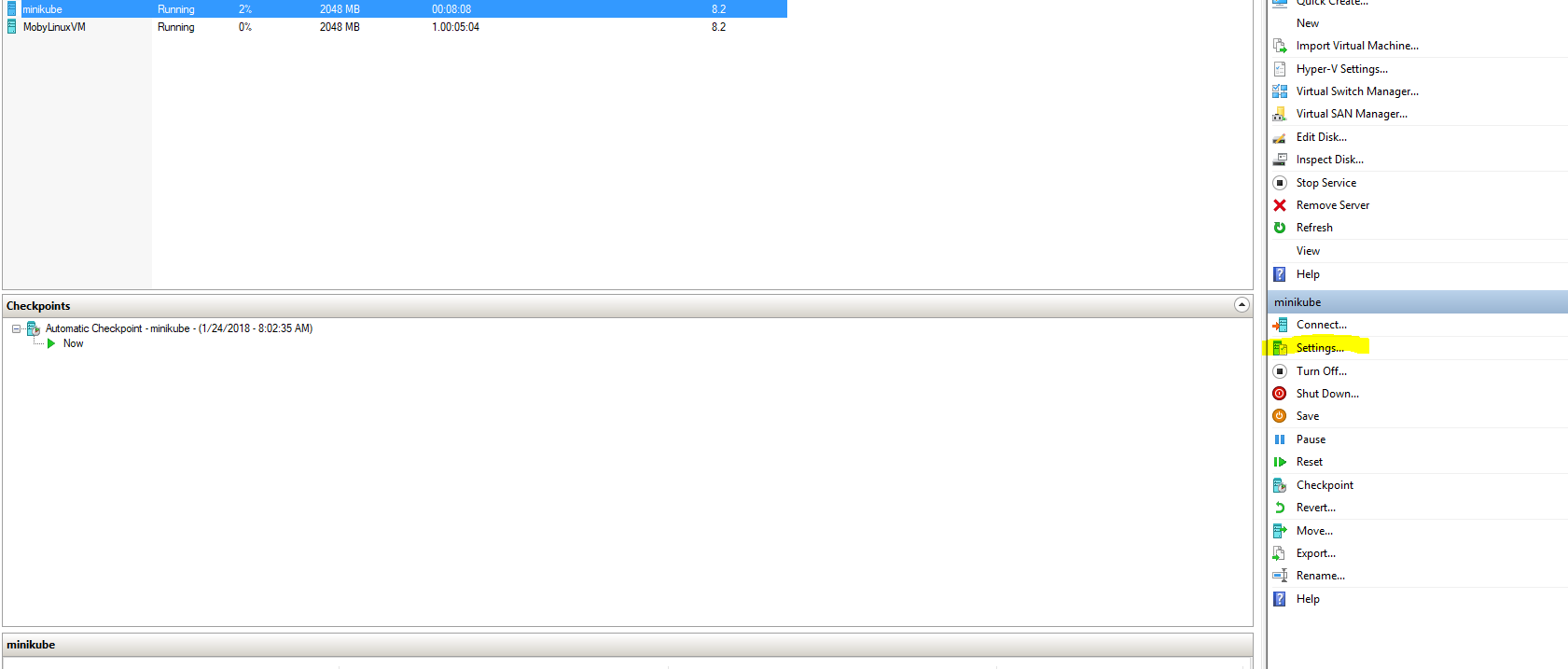
then

a minikube start after that was successful.
 ukphillips
on 24 Jan 2018
ukphillips
on 24 Jan 2018
Hi @ukphillips thanks for your message. Follow up with your suggestion and change Virtual switch from Primary Virtual Switch to Default Switch try again to start minikube and it's worked with me.
AWSOME. Thanks so much :)
trungung
on 25 Jan 2018
my minikube v0.25.0 instance on w10, hyperV, works very well when I am connected to an ethernet cable.
I have created an hyperv virtual switch, kubenet, and all works well.
when I am on my wifi, I create another external virtual switch connected to that, kubenetwifi, and try to start my k8s in the same way:
>minikube start --vm-driver hyperv --hyperv-virtual-switch kubenetwifi --insecure-registry="192.168.2.59:443" --alsologtostderr
the vm has kubenetwifi associated, correctly.
this does not work, with the following error:
 I0217 12:45:26.181438    2756 downloader.go:56] Not caching ISO, using https://storage.googleapis.com/minikube/iso/minikube-v0.25.1.iso
I0217 12:46:38.028751    2756 ssh_runner.go:57] Run: sudo rm -f /etc/docker/server-key.pem
I0217 12:46:38.072496    2756 ssh_runner.go:57] Run: sudo mkdir -p /etc/docker
I0217 12:46:38.081513    2756 ssh_runner.go:57] Run: sudo rm -f /etc/docker/ca.pem
I0217 12:46:38.086500    2756 ssh_runner.go:57] Run: sudo mkdir -p /etc/docker
I0217 12:46:38.095611    2756 ssh_runner.go:57] Run: sudo rm -f /etc/docker/server.pem
I0217 12:46:38.100737    2756 ssh_runner.go:57] Run: sudo mkdir -p /etc/docker
E0217 12:46:49.185155    2756 start.go:159] Error starting host: Error creating host: Error executing step: Provisioning VM.
: ssh command error:
command : sudo systemctl -f restart crio
err     : Process exited with status 1
output  : Job for crio.service failed because the control process exited with error code.
See "systemctl  status crio.service" and "journalctl  -xe" for details.
.
if I minikube ssh into the cluster, I can do this:
$ journalctl -xe | grep crio
and I get:
Feb 17 12:46:01 minikube systemd[1]: /lib/systemd/system/crio-shutdown.service:10: Executable path is not absolute: mkdir -p /var/lib/crio; touch /var/lib/crio/crio.shutdown
Feb 17 12:46:01 minikube systemd[1]: crio-shutdown.service: Cannot add dependency job, ignoring: Unit crio-shutdown.service is not loaded properly: Exec format error.
-- Subject: Unit crio.service has begun start-up
-- Unit crio.service has begun starting up.
Feb 17 11:46:03 minikube crio[2255]: time="2018-02-17 11:46:03.358233700Z" level=debug msg="[graphdriver] trying provided driver "overlay2""
Feb 17 11:46:03 minikube crio[2255]: time="2018-02-17 11:46:03.360947500Z" level=debug msg="backingFs=extfs,  projectQuotaSupported=false"
Feb 17 11:46:03 minikube crio[2255]: time="2018-02-17 11:46:03.361473900Z" level=info msg="CNI network rkt.kubernetes.io (type=bridge) is used from /etc/cni/net.d/k8s.conf"
Feb 17 11:46:03 minikube crio[2255]: time="2018-02-17 11:46:03.361703100Z" level=info msg="CNI network rkt.kubernetes.io (type=bridge) is used from /etc/cni/net.d/k8s.conf"
Feb 17 11:46:03 minikube crio[2255]: time="2018-02-17 11:46:03.370787200Z" level=debug msg="seccomp status: true"
Feb 17 11:46:03 minikube crio[2255]: time="2018-02-17 11:46:03.371324800Z" level=debug msg="Golang's threads limit set to 13320"
Feb 17 11:46:03 minikube crio[2255]: time="2018-02-17 11:46:03.371428200Z" level=fatal msg="No default routes."
Feb 17 11:46:03 minikube systemd[1]: crio.service: Main process exited, code=exited, status=1/FAILURE
-- Subject: Unit crio.service has failed
-- Unit crio.service has failed.
Feb 17 11:46:03 minikube systemd[1]: crio.service: Unit entered failed state.
Feb 17 11:46:03 minikube systemd[1]: crio.service: Failed with result 'exit-code'.
Feb 17 11:46:40 minikube systemd[1]: /lib/systemd/system/crio-shutdown.service:10: Executable path is not absolute: mkdir -p /var/lib/crio; touch /var/lib/crio/crio.shutdown
Feb 17 11:46:44 minikube sudo[2824]:   docker : TTY=unknown ; PWD=/home/docker ; USER=root ; COMMAND=/usr/bin/tee /etc/sysconfig/crio.minikube
Feb 17 11:46:45 minikube systemd[1]: /lib/systemd/system/crio-shutdown.service:10: Executable path is not absolute: mkdir -p /var/lib/crio; touch /var/lib/crio/crio.shutdown
Feb 17 11:46:47 minikube sudo[2909]:   docker : TTY=unknown ; PWD=/home/docker ; USER=root ; COMMAND=/usr/bin/systemctl -f restart crio
-- Subject: Unit crio.service has begun start-up
-- Unit crio.service has begun starting up.
Feb 17 11:46:47 minikube crio[2925]: time="2018-02-17 11:46:47.170491200Z" level=debug msg="[graphdriver] trying provided driver "overlay2""
Feb 17 11:46:47 minikube crio[2925]: time="2018-02-17 11:46:47.175134600Z" level=debug msg="backingFs=extfs,  projectQuotaSupported=false"
Feb 17 11:46:47 minikube crio[2925]: time="2018-02-17 11:46:47.175464600Z" level=info msg="CNI network rkt.kubernetes.io (type=bridge) is used from /etc/cni/net.d/k8s.conf"
Feb 17 11:46:47 minikube crio[2925]: time="2018-02-17 11:46:47.175649000Z" level=info msg="CNI network rkt.kubernetes.io (type=bridge) is used from /etc/cni/net.d/k8s.conf"
Feb 17 11:46:47 minikube crio[2925]: time="2018-02-17 11:46:47.179699700Z" level=debug msg="seccomp status: true"
Feb 17 11:46:47 minikube crio[2925]: time="2018-02-17 11:46:47.180263000Z" level=debug msg="Golang's threads limit set to 13320"
Feb 17 11:46:47 minikube crio[2925]: time="2018-02-17 11:46:47.180472000Z" level=fatal msg="No default routes."
Feb 17 11:46:47 minikube systemd[1]: crio.service: Main process exited, code=exited, status=1/FAILURE
-- Subject: Unit crio.service has failed
-- Unit crio.service has failed.
Feb 17 11:46:47 minikube systemd[1]: crio.service: Unit entered failed state.
Feb 17 11:46:47 minikube systemd[1]: crio.service: Failed with result 'exit-code'.
I have tried
minikube stop
minikube delete
but without success
 pomarc
on 18 Feb 2018
pomarc
on 18 Feb 2018
please have a try of a solution here: https://github.com/kubernetes/minikube/issues/2131
 jevy-wangfei
on 5 Mar 2018
jevy-wangfei
on 5 Mar 2018
@ukphillips changing switch to default solved the problem, many thanks.
 ChouhanSandeep
on 11 May 2018
ChouhanSandeep
on 11 May 2018
Issues go stale after 90d of inactivity.
Mark the issue as fresh with /remove-lifecycle stale.
Stale issues rot after an additional 30d of inactivity and eventually close.
If this issue is safe to close now please do so with /close.
Send feedback to sig-testing, kubernetes/test-infra and/or fejta.
/lifecycle stale
 fejta-bot
on 9 Aug 2018
fejta-bot
on 9 Aug 2018
Stale issues rot after 30d of inactivity.
Mark the issue as fresh with /remove-lifecycle rotten.
Rotten issues close after an additional 30d of inactivity.
If this issue is safe to close now please do so with /close.
Send feedback to sig-testing, kubernetes/test-infra and/or fejta.
/lifecycle rotten
fejta-bot
on 8 Sep 2018
Rotten issues close after 30d of inactivity.
Reopen the issue with /reopen.
Mark the issue as fresh with /remove-lifecycle rotten.
Send feedback to sig-testing, kubernetes/test-infra and/or fejta.
/close
fejta-bot
on 19 Oct 2018
@fejta-bot: Closing this issue.
In response to this:
Rotten issues close after 30d of inactivity.
Reopen the issue with/reopen.
Mark the issue as fresh with/remove-lifecycle rotten.Send feedback to sig-testing, kubernetes/test-infra and/or fejta.
/close
Instructions for interacting with me using PR comments are available here. If you have questions or suggestions related to my behavior, please file an issue against the kubernetes/test-infra repository.
 k8s-ci-robot
on 19 Oct 2018
k8s-ci-robot
on 19 Oct 2018
Finally Solved it. Took me more than 13 hrs of real pain deep in research.
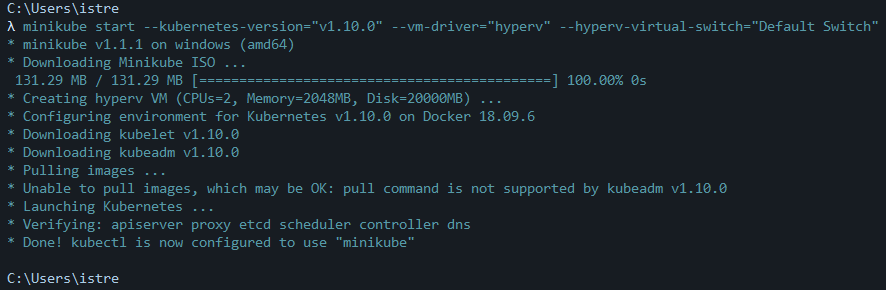
I changed the --hyperv-virtual-switch="Default Switch" as shown in my commander terminal. I am on windows 10 Enterprise.
I will now try to use the latest Kubernetes version 1.14 and see how it goes.
 mutuadavid93
on 12 Jun 2019
mutuadavid93
on 12 Jun 2019
A continuation on this fix that should help you setup "minikube" to to run off a chosen virtual switch in perpetuity on Windows 10 using Hyper-V.
1. Which Switch to Use
By default, when you enable Hyper-V and it does its initial install, it should generate a switch called "Public Access Switch" which is exposed to the outside world and can access the internet. You should be able to use this network adapter to avoid this error as outlined by previous responses (https://github.com/kubernetes/minikube/issues/2376#issuecomment-360088986). If it does not exist for some reason, open the "Hyper-V Manager" by searching for it in the task bar, and create a new one in the "Virtual Switch Manager". Select to make an "external" switch and give it a name.
2. Configure MiniKube to Always Use the Desired Switch
Use the following command to configure MiniKube to always use this virtual switch when it creates its necessary VM.
minikube config set hyperv-virtual-switch "Public Access Switch"
3. Additional Configuration Tips
I found this page useful as a reference for other areas to configure, instead of calling the commands with flags each time - increasing the VM default memory to 4096 GBs for example.
 BasicExp
on 15 Oct 2019
BasicExp
on 15 Oct 2019
Related issues
 StasPerekrestov
·
3Comments
StasPerekrestov
·
3Comments
 olalonde
·
3Comments
olalonde
·
3Comments
 Starefossen
·
3Comments
Starefossen
·
3Comments
 wudongyin
·
3Comments
wudongyin
·
3Comments
 alber70g
·
3Comments
alber70g
·
3Comments
Most helpful comment
Hi @ukphillips thanks for your message. Follow up with your suggestion and change Virtual switch from Primary Virtual Switch to Default Switch try again to start minikube and it's worked with me.
AWSOME. Thanks so much :)