Minikube: SSH issue with minikube start on windows hyper-v
minikube version: v0.24.1
Windows 10 1709 Build 16299.125 (With Optional Feature OpenSSH Enabled)
Hyper-V
minikube-v0.23.6.iso
What happened:
expected minikube to start when typing
minikube start --vm-driver=hyperv --hyperv-virtual-switch=Wireless --v=7
What you expected to happen:
minikube hangs and never starts
How to reproduce it (as minimally and precisely as possible):
I'm guessing enabling optional feature openssh in windows might have caused this issues
minikube start --vm-driver=hyperv --hyperv-virtual-switch=Wireless --v=7
Output of minikube logs (if applicable):
[stderr =====>] :
[executing ==>] : C:WINDOWSSystem32WindowsPowerShellv1.0powershell.exe -NoProfile -NonInteractive (( Get-VM minikube ).networkadapters[0]).ipaddresses[0]
[stdout =====>] : 192.168.0.16
[stderr =====>] :
Using SSH client type: native
&{{{
About to run SSH command:
sudo hostname minikube && echo "minikube" | sudo tee /etc/hostname
Error dialing TCP: ssh: handshake failed: ssh: unable to authenticate, attempted methods [none], no supported methods remain
Error dialing TCP: ssh: handshake failed: ssh: unable to authenticate, attempted methods [none], no supported methods remain
 AceHack
All 15 comments
So I removed the optional OpenSSH beta feature from Windows 10 and now it's working. Is there a way to force minikube to ignore this version of ssh and use the built in go version? I would really like to reinstall the optional windows openssh feature.
Thanks.
AceHack
on 18 Dec 2017
I have the same issue but do not have the OpenSSH beta installed on my Windows 10 Pro.
minikube version: v0.24.1
Windows 10 1703 Build 15063.726
Hyper-V
minikube-v0.23.6.iso
 javedmshah
on 20 Jan 2018
javedmshah
on 20 Jan 2018
We have tested the SSH beta on Windows 10 as part of Minishift, and have
not experienced similar results. I will have a closer look and see if I can
reproduce this.
--
Gerard Braad | http://gbraad.nl
[ Doing Open Source Matters ]
 gbraad
on 20 Jan 2018
gbraad
on 20 Jan 2018
I updated Windows 10 Pro v 1703 and this problem went away, thanks @gbraad.
Non-issue.
javedmshah
on 20 Jan 2018
Same problem with Windows 10 v1709 (10.0.16299.192]), minikube v0.25.0, Hyper-V, minikube-v0.25.1.iso.
C:\> minikube ip
ip.go:48] Error getting IP:  Host is not running
From HyperV manager, I am able to get root access in the minikube VM.
- dmesg shows an interesting thing:
hv_netvsc [xxxxguid]: Device MAC 00-xx-xx-xx-xx-12 link state upwhere the MAC address of the virtual switch is ...-xx-11 🤔 metadata-serviceandapi-serviceare up (via rkt)ip addr showgives eth0 with a MACaddr-based ipv6 address but no ipv4
- no ip routes, apparently
 danielefranceschi
on 31 Jan 2018
danielefranceschi
on 31 Jan 2018
Same issue, on Win10 1709 (build 17025.1000). Used to work, suddenly stopped. Fails with:
Error dialing TCP: ssh: handshake failed: ssh: unable to authenticate, attempted methods [publickey none], no supported methods remain
Nothing worked. Upgrading to 0.25, purging, nothing. @gbraad comment tipped me off tho. Issue went away when I have installed openssh. It seems the problem is when minikube cannot find ssh, and it uses internal Go implementation.
 unjello
on 9 Feb 2018
unjello
on 9 Feb 2018
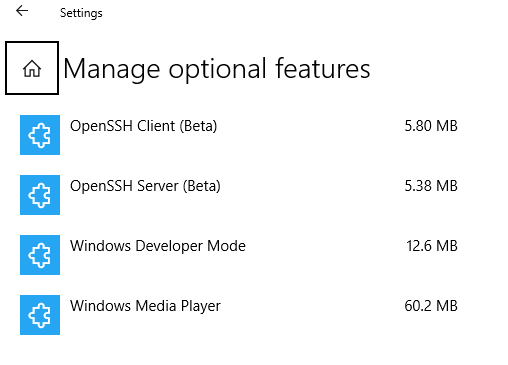
For me, it worked fine without openssh as long as I didn't have the optional windows ssh installed like below.
AceHack
on 9 Feb 2018
Uninstalling the OpenSSH Client (Search for "Manage Option Features"), restarting, deleting the minikube VM in HyperV and clearing out my Users/username/.minikube and .kube folders and then running the following, got it working.
The above clear out was just to be certain. I had tried the above with OpenSSH installed and it had failed. So the only difference was OpenSSH.
minikube start --kubernetes-version="v1.9.0" --vm-driver="hyperv" --memory=2048 --hyperv-virtual-switch="minikube external switch" --v=7 --alsologtostderr
Whilst I was getting the same error, I was able to run "minikube ip" and get a valid IP address.
_Error dialing TCP: ssh: handshake failed: ssh: unable to authenticate, attempted methods [none], no supported methods remain_
Windows 10 Pro Version 1709. Using Chocolatey to manage minikube and kubectl packages.
 Komorebi-E
on 17 Feb 2018
Komorebi-E
on 17 Feb 2018
@Komorebi-E When I mentioned OpenSSH, I installed one with Chocolatey. People responding later, I think as you, assume windows features. Either way, it seems OpenSSH fixes this issue, whether you need to install or uninstall it :)
unjello
on 17 Feb 2018
@unjello I've tested under more controlled conditions as I was experiencing other issues caused by poor wireless connection (HyperV external virtual switch is bound to my laptop WiFi adapter) and router DHCP was giving different IPs to the minikube VM in Hyper-V.
With the minikube VM assigned a static MAC address and the router having a static DHCP entry, minikube is consistently starting and stopping as I'd expect, with or without the OpenSSH client installed.
I'm running minikube 0.25.0
Without OpenSSH
SSH binary not found, using native Go implementation
With OpenSSH installed
Using SSH client type: native
Both result in a working cluster.
PS C:\WINDOWS\system32> minikube status
minikube: Running
cluster: Running
kubectl: Correctly Configured: pointing to minikube-vm at 192.168.1.141
Issues go stale after 90d of inactivity.
Mark the issue as fresh with /remove-lifecycle stale.
Stale issues rot after an additional 30d of inactivity and eventually close.
If this issue is safe to close now please do so with /close.
Send feedback to sig-testing, kubernetes/test-infra and/or fejta.
/lifecycle stale
 fejta-bot
on 3 Jun 2018
fejta-bot
on 3 Jun 2018
solved issue by using latest version of OpenSSH from https://github.com/PowerShell/Win32-OpenSSH/releases v7.7.0.0p1-Beta
original windows version v7.5 doesn't work for me, returns "no matching key exchange method found"
 maksimru
on 2 Jul 2018
maksimru
on 2 Jul 2018
Stale issues rot after 30d of inactivity.
Mark the issue as fresh with /remove-lifecycle rotten.
Rotten issues close after an additional 30d of inactivity.
If this issue is safe to close now please do so with /close.
Send feedback to sig-testing, kubernetes/test-infra and/or fejta.
/lifecycle rotten
fejta-bot
on 1 Aug 2018
Rotten issues close after 30d of inactivity.
Reopen the issue with /reopen.
Mark the issue as fresh with /remove-lifecycle rotten.
Send feedback to sig-testing, kubernetes/test-infra and/or fejta.
/close
fejta-bot
on 31 Aug 2018
@fejta-bot: Closing this issue.
In response to this:
Rotten issues close after 30d of inactivity.
Reopen the issue with/reopen.
Mark the issue as fresh with/remove-lifecycle rotten.Send feedback to sig-testing, kubernetes/test-infra and/or fejta.
/close
Instructions for interacting with me using PR comments are available here. If you have questions or suggestions related to my behavior, please file an issue against the kubernetes/test-infra repository.
 k8s-ci-robot
on 31 Aug 2018
k8s-ci-robot
on 31 Aug 2018
Related issues
 dkoston
·
3Comments
dkoston
·
3Comments
 cherish3620
·
3Comments
cherish3620
·
3Comments
 xmnlab
·
3Comments
xmnlab
·
3Comments
 djschny
·
3Comments
djschny
·
3Comments
 tstromberg
·
3Comments
tstromberg
·
3Comments
Most helpful comment
Uninstalling the OpenSSH Client (Search for "Manage Option Features"), restarting, deleting the minikube VM in HyperV and clearing out my Users/username/.minikube and .kube folders and then running the following, got it working.
The above clear out was just to be certain. I had tried the above with OpenSSH installed and it had failed. So the only difference was OpenSSH.
minikube start --kubernetes-version="v1.9.0" --vm-driver="hyperv" --memory=2048 --hyperv-virtual-switch="minikube external switch" --v=7 --alsologtostderrWhilst I was getting the same error, I was able to run "minikube ip" and get a valid IP address.
_Error dialing TCP: ssh: handshake failed: ssh: unable to authenticate, attempted methods [none], no supported methods remain_Windows 10 Pro Version 1709. Using Chocolatey to manage minikube and kubectl packages.