Minikube: host-only cidr conflicts with the network address of a host interface
Minikube version
v0.8.0
Environment:
- OS: Gentoo
- VM Driver: virtualbox
- Docker version: 1.12.0
- VirtualBox: 5.0.26
What happened:
I'm trying to run minikube start --cpus=2 --memory=4096
Starting local Kubernetes cluster...
E0823 12:26:56.482798   11817 start.go:83] Error starting host: Error creating. Error creating machine: Error in driver during machine creation: host-only cidr conflicts with the network address of a host interface. Retrying.
E0823 12:31:57.568838   11817 start.go:83] Error starting host: Error configuring auth on host: Too many retries waiting for SSH to be available.  Last error: Maximum number of retries (60) exceeded. Retrying.
What you expected to happen:
I would like to see sth like this:
Starting local Kubernetes cluster...
Kubernetes is available at https://192.168.99.100:8443.
Kubectl is now configured to use the cluster.
How to reproduce it:
It happens always on my Linux machine.
Anything else do we need to know:
Output of ip a, wlp1s0 is my primary network interface, I know issue is in this function, however I'm not sure host ip interferes with any interface ip except vboxnet0 which is virtualbox interface.
1: lo: <LOOPBACK,UP,LOWER_UP> mtu 65536 qdisc noqueue state UNKNOWN group default qlen 1
    link/loopback 00:00:00:00:00:00 brd 00:00:00:00:00:00
    inet 127.0.0.1/8 brd 127.255.255.255 scope host lo
       valid_lft forever preferred_lft forever
    inet6 ::1/128 scope host
       valid_lft forever preferred_lft forever
2: wlp1s0: <BROADCAST,MULTICAST,UP,LOWER_UP> mtu 1500 qdisc mq state UP group default qlen 1000
    link/ether a4:34:d9:8c:e2:f9 brd ff:ff:ff:ff:ff:ff
    inet 192.168.11.26/24 brd 192.168.11.255 scope global wlp1s0
       valid_lft forever preferred_lft forever
    inet6 fe80::5c1f:5481:44b8:580b/64 scope link
       valid_lft forever preferred_lft forever
3: enp0s31f6: <NO-CARRIER,BROADCAST,MULTICAST,UP> mtu 1500 qdisc pfifo_fast state DOWN group default qlen 1000
    link/ether f8:ca:b8:4d:5e:e9 brd ff:ff:ff:ff:ff:ff
6: vboxnet0: <BROADCAST,MULTICAST,UP,LOWER_UP> mtu 1500 qdisc pfifo_fast state UP group default qlen 1000
    link/ether 0a:00:27:00:00:00 brd ff:ff:ff:ff:ff:ff
    inet 192.168.99.1/24 brd 192.168.99.255 scope global vboxnet0
       valid_lft forever preferred_lft forever
    inet 192.168.99.100/24 brd 192.168.99.255 scope global secondary vboxnet0
       valid_lft forever preferred_lft forever
    inet6 fe80::aca7:69d4:eddf:a9b9/64 scope link
       valid_lft forever preferred_lft forever
 szymonpk
All 11 comments
It works with --host-only-cidr="192.168.99.1/26" which is half of default network.
szymonpk
on 23 Aug 2016
@szymonpk I have the same problem.
Could you explain where you added the --host-only-cidr="192.168.99.1/26" parameter to make it work?
 duelle
on 8 Sep 2016
duelle
on 8 Sep 2016
@duelle It's a flag to minishift start --host-only-cidr="192.168.99.1/26"
 jimmidyson
on 8 Sep 2016
jimmidyson
on 8 Sep 2016
Unfortunately this seems to be no workaround for me.
minishift start --host-only-cidr="192.168.99.1/26"
also fails with
Error starting host: Error starting stopped host: host-only cidr conflicts with the network address of a host interface.
duelle
on 23 Sep 2016
Same error here. I've tried --host-only-cidr flag also without success
 habutre
on 26 Sep 2016
habutre
on 26 Sep 2016
Looks like we might need to pick up this fix from upstream: https://github.com/docker/machine/pull/3597/files
 dlorenc
on 27 Sep 2016
dlorenc
on 27 Sep 2016
building minikube from HEAD works like a charm!
Thx everyone involved.
habutre
on 30 Sep 2016
minikube start --host-only-cidr="192.168.99.1/26"
 kalyanamp
on 27 Feb 2018
kalyanamp
on 27 Feb 2018
Hey guys... how this issue has been going?
I just installed Docker on a fresh Windows 8.1 x64 installation (2 weeks old) and I'm getting this error
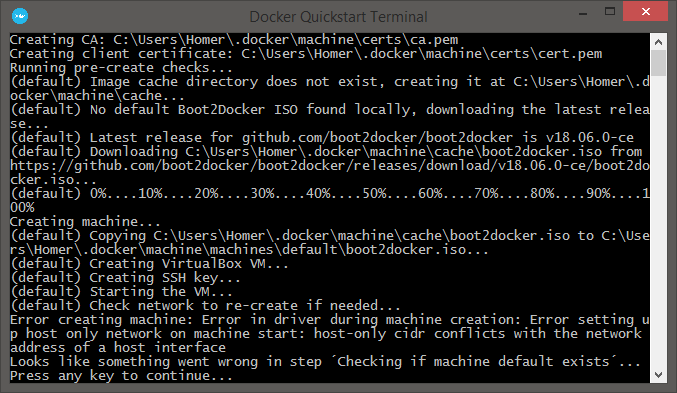
Steps done so far
- uninstalled and installed again
- restarted the machine
- Tried to run on a elevated prompt start.sh
- changed "HostOnlyCIDR": to my ip address
none of them worked
Using latest Docker Toolbox version with windows 8.1 x64 fully updated.
 tofanelli
on 17 Aug 2018
tofanelli
on 17 Aug 2018
--host-only-cidr should not include network/IP address of any of your interfaces
szymonpk
on 17 Aug 2018
@szymonpk ... yes, i wasn't using my network range... my network is 10.0.0.0/8 and I used the same on Docker Docs, 192.168.99.1/24, and many others and none of them worked... =\
tofanelli
on 17 Aug 2018
Related issues
 javajon
·
3Comments
javajon
·
3Comments
 wudongyin
·
3Comments
wudongyin
·
3Comments
 ahmetb
·
3Comments
ahmetb
·
3Comments
 mdkess
·
3Comments
mdkess
·
3Comments
 vainikkaj
·
3Comments
vainikkaj
·
3Comments
Most helpful comment
Same error here. I've tried
--host-only-cidrflag also without success