Mini-media-player: Since HA 0.115, checkboxes no longer appearing in speaker grouping view
After updating Home Assistant to 0.115:
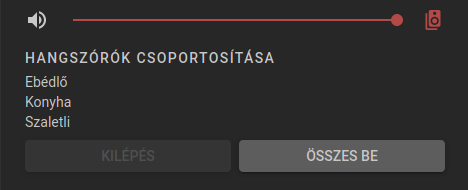 .
.
Also a strange behavior since v1.11.0 of Mini Media Player, previously the player's own checkbox was grayed out, now it's inconsistent. There are times when it shows, and there are time when it doesn't. Previous behavior was better IMHO.
 nagyrobi
All 35 comments
Same issue ;)
 jvalst
on 21 Sep 2020
jvalst
on 21 Sep 2020
Can't find the exact change in core HA that broke this, but I suspect the custom checkbox element i use in this card (paper-checkbox) is no longer imported directly when loading the HA frontend, solution would probably be to bundle the checkbox component with the card.
This will increase bundle size though which is unfortunate, especially when the element already exists in core HA.
 kalkih
on 21 Sep 2020
kalkih
on 21 Sep 2020
Will fix asap.
kalkih
on 21 Sep 2020
Thanks a lot! The click still works on the group, so no very big deal. Just find yourself the answer which part broke it, and maybe replace this checkbox with that new one as well?
jvalst
on 21 Sep 2020
And also, would it be possible to revert back to the previous behavior, when all the checkboxes were visible, and the ones unavailable were just grayed out?
The interface can be overseen better if all the checkboxes are present. I already have 4 multiroom-capable devices, and set up the speaker list the same for all, there you can see at a glance the exact options, if the current speakers's checkbox is missing, it's harder to oversee things as the lists look different for each speaker.
nagyrobi
on 21 Sep 2020
Same for yamaha speaker group
 ppanagiotis
on 22 Sep 2020
ppanagiotis
on 22 Sep 2020
his will increase bundle size though which is unfortunate, especially when the element already exists in core HA.
You could use buttons instead. Button is pressed while a speaker is in, a released when a speaker is not. The same buttons that you use for shortcuts would do perfectly. Even with the possibility to arrange them in rows and columns.
nagyrobi
on 22 Sep 2020
It worked again at my place, just to let you guys know ;)
jvalst
on 29 Sep 2020
Yes, interesting. Since v0.115.4 of Home Assistant, checkboxes are back...
nagyrobi
on 29 Sep 2020
Great news, was about to switch out the checkbox component but can probably hold off with that change for now then 👍🏼
kalkih
on 29 Sep 2020
Checkboxes are still missing on my 0.115.4 install.
Edit: And of course they reappear as soon as I refresh the frontend after posting this. Will update if the problem returns.
 jjlawren
on 6 Oct 2020
jjlawren
on 6 Oct 2020
Thanks for the feedback, let me know if the issue reappear.
kalkih
on 6 Oct 2020
I seems that since 0.116 I have this problem again...
Anyone else ?
 hcoohb
on 9 Oct 2020
hcoohb
on 9 Oct 2020
I seems that since 0.116 I have this problem again...
Anyone else ?
Correct, same issue. The checkboxes are gone again.
jvalst
on 9 Oct 2020
Correct, same issue. The checkboxes are gone again. Home Assistant 0.116.1
 robertw
on 9 Oct 2020
robertw
on 9 Oct 2020
Problem returned indeed.
nagyrobi
on 9 Oct 2020
The same problem …
 gieljnssns
on 11 Oct 2020
gieljnssns
on 11 Oct 2020
Any update on this?
ppanagiotis
on 18 Oct 2020
I have the same trouble here but only on my android tablet, on my iPhone and computer browsers I don't have any problem....
On my Android tablet I use "Fully Kiosk Broswer"
 Gulivertx
on 1 Nov 2020
Gulivertx
on 1 Nov 2020
I have the same trouble here but only on my android tablet, on my iPhone and computer browsers I don't have any problem....
On my Android tablet I use "Fully Kiosk Broswer"
I guess that has to do with some caching or something. On my Windows Chrome the checkboxes aren't shown either
jvalst
on 9 Nov 2020
@jvalst thank's for your reply, unfortunately not a cache problem.
Gulivertx
on 9 Nov 2020
same problem here. Running 0.117.6 and checkboxes are also missing. Only when I first add a card with the control it work. But the second time I load the card the checkboxes are removed. See the attached repro steps in the video
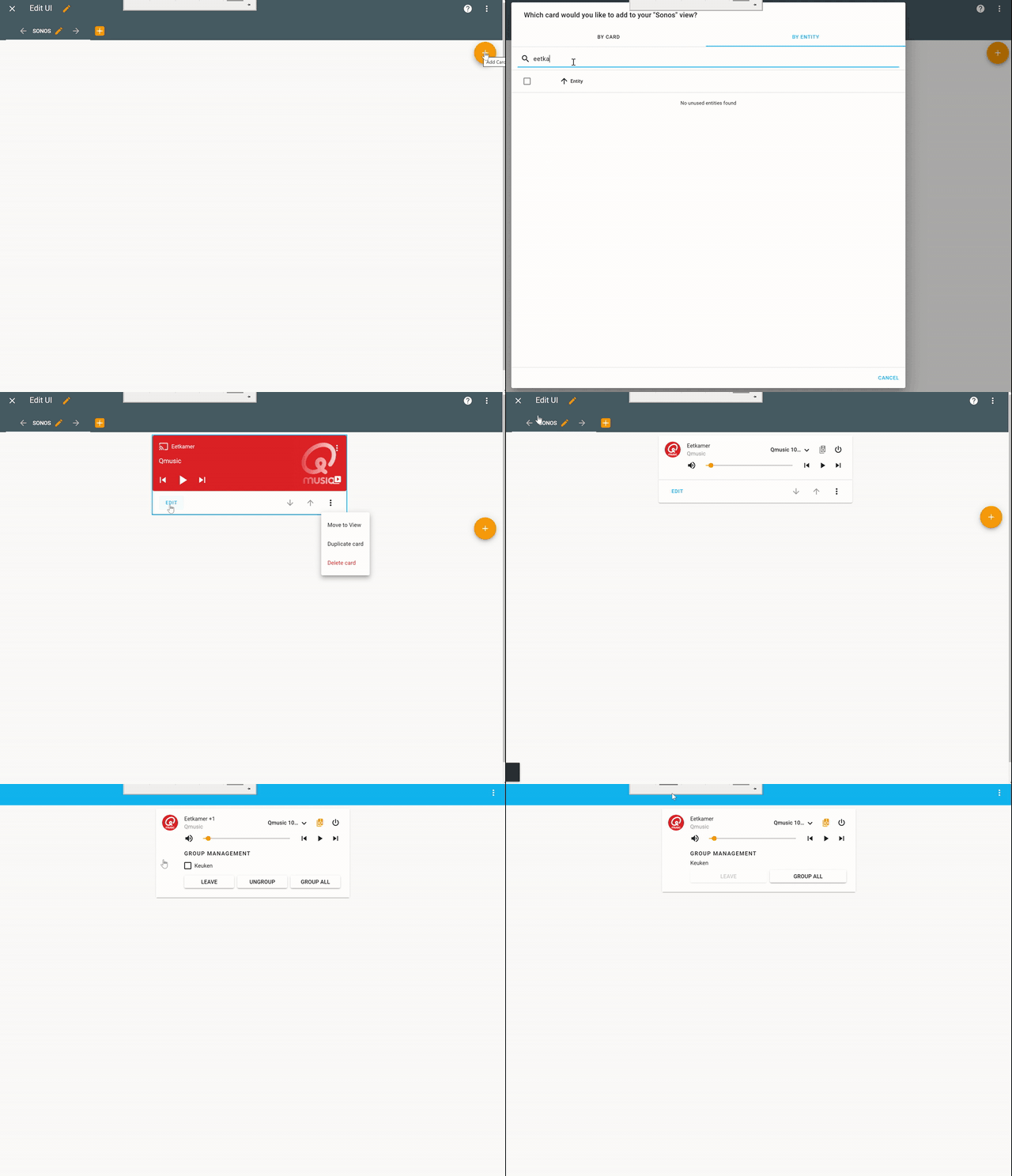
 bvansluis
on 16 Nov 2020
bvansluis
on 16 Nov 2020
I have the same problem on HA 0.118.4 and mini media player v1.11.0
 deluxestyle
on 1 Dec 2020
deluxestyle
on 1 Dec 2020
Is this project abandoned?
nagyrobi
on 1 Dec 2020
mini-media-player-bundle.js:1 Uncaught (in promise) TypeError: Cannot read property 'selectedLanguage' of undefined
    at pc (mini-media-player-bundle.js:1)
    at HTMLElement.render (mini-media-player-bundle.js:1)
    at HTMLElement.update (mini-media-player-bundle.js:1)
    at HTMLElement.performUpdate (mini-media-player-bundle.js:1)
    at mini-media-player-bundle.js:1
    at Generator.next (<anonymous>)
    at La (mini-media-player-bundle.js:1)
    at f (mini-media-player-bundle.js:1)
Maybe this is related and breaks the loading of the custom checkboxes.
 henrikbjorn
on 9 Dec 2020
henrikbjorn
on 9 Dec 2020
Until kalkih makes a decision where they want to go with this, I have taken the liberty of forking the 'checkbox-element' branch as it didn't work for me without modifying the position of the input element in 'checkbox.js'. Release below for anyone that wants to try it out:
https://github.com/mcguiresean/mini-media-player/releases/tag/v1.11.0a
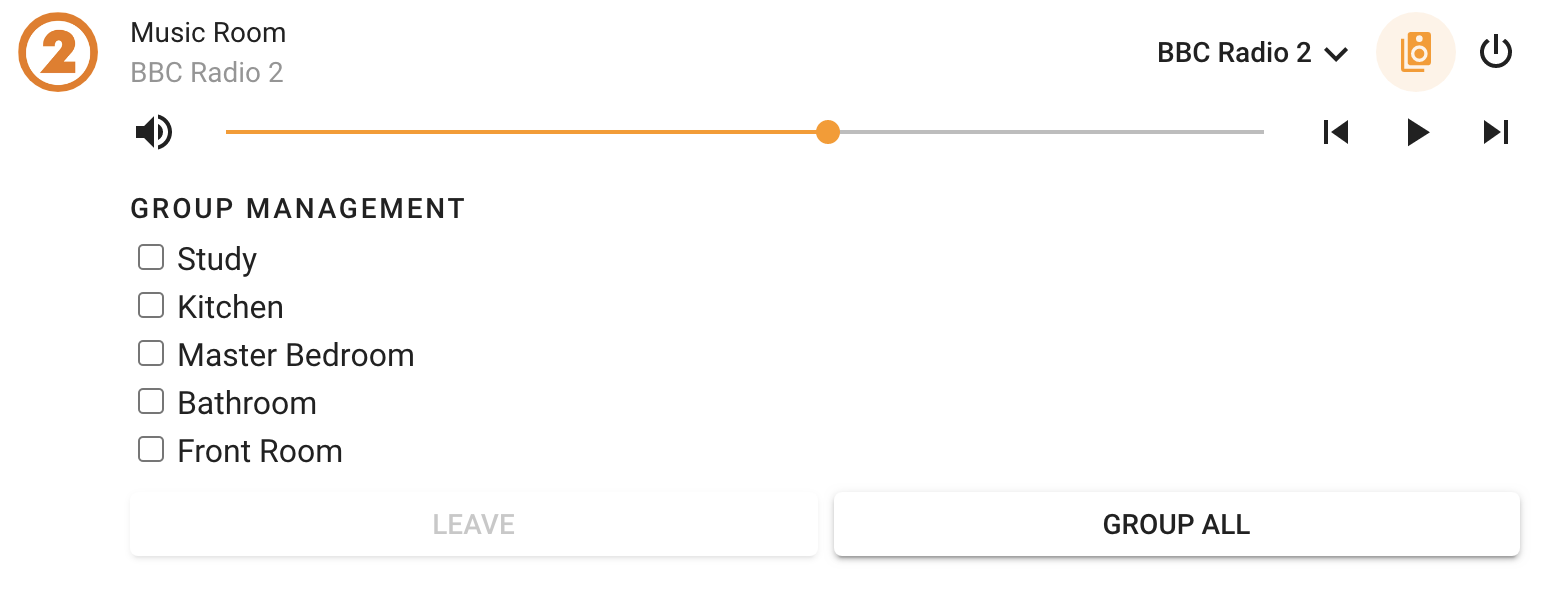
 mcguiresean
on 23 Dec 2020
mcguiresean
on 23 Dec 2020
I can confirm this fixes the problem, thank you!
 peewi96
on 24 Dec 2020
peewi96
on 24 Dec 2020
Excellent!
Thank you! This fixes it!
2020-12-23 11:29 időpontban mcguiresean ezt írta:
Until kalkih makes a decision where they want to go with this, I have taken the liberty of forking the 'checkbox-element' branch as it didn't work for me without modifying the position of the input element in 'checkbox.js'. Release below for anyone that wants to try it out:
https://github.com/mcguiresean/mini-media-player/releases/tag/v1.11.0a
[1]
--
You are receiving this because you authored the thread.
Reply to this email directly, view it on GitHub [2], or unsubscribe [3].
Links:
[1]
https://user-images.githubusercontent.com/12557638/102986765-3ae46180-4509-11eb-8f87-ea26c63913b3.png
[2]
https://github.com/kalkih/mini-media-player/issues/418#issuecomment-750104101
[3]
https://github.com/notifications/unsubscribe-auth/AAL2STHPJU6XJSYTLRVIFSTSWHA7ZANCNFSM4RS6BKNQ
nagyrobi
on 24 Dec 2020
Until kalkih makes a decision where they want to go with this, I have taken the liberty of forking the 'checkbox-element' branch as it didn't work for me without modifying the position of the input element in 'checkbox.js'. Release below for anyone that wants to try it out:
https://github.com/mcguiresean/mini-media-player/releases/tag/v1.11.0a
Nice! Why don't you open a merge request?
ppanagiotis
on 25 Dec 2020
Thanks @mcguiresean, I did that initial work and added a custom checkbox component to circumvent the change in HA where some default component aren't imported in the base (hence not available in custom-cards), but I didn't really finish it (seems like I was pretty close though 😆 ), can't remember if there was anything else I still had left to do before merging it...
I do currently not have access to my HA instance so can't merge atm, but will do a release in a week or so.
@peewi96 @nagyrobi Does it seem to work as expected with that change, do you notice any strange behaviour or issues?
Thanks!
kalkih
on 26 Dec 2020
I tried it as well and it seems to work.
The only thing which I found was the different style of the font.
It seems the list with the checkbox has a different font or font-size
deluxestyle
on 26 Dec 2020
@kalkih Yes it fixes it. The UI looks fine in:
- Android (multiple versions)
- Linux Firefox
- Windows Firefox
nagyrobi
on 28 Dec 2020
@mcguiresean, is it just a matter of replacing the js file with your version (/config/www/community/mini-media-player/mini-media-player-bundle.js)? I did that but it doesn't seems to work on my setup. Did a restart of HA.
bvansluis
on 31 Dec 2020
You need to also delete the .gz.
nagyrobi
on 31 Dec 2020
@mcguiresean, is it just a matter of replacing the js file with your version (/config/www/community/mini-media-player/mini-media-player-bundle.js)? I did that but it doesn't seems to work on my setup. Did a restart of HA.
Same here.
Uncaught (in promise) TypeError: Cannot read property 'selectedLanguage' of undefined :/
ppanagiotis
on 1 Jan 2021
Related issues
 davanda
·
3Comments
davanda
·
3Comments
 poldim
·
4Comments
poldim
·
4Comments
 darkkatarsis
·
4Comments
darkkatarsis
·
4Comments
 orickcorreia
·
5Comments
orickcorreia
·
5Comments
 fleXible
·
5Comments
fleXible
·
5Comments
Most helpful comment
Until kalkih makes a decision where they want to go with this, I have taken the liberty of forking the 'checkbox-element' branch as it didn't work for me without modifying the position of the input element in 'checkbox.js'. Release below for anyone that wants to try it out:
https://github.com/mcguiresean/mini-media-player/releases/tag/v1.11.0a