Mini-media-player: Icons missing in HA 0.110.beta
Since I installed the latest HA beta (0.110.0b3) my mediaplayers don't show the icons anymore.
The commands in more-info window works, but in lovelace the icons are missing.
Not only the "automatic icons" (Power, play,next stop ecc.), but also the ones in the custom shortcuts.
It's only me?
 mgiako
All 14 comments
Hello, this was fixed in the latest release https://github.com/kalkih/mini-media-player/pull/301
 kalkih
on 18 May 2020
kalkih
on 18 May 2020
@kalkih sorry,I had a problem and not really on 1.8.0, but...
even now, the normal icons are back, but the shortcut icons are not:
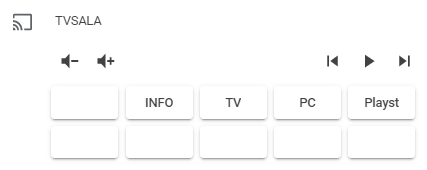
this is my config:
         - type: custom:mini-media-player
            entity: media_player.tvsala
            volume_stateless: true
            source: full
            hide:
              power: true
            shortcuts:
               columns: 5 # Max buttons per row
               buttons:
                 - icon: mdi:power
                   type: service
                   id: script.turn_on
                   data:
                     entity_id: script.toggletv
                 - name: INFO
                   type: service
                   id: remote.send_command
                   data:
                      entity_id: remote.broadlink
                      device: television
                      command: info
                 - name: TV
                   type: source
                   id: DTV
                 - name: PC
                   type: source
                   id: HDMI 1
                 - name: Playst
                   type: source
                   id: HDMI 2

                 - icon: mdi:play
                   type: service
                   id: remote.send_command
                   data:
                      entity_id: remote.broadlink
                      device: television
                      command: play
                 - icon: mdi:pause
                   type: service
                   id: remote.send_command
                   data:
                      entity_id: remote.broadlink
                      device: television
                      command: pause
                 - icon: mdi:stop
                   type: service
                   id: remote.send_command
                   data:
                      entity_id: remote.broadlink
                      device: television
                      command: stop
                 - icon: mdi:fast-forward
                   type: service
                   id: remote.send_command
                   data:
                      entity_id: remote.broadlink
                      device: television
                      command: ffwd
                 - icon: mdi:record-rec
                   type: service
                   id: remote.send_command
                   data:
                      entity_id: remote.broadlink
                      device: television
                      command: record
Okay I'll look into the shortcut icons.
kalkih
on 18 May 2020
I can confirm I don't get shortcut icons. I'm using latest HA dev (pulled today), and MMP 1.8.0.
 RogerSelwyn
on 18 May 2020
RogerSelwyn
on 18 May 2020
Home Assistant 0.110.0.dev20200512 + 1.8.0 fresh install
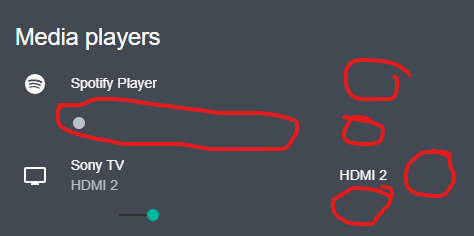
majority of the icons missing, can't controll really anything.
 kbalint
on 19 May 2020
kbalint
on 19 May 2020
@kbalint Try clearing cache if you've updated the card, most icons will show up again with the latest version of the card (see screenshot posted above). Rest of the icons will be fixed with #304 (shortcut icons / dropdown icon)
kalkih
on 19 May 2020
@kalkih cache was the first I tried, but to no avail.
kbalint
on 19 May 2020
Check your resource reference, reinstall from HACS if installed from there.
kalkih
on 19 May 2020
@kalkih it was installed manually for a year or so, and have this problem since the last update to the HA *-latest docker image next week or so. I've updated mmp from HACS _today_ right before submitting - but has the same glitched ui; cache cleared and no errors in the console.
kbalint
on 19 May 2020
@mgiako @RogerSelwyn New release available, should fix the last missing icons, please give it a shot and let me know, thanks!
kalkih
on 19 May 2020
@kbalint Hmm... not really sure then, try hitting the "reload resources" button from the HA UI (in the three dot menu in the header).
kalkih
on 19 May 2020
@mgiako @RogerSelwyn New release available, should fix the last missing icons, please give it a shot and let me know, thanks!
That seems to have fixed it.
RogerSelwyn
on 19 May 2020
@kalkih problem solved, thanks!
@kbalint maybe you have my same initial problem.
Tell me, what do you have in resources: ?
this
    - url: /hacsfiles/mini-media-player/mini-media-player-bundle.js
      type: module
or this
      - url: /hacsfiles/mini-media-player/mini-media-player.js
        type: module
Great, thanks for the help 👍
kalkih
on 20 May 2020
Related issues
 davanda
·
3Comments
davanda
·
3Comments
 porebas
·
5Comments
porebas
·
5Comments
 rpitera
·
3Comments
rpitera
·
3Comments
 darkkatarsis
·
4Comments
darkkatarsis
·
4Comments
 Krocko
·
4Comments
Krocko
·
4Comments