Mini-media-player: Dropdown menu won´t work on Iphone with Home Assistant app 2.0
Hey I have a Issue with the mini media player, on my Iphone I can´t control the drop down menu to choose a radio channel, there nothing happens then I press the radio channel I want to listing to. If I go to home assistant frontend at my computer, the mini media player works fine, there is no problems with the drop down menu.
Hope it will be fixed in the future.
Best Regards Stig
 lindberg87
All 17 comments
Hey,
Alright, I'll see if I can replicate the issue and fix it.
Does the dropdown close when you press an entry or does it stay open?
Also, what iOS version are you running? Is this in Safari or in the official HA app or in another browser?
Thanks!
 kalkih
on 31 Dec 2019
kalkih
on 31 Dec 2019
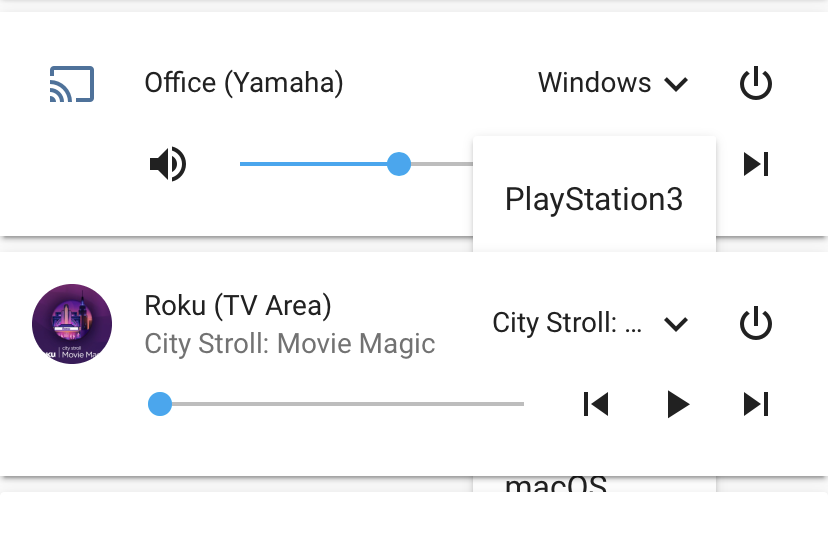
I'm not sure if my problem is related or not but for me the menu renders underneath the card below it like so in Chromium based browsers:
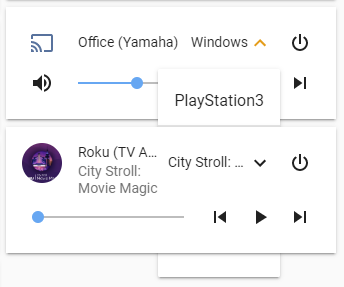
And like so in the iPhone iOS app:
 mihalski
on 1 Jan 2020
mihalski
on 1 Jan 2020
Could be related, the issue where the dropdown is rendered below the card was fixed in the latest update (v1.5.1), try updating to that version if you haven't already.
Although I saw some users reporting issues with the cache not clearing properly with HACS, resulting in the client not loading the latest version of the card and the issue remains. Uninstalling and reinstalling the card could solve that.
If you've installed the card manually, simply adding ?v=1.5.1 at the end of the mini-media-player resource url in your config should force the client to load the new version.
kalkih
on 2 Jan 2020
I have tried to uninstalled and reinstall the v1.5.1 and the problem is still there. I can open the drop down menu and choose a radio channel and the drop down menu closes and nothing happens.
If I do the same via chrome browser on my pc it work super perfect.
The problem started for me after mini player got update to v1.4.0
lindberg87
on 2 Jan 2020
I do use HACS and i just uninstalled, reinstalled, added to lovelace using HACS and now it works!
EDIT: And it works in both Chromium based browsers and in the iOS app.
mihalski
on 2 Jan 2020
I have tried to uninstalled and reinstall the v1.5.1 and the problem is still there. I can open the drop down menu and choose a radio channel and the drop down menu closes and nothing happens.
If I do the same via chrome browser on my pc it work super perfect.
The problem started for me after mini player got update to v1.4.0
Okay, thanks for the info, I'll check tomorrow, do you know what version of iOS you're on?
I do use HACS and i just uninstalled, reinstalled, added to lovelace using HACS and now it works!
EDIT: And it works in both Chromium based browsers and in the iOS app.
Perfect 👍
kalkih
on 2 Jan 2020
Hey Kalkih I´m running iOS 13.3 os iPhone xs max
lindberg87
on 3 Jan 2020
@lindberg87 Thanks, I was able to reproduce it in the latest iOS app, tried rolling back to an older version of the mini-media-player card, all the way back to 1.0.0 but the issue remained on all versions.
So most likely something changed with the iOS app because I know it was working before.
Will fix asap, thanks
kalkih
on 3 Jan 2020
Have the same issue not only on ios as well on Windows and Chrome
 deluxestyle
on 5 Jan 2020
deluxestyle
on 5 Jan 2020
@kalkih Thank you very much :)
lindberg87
on 5 Jan 2020
Have the same issue not only on ios as well on Windows and Chrome
@deluxestyle Which one, dropdowns rendering behind cards or that nothing happens when you press an item?
kalkih
on 5 Jan 2020
Oh sorry. Dropdowns behind cards.
deluxestyle
on 5 Jan 2020
@deluxestyle That was fixed in the latest release #201
kalkih
on 5 Jan 2020
@kalkih reinstalled with HACS and it seems to work now. maybe it was still chached
deluxestyle
on 5 Jan 2020
Should now be working as expected again in the latest release v1.5.2.
Thank you!
kalkih
on 8 Jan 2020
Kalkih Sorry to open this quote again, I just need to say thank you very much for your hard work on the update to mini player, the problem is now gone and solve :)
Best Regards
lindberg87
on 9 Jan 2020
That's great to hear, thank you for the feedback, it's always appreciated! 😃
kalkih
on 9 Jan 2020
Related issues
 orickcorreia
·
5Comments
orickcorreia
·
5Comments
 Krocko
·
4Comments
Krocko
·
4Comments
 kbrohkahn
·
3Comments
kbrohkahn
·
3Comments
 porebas
·
5Comments
porebas
·
5Comments
 rpitera
·
3Comments
rpitera
·
3Comments