Mini-graph-card: request: a way to overlay binary sensor data
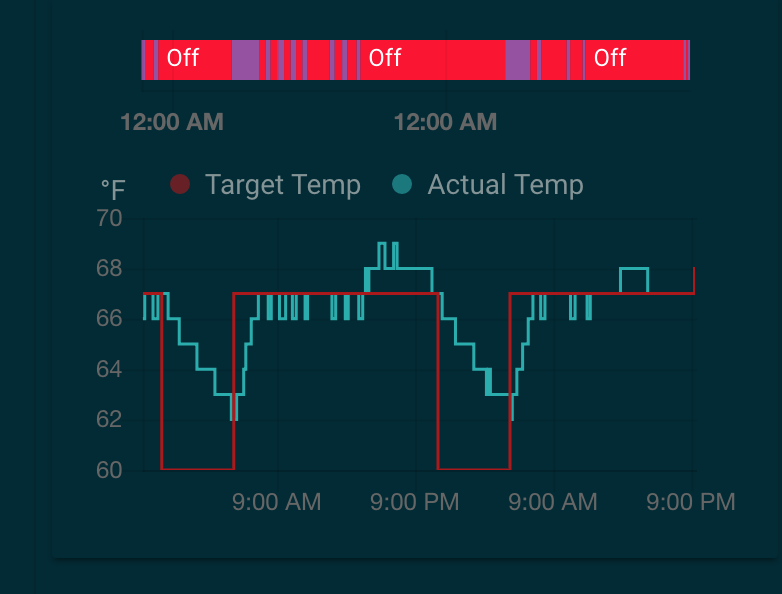
One of my use cases for graphing is to show my hvac state. I'm currently using this to show set temp, actual temp, and when the hvac system is heating or cooling (the bar across the top). It would be super useful to be able to include the binary sensor data in the graph (perhaps as an area fill under the primary graph value, or even just a line of status colors across the bottom)
I've tried turning the heat/cool/off values into 1/0 and putting those as a line across the bottom but the graph smoothing (I think) gets in the way of the line being hidden when the value is 0.
 skarfacegc
All 7 comments
You could always put a history-graph with just the binary sensor just below/above the mini graph card. Possibly wrap them both in a vertical-style-card.
 kalkih
on 24 Feb 2019
kalkih
on 24 Feb 2019
yeah, that's what I have now. Thought it would be cool to have the state history as an overlay on the main graph.
skarfacegc
on 24 Feb 2019
Okay. Most likely not going to add this though, I want to keep this card simple and minimalistic, the history-graph is a better alternative for more advanced or detailed use cases.
kalkih
on 24 Feb 2019
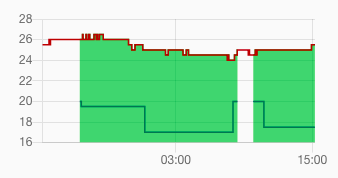
It would be great to have something like this one for binary_sensor. I didn't find yet some way to have a graph like this in home assistant, except for the climate contextual window.
 francesconazzaro
on 6 Jun 2019
francesconazzaro
on 6 Jun 2019
I came here looking for the same thing... a way to overlay the state of a binary_sensor.
Interesting, too, because the README shows the following config:
- type: custom:mini-graph-card
  entities:
    - entity: sensor.verandah
      name: Verandah
    - entity: sensor.lounge
      name: Lounge
    - entity: sensor.kitchen
      name: Kitchen
    - color: gray
      entity: input_number.nighttime
      name: Night
      show_line: false
      show_points: false
      show_legend: false
      y_axis: secondary
    show:
      labels: true
      labels_secondary: true
... where, looking at the graph, input_number.nighttime is either 1 or 0 and the graph displays exactly in the way I'm looking for.
As a work around, a template sensor like this will work just as well. However, you'll have to wait a few days for the data to populate to get anything useful to look at.
sensor:
  - platform: template
    sensors:
      numeric_binary_sensor:
        friendly_name: "Numeric Binary Sensor"
        value_template: "{% if is_state('binary_sensor.original_sensor','on') %}1{% else %}0{% endif %}"
 dlashua
on 11 Aug 2019
dlashua
on 11 Aug 2019
Yeah, that's the way to go, thanks for sharing the template example.
kalkih
on 12 Aug 2019
The history-graph card doesn't have a good way of showing non-numeric sensors. It shows it as a simple horizontal timeline bar. Which IMO is not readable at all - especially for binary sensors. It is almost impossible to notice there event like door-open which is shown there as 1px line.
For me mini-graph-card is an alternative for history-graph - a nicer way of showing the data. I like it's minimalist design and simple UI but it doesn't mean it cannot have rich configuration (in fact it has it already) and support for more entity types. If you use same card for all the graphs it makes your UI more unified.
Adding a new sensor (template) to just be able to show data on the graph is a workaround but it's not a good solution for me. Every new sensor is expensive IMO (it is another thing to track by HA, most people don't use recorde/history settings to limit stored data). Running Hassio on less powerful machines (like RPi < 3) is almost impossible now if you have a lot of sensors.
@kalkih I was looking for the same thing recently and first I have coded it, then I saw this thread... :) My change is almost ready, adds a generic way of displaying non-numeric entities and it doesn't add a lot of logic. Looking forward for your opinion about the code (will send PR today/tomorrow).
 maxwroc
on 15 Oct 2019
maxwroc
on 15 Oct 2019
Related issues
 Joezi79
·
4Comments
Joezi79
·
4Comments
 pejotigrek
·
6Comments
pejotigrek
·
6Comments
 NapalmCandy
·
4Comments
NapalmCandy
·
4Comments
 tomlut
·
4Comments
tomlut
·
4Comments
 simonwood0609
·
7Comments
simonwood0609
·
7Comments
Most helpful comment
It would be great to have something like this one for
binary_sensor. I didn't find yet some way to have a graph like this in home assistant, except for the climate contextual window.