Mini-css-extract-plugin: This plugin doesn't emit css files
Hi,
I'm new to webpack so I maybe missing something.
I setup a new (empty) project using webpack 4.16.5 and mini-css-extract-plugin 0.4.2.
The link to the repository: https://github.com/stavalfi/webpack-demo/blob/master/webpack.config.js
I don't see any css generated after webpack ended.
...
module: {
        rules: [
            {
                test: /\.css$/,
                use: [MiniCssExtractPlugin.loader, "css-loader"],
            },
            ...
        ]
    },
    plugins: [
        new HtmlWebpackPlugin({
            title: "Webpack demo",
        }),
        new MiniCssExtractPlugin({
            filename: "[name].css",
        })
    ],
...
Windows 7
npm 5.5.1
webpack mode: development
 stavalfi
All 4 comments
npm run build
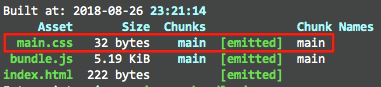
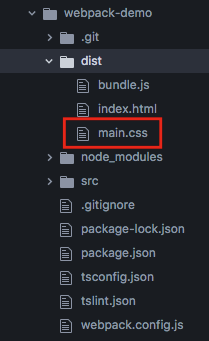
:)
npm start
⚠️
webpack-dev-serveruses a in-memory file system, which is normally faster during development and doesn't emit files to disk by default
Suggestions
package.json
{
  "name": "webpack-demo",
  "version": "1.0.0",
  "description": "",
  "private": true,
  "main": "index.js",
  "scripts": {
-   "start": "nodemon --watch webpack.config.js --exec \"webpack-dev-server --mode development\"",
+   "start": "cross-env NODE_ENV=development webpack-dev-server",
-   "build": "webpack --watch --mode development",
+   "build": "cross-env NODE_ENV=production webpack --watch",
    "test": "echo \"Error: no test specified\" && exit 1"
  },
  "keywords": [],
  "author": "",
  "license": "ISC",
  "devDependencies": {
+   "cross-env: "^5.2.0", // for windows
    "css-loader": "^1.0.0",
    "html-webpack-plugin": "^3.2.0",
    "less": "^3.8.1",
    "mini-css-extract-plugin": "^0.4.2",
-   "nodemon": "^1.18.3",
-   "npm-install-webpack-plugin": "^4.0.5",
-   "serve": "^9.6.0",
    "style-loader": "^0.22.1",
    "ts-loader": "^4.5.0",
-   "tslint": "^5.11.0",
    "tslint-eslint-rules": "^5.4.0",
-   "tslint-loader": "^3.6.0",
    "typescript": "^3.0.1",
    "webpack": "^4.16.5",
    "webpack-cli": "^3.1.0",
    "webpack-dev-server": "^3.1.5",
-   "webpack-merge": "^4.1.4"
  },
  "dependencies": {}
}
webpack.config.js
+ const isDEV = process.env.NODE_ENV === 'development'

const HtmlWebpackPlugin = require("html-webpack-plugin");
const MiniCssExtractPlugin = require("mini-css-extract-plugin");

module.exports = {
-   mode: "development",
+   mode: isDEV ? "development" : "production",
    entry: "./src/index.js",
    output: {
        filename: "bundle.js"
    },
    resolve: {
        // Add `.ts` and `.tsx` as a resolvable extension.
        extensions: [".ts", ".tsx", ".js"]
    },
    module: {
        rules: [
            {
                test: /\.css$/,
                use: [
-                 MiniCssExtractPlugin.loader,
+                 // ! for HMR (Hot Module Replacement) during development via `<style></style>`
+                 isDEV ? 'style-loader' : MiniCssExtractPlugin.loader,
                  "css-loader"
                ],
            },
            {
                test: /\.tsx?$/,
                loader: "ts-loader",
                exclude: [
                    "node_modules",
                    "webpack.config.js",
                    "dist"
                ]
            },
-            {
-                test: /\.ts$/,
-                enforce: 'pre',
-                use: [
-                    {
-                        loader: 'tslint-loader',
-                        options: {
-                            // tslint errors are displayed by default as warnings
-                            // set emitErrors to true to display them as errors
-                            emitErrors: true,
-                            // tslint does not interrupt the compilation by default
-                            // if you want any file with tslint errors to fail
-                            // set failOnHint to true
-                            failOnHint: true,
-                            // enables type checked rules like 'for-in-array'
-                            // uses tsconfig.json from current working directory
-                            typeCheck: true,
-                            // automatically fix linting errors
-                            fix: true,
-                        }
-                    }
-                ],
-                exclude: [
-                    "node_modules",
-                    "webpack.config.js",
-                    "dist"
-                ]
-            }
        ]
    },
    plugins: [
        // generate a html file after every time webpack end
        new HtmlWebpackPlugin({
            title: "Webpack demo",
        }),
        // put all the css files in one css file and not in the js files because js files can take time until they load so mean while the css are not loaded.
        // in this way, the browser can manage the process by him self because css and js are in different files.
        new MiniCssExtractPlugin({
            // [name] will be the name of the entry file which defined in the webpack.config.js
            filename: "[name].css",
        })
    ],
    devServer: {
        overlay: true, // capturing compilation related warnings and errors and show them instead of showing my actual website.
        stats: "errors-only",
        host: process.env.HOST,
        port: process.env.PORT,
        open: true, // Open the page in browser
    },
};
Lint files via an npm script or ideally with an editor plugin (separate process (faster, more reliable) and normally with better integration) instead and use webpack for building only :)
 michael-ciniawsky
on 26 Aug 2018
michael-ciniawsky
on 26 Aug 2018
I couldn't ask for a better answer! Thank you!
stavalfi
on 27 Aug 2018
I have the same issue on my own project. So, I have cloned this repo, built it and ran yarn build. I don't see any CSS files in the dist folder:
$ ls -ln dist
total 1761
-rw-r--r-- 1 4096 4096    7591 jan 26 08:39 0.7a1f928edc9663b92553.bundle.js
-rw-r--r-- 1 4096 4096   31075 jan 26 08:39 0.7a1f928edc9663b92553.bundle.js.map
-rw-r--r-- 1 4096 4096    1519 jan 26 08:39 0846ee599aaf088d1215.bundle.js
-rw-r--r-- 1 4096 4096    8000 jan 26 08:39 0846ee599aaf088d1215.bundle.js.map
-rw-r--r-- 1 4096 4096  379784 jan 26 08:39 2.eef7c6fd0a4f39539a00.bundle.js
-rw-r--r-- 1 4096 4096 1368064 jan 26 08:39 2.eef7c6fd0a4f39539a00.bundle.js.map
-rw-r--r-- 1 4096 4096     447 jan 26 08:39 index.html
It is exactly the same picture as I have in my own project. The only way I succeed to get CSS created is if I add my .scss file as a entry point:
  entry: {
    bundle: './src/main.jsx',
    style: './src/style.scss',
  },
In which case, I also get generated a second .js file:
$ ls -ln dist
total 4909
-rw-r--r-- 1 4096 4096 4967666 jan 26 12:36 bundle.0.js
-rw-r--r-- 1 4096 4096     941 jan 26 12:36 bundle.1.js
-rw-r--r-- 1 4096 4096   32038 jan 26 12:36 favicon.ico
-rw-r--r-- 1 4096 4096     496 jan 26 12:36 index.html
-rw-r--r-- 1 4096 4096   19725 jan 26 12:36 style.css
There is still something missing somewhere.
 madrus
on 26 Jan 2019
madrus
on 26 Jan 2019
Also getting a styles.bundle.min.js file... Anooying !
 adadgio
on 12 Mar 2019
adadgio
on 12 Mar 2019
Related issues
 dmitrybelyakov
·
3Comments
dmitrybelyakov
·
3Comments
 YanYuanFE
·
3Comments
YanYuanFE
·
3Comments
 thescientist13
·
3Comments
thescientist13
·
3Comments
 ripperdoc
·
3Comments
ripperdoc
·
3Comments
 skrobek
·
4Comments
skrobek
·
4Comments
Most helpful comment
:)
Suggestionspackage.jsonwebpack.config.jsLint files via an
npmscript or ideally with an editor plugin (separate process (faster, more reliable) and normally with better integration) instead and use webpack for building only :)