mini-css-extract-plugin with SSR.
How can we use mini-css-extract-plugin with SSR and server bundle.I tried using it is gives error
document is not defined
 princesoni1989
All 58 comments
@princesoni1989 looks like a bug/feature. Can you create minimum reproducible example?
 alexander-akait
on 5 Apr 2018
alexander-akait
on 5 Apr 2018
I'd recommend reading https://github.com/webpack-contrib/mini-css-extract-plugin/issues/48#issuecomment-375288454
 bwhitty
on 5 Apr 2018
bwhitty
on 5 Apr 2018
@bwhitty I tried same, Error was removed but with was producing warning related to content mismatch between server and client.
princesoni1989
on 5 Apr 2018
Don't use this plugin in a server bundle. Use null-loader or css-loader/locals (for CSS modules) instead.
 sokra
on 12 Apr 2018
sokra
on 12 Apr 2018
@sokra just to clarify your suggestion, how would a user import the generated asset name into a bundle to generate a
https://github.com/webpack-contrib/mini-css-extract-plugin#using-preloaded-or-inlined-css
The 'runtime code' aspect of this module really confuses me. I don't understand why there needs to be runtime code for CSS extraction, so I must be trying to use this module in the wrong situation. It seems highly geared towards JS-heavy single-page apps that load more JS and CSS asynchronously.
My goal is to server-render a react/redux app with link tags to the built CSS. My server code needs to know the paths of the built CSS files that include content hashes for caching.
Am I on the right track by using this module? The docs for the extract-text-webpack-plugin try to discourage users from using it with webpack 4, but this module doesn't seem to suit some of the past use cases.
 johnelliott
on 11 May 2018
johnelliott
on 11 May 2018
My experiments with SSR have shown that you can skip the "requireEnsure" hook on the server side. And I came to this solution: override method "getCssChunkObject" in MiniCssExtractPlugin class.
class ServerMiniCssExtractPlugin extends MiniCssExtractPlugin {
  getCssChunkObject(mainChunk) {
    return {};
  }
}
And then in server webpack config used class ServerMiniCssExtractPlugin.
My rule for CSS in config for server:
      {
        test: /\.css$/,
        use: [
          {
            loader: ServerMiniCssExtractPlugin.loader
          },
          {
            loader: 'css-loader',
            options: {
              importLoaders: 1,
              modules: true,
              localIdentName: '[name]__[local]--[hash:base64:5]',
              sourceMap: true
            }
          },
          {
            loader: 'postcss-loader',
            options: {
              plugins: () => [
                require('postcss-flexbugs-fixes'),
                require('autoprefixer')({
                  flexbox: 'no-2009',
                  grid: true
                })
              ]
            }
          }
        ]
      }
It's work for me.
 DimychOcean
on 30 May 2018
DimychOcean
on 30 May 2018
I just skipped this module entirely and I’m now using the css-loader and extract-loader.
johnelliott
on 30 May 2018
I also encountered this problem and thought it was a bug. Would you solve it? Or can I only solve it myself?
 yisar
on 28 Jul 2018
yisar
on 28 Jul 2018
To me works with the @sokra solution.
appConfig.module.rules.push({
        test: /\.(sa|sc|c)ss$/,
        use: "css-loader/locals"
});
 alejodaraio
on 6 Aug 2018
alejodaraio
on 6 Aug 2018
reply
winter regard.
------------------ 原始邮件 ------------------
发件人: "Alejo Daraio"notifications@github.com;
发送时间: 2018年8月6日(星期一) 中午11:55
收件人: "webpack-contrib/mini-css-extract-plugin"mini-css-extract-plugin@noreply.github.com;
抄送: "Subscribed"subscribed@noreply.github.com;
主题: Re: [webpack-contrib/mini-css-extract-plugin] mini-css-extract-pluginwith SSR. (#90)
To me works with the @sokra solution.
appConfig.module.rules.push({ test: /.(sa|sc|c)ss$/, use: "css-loader/locals" });
—
You are receiving this because you are subscribed to this thread.
Reply to this email directly, view it on GitHub, or mute the thread.
 winterJIE
on 6 Aug 2018
winterJIE
on 6 Aug 2018
 michael-ciniawsky
on 24 Aug 2018
michael-ciniawsky
on 24 Aug 2018
@michael-ciniawsky since you closed the issue and reading the comment you pointed, does that mean there'll be no SSR support in this plugin?
 ozguruysal
on 29 Aug 2018
ozguruysal
on 29 Aug 2018
请问你解决了吗?
 BODhaha
on 11 Oct 2018
BODhaha
on 11 Oct 2018
@michael-ciniawsky Regarding you affirming there will be no SSR for this plugin (you thumbed up @ozguruysal ), don't you guys think this is a bit harsh for people using ssr ? Do you have an alternative we can use ? I read the comments and suggestions and Im not able to get the requirements fulfilled (to extract the css from our vue components in prod. and generate appropriate CSS).
 Avcajaraville
on 25 Oct 2018
Avcajaraville
on 25 Oct 2018
@Avcajaraville Can you create new issue with test repo and describe what you have right now and what you expected and why?
alexander-akait
on 25 Oct 2018
@evilebottnawi Alright, I created a test repo for the issue, with comments on the README.md
Here is the repo: https://github.com/Avcajaraville/debugging-mini-css-extract-plugin
Please, read the readme and let me know if something is not clear.
Thanks a lot for taking time to look into this :)
I cant wait to have this working on my project ;)
Avcajaraville
on 26 Oct 2018
@evilebottnawi Did you look at my repo ? Im spending almost every day revisiting the issue and trying to come up with a solution.... no luck 😂
Avcajaraville
on 31 Oct 2018
Im spending almost every day revisiting this issue and trying to come up with a solution……no luck,too……
yisar
on 31 Oct 2018
@132yse Yeah, pretty sad to be blocked 😂
Im considering now to move into Nuxt.js, but I love to control my code and trying to avoid that. The only missing feature I have is to extract my css into single file and per routes.
Once I have that solved, I can work with a stack of ssr/vue
This evening I will be reviewing Nuxt and how (if) they solve this issue.
Hopefully, one day we get a solution for this :)
Avcajaraville
on 31 Oct 2018
@Avcajaraville there's a solution to this issue (at least for Vue JS) in my vue-ssr boilerplate. Please review this webpack config. Basically you extract css only from App.vue or any other file(s) you specify. You don't need to extract CSS from all components/views because Vue SSR will do the critical CSS injection automatically. See here. So what you need (splitting css by route) is achieved.
ozguruysal
on 31 Oct 2018
@Avcajaraville Only createRender will report an error. If you really want to use Vue ssr, try createBundleRender, and you won't report an error. The fundamental reason is that createRender will have a code :document.createElement('link),this code will create a style link.
yisar
on 31 Oct 2018
@evilebottnawi If Vue SSR uses createRender, it produces a JS file that operates on DOM. If mini-css-extra-plugin can't solve this problem, you can give a note to Vue SSR that says createBundleRender won't report errors because it produces a JSON file that doesn't contain DOM operations
yisar
on 31 Oct 2018
@ozguruysal The solution you are posting its not usable for our cases.
Please, find an example of your implementation here. You can npm install and run (instruction on readme file).
The main issue is that, as seen on the previously linked example, that I have a route (About) and there I declare styles for body, then I navigate to another (Home), where I also have styles for the body, and then back to About, the styles don't match again.
@132yse I'm not sure I understand how can I can give a note to Vue SSR that says createBundleRender won't report errors because it produces a JSON file that doesn't contain DOM operations. In any case, Im not using createRender but createBundleRender and still hitting the same issue. Please, check my repo as well to see what I did.
I tried all of these solutions and still no luck ... :(
Avcajaraville
on 31 Oct 2018
@Avcajaraville I checked your repo and my suggestion does solve your problem about mini-css-extract plugin. But I see that you have another issue with changing body styles from different components which is not about this plugin.
There are probably various ways to solve that issue. One is simply changing body class.
ozguruysal
on 4 Nov 2018
@ozguruysal Well, it just extract all the css from a source file (App.vue, for instance) and then inline the rest of the CSS for modules.
My issue with the body its just an example or use case where this approach might fail, due to the cascade in CSS.
I want to have all the css via file, not inlined on the page. Thats what Im trying to solve with no luck...
Avcajaraville
on 6 Nov 2018
@Avcajaraville I've recently had this pain of getting css/scss working with SSR and I've got webpack doing it for me:
I use the below test in module.rules[] for both server and client side:
{
        test: /\.(sa|sc|c)ss$/,
        use: [
          MiniCssExtractPlugin.loader,
          {
            loader: 'css-loader',
            options: {
              localIdentName: '[name]__[local]--[hash:base64:5]',
              minimize: {
                safe: true,
              },
              sourceMap: true,
            },
          },
          {
            loader: 'sass-loader',
            options: {
              sourceMap: true,
            },
          },
        ],
      },
and then use MiniCssExtractPlugin (obviously) as the plugin to pull it all into one file.
The one thing I kept tripping over was not including ignore-styles in dependencies and then using it in my server like so:
import register from 'ignore-styles';
register(['.css', '.scss']);
Then in my SSR I can use import './style.scss';
No idea if this is remotely useful for you or not but thought I'd at least try!
The reason I ended up here is because I need to figure out how to do make sure the css classes I've got in each component/module don't clash (so hashing, I think) and I add caching. If by any chance, you know then let me know!
 markkelsall
on 6 Nov 2018
markkelsall
on 6 Nov 2018
@markkelsall None of the proposed solutions work for my case. Still stuck with no success :(
Avcajaraville
on 13 Nov 2018
I'm in the same boat, unable to get this working with Vue/SSR. I switched back to [email protected] for now.
 arenddeboer
on 13 Nov 2018
arenddeboer
on 13 Nov 2018
@arenddeboer We are a lot of people having same issue, this repo contains already a few related issues and comments. Hope we can get some support eventually. Its really frustrating :|
Avcajaraville
on 13 Nov 2018
So, following @sokra suggestion, I changed the config for the server, not using the plugin but null-loader when creating the bundle.
Now my css is properly extracted (yihaaa!), but now all of the css gets in page load, which is not correct.
As an example, on landing page (home) I have also the styles for another route (about).
The JS code splitting works fine, but not the CSS.
Any idea of how to accomplish this ?
As reference, I update the repo with the changes I did.
To sum up;
this is a screenshot of the assets loaded on the landing page:
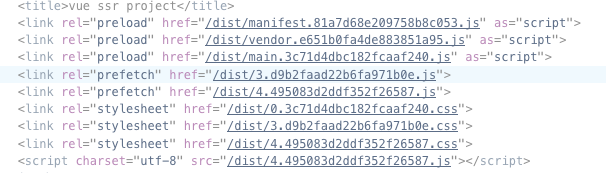
/dist/4.495083d2ddf352f26587.css should not be loaded on page load, but when navigating to /about (when actually needed, otherwise, there is no purpose on this code splitting).
I guess this is probably not a plugin issue but a webpack... Im so lost with this, maybe you guys can help and we can solve the issue together ... :)
Avcajaraville
on 14 Nov 2018
Hey guys, thanks for your work and the answers you've already provided. Unfortunately, I'm having the same issue on my project. Any idea why the styles are fetched on the page load and not on demand like the JS? Thanks in advance!
 Laegel
on 15 Nov 2018
Laegel
on 15 Nov 2018
@Avcajaraville I have same problem with u, get all routes css in one page, did u resolve it?
 neverthanmore
on 15 Nov 2018
neverthanmore
on 15 Nov 2018
@neverthanmore Nope, this whole webpack and ssr is driving me crazy ! I cant find anything nor Im getting any feedback ...
If you find something, please let me know :) good luck !!
Avcajaraville
on 15 Nov 2018
@Avcajaraville please create new issue with minimum reproducible test repo
alexander-akait
on 15 Nov 2018
@Avcajaraville I find if we push .css to async file can resolve this problem , so we can rewrite vue-server-render/client-plugin
neverthanmore
on 16 Nov 2018
@evilebottnawi I just did that, please find the issue here; please let me know if you need clarifications.
@neverthanmore can you please elaborate a bit more ? Im not quite understanding and Im very interested in solving the issue :)
Avcajaraville
on 16 Nov 2018
@Avcajaraville when we pack client bundle, we can see css bundle in
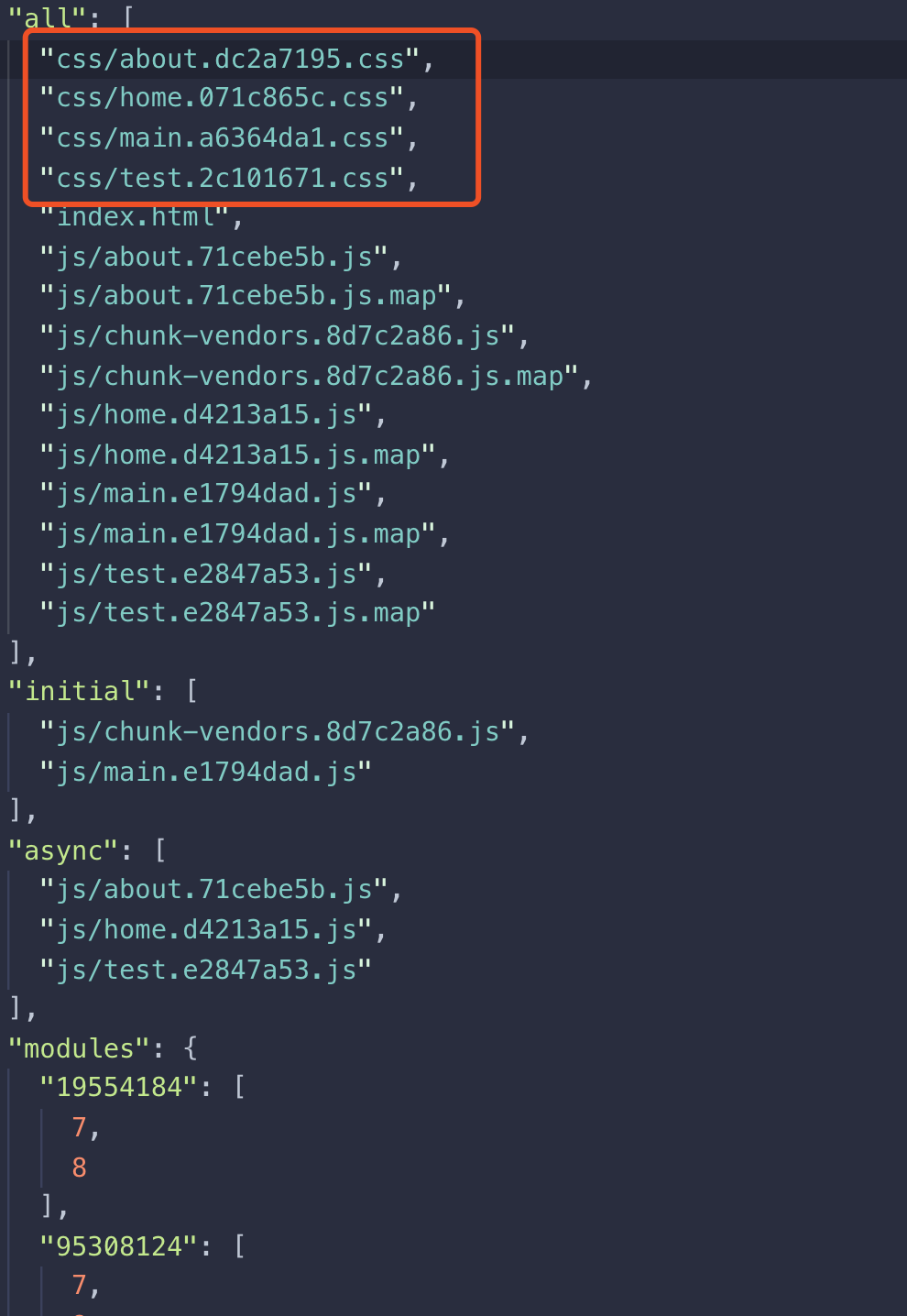
so we should move them to async , just like this
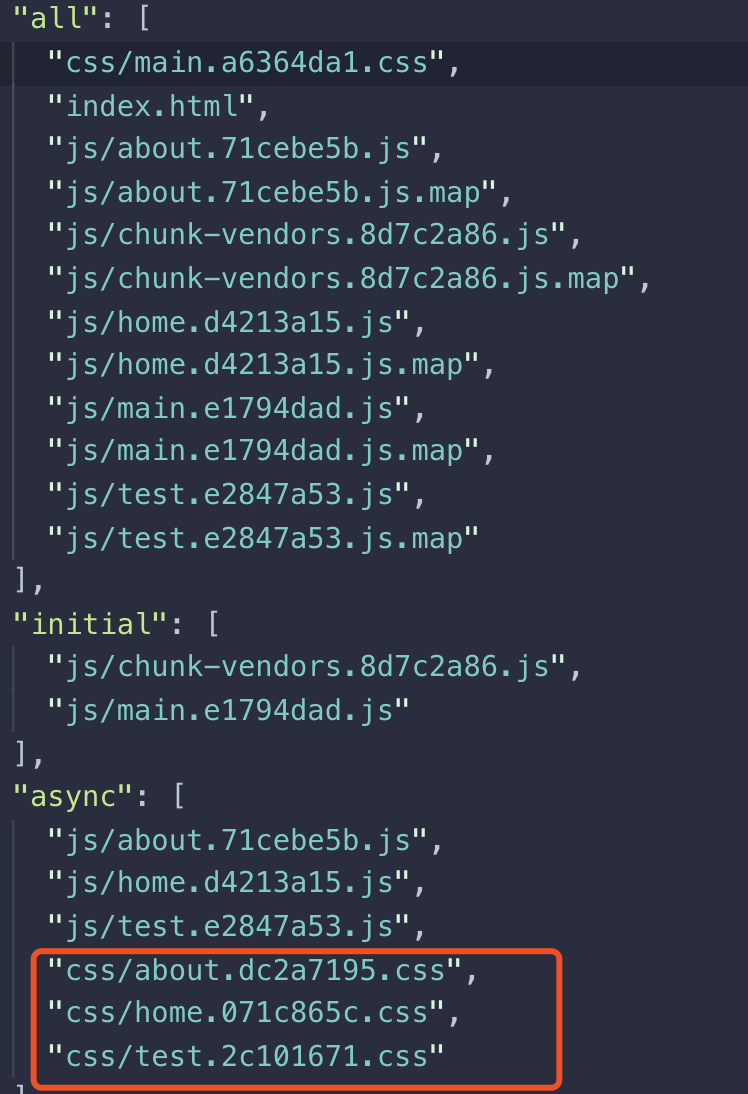
these pack logic is in node_modules/vue-server-renderer/client-plugin.js
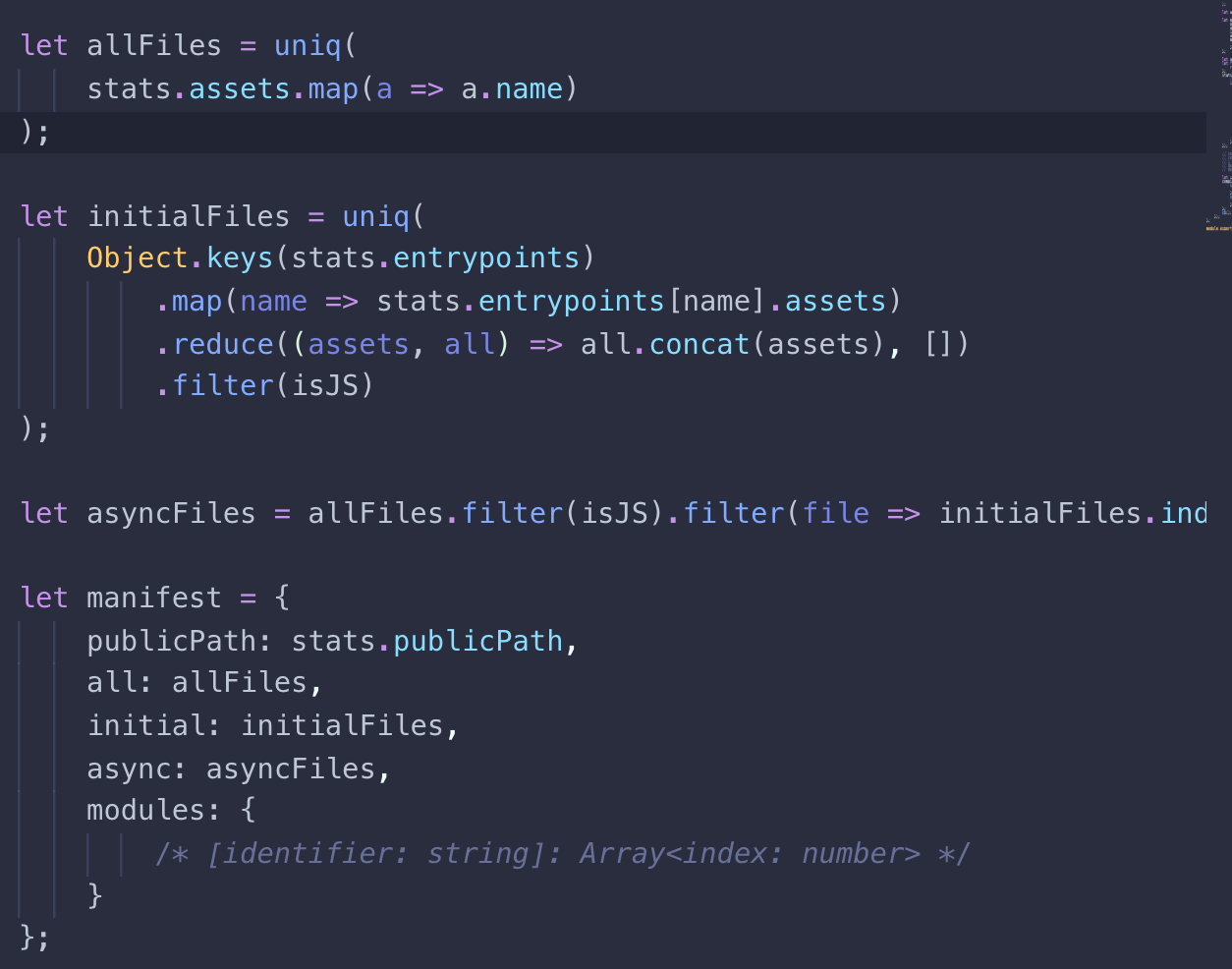
rewrite it
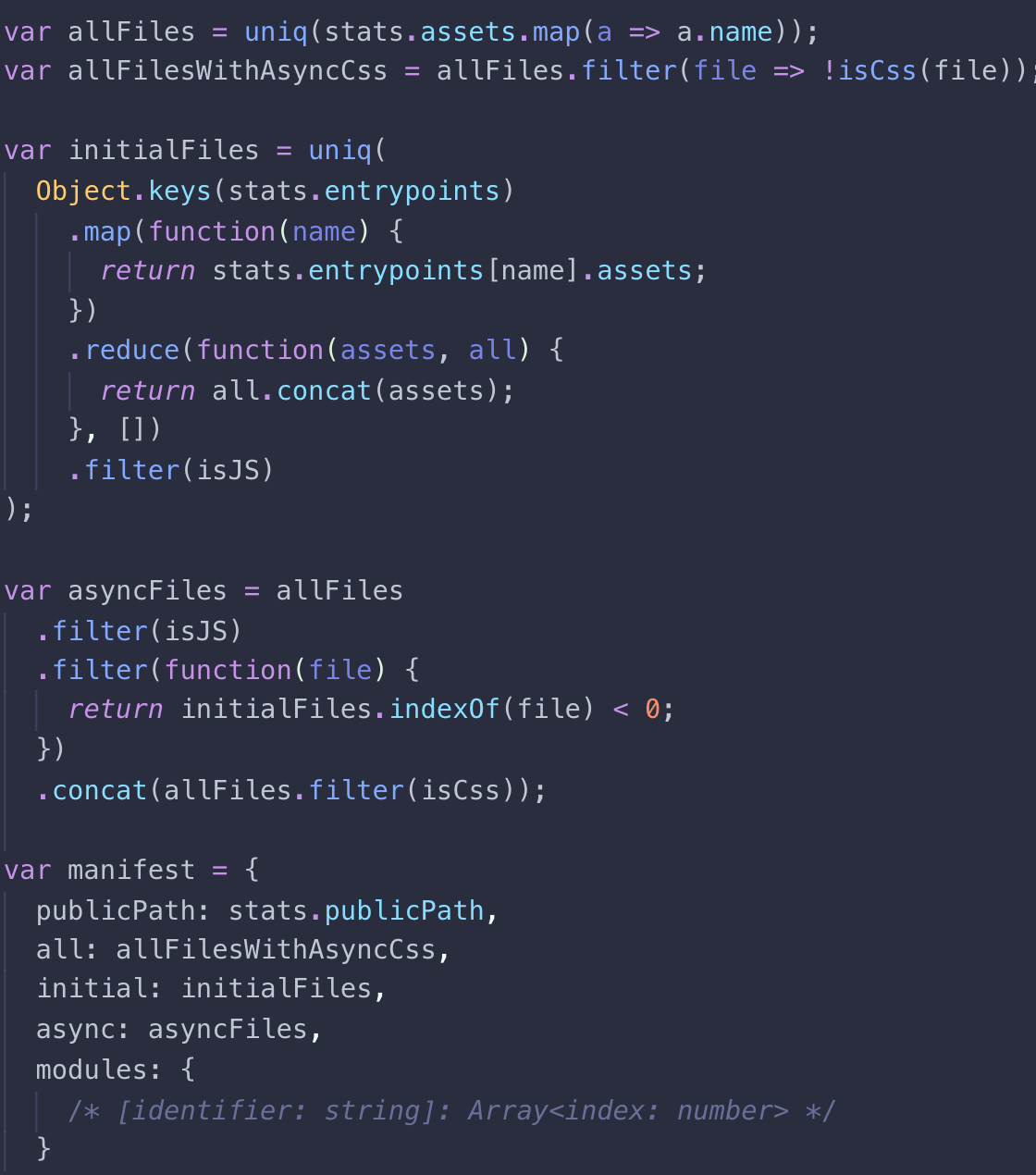
it works for me! Good luck to u
neverthanmore
on 16 Nov 2018
@neverthanmore Thanks for your suggestion. Unfortunately, this doesn't work for me, and even if it does, it will imply to rewrite a dependency source code, which is not an option for us.
@evilebottnawi Did you manage to have a look to the issue I opened ?
Avcajaraville
on 19 Nov 2018
@neverthanmore maybe it will be useful to be released
 chentianyuan
on 26 Nov 2018
chentianyuan
on 26 Nov 2018
@chentianyuan maybe
neverthanmore
on 29 Nov 2018
For anyone who may run into this issue in the future, updating to the latest version of vue and vue-server-renderer (2.5.21 at this time) along with following @sokra's advice to use _null-loader_ for the server config worked for me.
Updating vue (and vue-server-renderer) also fixed the css issue that @Avcajaraville was running into.
 pulekies
on 19 Dec 2018
pulekies
on 19 Dec 2018
@neverthanmore i rm the css in masfest.json from initial to async with a custom webpack plugin, it effective for me too,i think it just like your method did but we need not to modify the vue source code.
chentianyuan
on 31 Dec 2018
@chentianyuan it seems new pr didn't resolve this problem completely ! so sad
neverthanmore
on 8 Jan 2019
@chentianyuan it seems new pr didn't resolve this problem completely ! so sad
yisar
on 8 Jan 2019
Did anyone find a solution?
I'm facing something similar. I am using vue-cli 3 to build a npm package.
If a build without css everything works fine, but if I add css into js the SSR gets trouble with document is not defined.
Any idea?
 tiagomatosweb
on 1 Feb 2019
tiagomatosweb
on 1 Feb 2019
i have same problem, using NextJS in Lerna, its say "window is not defined", no one solved this yet?
 GianfrancoCorrea
on 14 Mar 2019
GianfrancoCorrea
on 14 Mar 2019
If people still have this issues, consider using this plugin instead: https://github.com/faceyspacey/extract-css-chunks-webpack-plugin ... It just works!
 sebkolind
on 31 Mar 2019
sebkolind
on 31 Mar 2019
If people still have this issues, consider using this plugin instead: https://github.com/faceyspacey/extract-css-chunks-webpack-plugin ... It just works!
it works for me. thankyou
 cuiyongjian
on 6 Jun 2019
cuiyongjian
on 6 Jun 2019
Somebody can create minimum reproducible test repo?
alexander-akait
on 6 Jun 2019
I fixed the issue by enforcing a limit of 1 single chunk:
new webpack.optimize.LimitChunkCountPlugin({
   maxChunks: 1
})
 milewski
on 23 Jun 2019
milewski
on 23 Jun 2019
Het @evilebottnawi , I did create a repo back in https://github.com/webpack-contrib/mini-css-extract-plugin/issues/90#issuecomment-433336560
Thanks !
Avcajaraville
on 24 Jun 2019
mini-css does not impact SSR, you shouldn't be using mini-css as part of an SSR build.
https://github.com/faceyspacey/universal-demo (look at the webpack build)
What's needed is chunk flushing: https://github.com/faceyspacey/webpack-flush-chunks
The concept is that you utilize the client build to locate assets that need to be served during the first render.
The mechanism I have designed is implemented in various chunking projects. Though i have not looked outside react at solving the problem.
https://www.smooth-code.com/open-source/loadable-components/docs/server-side-rendering/
some derivative of webpack-flush-chunks could perform the task
 ScriptedAlchemy
on 26 Jun 2019
ScriptedAlchemy
on 26 Jun 2019
null-loader works for me too.... it prefetches all CSS, but only adds tags for styles used on the page... which is as good as a win for me at this stage.
In server config:
    module: {
        rules: [{
            test: /\.(sa|sc|c)ss$/,
            use: [
                'null-loader',
            ]
        }]
    },
 nwallis
on 27 Aug 2019
nwallis
on 27 Aug 2019
use extract-css-chunks-webpack-plugin instead mini-css-extract-plugin
webpack.base.config.js
const ExtractCssChunksPlugin = require('extract-css-chunks-webpack-plugin')
{
  ...
  {
        test: /\.css$/,
        use: [
          {
            loader: ExtractCssChunksPlugin.loader,
            options: {
              hot: !isProd,
              reloadAll: !isProd
            }
          },
          'postcss-loader',
          'css-loader'
        ]
      },
      {
        test: /\.less$/,
        use: [
          {
            loader: ExtractCssChunksPlugin.loader,
            options: {
              hot: !isProd,
              reloadAll: !isProd
            }
          },
          'css-loader',
          'postcss-loader',
          'less-loader'
        ]
      }
  ...
  plugins: [
   ...
    new ExtractCssChunksPlugin({
      filename: isProd ? 'css/[name].[contenthash:8].css' : '[name].css',
      chunkFilename: isProd ? 'css/[name].[contenthash:8].chunk.css' : '[name].chunk.css'
    })
  ]
}
webpack.server.config.js
{
  ...
  plugins: [
    new webpack.optimize.LimitChunkCountPlugin({
      maxChunks: 1
    })
  ]
}
 Murphycx94
on 25 Nov 2019
Murphycx94
on 25 Nov 2019
So what's the deal with extract-css-chunks-webpack-plugin, how is it different? It tries to 'sell' HMR (even though mini-css-extract-plugin also says HMR is working?), other than that I don't see any difference?
 IlyaSemenov
on 14 Dec 2019
IlyaSemenov
on 14 Dec 2019
I merged with mini css and assist in maintaining both. Extract is under my total control and I can make more flexible alterations for users. The projects are generally kept in sync
ScriptedAlchemy
on 14 Dec 2019
Don't use this plugin in a server bundle. Use null-loader or css-loader/locals (for CSS modules) instead.
If we require regular CSS (not modules) on the server, now that null-loader is deprecated, what should be used instead?
Setting resolve.alias.package to false will tell webpack@5 to ignore a module.
That does not really seem to be applicable to this usecase.
Creating my own null-loader definitively works, just wondering if it's what I should do 😅
 slorber
on 1 Apr 2021
slorber
on 1 Apr 2021
We have emit: true | false option
alexander-akait
on 1 Apr 2021
Related issues
 mobilesite
·
4Comments
mobilesite
·
4Comments
 dmitrybelyakov
·
3Comments
dmitrybelyakov
·
3Comments
 IdeaHunter
·
3Comments
IdeaHunter
·
3Comments
 fvigotti
·
4Comments
fvigotti
·
4Comments
 ripperdoc
·
3Comments
ripperdoc
·
3Comments
Most helpful comment
My experiments with SSR have shown that you can skip the "requireEnsure" hook on the server side. And I came to this solution: override method "getCssChunkObject" in MiniCssExtractPlugin class.
And then in server webpack config used class ServerMiniCssExtractPlugin.
My rule for CSS in config for server:
It's work for me.