- Min Version: 1.15.0
- Operating system:
Arch Linux
Expected Behavior
- pressing CTRL + - twice should zoom out twice
- single wheel scroll should zoom
Actual Behavior
- pressing CTRL + - zooms out twice but sometimes it also scrolls the PDF
- single mouse wheel scroll doesnot do anything when holding CTRL
To Reproduce
- scroll to the middle of the PDF then play with zooming, by about 3rd zooming in, the page will scroll up
- slowly scroll the wheel one by one while holding CTRL
 shalva97
All 13 comments
This is probably the same root cause as #1207, so I would expect it to be fixed in the next release.
 PalmerAL
on 22 Aug 2020
PalmerAL
on 22 Aug 2020
@shalva97 Does this work for you now in the latest release?
PalmerAL
on 31 Aug 2020
nope... no difference.
sometimes,when zooming in, webpage stays blury. or if it can focus webpage scrolls. but i cannot find and exact steps to reproduce. This is quite random... but almost 75% of the time if i scroll to middle of PDF, wait for pages to load, zoom in, zoom out and it will scroll one page up
shalva97
on 2 Sep 2020
Thanks. I think I have a fix for the scrolling while zooming issue here: 5b5e1fc2de555fecb6d01dd81a9b0f59b2f181e2, but since it only happens inermittently like you mentioned, it's difficult to tell for sure. If you're willing to, it would be great if you could try running Min using the instructions in the readme and seeing if that fixes it for you.
Scrolling while pressing ctrl works for me on a trackpad; I'll try it out on a mouse later.
PalmerAL
on 2 Sep 2020
wow that is some magical one line fix for random scrolling ;D
okay, mouse scrolling issue left only... and i guess it was bad idea writing 2 issues into one issue....
shalva97
on 3 Sep 2020
Yeah, the scroll issue is kind of interesting; that line disables scroll anchoring, which is a Chromium feature that tries to scroll the page so that the content you're looking at stays in the same place as the page changes. I suspect there's a Chromium bug that makes it not work correctly with the PDF viewer, but it isn't necessary there anyway, so it's fine to just disable it.
I can't reproduce the zoom issue with a mouse, but I think it may have to do with how sensitive your scroll wheel is (mine is fairly sensitive). Can you try this:
Right click on the PDF viewer > inspect element > console > paste this code and press enter:
document.addEventListener('wheel', e => console.log(e.deltaX, e.deltaY, e.metaKey, e.ctrlKey, e.deltaMode))
and post the resulting output here?
Also, does the issue happen on normal webpages as well, or just the PDF viewer?
PalmerAL
on 4 Sep 2020
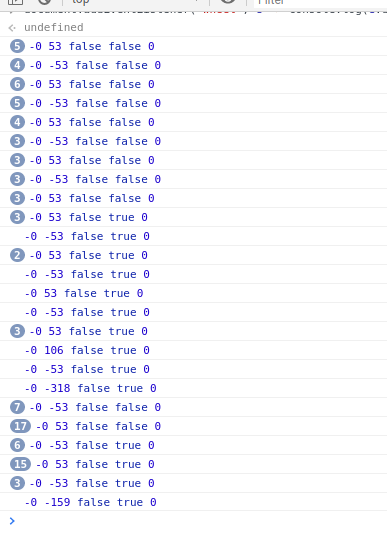
oh, it actually happens everywhere... here is my logs and it only zooms in if the output is greater than 53.
In firefox it is always -3 and never goes above that
shalva97
on 5 Sep 2020
Thanks! This should be fixed by 61429877560451ff7bd0c9928c918685ec70bdcd; if you could test it that would be great.
PalmerAL
on 12 Sep 2020
After some testing on my end, I found out that a mouse doesn't create the scroll while zooming issue, not on the newest release or on the newest master.
However, this problem does occur on both newest release and master while using a track pad.
Using the wheel event listener that @PalmerAL provided, using a mouse produced similar results to @shalva97's (no numbers were between -53 and 53):
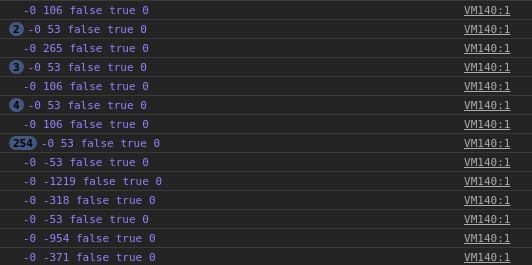
but using the track pad produced different results, the numbers were primarily from around 1 to 15:
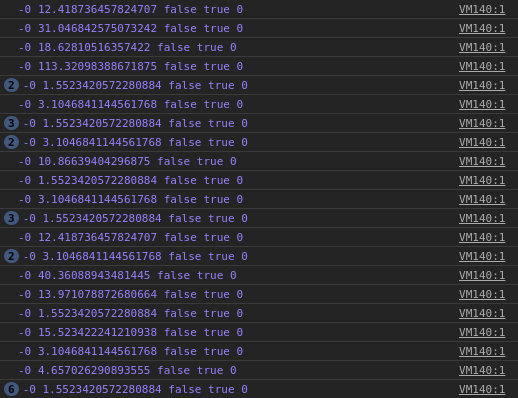
Also, the track pad issue is present everywhere, not only on pdf files.
I'm not very knowledgeable of the app and chromium, but isn't there a way to allow page scrolling only when the Ctrl key isn't pressed? I feel like that would fix the issue.
 Syndamia
on 12 Sep 2020
Syndamia
on 12 Sep 2020
@Syndamia I think that might be a different issue? IIUC, the two issues here were:
- The PDF document would sometimes jump by several pages suddenly when zooming. This is a PDF-viewer specific issue that should be fixed.
- If you scrolled too slowly with ctrl, the page would not zoom in (but it should now).
PalmerAL
on 15 Sep 2020
@PalmerAL both issues are resolved. Perfect. I would say you got a double kill!
should we close this now?
shalva97
on 15 Sep 2020
I think so. @Syndamia, could you open a new issue for this trackpad problem?
 kodumbeats
on 15 Sep 2020
kodumbeats
on 15 Sep 2020
I think that might be a different issue?
Yes, I misunderstood this issue a bit.
could you open a new issue for this trackpad problem?
Yep, it's #1244.
Syndamia
on 15 Sep 2020
Related issues
shalva97
·
6Comments
 PEPERSO
·
4Comments
PEPERSO
·
4Comments
 BillDietrich
·
5Comments
BillDietrich
·
5Comments
 abejfehr
·
6Comments
abejfehr
·
6Comments
 BenStigsen
·
6Comments
BenStigsen
·
6Comments
Most helpful comment
Yes, I misunderstood this issue a bit.
Yep, it's #1244.