Good day, I found one flaw in the download, the download is not pictured there.
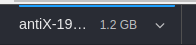
And the question is: How can I see the downloaded volume?
 userkilled
All 19 comments
Just to clarify, you want to see the the exact amount of the file that's been downloaded so far?
 PalmerAL
on 6 Mar 2020
PalmerAL
on 6 Mar 2020
Yes, it is desirable
userkilled
on 6 Mar 2020
I agree. Downloads are bad at showing that something is happening.
This is what happend to me, i downloaded some Windows executable file, tried to open it with Wine but no luck, okay... then i added it to Steam to see if Proton would open it, still no luck. It was a bad feeling like, really bad, because i dont like Windows. But i needed that weird program, so just when i was going to search how to install virtual box i noticed a blue line above the download which was growing.... and... comeon... the file was still downloading and i though Wine and Proton failed me... it was depressing...
why would you make it so hard to see it? it is almost invisible in dark mode. Please add some numbers, some more feedback so i know it is not an insta download, but a download that is in progress....
i would recommend adding a percentage or currently downloaded bytes next to the size
 shalva97
on 11 Aug 2020
shalva97
on 11 Aug 2020
I am also not sure what will happen when i close downloads bar. searched the 3 dot menu but there are no Downloads entry, so now i can only wonder what happens if i press X icon
shalva97
on 11 Aug 2020
I tend to agree, so I've increased the visibility of the progress bar in 14eb2f274918a7b151e54b3e7002577e993cf412. Before/after:
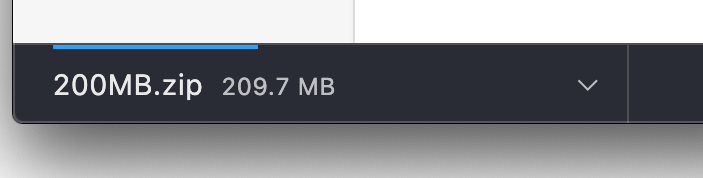
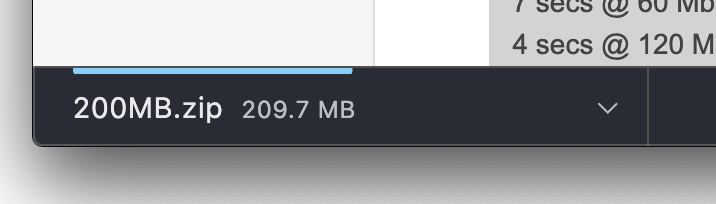
We could add a number indicating the current progress that updates, but I think it might be too annoying - for a medium-sized download, having obvious progress indicators is good, but for very large downloads, I sometimes want to just let it keep downloading in the background while I do something else, and in that case, progress indicators that draw a lot of attention are bad.
If you close the bar, the file will still finish downloading, it just won't show up in the UI anywhere (there isn't any kind of download history).
PalmerAL
on 12 Aug 2020
ummm, a bit more margin top will be better maybe?
shalva97
on 12 Aug 2020
i think that downloads are poorly implemented, changing colors wont help.
i found some external download managers like uGet and XDM, maybe it is possible to use them instead? i wouldnot mind installing them... anyways i would prefer wget over Min's downloads
shalva97
on 13 Aug 2020
Can you elaborate on what issues you have with the implementation?
PalmerAL
on 13 Aug 2020
lets say there is a large file download. The progress bar is too small at the start, it is like a dot and it seems to be an instant download
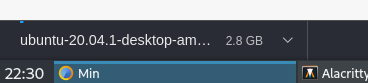
clicking it with mouse changes the background color, and this is making me think download was instantaneous ( okay, maybe i will know that file is too large and i have to wait, but this is often not the case) but mouse clicks does nothing... then i go to terminal and try to open it but everything fails.
no pause/resume.
no any kind of popup at mouse hover to know there is something happening.
disconnecting/reconnecting doesnot show any feedback. will it continue the download if internet connects again?
the X icon is also bad, what if i missclick, if there is no history how i know when download is finished. Right now i am still downloading Ubutnu iso and have no idea how to stop it.
no "show in file manager" option
the way it handles downloads makes me question too many simple things.... how much is downloaded? if it is reconnected to internet will the download continue? how i know if it resumed download? where is the list of downloads? etc...
more than half of this list is feature requests, but at least the feedback should be there. i dont know... a simple popup when hovering the download? or hide/show a text with download speed and time left?
shalva97
on 13 Aug 2020
Thanks, that helps me understand better. I think the design changes you mention certainly make sense:
- The progress bar could start at like 5-10% instead of 0.
- Making the click effect only happen if the file is completely downloaded sounds simple enough.
Having a tooltip with the current progress sounds good.
I'm not sure I want to add pause/resume at the moment, unless there's more evidence that a large number of people would use it.
- Resuming downloads is mostly dependent on the website I think, but if that's not working, we could probably investigate it more.
- I guess we could hide the close button when there are active downloads. I think it's probably good to have it though; you may not want the download manager taking up space on your screen. (Or as an alternative, there could be a "collapse" button maybe).
- Once the file's finished downloading, there's a file folder icon next to the item that should open it in the file manager.
PalmerAL
on 15 Aug 2020
just pulled it and it is way better...
- I guess we could hide the close button when there are active downloads. I think it's probably good to have it though; you may not want the download manager taking up space on your screen. (Or as an alternative, there could be a "collapse" button maybe).
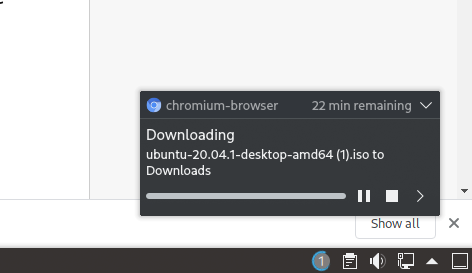
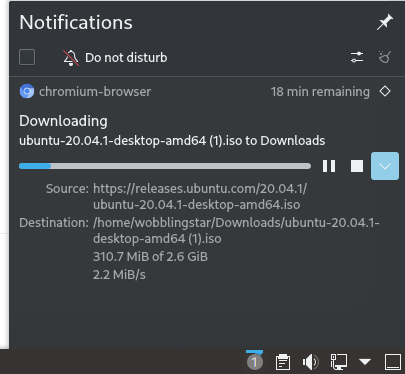
what if there will be a notification? i dont know how hard could it be to add but this is from chrome and it looks really good (KDE)
showing nottification | closed, but it is still inside notification list
:-------------------:|:-----------------:
 |
| 
Firefox also displays exactly same notification but without pause/resume....
there could be a list similar to !history like !downloads which will show all the downloads that are in progress or downloaded. I have seen some people never clean their Downloads folder, so a list like this will help them find the downloaded file faster.
also "copy download link" will be useful to have it somewhere...
tooltip is really good, but it has few things that could be improved. I think it shouldnot have a delay to show up and it will be better if it was updating in realtime.
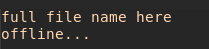
after all just this tooltip alone will be enough for me to be happy:
downloading | when reconnected to internet | failed to download | no internet
:-:|:-:|:-:|:-:
 |
|  |
|  |
| 
shalva97
on 16 Aug 2020
Building a separate notifications UI would be nice, but it'd be a fairly large project, and I don't think it makes sense to invest the time in that for now. Likewise, the tooltip issues are limitations of the system-provided tooltip UI - to fix that, we'd have to design our own tooltip, which I don't think I want to do.
there could be a list similar to !history like !downloads which will show all the downloads that are in progress or downloaded. I have seen some people never clean their Downloads folder, so a list like this will help them find the downloaded file faster.
Do you have other sources of downloads than just the browser (and is there a meaningful difference between files you download in the browser vs outside of it)? Personally, my downloads folder is a huge mess, but since all the files are downloaded from the browser, an in-browser download list wouldn't be any better. (And since the download list can be sorted to show the most-recent files at the top, I wouldn't expect finding recently-downloaded files to be a large issue).
also "copy download link" will be useful to have it somewhere...
Could you explain what you would use this for?
PalmerAL
on 17 Aug 2020
yeah... you are right, download list is useless if you sort files, but i would still wish to have it... because
- to copy download link, so i could share the link to my friend, or to my phone. or maybe i changed the file and overwrote to existing one so now i need to redownload it
- also a "retry download" would be easier. right now if downloads fails there is nothing i can do to retry and if i reopen Min it will be gone.
Actually i think it is possible to live without download list. It has been about 5-6 months since i have started using Min and only few days ago i needed to download a file. also images, never downloaded them but copypasted them just like text. So one download per 5 months... and maybe once few years i will use "copy download link" :D
okay, maybe i can say no to download list and notifications and many more small functionality, but i think a better tooltip is must have. When there is no feedback of what is happening in the background.... it feels weird...
lets say i want to know if it is downloading, i have to hover over it twice and compare numbers.... and thats all i can know.
How do you feel when you dont know how fast it is downloading and how much time it needs? maybe you forgot to turn off VPN, which is very slow, and now you have to waste few extra hours until it finishes the download... this could be rare but still
shalva97
on 18 Aug 2020
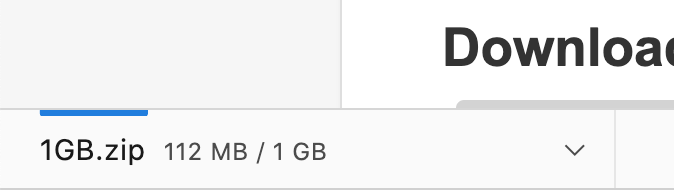
For the tooltip, one thing I thought of is to make the file size number change to show the progress when you hover over it, like this:
normal:
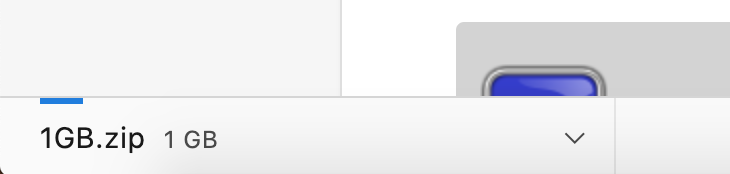
Hovering:
PalmerAL
on 2 Sep 2020
that would be better if it updates as the file downloads. Pulled master but there was no such changes to see it myself...
shalva97
on 7 Sep 2020
I haven't implemented it yet; it was just an idea I thought of. But since you like it I'll do it at some point.
PalmerAL
on 12 Sep 2020
@shalva97 I've implemented that in 36a4f03f875896a9ebefe353187aba78e3d84f2a.
I think everything mentioned here is either fixed or better to skip for now, although I haven't read over the whole issue again.
PalmerAL
on 17 Sep 2020
tested it and feedback is there so i guess it is fine.
but not sure if we should close this, because it is not fully implemented. or close and reopen in future?
shalva97
on 17 Sep 2020
I had to reread this a few times to get an idea of what's going on. For sake of clarity, I opened #1245 and think it's best this is closed for now.
@shalva97 Thanks for the great UI/UX discussion - t'was a pleasure to read. If there's something you mentioned above that you feel deserves more discussion, please open up a new issue so your ideas don't get lost in the aether.🥇
 kodumbeats
on 17 Sep 2020
kodumbeats
on 17 Sep 2020
Related issues
 dj-sash
·
7Comments
shalva97
·
5Comments
dj-sash
·
7Comments
shalva97
·
5Comments
 achou11
·
3Comments
shalva97
·
6Comments
shalva97
·
3Comments
achou11
·
3Comments
shalva97
·
6Comments
shalva97
·
3Comments