From #390:
Also, it would be nice if min remembered my passwords... i made another bash program for this too but perhaps min could integrate with KDE's wallet or something. Not sure if a standard exists for this or perhaps gnome and kde have different incompatible interfaces for this.
 PalmerAL
All 29 comments
Sorry about the duplicate issue @PalmerAL - I'll go ahead and respond here then. This library might be of some help to get this feature added. https://github.com/buttercup/buttercup-core
 kodaxx
on 24 Mar 2018
kodaxx
on 24 Mar 2018
No news on this one?
I think that those days your default web browser has to support password management.
Most of us have probably many credentials from many website.
This makes almost impossible to remember all of theme. Unless you always use the same password which is definitely not a good security practice.
Personally, I use random generated password remembered by the browser.
I would love to switch to Min but I really mist this feature.
 alexandrestein
on 26 Nov 2018
alexandrestein
on 26 Nov 2018
@alexandrestein I'd be suspicious if every browser out there supported saving passwords... It's a responsibility which needs to be carefully taken care of.
 code-hunger
on 26 Nov 2018
code-hunger
on 26 Nov 2018
@code-hunger maybe not every browsers but many of them.
I'm using it in chromium and Firefox.
I checked about brave and Opera and both dose.
I guess edge, ie or Safari does it as well.
This makes probably around 95% of the browser usage which supports password management.
alexandrestein
on 26 Nov 2018
Yeah, I tend to agree with @code-hunger here. Password management would be a nice feature to have, but it's tricky to do correctly, and the consequences if you do it wrong are pretty bad (exposing passwords to the wrong websites, etc.) Maybe in the future it will make sense to implement this, but it would require a lot of time and thought, and I'm not sure it's something I really want to be responsible for.
In the meantime, you could probably make a script to autofill passwords with a userscript if you wanted to.
PalmerAL
on 27 Nov 2018
@PalmerAL thank you for this answer.
From this point of view I could agree.
This can easily became dangerous.
It doesn't look out of reach to parse the actual domain and to propose all saved password which are saved with the exact same domain and those which are saved for the parent domains.
Some tools parse domain name like this one.
This can be an helper to look for related domains.
It's not a big deal, I'm not dying for it.
I was just wondering if there was any improvement.
alexandrestein
on 27 Nov 2018
This has been requested enough (see https://github.com/minbrowser/min/issues/532#issuecomment-458806491) that I'm re-thinking whether we want to do this. Like I said before, we'll have to be really careful that this is secure, so I think there's a couple things we should do to simplify this and reduce the risk:
- For password storage, there's a library for using the system keychain that seems reasonably well-tested: https://github.com/atom/node-keytar. Including native modules is likely going to make building Min more complicated; we'll have to look into that more and see if there's a way to mimize that.
- Auto-filling passwords can be risky - if for some reason we mis-identify which page is currently loaded (like if
getURLreturns the wrong results, or possibly if there's a race condition while a new page is loading), we could fill in the wrong password, which could potentially be abused. As a result, I suggest that instead of auto-filling, we show a banner at the top of the screen with something like "Use your password for [sitename]? [yes] [no]", and you would have to click to fill in the password for that site. This would make it slightly less convenient to fill in passwords, but since most sites remember your login for a long time, I don't think it should be a big issue, and it would help mitigiate a lot of potential security issues. - After reading this: https://bugzilla.mozilla.org/show_bug.cgi?id=360493, I'm guessing we should disable password filling for cross-origin forms (although that sounds more like a Myspace bug than anything else?)
PalmerAL
on 10 Feb 2019
_To preface, my background in dev is very little (in the context of software development, it's zero), so apologies if anything I suggest makes no sense, has already been explored, or I'm just massively oversimplifying it. (I'm hoping at least something in there will light a spark for someone who knows a bit more! "Well no... that's ridiculous, but wait... what if we did this?")_
// Is it at all possible to outsource the heavy-lifting of password storage/management/security to a choice of a few third-party vaults (e.g. LastPass)?
- Kind of like a skeletal interface or set of "sockets" for a third-party to plug into...? I don't know if I'm just describing an API, but maybe something that functions in a similar way?
- Closest example I can think of off the top of my head would be what iOS now allows on iPhones – in addition to the internal default storage, your have the option to use a third-party password manager as the default to feed into the autofill. Totally different evironment/rules etc, but it does what I'm trying to describe.
- If something like this is actually possible, would it also help keep the memory footprint and app size down by letting the third-party vault do all the heavy-lifting?
- More importantly, would that help alleviate the danger of exposing people's passwords to exploitation, by (I guess) passing the responsibility onto a third party that has already invested considerable resources into building the security (and already built up trust)?
- LastPass offers a lot for free, so users could be directed to set up an account there (or somewhere similar) by default, negating the need to build an internal vault as well
- That said, I don't know if that'll just be more work rather than less. I get there's still a lot that could probably go wrong in the act of passing it from LastPass to Min (assuming that's how it even works, or whether that was pretty much the main concern already described above).
_Station app is trying to implement something similar, but so far they've only managed to integrate 1Password. They are also an open source browser, but they've reimagined it as a sort of "web-app command centre". It's probably a totally different setup, so I don't know if that's a useful reference or not._
// Or is there at least a way to provide the option to use something other than the built-in vault?
- I've been trying to move away from using browsers' built-in password storage, for security and practical reasons.
- In a practical sense I often switch back and forth across several devices (between desktop and iphone at the very least, but also across browsers) to do certain tasks. These tasks almost always require logging into somewhere, so duplicated info was/is a nightmare – like if I update a password on Chrome, I've still have to update the old one on Firefox/iOS/apple keychain. On many occasions I found myself opening up every browser just to figure out which one had the most recent details.
- I've also invested a fair amount of time consolidating details into the vault and randomising the passwords. So even once the massive task of building a secure internal "vault" in Min is achieved, I (and possibly others) may still be leery of entering in all our info to a new browser all over again when we're already invested in LastPass or 1Password.
- As for security: when I was researching password management, the point was made numerous times (by people who worked in online security) that storing your passwords in browsers was a big no-no, because their security (even Chrome's) was apparently pretty flawed.
_Regarding that last point though: during my research, everyone seemed to have different feelings/ideas about what they considered secure or risky, and who they trusted login info with. Some may prefer this, some may prefer that, others couldn't give a hoot either way and were content with internal storage. Putting all my eggs in one basket could possibly a terrible idea down the track, but it's a personal choice. I guess the main takeaway at least would be that there seems to be no single agreed solution for password security; it just comes down to personal preference, so the need to give users the option may be something to be considered._
––
_(@PalmerAL, if you notice a double-up, I had also written about this at length in a survey response, before I realised there was already a thread for it, but I've expanded on that response a fair bit more as you can see)_
_"I am sorry I wrote you such a long letter, but I didn't have time to write a shorter one"_
_- Somebody old/famous_
 MarkWahlsten
on 27 Feb 2019
MarkWahlsten
on 27 Feb 2019
Thanks for the ideas! In theory, it should be possible to do something like that, but I'm not sure how practical it would be.
We could create our own password manager API like iOS does, but we'd have to convince every popular password manager to support that, and that's unlikely to happen considering we don't have that many users (yet).
Currently, most password managers provide browser extensions, so if we added support for the Chrome browser API's, we could support every password manager (and a ton of other extensions as well). However, this is a really complex project to do, both to initially implement, and to ensure that our implementation remains compatible with Chrome's. I don't think I have enough time to do this, but if someone is interested and willing to do it, I'd happily accept PR's for it.
The Station approach is interesting - it looks like 1Password provides a command-line tool to access your passwords, and they've written a wrapper to use that in Node. That would actually be fairly simple to implement, and it looks like Lastpass and Bitwarden have CLI tools as well (although having to write a separate integration for each password manager isn't ideal, we could probably make a library that detects whatever is installed on your system and exposes a unified API for them).
If we were to store passwords ourself, we would likely either use the OS-provided keychain API's, or use an existing and well-tested library to do this (although I'm not sure what that would be yet), so I don't think there's anything inherently insecure about doing it ourself (although it definitely is something I'm concerned about and that we need to be careful with). I also wouldn't expect this to have any significant impact on memory usage.
If you have links to the articles you read about browser password managers being insecure, I'd be interested in reading them. There definitely have been exploits in browser-based password managers before, but I'm not sure they're inherently insecure compared to a separate app. (This article did make the point that autofill is a bad idea, which I would agree with, which is why I mentioned above we likely won't do that).
Anyway, thanks for the suggestions! There's definitely a lot to think about with this. The CLI-based approach sounds like it would work better than I was expecting, and it has the benefit of working with people's existing tools, rather than forcing you to adopt an entirely new password manager; we might want to consider doing that.
PalmerAL
on 1 Mar 2019
Working on a simple POC/prototype with Bitwarden-CLI integration:
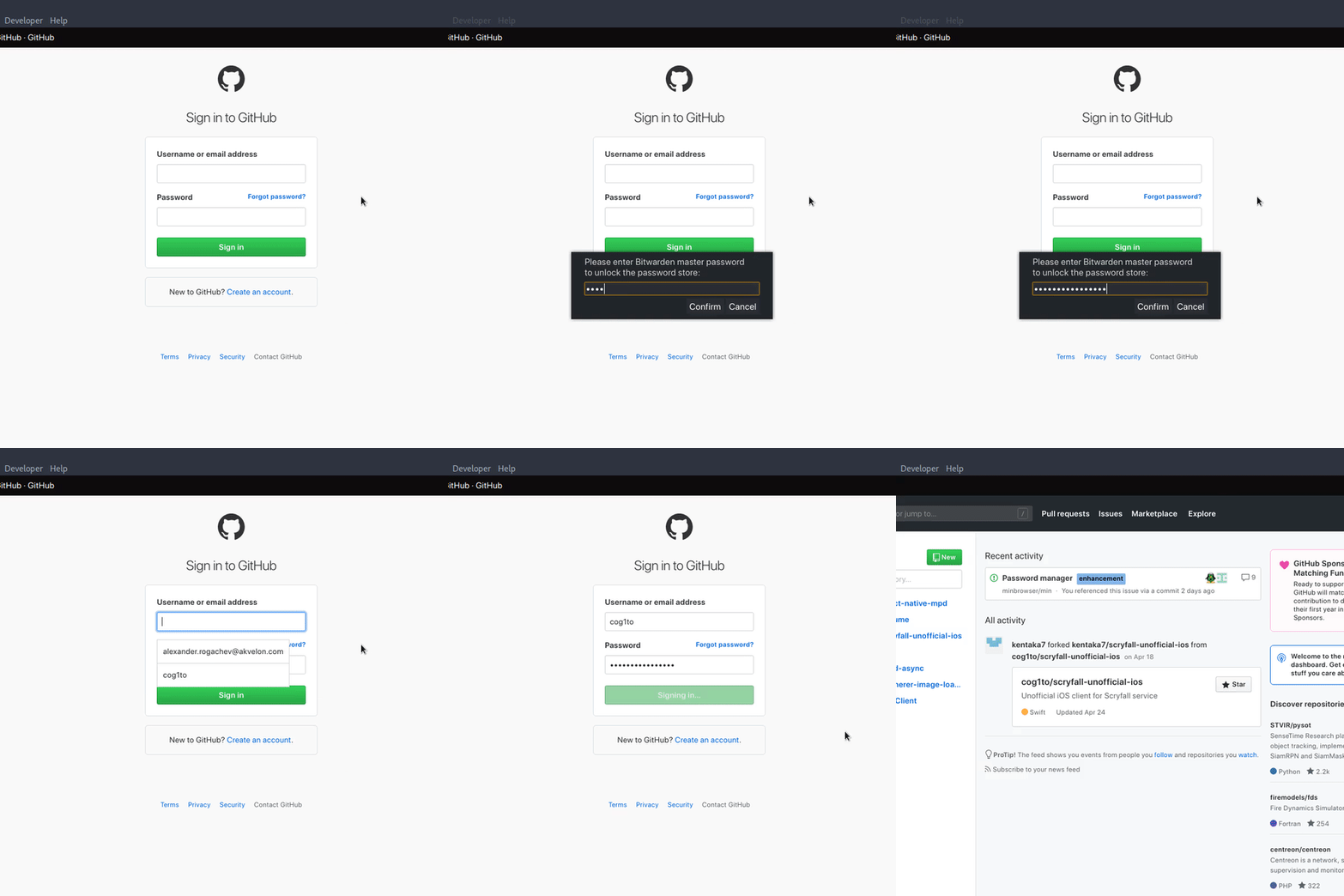
There are obviously still things to do and improve, so I would gladly accept any input/suggestions while I'm working on it. Or anyone can just clone the branch and use my code in whatever way they like :)
 cog1to
on 27 Jun 2019
cog1to
on 27 Jun 2019
@cog1to This is really cool! Interacting with the CLI is simpler than I thought, which is nice. I definitely think that we could integrate this and have it work well.
First, I would suggest that instead of having a "use bitwarden" preference, we make it a "use password manager" preference, with a value of "bitwarden"; the settings page could have a dropdown menu to pick a password manager. This has the downside that you would only be able to enable one password manager at once, but I think most people aren't using multiple password managers anyway, and I think that would allow us to significantly simplify the code for this feature.
I think the first challenge to figure out with this is how setup should work. I assumed that the CLI came bundled with the password manager, but it's actually a separate download, and the instructions for installing it are fairly intimidating: https://help.bitwarden.com/article/cli/. I expect that a lot of people using Min aren't going to have enough experience with the command line to be comfortable doing this, so we need a way to simplify installation. One idea I have is to do something like this:
- On startup, check if the CLI is already installed; if it is, we don't need to do anything.
If it isn't, show a dialog box sort of like this:
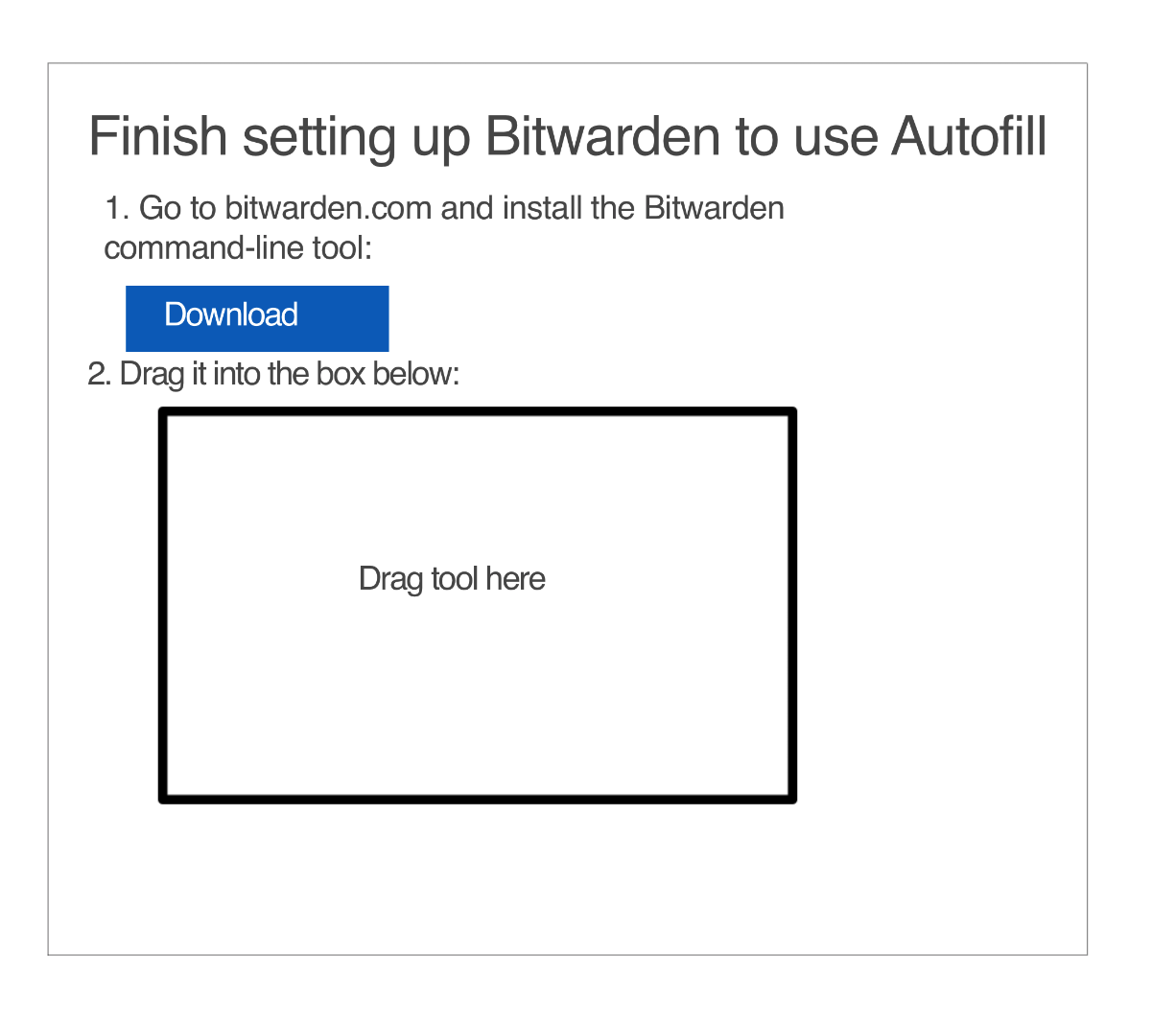
When you drop the tool in the box, make a copy of it and place it in Min's user data folder
- Run that binary whenever we want to get passwords
That way, we can ensure we always have access to the CLI, without requiring users to know anything about the command line.
The forced-vs-unforced thing is also really confusing to me, because there's no indication in the UI that you need to unlock the vault, and it's not obvious that you need to use the keyboard shortcut instead. I think we should just show a notification somewhere in the UI that you need to unlock, although I'm not exactly sure where it should go yet.
PalmerAL
on 28 Jun 2019
@PalmerAL thanks for the comments.
I kind of agree with the single vs multiple password managers: having an ability to have multiple of them enabled might be an overkill. I'm going to refactor this stuff to have a single dropdown selection.
Regarding forced-vs-unforced, this is a little more debatable. You're probably right about this. I was mostly looking at qutebrowser userscripts when implementing this, and they all do work with keyboard shortcuts to initiate the feature.
We can try to add a top/bottom info bar (a-la Downloads manager) to show a message, like Min has detected a login form on this page, click <<this>>/type <<shortcut>> to unlock the password manager and use autofill.
There's also a related issue with form detection. The problem with relying on just the page load handlers is that it will always miss JS-generated UI that some sites use (Reddit, for example). If we find a reliable (and most importantly - fast) way to re-evaluate HTML on DOM change events, we might get rid of the shortcut. So far I wasn't able to do so in a way that would satisfy my expectations.
Because of that, I would still leave the shortcut as an option to manually activate autofill.
cog1to
on 28 Jun 2019
I've added Bitwarden setup dialog:
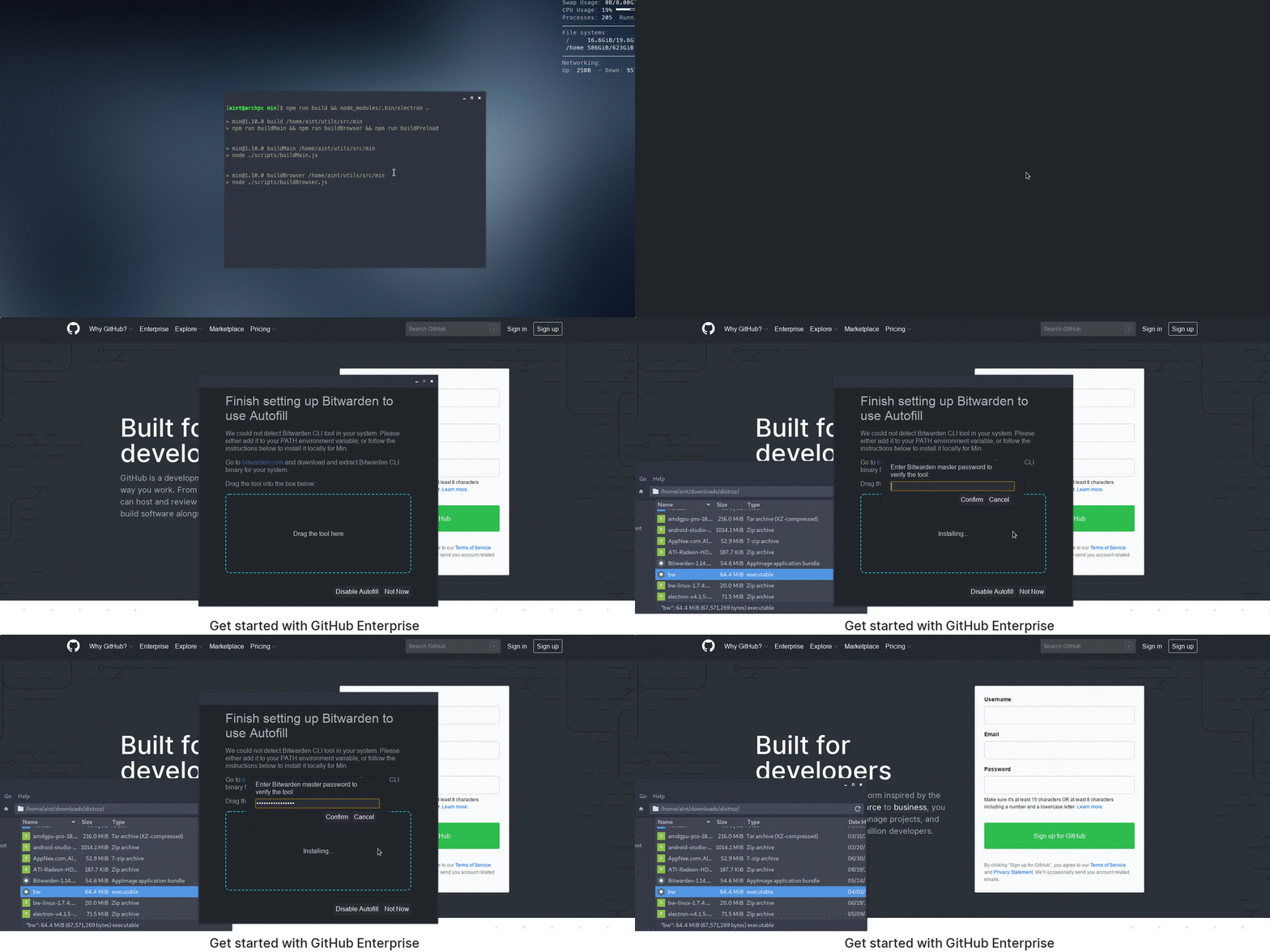
Tried experimenting with auto-detecting dynamically loaded forms on web pages today (with the help of MutationObserver), and I don't like the results so far. While it was mostly working, there were some cases when it either didn't work at all (Reddit's login popup), or was buggy and caused a severe performance degradation due to infinite update cycles (HumbleBundle site). So I'm still leaning towards manually triggering password fill via keyboard shortcuts.
cog1to
on 5 Sep 2019
Seems to work fine for static pages though (and even pages with user/pass fields loaded but hidden by default).
cog1to
on 5 Sep 2019
@cog1to It's looking good!
Regarding form detection, I wonder if we could listen for the focus event on the document, and then check if whatever was focused is a username/password field. I think that would have a lot of benefits:
- Since the checking would happen at the time you try to sign in, it would work on basically every site, regardless of how the site creates the password fields.
- This would also mean that we would only have to prompt to unlock the vault when you actually try to sign in.
- In turn, that would mean we could just have one way of filling in passwords, and eliminate the distinction between forced and unforced.
Also, I kind of wonder about making the unlock and tool setup dialogs overlays in the main window instead of separate windows. I'm not as sure about this, but it seems like it would simplify things a bit (since you could reuse the main window styling, and reduce the need to send data over IPC messages).
I'll try to look over the rest of the PR soon when I have more time.
PalmerAL
on 8 Sep 2019
@PalmerAL regarding input fields detection, that's a decent option. I'm a little worried about being too disruptive though.
We won't be able to easily differentiate between Sign In and Sign Up forms, so potentially the unlock dialog will be popping up even in cases when user has no intention to fill the field. Same problem for cases when user simply doesn't have credentials saved in the password manager. Since we cannot know beforehand if credentials are there, we risk showing the dialog with no purpose and to the annoyance of the user.
I'm more inclined to let users do stuff manually in such cases instead of guessing that what we do might be helpful.
Let's list our options here:
1. Keep forced/unforced logic.
Pros:
- Non-disruptive. User activates the feature only when he/she needs to.
Cons:
- More code compexity.
- The flow is not super clear. User has to know how to activate the PM.
2. Focus auto-detect.
Pros:
- Easier to use.
Cons:
- False triggers. Can trigger PM unlock when it's not needed. We can mitigate that to some extent, but not with 100% reliability.
3. Unlock on startup + Focus auto-detect.
Pros:
- Probably the most straightforward in terms of code. We trigger the unlock once when browser launches.
Cons:
- Can become annoying. User might not need it at all in a particular session.
As I said, I'm more inclined to 1, but that's my personal preference. As most engineers, I'm not very good at UX :) So I can refactor to whatever we agree to be the best approach. Or maybe we can come up with a fourth one.
cog1to
on 10 Sep 2019
I can definitely see how that would be annoying; I do wonder how common the signup/no credentials cases are compared to the login case, but I doubt there's any way to get data on that. (Actually, now that I think about it, what I mentioned in my last comment is how the master password dialog works in Firefox, and it can be fairly annoying).
I think it's really important that it be obvious how to use autofill, without needing to read any instructions. So just doing 1 probably isn't a good option.
One thing that might work is a combination of a keyboard shortcut + focus detection:
- If you press the keyboard shortcut, the browser would unlock if necessary and then autofill.
- If you focus on an input, it would add a DOM element with a lock icon, like Safari does:
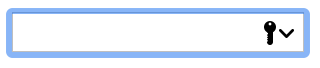
clicking on this (or tabbing to it + space) would unlock and autofill.
I think that might be more obvious to use, without creating as much disruption if you don't want to autofill.
PalmerAL
on 16 Sep 2019
Hi @PalmerAL
The CLI-based approach sounds like it would work better than I was expecting
Awesome! I'm really looking forward to how this pans out. Thanks for your work on this @cog1to and @PalmerAL
I think it's really important that it be obvious how to use autofill, without needing to read any instructions. So just doing 1 probably isn't a good option. One thing that might work is a combination of a keyboard shortcut + focus detection.
- I definitely agree with this from a user perspective, I'm interested in seeing how keyboard shortcut + focus detection would work.
- By default, LastPass doesn't prompt to unlock for every password.
- Instead you set an interval – e.g. every new session, every day, every week, every month – it will log itself out after that time, and prompt you for the master password the next time you try to use autofill.
- You can also mark certain accounts/passwords to always reprompt for the master password
- you can see there is a password saved in the little padlock context menu (like in your Safari example),
- but when you try select the account you'll get a separate popup window asking for the master password.
- I don't know why Lastpass does it like this, a whole new window doesn't seem like the best solution (especially if pop-up blockers are in use)
- Even more so given that their 'reprompt' popup crashes their Spotlight-esque quick search feature in their desktop app... it's kind of a mess.
- honestly I'm having a serious look at switching to Bitwarden and kind of steamed I hadn't gone with it to start with
- The little overlay in the Bitwarden prototype above is way more elegant and makes so much more sense
We won't be able to easily differentiate between Sign In and Sign Up forms, so potentially the unlock dialog will be popping up even in cases when user has no intention to fill the field.
Lastpass has trouble diffrentiating between sign-up and sign-in too, for example:
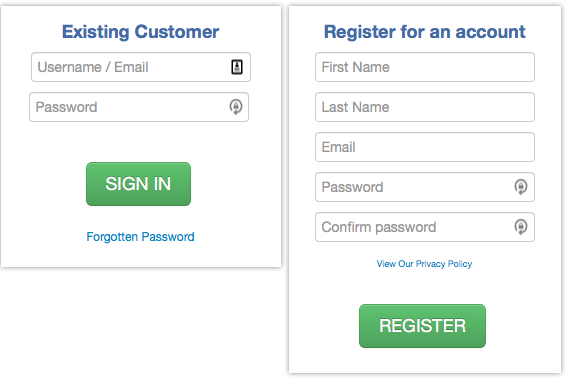
- Lastpass tries to recognise sign-up forms and offers to randomly generate a password for you, and most of the time it's useful. In a lot of cases though it confuses sign-in/sign-up forms, or doesn't recognise some fields as username/password fields at all.
- That may only be a Lastpass issue, or just a badly-made website
- I'm not sure how other managers do it
Currently, most password managers provide browser extensions, so if we added support for the Chrome browser API's, we could support every password manager. However, this is a really complex project to do
Totally! I have no real desire for chrome extensions to be implemented in Min, given that there are probably enough userscripts out there that could cover most needs (although I understand extensions can do more). To me, Pinterest's browser extensions are a pretty good example of why I understand that extentions are probably just a nightmare to be avoided:
- I'm guessing they had to upkeep 4–5 different extensions for each browser
- They often broke whenever one of the browsers had a big update
- Or would clash with pop-up blockers
- At one point I remember Pinterest abandoned browser extensions altogether, in favour of a bookmarklet (a move I thought made much more sense, workload and compatability-wise)
- But then they went back to extensions for some reason
- That's likely more the app-dev's problem than the browsers, but cases like this just make extension support seem not worth the hassle of implementing and keeping up to date
If there's some other use-case that warrants it, go for it, but I'm not hanging out for it myself.
If you have links to the articles you read about browser password managers being insecure, I'd be interested in reading them.
They were all mostly comments made in forums by people who (allegedly) work in online security. I can't really remember where I read them (and probably aren't really citeable sources haha), but the article you linked to pretty much sums up the points I think they were making – for them they felt the autofill flaw was a deal-breaker.
They – whoever "they" are – may have also flagged the way passwords were stored for many browsers...? But I could be misremebering. That may have also changed since then. Sorry I don't have anything more substantial.
MarkWahlsten
on 18 Dec 2019
hey guys, thanks for the feedback. I tinkered a little with the implementation of inline button, here's the basic prototype:
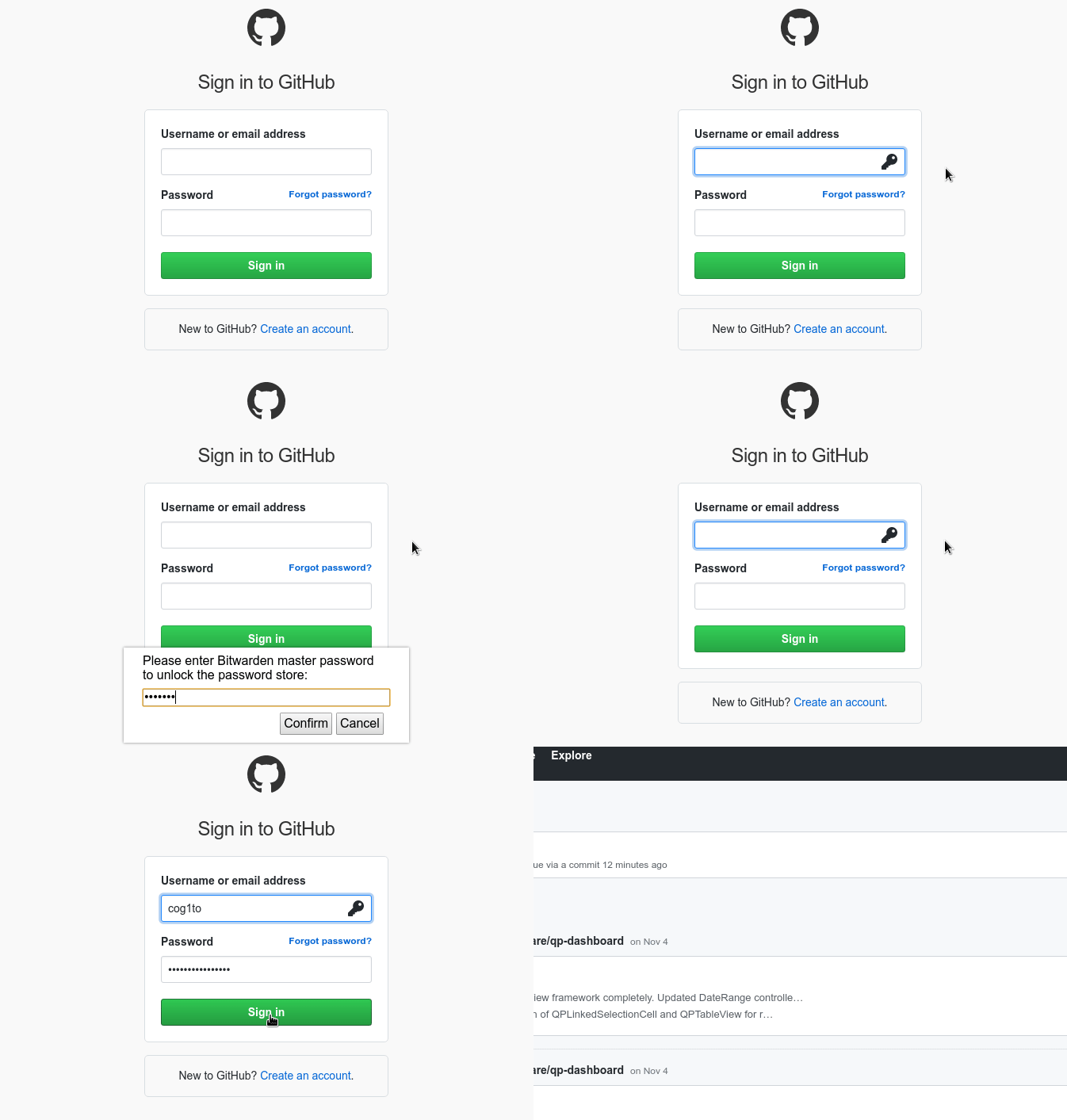
there are few problems/issues with current code that I'd like to address:
- there are still issues on some websites with detecting field value changes. some sites use JS events on input fields to detect changes, so without firing/emulating proper events pages could show 'empty username/password' errors. I partially fixed it by manually firing
onchangeevents from the input elements, but current solution is not 100% error-free. seems like different pages listen to different events - the unlock button is not very flashy. I wanted to add some kind of hover effect, and also re-use
fontawesomefeatures for it, but could not figure out how to preload bundled CSS and fonts via preload scripts, so right now is just a static SVG. any help here will be appreciated - I need to sync up with the upstream to fix the Dark Mode styling inside my dialogs/prompts. it got broken after one of the updates to Settings storage logic, I think
- To fix the feature inside iframes (Reddit uses that, for example), I did a couple of small changes, namely [1] I added 'enableNodeIntegrationInSubFrames' option to webview creator (which is questionable), and [2] I modified IPC event logic to provide frame ID value, so ipcMain can send event back to a specific iframe.
cog1to
on 22 Dec 2019
It's looking good!
there are still issues on some websites with detecting field value changes. some sites use JS events on input fields to detect changes, so without firing/emulating proper events pages could show 'empty username/password' errors. I partially fixed it by manually firing onchange events from the input elements, but current solution is not 100% error-free. seems like different pages listen to different events
Can you share some examples of sites that do this?
the unlock button is not very flashy. I wanted to add some kind of hover effect, and also re-use fontawesome features for it, but could not figure out how to preload bundled CSS and fonts via preload scripts, so right now is just a static SVG. any help here will be appreciated
Loading fontawesome in each tab isn't a good idea, because it increases page loading time and could also cause conflicts if the page itself uses fontawesome already. However, it should be possible to do everything that FA does with normal CSS. For hover, you could probably just add a JS listener to it that changes the style attribute. I'm not sure it needs to be any flashier than that; what else were you thinking of?
I'll try to look at the rest of the PR soon.
PalmerAL
on 22 Dec 2019
Can you share some examples of sites that do this?
My test target for that specific issue was HumbleBundle site. Before I did an update with firing 'onchange' event, Atlassian login page was behaving the same way.
Loading fontawesome in each tab isn't a good idea, because it increases page loading time and could also cause conflicts if the page itself uses fontawesome already.
Yeah, that makes sense. Pushed a small update with hover effect.
cog1to
on 22 Dec 2019
@cog1to 's PR has been merged, so Bitwarden is fully supported now. Here's some screenshots of what the integration looks like:
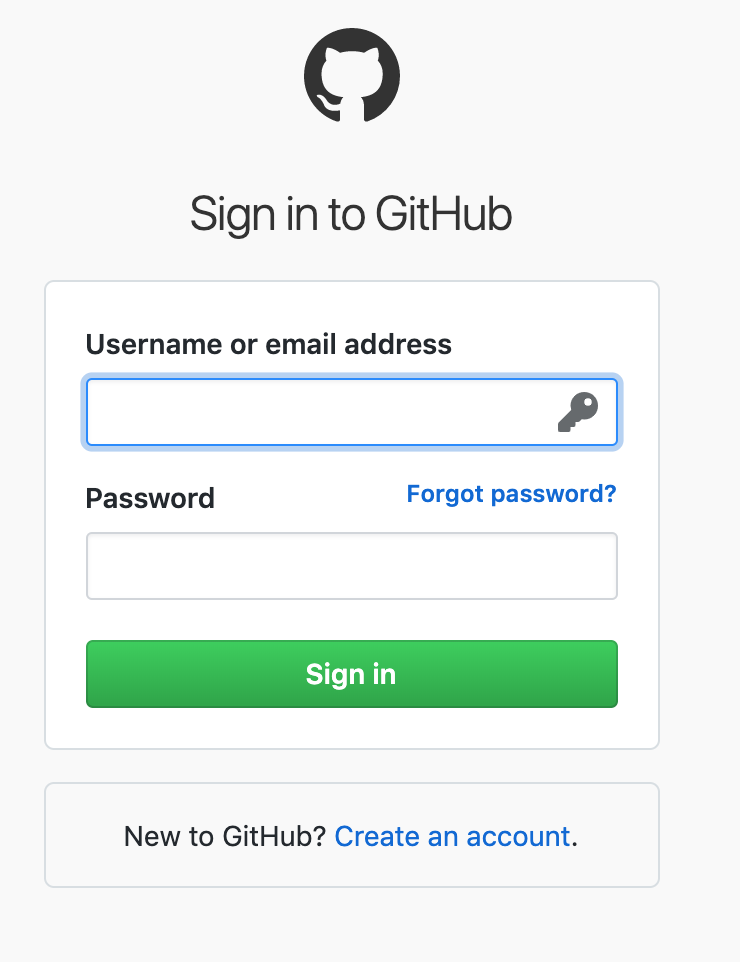
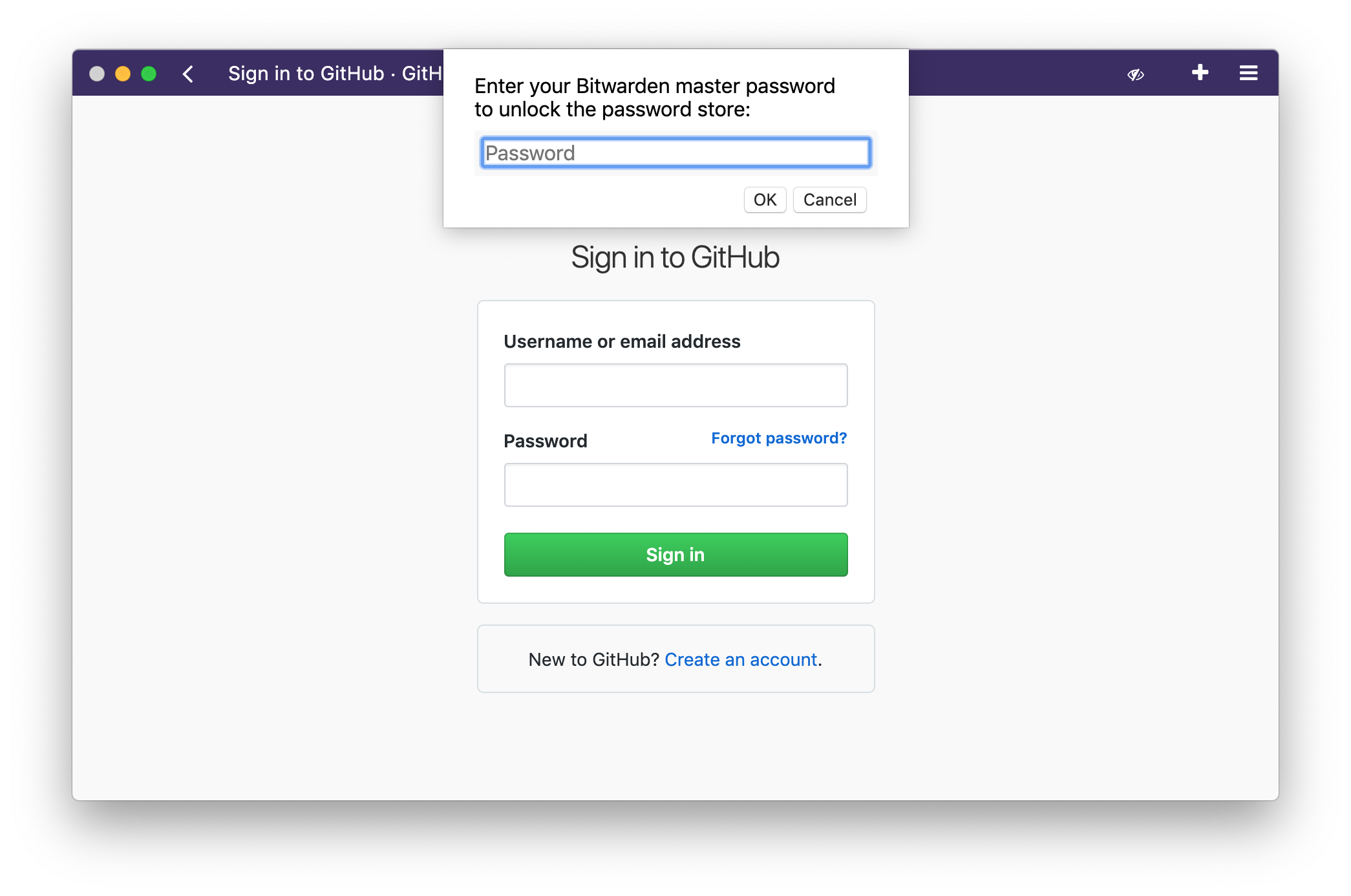

Copying from the PR:
I'm hoping to support more than one password manager when this launches, so I'm going to try to add support for another one (probably 1password) over the next couple weeks, but if that ends up taking too long, I'll go ahead and release the next version with just Bitwarden. This should be released fairly soon either way.
PalmerAL
on 31 Jan 2020
I have a question regarding Bitwarden.
When does it sync the vault?
Because I have added a new entry which does not seem to be synced. I also tried restarting min. I even waited a while so that I got ask if I want to continue in the task I left the last time.
And the most important thing: I also checked if I spelled the domain correctly.
But still min can't find a corresponding entry.
 Nesaijn
on 2 Sep 2020
Nesaijn
on 2 Sep 2020
As far as I could tell from the code (correct me if I'm wrong), Min doesn't automatically sync the vault.
Min password management works by utilizing a CLI tool that actually does the heavy lifting like logging in and syncing your vault. In your case running the command bw sync in a command line interface should work.
 Syndamia
on 2 Sep 2020
Syndamia
on 2 Sep 2020
This is interesting; we have a forceSync() method; but it looks like I accidentally deleted the code that was calling it in a54c51240805dc8e57f612db462e04c83da51cc1. I guess we should add that back.
In the meantime, if you have bitwarden installed globally, the command Syndamia mentioned should work; if you installed it using the setup dialog in Min, you'll need to run one of these:
~/library/application support/min/tools/bw sync on macOS
\users\username\appdata\roaming\min\tools\bw sync on Windows
/home/username/.config/Min/tools/bw sync on Linux.
As far as I know, 1password syncs automatically (and there's no sync command), so it shouldn't be affected.
PalmerAL
on 2 Sep 2020
Fixed in 9f94fd398142814e3914af6ecc2921e7740cbc97. Sorry about that!
(You will still have to restart Min for new credentials to show up).
PalmerAL
on 2 Sep 2020
Haha. Syncing manually worked. Thanks for the tipp. Without the path to the tool I wouldn't be able to figure out how to run the command since I have installed it in Min.
What exactly does the forceSync() Method do? Will it sync automatically on every new session of Min?
Nesaijn
on 3 Sep 2020
With the fix, it should sync every time you re-enter your master password (which would happen the first time you try to autifll after restarting Min).
forceSync basically just runs the same bw sync command.
PalmerAL
on 4 Sep 2020
Not sure if it would be better suited as a feature request, but:
It would pretty awesome if min would integrate with pass
 waynew
on 18 Nov 2020
waynew
on 18 Nov 2020
Related issues
 Vulpezz
·
6Comments
Vulpezz
·
6Comments
 mtgperales
·
3Comments
mtgperales
·
3Comments
 CherryMan
·
3Comments
CherryMan
·
3Comments
 PEPERSO
·
4Comments
PEPERSO
·
4Comments
 whitelynx
·
5Comments
whitelynx
·
5Comments
Most helpful comment
@cog1to 's PR has been merged, so Bitwarden is fully supported now. Here's some screenshots of what the integration looks like:
Copying from the PR: