Like vimium extension.
 rodrimaia
All 19 comments
How would you propose that to proceed with this @PalmerAL? js/keybindings.js includes some general code as follows.
document.body.addEventListener("keyup", function (e) {
    if (e.keyCode == 17) { //ctrl key
        leaveExpandedMode();
    }
});
- Would we need to extend this to allow an extension to set it's own keybindings?
- How would we handle multiple events bound to the same key-combo? Should they both trigger? First wins? last wins?
I wouldn't mind working on this.
 AngeloR
on 18 Apr 2016
AngeloR
on 18 Apr 2016
Min already uses Mousetrap for most of the keybindings, which lets you do something like this:
Moustrap.bind("t", function() {
  addTab();
});
The part that's difficult is that the keybindings shouldnt't trigger if an input (or contentEditable element) on the page is focused, otherwise you wouldn't be able to type anything. For that to work, the browser would have to send an IPC message to the webview, and then the webview would have to send an IPC message back to the browser. IPC messages are pretty slow, but I'm not sure what the actual numbers are. It's possible this would be fast enough, but maybe not.
So, I'm not really sure how this should work. If you have any ideas, I'd love to hear them!
Would we need to extend this to allow an extension to set it's own keybindings?
Min doesn't support extensions yet (and probably won't for a while), but I guess eventually that would be nice to have.
How would we handle multiple events bound to the same key-combo? Should they both trigger? First wins? last wins?
The way Mousetrap does it is that both trigger. I'm not sure there's any real reason to do it one way or another, so it's probably easiest to just go with what mousetrap does.
 PalmerAL
on 18 Apr 2016
PalmerAL
on 18 Apr 2016
This is partially fixed by #154, since you can now customize most of the shortcuts.
PalmerAL
on 23 May 2016
But the most important things in vimium or vimfx are f/F and jk. Regardless of f/F, there are still no way to set j/k/h/l/X/t/o in Setting page.
 suzumiyasmith
on 14 Dec 2016
suzumiyasmith
on 14 Dec 2016
As of 04395552f8976cf3ed8b94b17f8ff67cbf4ae7c8, you can now set a single-letter shortcut for any of the actions listed on the preferences page. Next step is to implement more of the actions from Vimium.
PalmerAL
on 24 Nov 2017
As of 0439555, Next step is to implement more of the actions from Vimium.
Has there been any progress on this? It is literarily the _last_ thing that I deeply miss from Min. All the other add-ons I can live without but this just makes browsing so much easier,
 polaroidkidd
on 6 Nov 2018
polaroidkidd
on 6 Nov 2018
@polaroidkidd Not really, mostly because Vimium supports a lot of different shortcuts, and I'm not really sure which ones are worth adding. Looking at http://vimium.github.io/:
- Everything in the "navigating history" and "manipulating tabs" should be available already (with the exception of "add tab").
- Supporting the scrolling actions should be fairly simple, it probably makes sense to do those.
- I'm not sure exactly what "Open URL, bookmark, or history entry" does - have you used that shortcut before?
- Reload and inspect element are going to require changing the menu bar code to support using data from settings (which depends on #451), but should be possible eventually.
- I'm not sure how the find mode actions would work with the text input, but we could probably still do it.
- What does "enter insert mode" do?
PalmerAL
on 7 Nov 2018
My mistake, I should have been more specific. What I meant was the url navigation feature from Vimium.
Essentially, I press f (for "Open a link in the current tab (LinkHints.activateMode)") and am presented by an overlay of key kombinations on (most) clickable links.
If I hit any of the keys, the link is opened in a new page. Key-Overlays on input fields move the cursor to that input field. Pressing ESC releases the cursor from the input field (most of the time, I guess it depends on the website) and I am able to use the f command again.
The image below shows a web-page with the Overlay. Notice some links are single keys, and others are double keys. For the double keys, hitting the first causes any non-matching keys currently being displayed to dissapear.
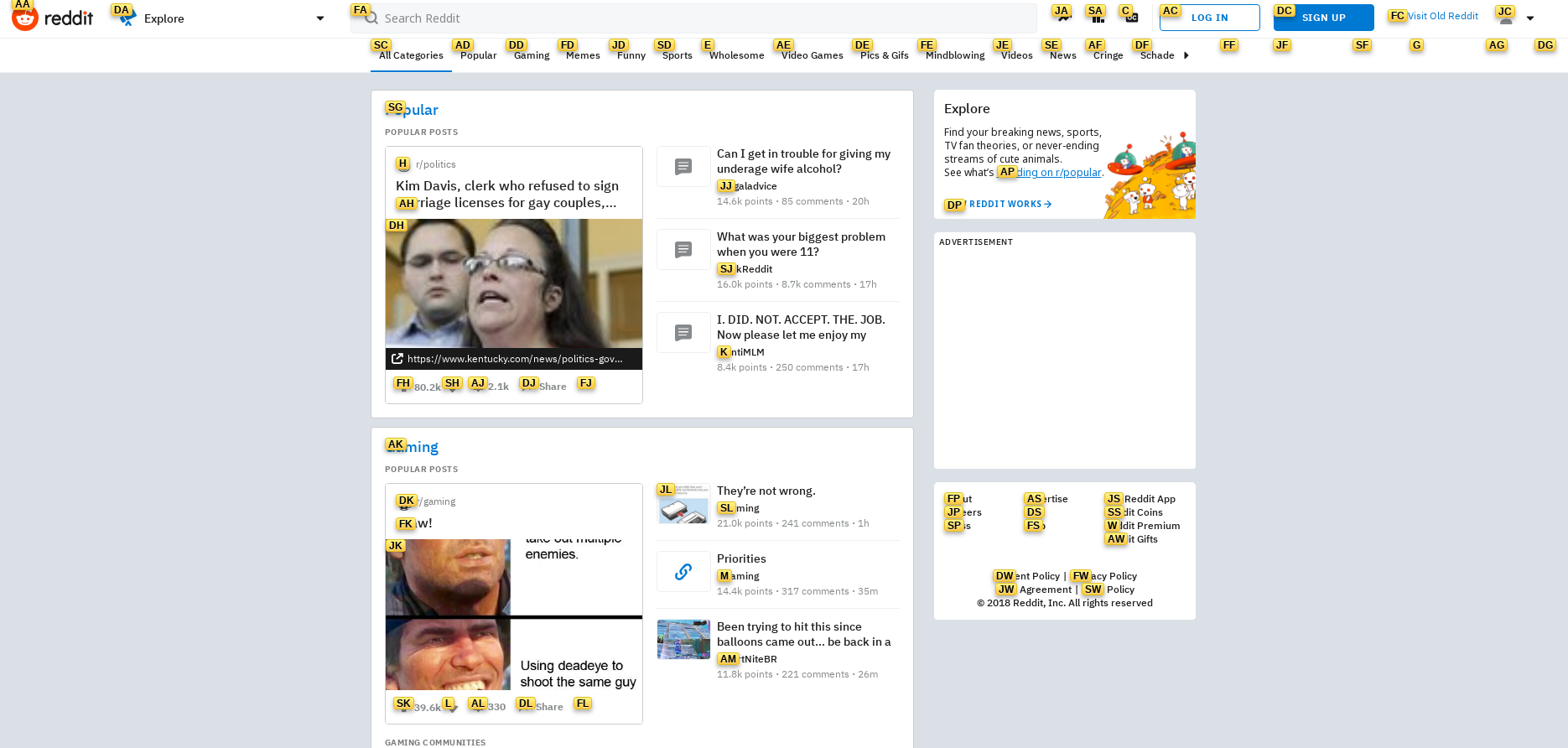
All in all, this makes browsing a lot more comfortable (esp. in the age of endless pop-ups, I can just hit f and close it without having to have pixel-perfect mouse aim on the impossibly small close-buttons)
Regarding "enter insert mode", I have no idea. I only ever use the f command.
polaroidkidd
on 7 Nov 2018
@polaroidkidd Interesting, I didn't know about that! That seems kind of complicated to include as a built-in option, but it should be possible to do all of that with a userscript. I've written a script that does most of the things you mentioned here: https://gist.github.com/PalmerAL/a32a7fc60913e641e621b76c2339d8c2. I would imagine that it would be possible to add support for inputs without too much work; if there's enough interest in this we could put it in a separate repository so people could contribute to it.
PalmerAL
on 8 Nov 2018
@PalmerAL Well, I've been meaning to brush up on my WebDev skills for some time now so I might as take this opportunity to contribute to a project. I'm going to have a more detailed look at the source this weekend. However, before I loose myself, would you have an Idea where I could begin implementing this feature?
EDIT:
I've had a change to look a bit into it and will, for a start, go with your suggestion of doing it via a userscript. Thanks for being responsive (honestly, there's plenty of OpenSource projects which aren't. Kudos to you!)
EDIT 2:
Oh wow! Most of it works already! That's pretty neat! I'll try to get the rest up and running and get back to you!
polaroidkidd
on 8 Nov 2018
I second this as an much expected feature.
I understand that clicking link with keystrokes is a too complex (and maybe undesirable) feature to have, but the rest of the vim binding are much simpler and I think has a lot of synergy of the minimalist browser.
Features that I, as I vim user, would be happy to see:
Modes:
Modes are not a complex thing, the only real special things about them is that different key bindings are defined in different modes, Vim has his own array of modes, for the browser I think we would need three:- Normal mode: this is the mode you do most of browser, you change tabs, you create tabs, you scroll the page and etc...;
- Insert mode: this is the mode you get when you click a text box, here most of the standard key binding are disable, and you can write as normal.
Navigation bar mode: this is the mode you would be when you are typing in the navigation bar. This should be mostly similar to Insert mode, but I think the abstract differentiation would be useful to further development.
For simplicity we could make so that "Insert mode" and "Navigation bar mode" simple have no bindings besides "ESC" which is the default binding that take you back to normal mode.
Binding: This is the bindings I would like to see in the normal mode:
- j : Scroll down a little
- k : Scroll up a little
- h: Navigate back
- l: Navigate forward
- /: Find in page
- o: Focus on the navigation bar / change to navigation bar mode
- t: open new tab and focus on navigation bar / change to navigation bar mode
- dd: close current tab
I think this are the most important, but I might be missing something, the actual binding are just a suggestion and I would like it to be configurable.
- Configuration file: There are a (limited) range of keystrokes that are able to be map in the preferences tab, I would be very happy to have my own configuration file where I can map a keystroke to some function of the browser. With a wide array of commands that are able to be mapped.
 Figuera
on 5 Feb 2019
Figuera
on 5 Feb 2019
@Figuera Thanks for the ideas!
I'm not sure I really understand how the concept of modes would be useful; there's enough possibilities for keybindings that the bindings for tabs, editing text, and typing in the searchbar shouldn't overlap with each other anyway, so I would think it would be OK to just have all the bindings available in all contexts. Or are you thinking about adding more shortcuts that would require overlapping?
We do support single-character shortcuts in the preferences page (and they will be disabled if a textbox is focused, so you can still type). In particular, I think you should be able to change the settings for these to what you mentioned:
- navigate back
- navigate forward
- focus the navigation bar (labeled "enter edit mode" on the preferences page)
The others sound like good ideas to add as well, although the level of complexity varies based on the shortcut:
- Scroll up/down should be pretty easy to add (and actually I think you can do that right now with a userscript).
- find in page/open new tab requires connecting the keybinding preferences to the app menu items, which depends on this issue to change how settings are saved: #451 (and if we did this, settings would be saved inside a separate file instead of in the database, which addresses the other point you mentioned).
- multiple-key shortcuts might require some more thinking to get right. I guess this could either be a separate mode like you mentioned, or it could depend on pressing the key twice in a certain amount of time.
PalmerAL
on 7 Feb 2019
Here's a userscript for the scrolling shortcuts:
window.addEventListener("keypress", function(e) {
    if (e.keyCode === 106 && !["INPUT", "TEXTAREA"].includes(e.target.tagName)) {
        window.scrollBy(0, 30)
    }
});
window.addEventListener("keypress", function(e) {
    if (e.keyCode === 107 && !["INPUT", "TEXTAREA"].includes(e.target.tagName)) {
        window.scrollBy(0, -30)
    }
});
From the code you just sent I realized that you might not need to have explicit modes to do what I want it to achieve. But the reason I posted what I posted was that I am not able to configure the shortcuts the way I would like it.
For example, I have set "o" to be the shortcut to "focus on the navigation bar.", and it works fine, but then I am not able to write on the navigation bar since every time I press "o" the navigation text is cleaned up and focused again.
I thought that would be a problem for texts boxes too, but I was wrong I can still use "o" in the text box.
If there is a way to get the shortcuts not to work on the navigation bar, I would be happy enough.
PS: Is there a place where I can save the code you send it to configure the shortcuts? I don't know how to proceed.
Figuera
on 7 Feb 2019
For example, I have set "o" to be the shortcut to "focus on the navigation bar.", and it works fine, but then I am not able to write on the navigation bar since every time I press "o" the navigation text is cleaned up and focused again.
Oops, it looks like I forgot about the searchbar when I added this feature originally; I've fixed it in 28eb68e1ef4dc36aa136630628a65ff9288d8fc6.
PS: Is there a place where I can save the code you send it to configure the shortcuts? I don't know how to proceed.
Yes, there's directions here: https://github.com/minbrowser/min/wiki/userscripts
PalmerAL
on 8 Feb 2019
I have altered @PalmerAL 's snippet such that the f key opens the links in the same tab, and the F key in a new tab. In addition I updated the styling to better match the vimium extension.
I also incorporated the j and k bindings for scrolling. If you want more or less scrolling per keypress, alter it to your liking.
Here is my userscript
EDIT: I removed my own script in favor of the repository provided by PalmerAL
 BramVerb
on 5 May 2020
BramVerb
on 5 May 2020
@BramVerb This is really nice! I've created a repository for this so it's easier to find and contribute to: https://github.com/PalmerAL/min-vim-mode
PalmerAL
on 6 May 2020
@BramVerb This is really nice! I've created a repository for this so it's easier to find and contribute to: https://github.com/PalmerAL/min-vim-mode
Good idea, I took the opportunity and contributed already!
 whiterock
on 6 May 2020
whiterock
on 6 May 2020
Closing issue as it is fixed with this repo https://github.com/PalmerAL/min-vim-mode
 Milad-Laly
on 10 Oct 2020
Milad-Laly
on 10 Oct 2020
Related issues
 shalva97
·
6Comments
shalva97
·
6Comments
 BillDietrich
·
5Comments
BillDietrich
·
5Comments
 whitelynx
·
5Comments
whitelynx
·
5Comments
 Blouko
·
5Comments
Blouko
·
5Comments
 abejfehr
·
6Comments
abejfehr
·
6Comments
Most helpful comment
I second this as an much expected feature.
I understand that clicking link with keystrokes is a too complex (and maybe undesirable) feature to have, but the rest of the vim binding are much simpler and I think has a lot of synergy of the minimalist browser.
Features that I, as I vim user, would be happy to see:
Modes:
Modes are not a complex thing, the only real special things about them is that different key bindings are defined in different modes, Vim has his own array of modes, for the browser I think we would need three:
Navigation bar mode: this is the mode you would be when you are typing in the navigation bar. This should be mostly similar to Insert mode, but I think the abstract differentiation would be useful to further development.
For simplicity we could make so that "Insert mode" and "Navigation bar mode" simple have no bindings besides "ESC" which is the default binding that take you back to normal mode.
Binding: This is the bindings I would like to see in the normal mode:
I think this are the most important, but I might be missing something, the actual binding are just a suggestion and I would like it to be configurable.