Migrate: Error when running initial migration with a schema in DATABASE_URL
report id 10873
Bug description
When running migrate save with a DATABASE_URL that includes a schema component, I get the following error.
(base) ➜  keystone-5 git:(prisma-adapter) ✗ DATABASE_URL=postgres://***:***@localhost:5432/keystone?schema=somethingprisma migrate save --name init --experimental --schema .prisma/schema.prisma
Oops, an unexpected error occured!
Failure during a migration command: Connector error. (error: Error querying the database: No such table: something._Migration
   0: migration_core::api::ListMigrations
             at migration-engine/core/src/api.rs:118)
If I remove the schema component of the DATABASE_URL the migration runs successfully.
This is running 2.6.0-dev.47.
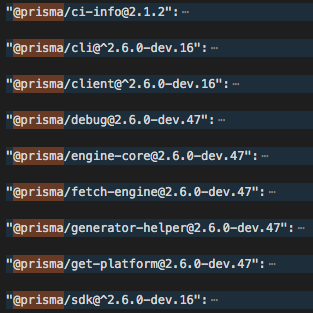
EDIT: This appears to be a regression introduced in 2.6.0-dev46. Rolling back to 2.6.0-dev45 resolves the issue for now.
Environment & setup
- OS: OSX
10.15.5 - Database:
psql (PostgreSQL) 12.2 - Node.js version:
v12.11.0 - Prisma version:
2.6.0-dev47
 timleslie
All 16 comments
Thanks for your report @timleslie!
We tried to reproduce it without success.
Could you try again with version 2.6.0-dev.61?
Note the official 2.6.0 is almost there 😃
 Jolg42
on 1 Sep 2020
Jolg42
on 1 Sep 2020
Hi @Jolg42, I just upgraded to 2.6.0 and I'm seeing the same issue.
I should have mentioned that the schema in question does not exist in the database when I run the migration. Up until dev45 it would get automatically created for me. Has this changed?
If I manually create the schema then everything works as expected.
timleslie
on 2 Sep 2020
It looks like this PR is the culprit:
https://github.com/prisma/prisma-engines/commit/a0b427d77d040aa7a76ddeedfb63e269351d63d7
There are a bunch of changes here with CREATE SCHEMA IF NOT EXISTS moving from one place to another. I suspect somewhere along the line this query is no longer being executed.
I'm not familiar enough with the code to say exactly where the issue might be, but maybe @tomhoule can help?
timleslie
on 2 Sep 2020
And now I read the PR I see: "We do not try to create the schema on initialization on postgres anymore", and reading through to the linked issue I see that this is intentional.
I would like it if there were a way to indicate to prisma that I would like it to create schemas for me, but I realise that this may be complicating your scope in an already complex area. If you are able to add some kind of flag to that effect then please do, otherwise feel free to close this issue. In the mean time I'll manually handle the schema creation, which shouldn't be too difficult.
timleslie
on 2 Sep 2020
Awesome finding @timleslie, I'll let @tomhoule review that next week as he is on vacation right now 🌞
Jolg42
on 2 Sep 2020
Also experienced this issue today when upgrading from 2.5.1 to 2.6.0-dev.48.
Removing the schema string at the end of the connection URL does indeed allow the migration to run successfully, which is our current work around. Looking forward to a patch for this :) The comments on this thread were also super helpful, thank you! 🙌✨

 eemmiillyy
on 3 Sep 2020
eemmiillyy
on 3 Sep 2020
I think I know where the regression comes from, I'll look into this asap!
 tomhoule
on 7 Sep 2020
tomhoule
on 7 Sep 2020
https://github.com/prisma/prisma-engines/pull/1096 addresses the missing schema name in the CREATE TABLE statement for the migrations table. We have to see if the other change (not automatically creating the schema on startup on postgres) causes regressions, but I think we can close this issue as soon as https://github.com/prisma/prisma-engines/pull/1096 is merged.
tomhoule
on 7 Sep 2020
To clarify: we still do create the schema, but not automatically on startup in the migration engine, rather in the CLI when connecting (the CLI will notice that the database is not reachable, and offer to create it with an interactive prompt).
tomhoule
on 7 Sep 2020
If your use case is not addressed, please comment here and we'll find a way to make it work for you :)
tomhoule
on 7 Sep 2020
Hi @tomhoule, I'm still seeing the error on 2.7.0-dev24:
(base) ➜  keystone-5 git:(prisma-adapter) ✗ DATABASE_URL=postgres://***:***@localhost:5432/keystone?schema=abc yarn prisma migrate save --name init --experimental --schema schema.prisma
yarn run v1.22.4
$ prisma migrate save --name init --experimental --schema schema.prisma
Error: Failure during a migration command: Connector error. (error: Error querying the database: No such table: abc._Migration
   0: migration_core::api::ListMigrations
             at migration-engine/core/src/api.rs:118)

error Command failed with exit code 1.
info Visit https://yarnpkg.com/en/docs/cli/run for documentation about this command.
For more details on the use case, I'm trying to automatically run the initialisation of a prisma database and client from within a Node script, so I would like to be able to do all this without any interactive prompts. Ideally I would use functions from the sdk to perform migrations, but for now I'm happy to shell out to the command line.
timleslie
on 8 Sep 2020
The interactive prompt can be disabled with the --create-db flag like prisma migrate save --name init --create-db --experimental but it looks like you don't get to the interactive prompt here.
Jolg42
on 8 Sep 2020
I'll take time to investigate this.
tomhoule
on 8 Sep 2020
This is pretty serious. I'm trying to onboard prisma for the first time and can't really perform the steps mentioned in the tutorial.
Meanwhile - suggesting people to use prisma cli 2.5.1 to create the initial migrations folder - npm i --save-dev @prisma/[email protected]
p.s Thank you for making prisma.
 rootux
on 8 Sep 2020
rootux
on 8 Sep 2020
Hello, thanks for reporting the issue and calling our attention. A fix is already on the way.
 albertoperdomo
on 9 Sep 2020
albertoperdomo
on 9 Sep 2020
I just upgraded to 2.7.0-dev.40 and the issue appears to be have been solved. Thanks @tomhoule 🚀
timleslie
on 10 Sep 2020
Related issues
 divyenduz
·
3Comments
divyenduz
·
3Comments
 marcjulian
·
4Comments
marcjulian
·
4Comments
 timhall
·
3Comments
timhall
·
3Comments
 ff-anthony-soto
·
3Comments
ff-anthony-soto
·
3Comments
 flybayer
·
3Comments
flybayer
·
3Comments
Most helpful comment
I just upgraded to
2.7.0-dev.40and the issue appears to be have been solved. Thanks @tomhoule 🚀