On Windows 10 so it may be related to the enviroment.
Brand new clone, installed prisma2 via npm globally, followed the instructions
npm installnpm install -g prisma2prisma2 lift save --name 'init'
And then i get the following error:
PS ~\Projects\photonjs\examples\typescript\graphql-apollo-server> prisma2 lift save --name 'init'
[migration-engine] error: Error: spawn C:\Users\kalan\AppData\Roaming\nvm\v12.4.0\node_modules\prisma2\migration-engine ENOENT
    at Process.ChildProcess._handle.onexit (internal/child_process.js:264:19)
    at onErrorNT (internal/child_process.js:456:16)
    at processTicksAndRejections (internal/process/task_queues.js:84:9) {
  errno: 'ENOENT',
  code: 'ENOENT',
  syscall: 'spawn ' +
    'C:\\Users\\kalan\\AppData\\Roaming\\nvm\\v12.4.0\\node_modules\\prisma2\\migration-engine',
  path: 'C:\\Users\\kalan\\AppData\\Roaming\\nvm\\v12.4.0\\node_modules\\prisma2\\migration-engine',
  spawnargs: []
}
Error: Error in lift engine: ****
 Kalcode
All 6 comments
I can confirm that this works on macOS without any issues so, as you said, it can be a Windows-only issue.
 alireza-ahmadi
on 19 Jun 2019
alireza-ahmadi
on 19 Jun 2019
I get the same error on Windows (10.0.17134 Build 17134) and Linux (Ubuntu 19.04)
 JustinVoitel
on 19 Jun 2019
JustinVoitel
on 19 Jun 2019
Thanks for bringing this up!
We're aware of this bug and we're tracking this issue here: https://github.com/prisma/prisma2-core/issues/4
 matthewmueller
on 26 Jun 2019
matthewmueller
on 26 Jun 2019
I use yarn instead of prisma2 cli directly and this works. So in wsl write yarn prisma2 lift save...
Did not tried with npm and powershell.
 mazzaker
on 28 Jun 2019
mazzaker
on 28 Jun 2019
I can confirm this behavior on Windows (using both cmd.exe or Cmder):
E:\Projects\throwaway\prisma2_483_2  ([email protected])
λ prisma2 lift save --name 'init'
[migration-engine] error: Error: spawn C:\Users\Jan\scoop\persist\nvm\nodejs\v12.6.0\node_modules\prisma2\migration-engine ENOENT
    at Process.ChildProcess._handle.onexit (internal/child_process.js:264:19)
    at onErrorNT (internal/child_process.js:456:16)
    at processTicksAndRejections (internal/process/task_queues.js:77:11) {
  errno: 'ENOENT',
  code: 'ENOENT',
  syscall: 'spawn C:\\Users\\Jan\\scoop\\persist\\nvm\\nodejs\\v12.6.0\\node_modules\\prisma2\\migration-engine',
  path: 'C:\\Users\\Jan\\scoop\\persist\\nvm\\nodejs\\v12.6.0\\node_modules\\prisma2\\migration-engine',
  spawnargs: [Array]
}
Error: spawn C:\Users\Jan\scoop\persist\nvm\nodejs\v12.6.0\node_modules\prisma2\migration-engine ENOENT
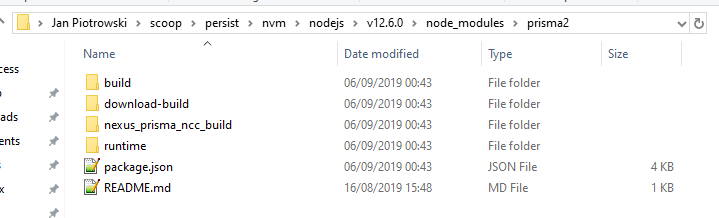
The file does exist not when you installed via cmd.exe (because of https://github.com/prisma/prisma2/issues/503):
But it does _does_ exist when you installed Prisma2 using Cmder:
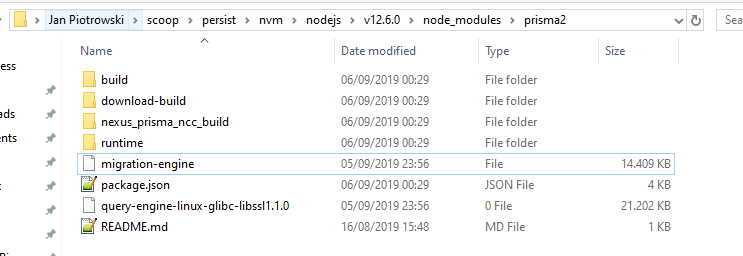
(The file is probably not executable on Windows as a child process it seems.)
 janpio
on 6 Sep 2019
janpio
on 6 Sep 2019
The PR that was just merged and some other should make Prisma2 including Lift work much better on Windows (meaning not in WSL, but directly in cmd.exe or Cmder).
janpio
on 10 Sep 2019
Related issues
 nickreynke
·
4Comments
nickreynke
·
4Comments
 julien1619
·
3Comments
julien1619
·
3Comments
 mariushab
·
3Comments
mariushab
·
3Comments
 RafaelKr
·
3Comments
RafaelKr
·
3Comments
 sameoldmadness
·
4Comments
sameoldmadness
·
4Comments
Most helpful comment
I can confirm that this works on
macOSwithout any issues so, as you said, it can be a Windows-only issue.