Microsoft-identity-web: Post Sign-out Redirect
Apologies if I've missed this in the documentation, samples, or source code!
What I'd like to achieve is the ability to, after the user clicks Sign-Out, redirect the user back to the home screen of the application. Currently they are left on the "it is a good idea to close all of your browser windows" screen.
I'm running an ASP.NET Core 3.1 MVC application, using Microsoft.Identity.Web/Microsoft.Identity.Web.UI 0.2.3-preview. The sign-out button uses the action hosted by Microsoft.Identity.Web.UI as below.
<a asp-controller="Account" asp-action="SignOut" asp-area="MicrosoftIdentity">Sign-out</a>
This sign-out is very helpful in the scenarios where:
(1) the user is stuck in a broken app, where an error has occurred in an AJAX component
(2) the user has changed roles and need a fresh claims token
 markholst
All 20 comments
@markholst : this is an app registration topic; you need to be sure that you register
See https://github.com/Azure-Samples/active-directory-aspnetcore-webapp-openidconnect-v2/tree/master/1-WebApp-OIDC/1-1-MyOrg#step-1-register-the-sample-with-your-azure-ad-tenant
 jmprieur
on 8 Sep 2020
jmprieur
on 8 Sep 2020
@jmprieur thanks for responding quickly, I know you are all very busy over there!
I have updated this setting in the App Registration. It hasn't solved the situation, but things have certainly changed.
After an iisreset and a fresh incognito session to run it through, I can see it now generates a different URL with "post_logout_redirect_uri=" in there. So far, so good!
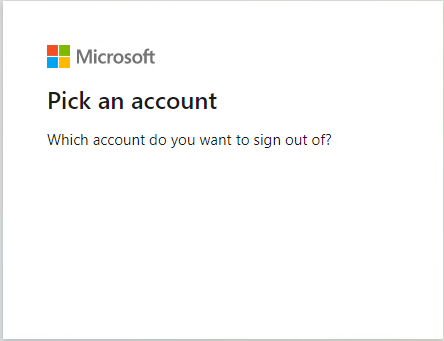
It then leaves me with this rather odd screen -
What else am I missing?
(I was looking on the web for the code that implements "signout-oidc", I assume this is part of Microsoft.Identity.Client and not Microsoft.Identity.Web?)
markholst
on 8 Sep 2020
@markholst it's actually ASP.NET Core that handles it.
jmprieur
on 8 Sep 2020
so one would need to set 'SignedOutRedirectUri'
I'll give this a go tomorrow
markholst
on 8 Sep 2020
yes, indeed.
Do you agree that we can close this issue?
jmprieur
on 9 Sep 2020
Hi @jmprieur, apologies for not responding sooner.
I am still having issues, and having difficulty pinning it down. I'll send through some additional details in the next couple of working days. I'd appreciate it if you could at least help give me a quick sanity check to ensure I haven't done anything silly.
I haven't checked in the last couple of weeks, but do the demos include the sign-out capability for ASP.NET Core 3 in an MVC scenario?
(I appreciate this is a cross-over between Microsoft.Identity.Web, Microsoft.Identity.Client, ASP.NET Core and Azure AD!)
markholst
on 11 Sep 2020
@markholst : did you see this sample: https://github.com/Azure-Samples/active-directory-aspnetcore-webapp-openidconnect-v2/tree/master/1-WebApp-OIDC/1-6-SignOut ?
jmprieur
on 23 Sep 2020
@jmprieur I have just read the linked article. There's no actual sample in that folder? I think I'm OK with the theory, it's more problems with the mechanics of it all...
I've reviewed my implementation again and can't quite piece together what's missing.
Reviewing the other samples under this repo:
- https://github.com/Azure-Samples/active-directory-aspnetcore-webapp-openidconnect-v2/blob/master/1-WebApp-OIDC/1-1-MyOrg/appsettings.json
- https://github.com/Azure-Samples/active-directory-aspnetcore-webapp-openidconnect-v2/blob/master/1-WebApp-OIDC/1-2-AnyOrg/appsettings.json
- https://github.com/Azure-Samples/active-directory-aspnetcore-webapp-openidconnect-v2/blob/master/1-WebApp-OIDC/1-3-AnyOrgOrPersonal/appsettings.json
- https://github.com/Azure-Samples/active-directory-aspnetcore-webapp-openidconnect-v2/blob/master/1-WebApp-OIDC/1-4-Sovereign/appsettings.json
They are all quite consistently defining:
- "CallbackPath": "/signin-oidc",
- "SignedOutCallbackPath": "/signout-callback-oidc"
Reviewing the App Registration documentation at:
This specifies the redirect URIs:
- https://WebApp-OpenIDConnect-DotNet-code-v2-contoso.azurewebsites.net
- https://WebApp-OpenIDConnect-DotNet-code-v2-contoso.azurewebsites.net/signin-oidc
And the signout URI as:
- In the Advanced settings section set Logout URL to https://WebApp-OpenIDConnect-DotNet-code-v2-contoso.azurewebsites.net/signout-oidc
When I run through the sign-out process in my ASP.NET CORE 3.1 web app:
- I have Sign out button, this has the URL
https://localhost:44340/MicrosoftIdentity/Account/SignOut
When I click Sign out...
- I am directed to a screen which says "Pick an account"
This uses the URL https://login.microsoftonline.com/(tenantid)/oauth2/v2.0/logout?post_logout_redirect_uri=https%3A%2F%2Flocalhost%3A44340%2Fsignout-callback-oidc&state=(stuff-in-here)&x-client-SKU=ID_NETSTANDARD2_0&x-client-ver=5.5.0.0
When I click the account...
- I am directed to a screen which says "Hang on a moment while we sign you out"... this then refreshes but with a new message "You signed out of your account. It's a good idea to close all browser windows."
The URL for this is https://login.microsoftonline.com/(tenantid)/oauth2/v2.0/logoutsession
markholst
on 15 Oct 2020
Yes @markholst this is the expected experience.
Proposing to close this issue. Feel free to reopen if you disagree.
jmprieur
on 20 Oct 2020
Ahh, thanks @jmprieur!
I guess this is potentially straying into a different question, but for context helps provide some understanding on motivation behind our requirement.
We used to have a fairly efficient user workflow where a user would hit sign-out, and would quickly redirect back to the home page.
This all changed when we introduced Microsoft.Identity.Web.UI into the solution.
Now, the reason behind needing to efficiently sign-out/sign-in was related to the problem where we'd have Service Calls within Controllers, ViewComponents and AJAX calls fail because they would receive the dreaded MsalUiRequiredException.
This has been significantly improved by introducing the AuthorizeForScopes attribute to our Controllers, but this didn't solve errors arising in ViewComponents and AJAX calls.
Our key ViewComponent that fails is the one that renders the LHS navigation menu, which is part of _layout.cshtml. This regularly hits our Security API.
We integrated Microsoft.Identity.Web.UI around 3 months ago, and for the life of me I cannot find the link to the official how-to documentation. I was hoping to confirm if there is a solution available to our problem.
We're actually updating now to Microsoft.Identity.Web / Microsoft.Identity.Web.UI 1.1.0 and will re-assess how everything is going after this round of app patching. Fingers crossed!
markholst
on 21 Oct 2020
Also, well done on getting everything out of preview - a major milestone for your team I'm sure! :)
markholst
on 21 Oct 2020
@markholst - I came here with the same issue and wanted to share my results.
The answer: depends on the account.
I was using a free tenant created from a hotmail account: sampleemailhotmail.onmicrosoft.com. When I would signin/signout using the account that created the tenant ([email protected]) it would remain on the "You signed out of your account. It's a good idea to close all browser windows." window.
If I signin/signout using a user I created in the tenant ([email protected]) then the signout would redirect to /MicrosoftIdentity/Account/SignOut page.
Hope this helps.
 Phatius
on 10 Nov 2020
Phatius
on 10 Nov 2020
@jmprieur I want my users to see a custom SignedOut page, not the one at /MicrosoftIdentity/Account/SignedOut. I'm using Blazor, and the MicrosoftIdentity MVC page doesn't render with my site layout. Is there a way to do that?
 shanemikel
on 10 Nov 2020
shanemikel
on 10 Nov 2020
@Phatius thanks for this information, unfortunately we are limited to Azure AD tenancy accounts.
I have also been integrating React based SPA apps using the MSAL JavaScript library, using the redirect methodology (as opposed to popups). This does _exactly_ what I want it to do, i.e. after sign-out I am redirected back to the app as an unauthenticated user - perfect!
markholst
on 12 Nov 2020
@markholst @shanemikel I was struggling with this and came up with a solution. Maybe it would help others as well.
Since under the hood this is just another razor page, it can be overridden by a UI that we want. It's a similar approach that was done before this Identity web library came into the picture.
You can create a razor page at the exact same path and it will use the provided UI instead of the default.
This is where the file needs to go

Sample code

Final rendered output

You can get the code of the default UI from here and customize accordingly
https://github.com/AzureAD/microsoft-identity-web/blob/master/src/Microsoft.Identity.Web.UI/Areas/MicrosoftIdentity/Pages/Account/SignedOut.cshtml
@jmprieur Can you confirm if that's the expected approach to take?
 abhisheksiddhu
on 6 Dec 2020
abhisheksiddhu
on 6 Dec 2020
I have the same issue as @shanemikel, I would like to have it to redirect to a custom url instead of redirect to /MicrosoftIdentity/Pages/Account/SignedOut. I have SignedOutCallbackPath defined but it doesn't work, it always ends at /MicrosoftIdentity/Pages/Account/SignedOut.
 vitali-karmanov
on 14 Jan 2021
vitali-karmanov
on 14 Jan 2021
@vitali-karmanov You can write a redirect after the loading of this page
abhisheksiddhu
on 16 Jan 2021
@abhisheksiddhu I've tried your approach and created the SignedOut.cshtml but I get the following Build error
_The type 'Areas_MicrosoftIdentity_Pages_Account_SignedOut' in 'C:\Projects\MB\cp\pb.ClinicianPortal.Web\obj\Debug\netcoreapp3.1\Razor\Areas\MicrosoftIdentity\Pages\Account\SignedOut.cshtml.g.cs' conflicts with the imported type 'Areas_MicrosoftIdentity_Pages_Account_SignedOut' in 'Microsoft.Identity.Web.UI.Views, Version=1.1.0.0, Culture=neutral, PublicKeyToken=null'. Using the type defined in 'C:\Projects\MB\cp\pb.ClinicianPortal.Web\obj\Debug\netcoreapp3.1\Razor\Areas\MicrosoftIdentity\Pages\Account\SignedOut.cshtml.g.cs'._
Any thoughts?
I've continued this conversation on a similar issue. Don't want to split resources across two issues. The other issue is, https://github.com/AzureAD/microsoft-identity-web/issues/758#issuecomment-780689916
 munkii
on 17 Feb 2021
munkii
on 17 Feb 2021
That's an expected warning telling that you're overriding the provided view from the library with your view. You can safely ignore this warning in this particular scenario.
It's similar to when we try to override a non-virtual method in a derived class, it warns us that it's hiding the method from the base class and we should use the new keyword if the method hiding was intended. Unfortunately, we don't yet have a solution, or maybe I am not aware of a way to similarly tell the razor compiler that this override was intended.
abhisheksiddhu
on 18 Feb 2021
I created the SignedOut razor page as described above, and was also getting the build error. I was able to solve it by changing the namespace of the model.
 witheej
on 5 Mar 2021
witheej
on 5 Mar 2021
Related issues
 jennyf19
·
4Comments
jennyf19
·
5Comments
jennyf19
·
4Comments
jennyf19
·
5Comments
 ArieJones
·
3Comments
ArieJones
·
3Comments
 Cholo981
·
3Comments
Cholo981
·
3Comments
 mia01
·
4Comments
mia01
·
4Comments
Most helpful comment
@jmprieur I want my users to see a custom SignedOut page, not the one at /MicrosoftIdentity/Account/SignedOut. I'm using Blazor, and the MicrosoftIdentity MVC page doesn't render with my site layout. Is there a way to do that?