Microsoft-identity-web: [Bug] Redirect URI is set to http instead of https when deploying to Azure App Service for Docker container (Linux)
Which Version of Microsoft Identity Web are you using ?
Microsoft Identity Web 1.0.0-preview
Where is the issue?
- Web App
- [ x ] Sign-in users
- [ ] Sign-in users and call web APIs
- Web API
- [ ] Protected web APIs (Validating tokens)
- [ ] Protected web APIs (Validating scopes)
- [ ] Protected web APIs call downstream web APIs
- Token cache serialization
- [ ] In Memory caches
- [ ] Session caches
- [ ] Distributed caches
Other? - please describe;
Probably valid for most cases.
Is this a new or existing app?
This is an experiment to test an app with Microsoft.Identity.Web deployed to Azure App Service for Docker Containers.
Repro
- Open example 1-2-AnyOrg
- Add Docker support in Visual Studio (create standard Dockerfile)
- Build image
- Publish to container registry
- Create a new App Service using the container image
- Add configuration
- Browse new web app, and you will be redirected to login.microsoftonline.com as expected, but with
redirect_uri=http%3A%2F%2F<your app service name>.azurewebsites.net%2Fsignin-oidcinstead ofredirect_uri=https%3A%2F%2F<your app service name>.azurewebsites.net%2Fsignin-oidc. - Manually changing the redirect URI to HTTPS will enable authentication and the app will work as expected.
Expected behavior
Expected to be redirected to the HTTPS-page.
Actual behavior
Error AADSTS50011 is shown in the browser, as there is a mismatch between registered redirect-URIs.
Possible Solution
Maybe there is a way to configure the App Service to avoid this issue? Or is there a way to configure Microsoft.Identity.Web to use HTTPS in the redirect URI?
Additional context/ Logs / Screenshots
The application log shows the following:
Microsoft.AspNetCore.HttpsPolicy.HttpsRedirectionMiddleware[3]: Failed to determine the https port for redirect.
There is a hint here that SSL should not be enabled in the web app, but how is it possible to not have SSL enabled in the web app, but still have HTTPS in the redirect URI?
 mochr
mochr
All 43 comments
I'm seeing the same behavior using example 1-1, deployed to a regular Azure App Service (not docker). Reply urls in azure are set to https, "domain" in the appsettings.json is set to https, but when I try to use the login mechanism, it's passing http as my reply url. Works fine in localhost while debugging.
 BurritoSmith
on 24 Apr 2020
BurritoSmith
on 24 Apr 2020
@BurritoSmith : did you add the right redirect URIs (with https:) in the app registration for your application?
 jmprieur
on 24 Apr 2020
jmprieur
on 24 Apr 2020
Spec
(updated on 07/05/2020)
Why?
In order to avoid customers to have to update the redirect URI in the code when they deploy their Web apps, the redirect URI is computed automatically by ASP.NET Core (part of the auth code flow), and also by Microsoft.Identity.Web (in TokenAcquisition.BuildConfidentialClientApplicationAsync).
Note that this does not prevent developers to add redirect URI in the app registration portal, but this allow them to have the same code for debugging locally and for deployed applications if they wish to.
The MSAL.NET part is here:
Although this solves many cases, there are cases (like working in containers, or with reverse proxys), where this is not flexible enough
The openIDConnect redirect URI is computed by ASP.NET Core, but can be overriden by subscribing to the OpenIdConnect OnRedirectToIdentityProvider event and by setting the context.ProtocolMessage.RedirectUri property to the desired redirect URI.
Same problem for the post logout redirect URI used in global sign-out. It needs to be overridable, and that can be done but subscribing to the OnRedirectToIdentityProviderForSignOut openIdConnect event and setting the context.ProtocolMessage.PostLogoutRedirectUri property.
What?
Given the following config
"CallbackPath": "/signin-oidc",
"SignedOutCallbackPath ": "/signout-callback-oidc",
The proposal is to add new properties in MicrosoftIdentityOptions to override the redirect URI and the post logout redirect URI:
- Add
RedirectUriinMicrosoftIdentityOptions - Add
PostLogoutRedirectUriinMicrosoftIdentityOptions
Given the following config
// "CallbackPath": "/signin-oidc",
// "SignedOutCallbackPath ": "/signout-callback-oidc",
"RedirectUri ": "http://mywebapp.mycompany.com/signin-oidc",
"PostLogoutRedirectUri": "http://mywebapp.mycompany.com/signout-callback-oidc",
- Use these properties in the AddSignIn method:
In the builder.AddOpenIdConnect(openIdConnectScheme, options =>
{ bloc:
var redirectToIdpHandler = options.Events.OnRedirectToIdentityProvider;
options.Events.OnRedirectToIdentityProvider = async context =>
{
// Call what Microsoft.Identity.Web is doing
await redirectToIdpHandler(context);
// Override the redirect URI to be what you want
if(microsoftIdentityOptions.RedirectUri != null)
{
context.ProtocolMessage.RedirectUri = (microsoftIdentityOptions.RedirectUri;
}
};
var redirectToIdpForSignOutHandler = options.Events.OnRedirectToIdentityProviderForSignOut;
options.Events.OnRedirectToIdentityProviderForSignOut = async context =>
{
// Call what Microsoft.Identity.Web is doing
await redirectToIdpForSignOutHandler(context);
// Override the redirect URI to be what you want
if (microsoftIdentityOptions.PostLogoutRedirectUri )
{
context.ProtocolMessage.PostLogoutRedirectUri = microsoftIdentityOptions.PostLogoutRedirectUri;
}
};
});
__
@jennyf19 @pmaytak @bgavrilMS @henrik-me : what do you think?
jmprieur
on 24 Apr 2020
@jmprieur yes, the redirect URIs in the app registration are set to https. I actually mis-informed you yesterday when I said my app was hosted on azure (it was late in the day and I was tired and confused about which particular one this was....). This particular app is an internal one that is hosted behind a load balancer. The nodes host the application on http using ports to separate each application in IIS but the load balancer accepts https traffic then forwards that on to the nodes over http. So in this model the nodes seem to be checking themselves and determining that they are being hosted over http and therefore changing the reply url that gets passed up accordingly. I haven't sniffed the traffic out, but it's possible that in the flow, they're actually passing the machine name that's hosting them rather than the host.domain name we're using to reach our LB. IE http://mymachinename:44200 instead of https://myhost.mydomain.com. I have seen a few different errors from the MS login about mismatched reply URLs when the machine names are not included.
In any case, being able to override the behavior you described above would be a must for our situation. We can not rely on our machines accurately obtaining a computed return URL. I assumed that it was using the "domain" property in the JSON config as the reply url. To me, you could use that in conjuction with the signin-oidc, or just add another property in the json config for us to manipulate what the reply url should be.
BurritoSmith
on 24 Apr 2020
Thanks for the explanation @BurritoSmith .
and for confirming that the spec above would work for you!
yes, we would use the CallbackPath JSON property:
jmprieur
on 24 Apr 2020
So am I understanding it correct that the property will be set to the following?
"CallbackPath": "https://<app_name>.azurewebsites.net/signin-oidc"
That would be perfect for me, and also having the possibility to not specify the full path for local development.
mochr
on 24 Apr 2020
I had a little bit of time this morning to play around with trying to manually add the return URI into the process. I was working with the file you mention above @jmprieur (microsoft-identity-web/src/Microsoft.Identity.Web/TokenAcquisition.cs) and wasn't able to get it to inject my return URI into the MS Login GET request with the querystring parameter set to my manual override. There is obviously something else going on deeper in the plumbing that I didn't dig into. Just for the heck of it, I also tried updating the CallbackPath property now to an absolute URI and that did not work (as I wouldn't expect it to since this hasn't been implemented in my current version) but it did throw an exception as it was not able to be parsed.
Please let us know when you've implemented your suggested changes so I can come back to this in my project. For now, I've had to roll back to an older version of our OpenID authentication process.
thanks so much.
BurritoSmith
on 27 Apr 2020
@BurritoSmith, we have prioritized fixing this issue (cc: @jennyf19)
Meanwhile, do you want to try the following (in your startup.cs) ?
public void ConfigureServices(IServiceCollection services)
{
services.AddSignIn(Configuration);
services.Configure<OpenIdConnectOptions>(OpenIdConnectDefaults.AuthenticationScheme,
options => {
var redirectToIdpHandler = options.Events.OnRedirectToIdentityProvider;
options.Events.OnRedirectToIdentityProvider = async context =>
{
// Call what Microsoft.Identity.Web is doing
await redirectToIdpHandler(context);
// Override the redirect URI to be what you want
context.ProtocolMessage.RedirectUri = "your redirect URI";
};
});
// More code here ...
}
I tested this solution, and it works for sign-in 👍 The sign-out redirect URI (post_logout_redirect_uri) is still http though. You can test the app at https://demoopenid.azurewebsites.net/.
mochr
on 28 Apr 2020
@mochr : thanks for confirming.
You can also the post logout URI with context.ProtocolMessage.PostLogoutRedirectUri = "your post logout URI";
Updating the code snippet:
public void ConfigureServices(IServiceCollection services)
{
services.AddSignIn(Configuration);
services.Configure<OpenIdConnectOptions>(OpenIdConnectDefaults.AuthenticationScheme,
options => {
var redirectToIdpHandler = options.Events.OnRedirectToIdentityProvider;
options.Events.OnRedirectToIdentityProvider = async context =>
{
// Call what Microsoft.Identity.Web is doing
await redirectToIdpHandler(context);
// Override the redirect URI to be what you want
context.ProtocolMessage.RedirectUri = "your redirect URI";
context.ProtocolMessage.PostLogoutRedirectUri = "your post logout URI";
};
});
// More code here ...
}
Thanks for the suggestion! I tested it and found that I needed to add the post logout URI to the OnRedirectToIdentityProviderForSignOut event. This solution works as expected with an added WebAppURI parameter in the configuration, but an integrated solution using absolute or relative CallbackPath/SignedOutCallbackPath would of course be preferable.
https://demoopenid.azurewebsites.net/ has been updated with the code below.
```c#
public void ConfigureServices(IServiceCollection services)
{
services.AddSignIn(Configuration);
services.Configure
options => {
var redirectToIdpHandler = options.Events.OnRedirectToIdentityProvider;
options.Events.OnRedirectToIdentityProvider = async context =>
{
// Call what Microsoft.Identity.Web is doing
await redirectToIdpHandler(context);
            // Override the redirect URI to be what you want
            if(Configuration["AzureAd:WebAppURI"] != null)
            {
                context.ProtocolMessage.RedirectUri = Configuration["AzureAd:WebAppURI"] + Configuration["AzureAd:CallbackPath"];
            }
        };

        var redirectToIdpForSignOutHandler = options.Events.OnRedirectToIdentityProviderForSignOut;
        options.Events.OnRedirectToIdentityProviderForSignOut = async context =>
        {
            // Call what Microsoft.Identity.Web is doing
            await redirectToIdpForSignOutHandler(context);

            // Override the redirect URI to be what you want
            if (Configuration["AzureAd:WebAppURI"] != null)
            {
                context.ProtocolMessage.PostLogoutRedirectUri = Configuration["AzureAd:WebAppURI"] + Configuration["AzureAd:SignedOutCallbackPath"];
            }
        };
    });

// More code here ...
}
```
mochr
on 28 Apr 2020
Awesome @mochr for confirming.
cc: @jennyf19 @pmaytak
jmprieur
on 28 Apr 2020
@jmprieur @jennyf19 I can confirm your suggested additions to the startup.cs file are also working in my above described environment. I agree with @mochr that your suggested change is more ideal however so I will wait to wait to re-implement this for our .net core 2.2 to .net core 3.1 upgrade when you have things finalized. Thanks so much for your work on this!
BurritoSmith
on 28 Apr 2020
Thanks for the quick response, but I don't think this issue is fully fixed. When i run the 1-2-AnyOrg example, the BuildConfidentialClientApplicationAsync is not run at all. It is the OpenIdConnectHandler from Microsoft.AspNetCore.Authentication.OpenIdConnect that seems to handle the sign in and sign out actions. This use the CallbackPath and SignedOutCallbackPath from OpenIdConnectOptions, which does not allow absolute URIs.
mochr
on 6 May 2020
@mochr : did you use your own version of Microsoft.Identity.Web (that you rebuilt yourself)?
we have not released Microsoft.Identity.Web-0.1.2-preview yet.
Fixed mean in master
The issue will be closed when we have released - should be today
cc: @jennyf19
jmprieur
on 6 May 2020
Yes, I have added the master branch as a dependency to the example project, and built from source.
mochr
on 6 May 2020
Oh, I see, this does not work for the first leg of the Auth code flow handled by the Web app when the user signs-in.
jmprieur
on 6 May 2020
@mochr : do you want to try again?
https://github.com/AzureAD/microsoft-identity-web/issues/115#issuecomment-618984571
jmprieur
on 11 May 2020
I have tested it in Azure App Service for Linux containers, and now it works! Thanks again 👏
mochr
on 11 May 2020
Thanks for confirming, @mochr
Do you need us to release urgently?
jmprieur
on 11 May 2020
No, there is no need to rush the next release for me. I guess the next release will be out soon anyway (within 2-3 weeks).
mochr
on 11 May 2020
For many people who only want to ensure https is used (instead of http) like myself as I'm running in a Docker container hosted in Azure App Service. I think a simpler option such as ForceHttpsRedirectUris = true in the configuration/options would be simpler. It would remove the need to specify the full absolute URI just to ensure https is used allowing the computed redirect URI to stay and just upgrade it to https. I'm concerned with managing the absolute URIs across configuration files and environments - relative paths as so much friendlier.
Here is what I've currently done which solved my issue of http being used when in a Docker container:
services.Configure<OpenIdConnectOptions>(OpenIdConnectDefaults.AuthenticationScheme,
    options => {
        var redirectToIdpHandler = options.Events.OnRedirectToIdentityProvider;
        options.Events.OnRedirectToIdentityProvider = async context =>
        {
            // Call what Microsoft.Identity.Web is doing
            await redirectToIdpHandler(context);

            // Override the redirect URI to be what you want
            if (context.ProtocolMessage?.RedirectUri?.StartsWith("http://") ?? false)
            {
                context.ProtocolMessage.RedirectUri = context.ProtocolMessage.RedirectUri.Replace("http://", "https://");
            }
        };

        var redirectToIdpForSignOutHandler = options.Events.OnRedirectToIdentityProviderForSignOut;
        options.Events.OnRedirectToIdentityProviderForSignOut = async context =>
        {
            // Call what Microsoft.Identity.Web is doing
            await redirectToIdpForSignOutHandler(context);

            // Override the redirect URI to be what you want
            if (context.ProtocolMessage?.PostLogoutRedirectUri?.StartsWith("http://") ?? false)
            {
                context.ProtocolMessage.PostLogoutRedirectUri = context.ProtocolMessage.PostLogoutRedirectUri.Replace("http://", "https://");
            }
        };
    });
 krispenner
on 13 May 2020
krispenner
on 13 May 2020
@BurritoSmith @mochr Included in 0.1.3-preview release
@krispenner - so you know @jmprieur will be opening a new issue for the feature you asked for here.
 jennyf19
on 16 May 2020
jennyf19
on 16 May 2020
@jennyf19 @jmprieur Thanks so much guys for your work on this. I haven't been following this super closely since I've been pretty crazy busy with several projects but I'm curious if this release will work on the first leg of the authentication process. @jmprieur mentioned above that a prior version would not and that's actually the only place I need it as I'm not using MSAL for my client-side stuff.
Thanks again for all your efforts!
BurritoSmith
on 16 May 2020
Yes, @BurritoSmith it will work on the first leg of the authentication process.
Thanks for your feedback. We appreciate much!
jmprieur
on 16 May 2020
I have tested it in Azure App Service for Linux containers, and now it works! Thanks again 👏
@mochr Can you please share working code sample? I'm still getting same error. Updated all nuget packages but still problem persists.
When I run application locally then it works but problem comes only when I deploy to Azure App Service (Container-linux).
@jmprieur It should have worked seamlessly but facing issues. Not sure why its not called out specifically with given fix (code sample) in any of the forum.
 AAGhotkar
on 26 May 2020
AAGhotkar
on 26 May 2020
@AAGhotkar Are you using version 0.1.3-preview of the Microsoft.Identity.Web and Microsoft.Identity.Web.UI packages?
Did you add the app settings for RedirectUri and PostLogoutRedirectUri in your configuration?
  {
    "name": "AzureAd__PostLogoutRedirectUri",
    "value": "https://<your app service name>.azurewebsites.net/signout-callback-oidc",
    "slotSetting": false
  },
  {
    "name": "AzureAd__RedirectUri",
    "value": "https://<your app service name>.azurewebsites.net/signin-oidc",
    "slotSetting": false
  },
And did you configure your app registration in Azure Ad with the redirect URI https://<your app service name>.azurewebsites.net/signin-oidc?
mochr
on 26 May 2020
@AAGhotkar where would you suggest we add it? templates? wiki page? samples?
jmprieur
on 26 May 2020
@jmprieur traditionally, detailed examples should go in the samples with a quick "how-to" on the home page of the repo. If there are different multiple implementations, they should be well marked in the samples with each sample titled for the implementation.
BurritoSmith
on 26 May 2020
@jmprieur I have read through this thread multiple times, and appreciate all of the suggestions. I have not been able to find any way of getting this to work for a Server Side Razor application running in a container on Azure. Is there a documentation example somewhere starting from scratch for a Blazor Server side App and deploying it to a container?
I, like the others can run from my local machine, but once deployed to Azure I get the following error:
AADSTS50011: The repoly URL specified in the request does not match the reply URLs configured for the applicaiton.
I followed this pattern by starting with a blazor server side application in Visual Studio 2019, and changed out the v1 code for v2 code.
The pattern there is different from the one above
i.e.
public class Startup
{
 ...
 // This method gets called by the runtime. Use this method to add services to the container.
 public void ConfigureServices(IServiceCollection services)
 {
  services.AddSignIn(Configuration, "AzureAd");

  services.AddRazorPages().AddMvcOptions(options =>
  {
   var policy = new AuthorizationPolicyBuilder()
                 .RequireAuthenticatedUser()
                 .Build();
   options.Filters.Add(new AuthorizeFilter(policy));
  }).AddMicrosoftIdentityUI();
I have tried various ways to incorporate the suggestions above into this pattern, and not been able to get any to work. (the closest that I have come is the application loops for a bit, then gets to a failure screen:
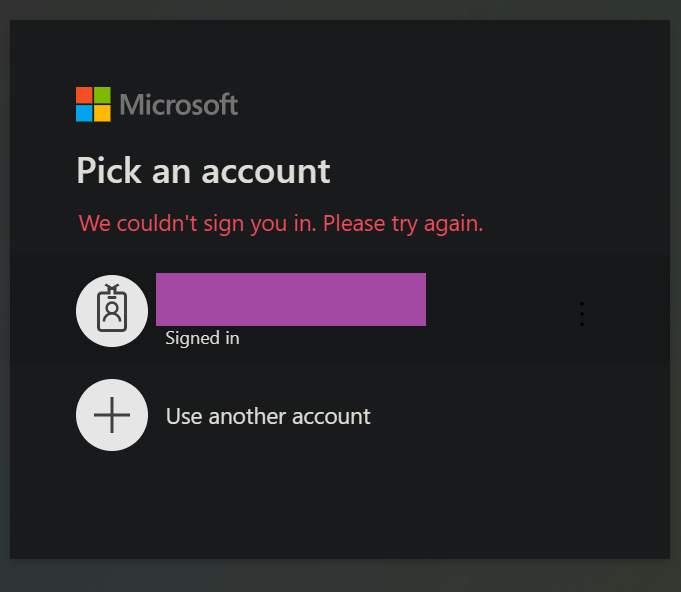
Question to @mochr and @krispenner, what project type are you running this code in? I like both of your suggestions. I just cant get either to work in my Blazor app.
 goshmiller
on 26 May 2020
goshmiller
on 26 May 2020
@goshmiller when you see the reply url failure message, what is the reply url in your browser address bar? That's the best way to troubleshoot any issues - make sure whatever that querystring variable is set to matches a valid reply url in your application in Azure.
BurritoSmith
on 26 May 2020
@BurritoSmith Thanks for the suggestion. I took a look, and in Chrome the redirect_uri parameter was exactly as it should be.
I then opened the application from Edge, and IE, and it worked there! Now I need to dig into why Chrome won't work for authentication when the other browsers do.
To Re-create what I did, I start with Visual Studio 2019 starting a Blazor App, Server side, change Authentication to "Work or School Accounts", enable docker support.
Then update the generated code from this:
public void ConfigureServices(IServiceCollection services)
        {
            services.AddAuthentication(AzureADDefaults.AuthenticationScheme)
                .AddAzureAD(options => Configuration.Bind("AzureAd", options));

            services.AddControllersWithViews(options =>
            {
                var policy = new AuthorizationPolicyBuilder()
                    .RequireAuthenticatedUser()
                    .Build();
                options.Filters.Add(new AuthorizeFilter(policy));
            });

            services.AddRazorPages();
            services.AddServerSideBlazor();
            services.AddSingleton<WeatherForecastService>();
        }
With the code gleaned from above (and the other articles about migrating to v2)
To this:
        public void ConfigureServices(IServiceCollection services)
        {

            services.AddSignIn(Configuration, "AzureAd");

            //https://docs.microsoft.com/en-us/azure/active-directory/develop/scenario-web-app-sign-user-app-configuration?tabs=aspnetcore
            services.AddRazorPages().AddMvcOptions(options =>
            {
                var policy = new AuthorizationPolicyBuilder()
                              .RequireAuthenticatedUser()
                              .Build();
                options.Filters.Add(new AuthorizeFilter(policy));
            }).AddMicrosoftIdentityUI();

            services.Configure<OpenIdConnectOptions>(OpenIdConnectDefaults.AuthenticationScheme,
            options =>
            {
                var redirectToIdpHandler = options.Events.OnRedirectToIdentityProvider;
                options.Events.OnRedirectToIdentityProvider = async context =>
                {
                    // Call what Microsoft.Identity.Web is doing
                    await redirectToIdpHandler(context);

                    // Override the redirect URI to be what you want
                    if (context.ProtocolMessage?.RedirectUri?.StartsWith("http://") ?? false)
                    {
                        context.ProtocolMessage.RedirectUri = context.ProtocolMessage.RedirectUri.Replace("http://", "https://");
                    }
                };

                var redirectToIdpForSignOutHandler = options.Events.OnRedirectToIdentityProviderForSignOut;
                options.Events.OnRedirectToIdentityProviderForSignOut = async context =>
                {
                    // Call what Microsoft.Identity.Web is doing
                    await redirectToIdpForSignOutHandler(context);

                    // Override the redirect URI to be what you want
                    if (context.ProtocolMessage?.PostLogoutRedirectUri?.StartsWith("http://") ?? false)
                    {
                        context.ProtocolMessage.PostLogoutRedirectUri = context.ProtocolMessage.PostLogoutRedirectUri.Replace("http://", "https://");
                    }
                };
            });

            services.AddServerSideBlazor();
            services.AddSingleton<WeatherForecastService>();
        }
Then I deploy the container to the Azure Container Registry, with an App Service. It now works for me in IE/Edge, but not Chrome.
goshmiller
on 27 May 2020
so you know @jmprieur will be opening a new issue for the feature you asked for here.
Can you provide a link to the new issue so I can track it please?
FYI https://github.com/AzureAD/microsoft-identity-web/issues/115#issuecomment-627758989
krispenner
on 10 Jun 2020
My bad, @krispenner, I thought I had linked it. It's https://github.com/AzureAD/microsoft-identity-web/issues/175
It's assigned to @pmaytak
jmprieur
on 10 Jun 2020
I have what appears to be this same issue when my web app is deployed on a HTTP server behind a HTTP reverse-proxy!
How do I discover when a fix is available?
 graemeWT
on 15 Jun 2020
graemeWT
on 15 Jun 2020
We are in the process of releasing a new version at the moment, @graemeWT.
@pmaytak will tell you when this is done (should be today PST time)
Meanwhile, you can use the RedirectUri and PostLogoutRedirectUri properties of the appsettings.json.
jmprieur
on 15 Jun 2020
Hi @jmprieur ,
I tried adding the RedirectUri and PostLogoutRedirectUri to the appsettings.json file, but AzureAD still gets the request with http://
I've tried using Microsoft.Identity.Web (and .UI) version 0.1.13-preview and 0.1.15-preview.
Just to be clear, where should we put this in the appsettings? as a new root child? Or as part of the "AzureAD" child?
{
  "Logging": { ...},
  "AllowedHosts": "*",
  "AzureAd": { ... },
  "RedirectUri":
   {
       "name": "AzureAd__RedirectUri",
       "value": "https://<myapp>.<mydomain>.com/signin-oidc",
       "slotSetting": false
   }
}
or
{
  "Logging": { ...},
  "AllowedHosts": "*",
  "AzureAd":
   {
       "Instance": "...",
       "Domain": "...",
       "TenantId": "...",
       "ClientId": "...",
       "CallbackPath": "/signin-oidc",
       "SignedOutCallbackPath": "/signout-callback-oidc",
       "ClientSecret": "...",
       "RedirectUri":
       {
            "name": "AzureAd__RedirectUri",
            "value": "https://<myapp>.<mydomain>.com/signin-oidc",
            "slotSetting": false
       }
   }
}
(The 2nd one seems to invalidate my Configuration)
 TimThaens
on 19 Jun 2020
TimThaens
on 19 Jun 2020
Hi, @TimThaens. Please try the methods specified in article Configure ASP.NET Core to work with proxy servers and load balancers to enable forwarded headers instead of using these redirect properties.
 pmaytak
on 20 Jun 2020
pmaytak
on 20 Jun 2020
@BurritoSmith @goshmiller @graemeWT @TimThaens @krispenner
We've been directed by the ASP .NET Core team to remove the MicrosoftIdentityOptions values of RedirectUri, PostLogoutRedirectUri, and ForceHttpsRedirectUris from the public API. These will be removed in the next release (0.2.0-preview).
The AspNetCore guidance for working with proxies is here
Address the issue centrally by using UseForwardedHeaders to fix up the request fields like scheme.
The container scenario should have been addressed by default in .NET Core 3.0
If there are issues with this for you, please contact the ASP .NET Core team, as they will be the right team to assist with this.
More info here.
cc: @jmprieur @Tratcher
jennyf19
on 23 Jun 2020
Hi,
Thanks for this email.
It is going to take me a while to work out what it means but I guess it is important.
Regards
Graeme
From: jennyf19 notifications@github.com
Sent: Wednesday, 24 June 2020 2:39 AM
To: AzureAD/microsoft-identity-web microsoft-identity-web@noreply.github.com
Cc: Graeme Thomson graeme.thomson@avaxa.com; Mention mention@noreply.github.com
Subject: Re: [AzureAD/microsoft-identity-web] [Bug] Redirect URI is set to http instead of https when deploying to Azure App Service for Docker container (Linux) (#115)
@BurritoSmithhttps://github.com/BurritoSmith @goshmillerhttps://github.com/goshmiller @graemeWThttps://github.com/graemeWT @TimThaenshttps://github.com/TimThaens @krispennerhttps://github.com/krispenner
We've been directed by the ASP .NET Core team to remove the MicrosoftIdentityOptions values of RedirectUri, PostLogoutRedirectUri, and ForceHttpsRedirectUris from the public API. These will be removed in the next release (0.2.0-preview).
The AspNetCore guidance for working with proxies is herehttps://docs.microsoft.com/en-us/aspnet/core/host-and-deploy/proxy-load-balancer?view=aspnetcore-3.1
Address the issue centrally by using UseForwardedHeaders to fix up the request fields like scheme.
The container scenario should have been addressed by default in .NET Core 3.0https://devblogs.microsoft.com/aspnet/forwarded-headers-middleware-updates-in-net-core-3-0-preview-6/
If there are issues with this for you, please contact the ASP .NET Core teamhttps://github.com/dotnet/aspnetcore, as they will be the right team to assist with this.
More infohttps://github.com/AzureAD/microsoft-identity-web/issues/223 here.
cc: @jmprieurhttps://github.com/jmprieur @Tratcherhttps://github.com/Tratcher
—
You are receiving this because you were mentioned.
Reply to this email directly, view it on GitHubhttps://github.com/AzureAD/microsoft-identity-web/issues/115#issuecomment-648279232, or unsubscribehttps://github.com/notifications/unsubscribe-auth/AAZRCTXDPLFH4A2UCBAHLYLRYDLBVANCNFSM4MNDW5PA.
graemeWT
on 24 Jun 2020
Many thanks, @jennyf19
The AspNetCore guidance for working with proxies worked for me.
TimThaens
on 25 Jun 2020
Thanks for confirming, @TimThaens
and thanks for the heads-up @Tratcher
jmprieur
on 25 Jun 2020
Updated the documentation Deploying Web apps to App services as Linux containers
jmprieur
on 25 Jun 2020
Related issues
 mia01
·
4Comments
mia01
·
4Comments
 Cholo981
·
3Comments
jmprieur
·
5Comments
Cholo981
·
3Comments
jmprieur
·
5Comments
 gjlumsden
·
6Comments
gjlumsden
·
6Comments
 mgmccarthy
·
4Comments
mgmccarthy
·
4Comments
Most helpful comment
Thanks for the suggestion! I tested it and found that I needed to add the post logout URI to the
OnRedirectToIdentityProviderForSignOutevent. This solution works as expected with an addedWebAppURIparameter in the configuration, but an integrated solution using absolute or relativeCallbackPath/SignedOutCallbackPathwould of course be preferable.https://demoopenid.azurewebsites.net/ has been updated with the code below.(OpenIdConnectDefaults.AuthenticationScheme,
```c#
public void ConfigureServices(IServiceCollection services)
{
services.AddSignIn(Configuration);
services.Configure
options => {
var redirectToIdpHandler = options.Events.OnRedirectToIdentityProvider;
options.Events.OnRedirectToIdentityProvider = async context =>
{
// Call what Microsoft.Identity.Web is doing
await redirectToIdpHandler(context);
}
```