Microsoft-graph-docs: Getting a 403 Forbidden when getting list of install apps.
The graph token it authorized with 'User.ReadWrite.All', and I'm doing a GET request to 'https://graph.microsoft.com/beta/users/{userid}/teamwork/installedApps'. And it throws a 403.
{
  "error": {
    "code": "UnknownError",
    "message": "",
    "innerError": {
      "date": "2020-08-11T19:28:08",
      "request-id": "ca6f85b6-9152-4330-a1c5-b6ce73378d30"
    }
  }
}
The token works, since I can remove "teamwork/installedApps" and it returns the user info.
Document Details
⚠ Do not edit this section. It is required for docs.microsoft.com ➟ GitHub issue linking.
- ID: 27e0c7db-a498-3c5b-f414-c7edb352b71a
- Version Independent ID: 957eb16a-547f-b7f4-5871-c2d64e1446db
- Content: List apps installed for user - Microsoft Graph beta
- Content Source: api-reference/beta/api/user-list-teamsappinstallation.md
- Product: microsoft-teams
- Technology: microsoft-graph
- GitHub Login: @clearab
- Microsoft Alias: MSGraphDocsVteam
 matula
All 14 comments
@matula ,
To get list of installed apps for the user you need to add all permissions as documented here. Could you please try adding the required permissions ?
 VaraPrasad-MSFT
on 12 Aug 2020
VaraPrasad-MSFT
on 12 Aug 2020
The permissions is normal, but I have the same error. It's been happening since yesterday.
 cho-minsoo
on 13 Aug 2020
cho-minsoo
on 13 Aug 2020
Hello @matula
I have been able to reproduce the error from Graph Explorer using delegated permissions. Are you also using delegated permissions in your requests? However, if I use application permissions, I am able to retrieve the installed apps for a user.
Regards
Jarbas Horst
 JarbasHorst
on 13 Aug 2020
JarbasHorst
on 13 Aug 2020
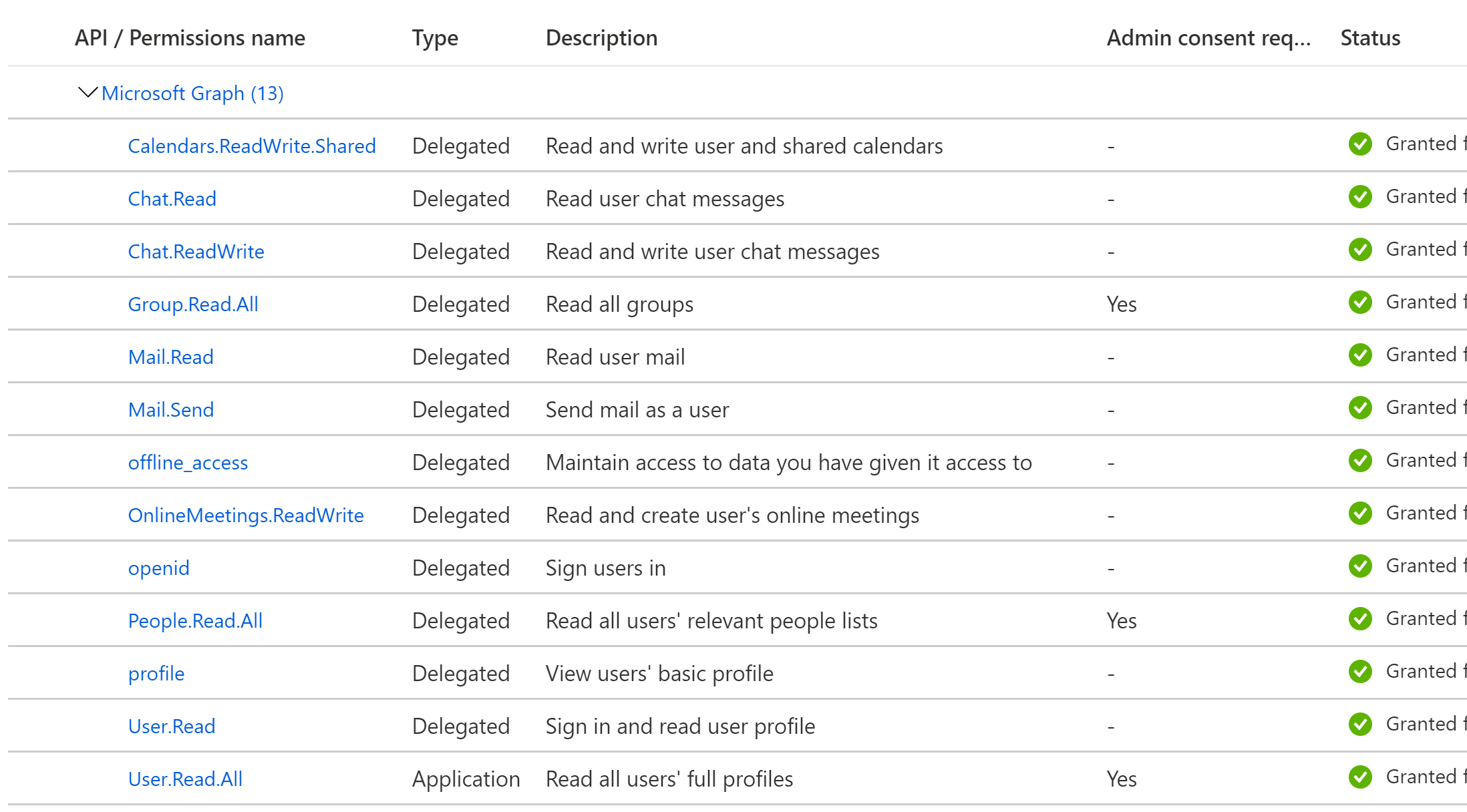
Our team is having the same issue, we have application permissions granted for this (we use user.read.all) and it still returns the 403 unknown error. It's worked fine from January 2020 until this week.
Below is a list of our permissions for reference.
 NiceJingle
on 14 Aug 2020
NiceJingle
on 14 Aug 2020
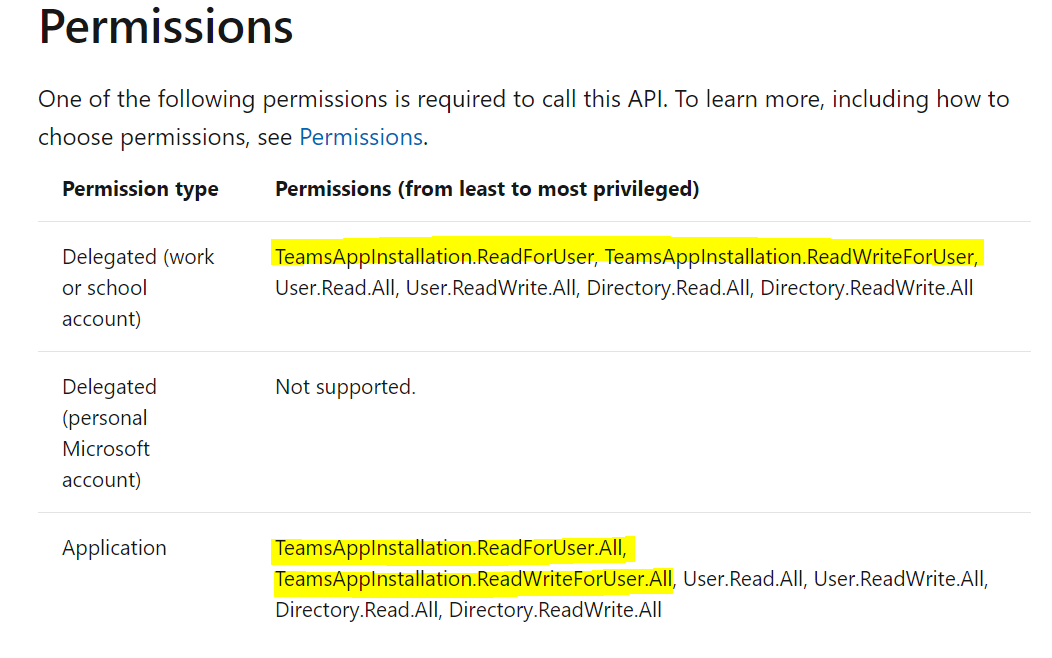
To get the list of apps installed for a user you need additional permissions
For Delegate
TeamsAppInstallation.ReadForUser,
TeamsAppInstallation.ReadWriteForUser
also, could you please find below screen shot for your reference, and check the docs for more info.
VaraPrasad-MSFT
on 17 Aug 2020
Adding those permissions did not fix the issue. In addition, the docs list to have one of those permissions, which we already had (user.read.all).
NiceJingle
on 17 Aug 2020
Adding those permissions did not fix the issue. In addition, the docs list to have one of those permissions, which we already had (user.read.all).
Hey @VaraPrasad-MSFT - Who can we escalate this to? This API is clearly broken and not working the way the document you provided says it should. We clearly have the User.Read.All (see @NiceJingle screen show) but it's still not working.
@eketo-msft @AckoMSFT @ArunMSFT @SeanMSFT @BenV-MSFT
 chipallen
on 17 Aug 2020
chipallen
on 17 Aug 2020
@chipallen ,The document is recently updated . permissions required to call this API.
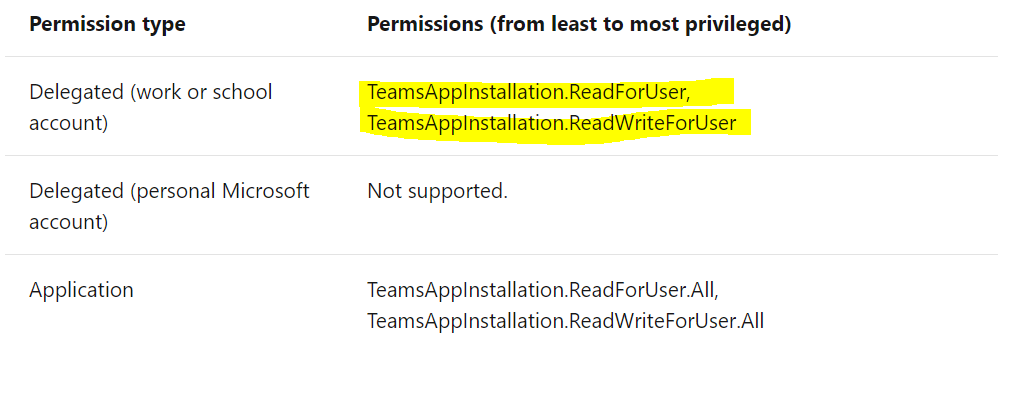
I have not found mentioned permissions in your permissions list.
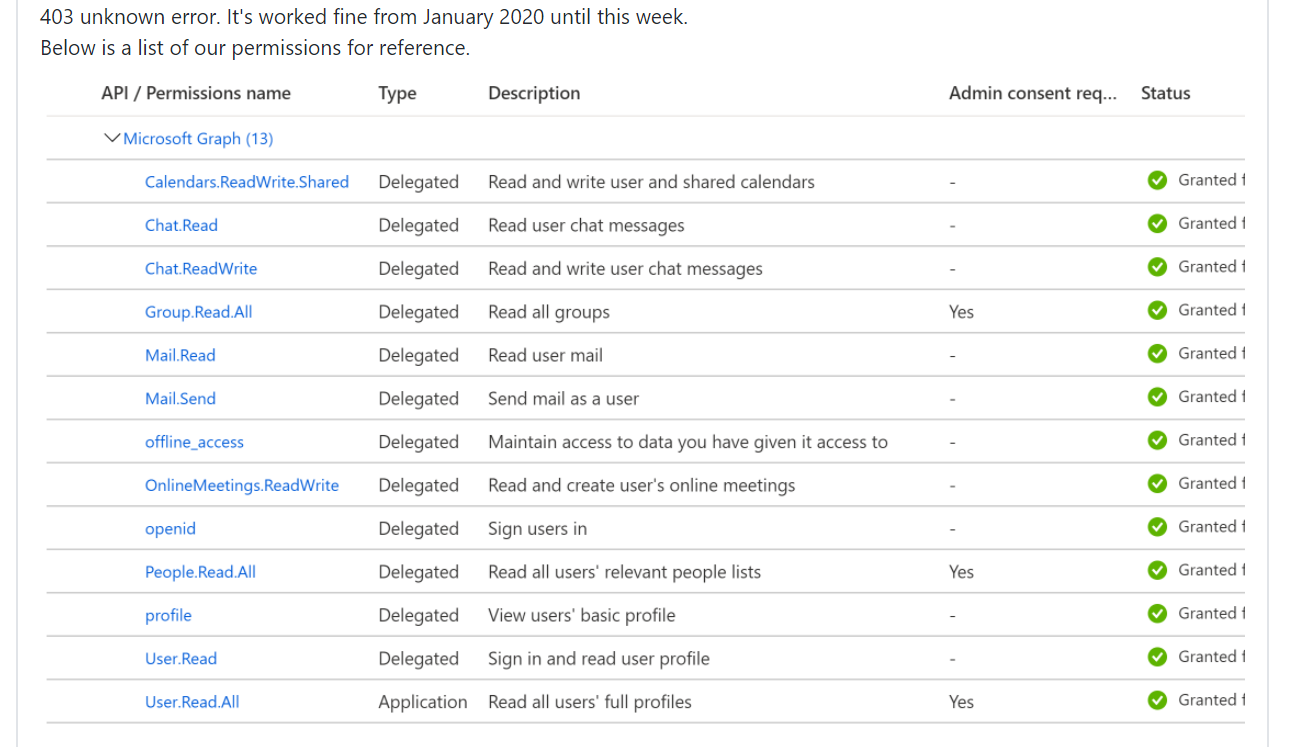
please add the required permissions as i mentioned above. Let me know if you face any issues.
VaraPrasad-MSFT
on 18 Aug 2020
@VaraPrasad-MSFT
I added those permissions as well
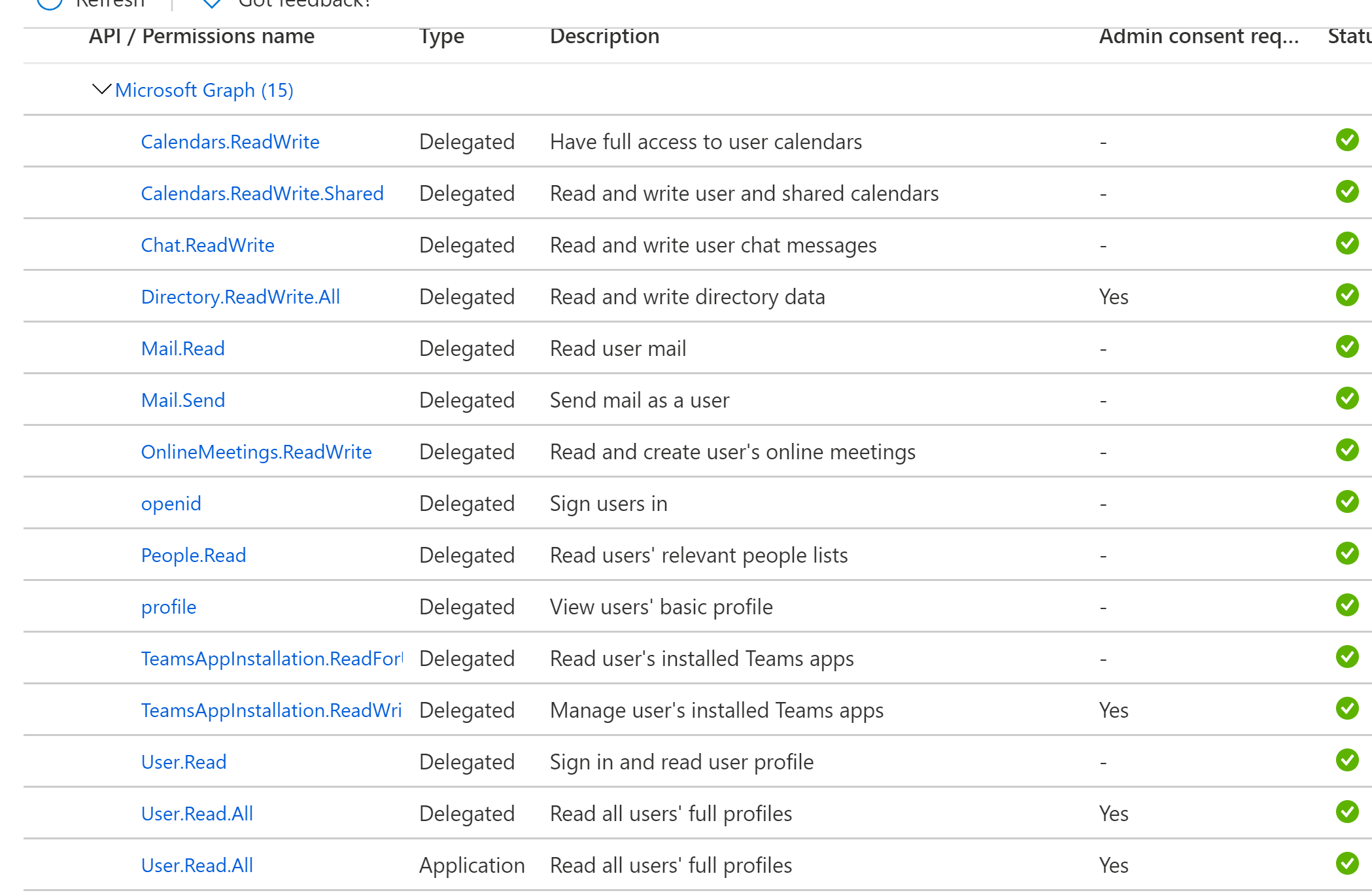
After doing that I get the same error, that does not fix anything.

NiceJingle
on 18 Aug 2020
@chipallen, @NiceJingle, @matula - Can any one of you just confirm if your token has the required permissions mentioned.
This looks like bug. Your confirmation will help me processed creating bug.
 Abhijit-MSFT
on 20 Aug 2020
Abhijit-MSFT
on 20 Aug 2020
Please re-open if this issue still persists
 Gousia-Begum
on 28 Aug 2020
Gousia-Begum
on 28 Aug 2020
Please reopen this as we need to understand if this is a bug and the ETA for getting a fix. @Abhijit-MSFT any updates?
 scottsa-msft
on 28 Aug 2020
scottsa-msft
on 28 Aug 2020
Hey have been having issues with my local and tunneling issues so testing has been slowed for me. On our dev I've added the permissions the the token and the call still fails. I ran it through the JWT to verify that the permissions are there which is posted below. We did switch the token since our old one was application level while these are delegated.

NiceJingle
on 28 Aug 2020
As of this morning, everything seems to be working fine (working on both dev and local). Not sure what changed but feel free to close.
NiceJingle
on 31 Aug 2020
Related issues
 GregSpyra
·
4Comments
GregSpyra
·
4Comments
 nilleb
·
4Comments
nilleb
·
4Comments
 abhatt29
·
4Comments
abhatt29
·
4Comments
 Chotimir
·
3Comments
Chotimir
·
3Comments
 findyoucef
·
4Comments
findyoucef
·
4Comments