Microsoft-graph-docs: API to update presence?
This is awesome, will there be an API to update the presence anytime soon? This is really urgent. Thanks!
Document Details
⚠ Do not edit this section. It is required for docs.microsoft.com ➟ GitHub issue linking.
- ID: f2d11937-be0f-5dba-2172-be5a53b40b30
- Version Independent ID: 4d94466a-1d49-c36f-da1d-50d24f5c0661
- Content: presence resource type - Microsoft Graph beta
- Content Source: api-reference/beta/resources/presence.md
- Product: cloud-communications
- Technology: microsoft-graph
- GitHub Login: @ananmishr
- Microsoft Alias: MSGraphDocsVteam
 AnkitsCode
All 15 comments
https://presence.teams.microsoft.com/v1/presence/getpresence/
would be preferable to return status message as "note" and out of office etc
"presence":{"sourceNetwork":"Self","note":{"message":"I'm testing this..","publishTime":"2020-02-11T15:41:43.3135946Z","expiry":"2020-02-11T23:59:59.999Z"},"calendarData":{"isOutOfOffice":false},"capabilities":["Audio","Video"],"availability":"Available","activity":"Available","deviceType":"Web"}
 danjus10
on 11 Feb 2020
danjus10
on 11 Feb 2020
Any news on this, @ananmishr?
 nrishoj
on 24 Mar 2020
nrishoj
on 24 Mar 2020
Is there any news regarding this matter @ananmishr @AnkitsCode
 Rowdy
on 20 Apr 2020
Rowdy
on 20 Apr 2020
Undocumented https://presence.teams.microsoft.com/v1/me/publishnote works to update your presence. Using developer tools in Chrome, updating the status and then taking a look at the network posts.
 Absoblogginlutely
on 21 May 2020
Absoblogginlutely
on 21 May 2020
@Absoblogginlutely Hy Andy how to you use the publishnote API to set it?
Rowdy
on 26 May 2020
I've been hesitant to write this up as it's not officially supported as there is nothing about the presence.teams.microsoft.com api online (apart from this thread basically) and so far I haven't had time to work out how to calculate the value of the authorization header. However you can do the following.
Log into teams.microsoft.com in chrome and open up the developer tools by pressing F12. Select the network tab and then in the main window click your avatar at the top right and enter a status update. In developer tools, select network tab, scroll to the publish note entry in the left
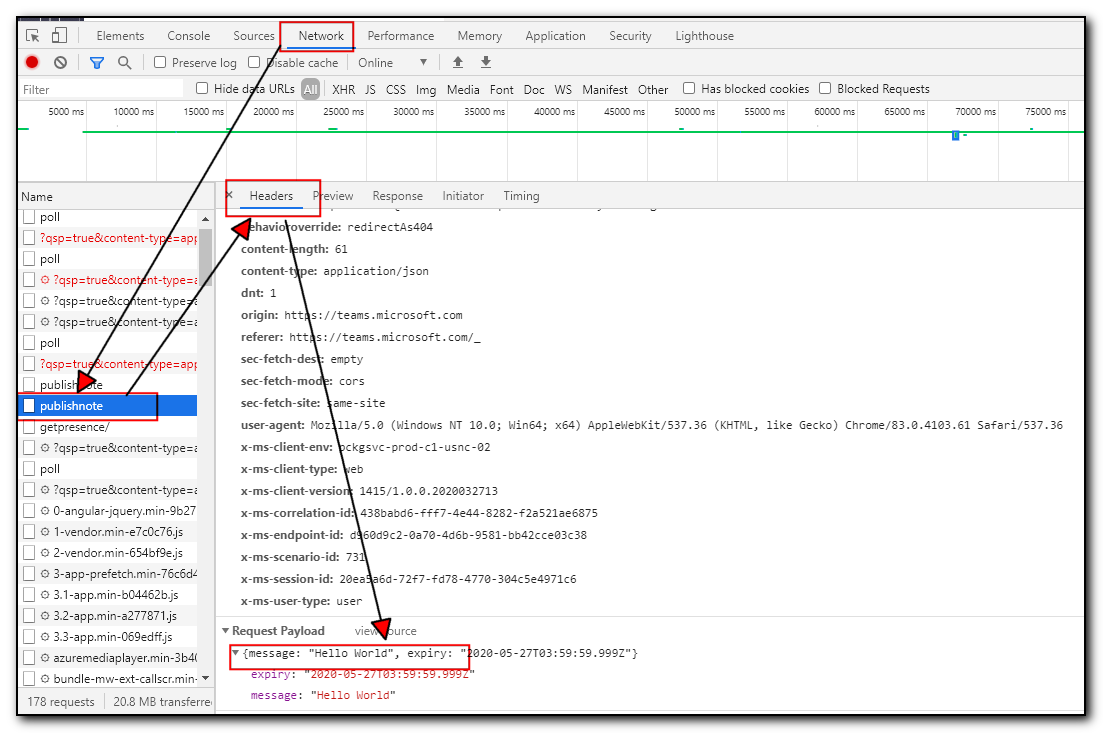
Select the headers tab and you can see the entry you just posted.
Right click publish note in the left window, choose copy/copy as powershell
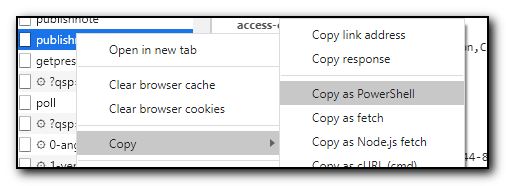
You can then copy the resulting code into your powershell editor of choice, and then edit away
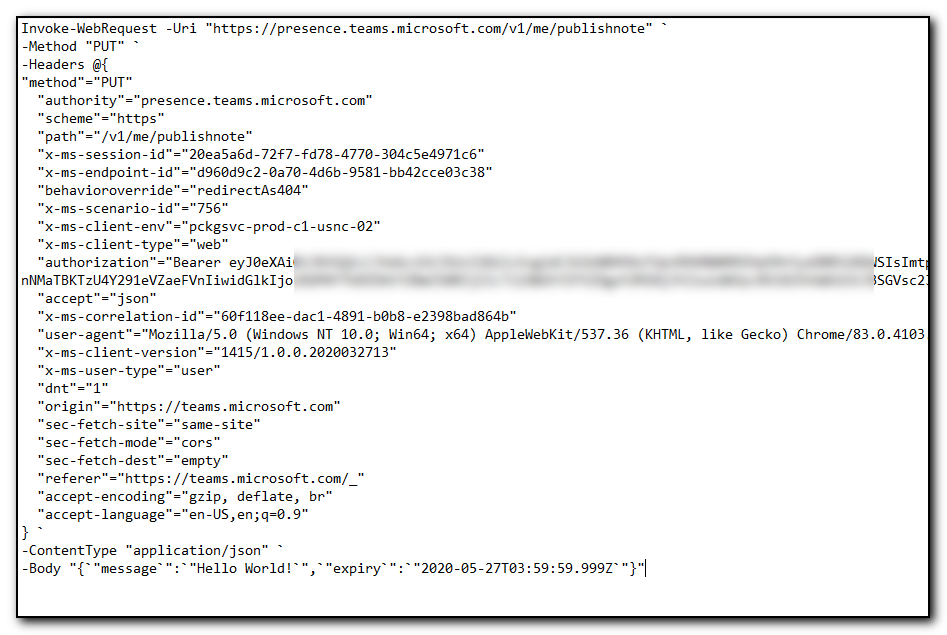
Note the authorization is going to change after time (I think it's an hour) so the next thing to automate is obtaining that header automatically from the logged in session from the browser.
I've not had time (or experience) in grabbing that information yet.
Absoblogginlutely
on 26 May 2020
Actually the funny thing is that my tenant uses the presence API for the status change.
Presence API for status and Publishnote for status text 😯
Rowdy
on 26 May 2020
I only see the graph api as having read only access and you can't set permissions to presence.teams.microsoft.com in the same way that you would the graph api in Azure AD apps.
Absoblogginlutely
on 26 May 2020
Note the authorization is going to change after time (I think it's an hour) so the next thing to automate is obtaining that header automatically from the logged in session from the browser.
I've not had time (or experience) in grabbing that information yet.
@Absoblogginlutely Have you got around to looking at this one again?
Can you use configured Azure auth API access auth to set the user presense with:
https://presence.teams.microsoft.com/v1/{userID}/publishnote
instead of https://presence.teams.microsoft.com/v1/me/publishnote
 PylotLight
on 4 Aug 2020
PylotLight
on 4 Aug 2020
Can anyone give any kind of update at all on the setting of presence (even if it's pretty vague)? Is it being worked on and if not then is it in the pipeline and if so then approx when might it start to be worked on? Any kind of timescales at all, i.e. 2 months time, 6 months time? Any kind of feedback would be appreciated...
If there isn't then is there any kind of interim programmatic alternative method for the setting, e.g. an older API etc? (The above thread looks to be something done via Chrome which is not feasible for a server app).
 simon-gillespie-acrinax-com
on 21 Oct 2020
simon-gillespie-acrinax-com
on 21 Oct 2020
I think changing the presence is not that easy as requested here, but of course needed. This request is from February, why is nobody answering? So everybody, please vote here: https://microsoftteams.uservoice.com/forums/555103-public/suggestions/39651298-microsoft-graph-presence-api
What I mean with not that easy: There can't be something like a single changeable presence status for a whole ecosystem like this. There can only be a single aggregated value to get, but never to set.
For example MS Teams think: ok, he is on the machine. He is there. So it set "available" for its own.
Outlook "think", Oh, he is in a meeting now, its not a teams meeting but anyway: you are busy.
You started a call for this meeting using whatever other app from non-MS, that uses the new "presence API", it set you also as busy. After the call the non-MS set the status to available, but you now leaved the seat.
So at the end every app has to maintain his own presence status, it should never set something like a global status, as a app does not and can't know something about your global status. The global status must be some aggregation of all the different app statuses. I already see a lot of issues already where only outlook and teams trying to set the correct presence status, that's often already wrong.
So Microsoft: Please add an per app status option and do some nice status aggregation for that then.
 bormm
on 26 Oct 2020
bormm
on 26 Oct 2020
@bormm, I would actually see this as an automated method of reproducing the functionality that is already in the client with setting the presence and status message manually. We already have a method to set Teams status to Away (or offline) until changed that overwrites any auto detected status.
Although your logic of having multiple presence states is correct, the requested functionality is doing the same as clicking the buttons in the gui which still leads to the issues you pointed out.
However I would say the manual setting of a status should override any automatic detection of status (until an optional timeout period of the status expires similar to the status text showing for a predetermined amount of time).
It's already technically possible to set the status through powershell as demonstrated above using an API - I've just not found the way to authenticate with the api manually (yet), however I've not had as much time to investigate recently.
Absoblogginlutely
on 28 Oct 2020
@Absoblogginlutely I see your point, but I also see a lot of issues come if more apps want to change the status. Your question was about setting "the" presence status, now you are requesting setting the status of teams which is I think a relevant difference. Of course the later one should be possible at least for teams addins, but would it make sense for example "Zoom" is allowed to change the teams presence status? And what about if you do not have O365 without teams? In that case you can't the the status of teams. I have sent my comment and a link to the uservoice to the MS-Teams team, maybe they will take a look into this.
bormm
on 28 Oct 2020
@Absoblogginlutely Regarding the fields in your screenshot, I can see that the bearer and also correlation-id are from acquiring the access token (AuthenticationResult), where from Graph would I get the session-id and endpoint-id ?
simon-gillespie-acrinax-com
on 30 Oct 2020
Was thinking about the auth situation, would it be possible for a Teams bot to act as a user and ask the bot to change status for you similar to how you would edit it yourself in the UI?
Update: Haven't been able to get this to work, as I can't replicate the auth token/cookie that teams generates, and theres no write permission for Graph.
PylotLight
on 3 Nov 2020
Related issues
 gi-joe-moto
·
3Comments
gi-joe-moto
·
3Comments
 joostvdlinden
·
4Comments
joostvdlinden
·
4Comments
 fredericklin
·
3Comments
fredericklin
·
3Comments
 abhatt29
·
4Comments
abhatt29
·
4Comments
 RobinBreman
·
4Comments
RobinBreman
·
4Comments
Most helpful comment
Is there any news regarding this matter @ananmishr @AnkitsCode