Microsoft-graph-docs: Can't view my own presence
When running the beta presence API query.
https://graph.microsoft.com/beta/me/presence
I get the below. What permissions should I need to view my own presence?
{
"error": {
"code": "Unauthorized",
"message": "Unauthorized",
"innerError": {
"request-id": "e41d5f28-5fc1-4f01-8e15-a8264b337303",
"date": "2019-12-11T16:06:45"
}
}
}
Document Details
⚠ Do not edit this section. It is required for docs.microsoft.com ➟ GitHub issue linking.
- ID: d56857e6-428f-e4ea-f77e-e2662fc7e7ae
- Version Independent ID: 01e364fb-9af7-8fe6-a662-185ed233132d
- Content: Get presence - Microsoft Graph beta
- Content Source: api-reference/beta/api/presence-get.md
- Product: cloud-communications
- Technology: microsoft-graph
- GitHub Login: @VinodRavichandran
- Microsoft Alias: MSGraphDocsVteam
 alexpeasleyghc
All 20 comments
Same issue here. And what about GET/PATCH method, any ETA on that?
 jfremmegaard
on 12 Dec 2019
jfremmegaard
on 12 Dec 2019
Same here
 JanLochi
on 13 Dec 2019
JanLochi
on 13 Dec 2019
@JanLochi and @jfremmegaard. It looks like it is a an Admin permission that has to be set. I don't have the rights to do it in my Org. But that seems to be the default behavior.
alexpeasleyghc
on 13 Dec 2019
@JanLochi and @jfremmegaard. It looks like it is a an Admin permission that has to be set. I don't have the rights to do it in my Org. But that seems to be the default behavior.
I am not so sure. Even if I grant "Admin Consent" in Azure AD to the application, I get a 401.
What is strange is I do get the permissions in my token, just 401 when I try and read mine or others presence:
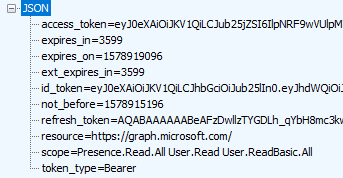
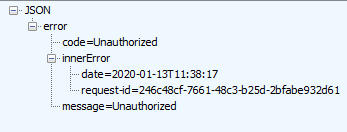
FWIW it works in Graph Explorer, but that is different AAD application to our own.
 leeford
on 13 Jan 2020
leeford
on 13 Jan 2020
@alexpeasleyghc is this issue fixed now once you have admin permissions?
@jfremmegaard Do you mean a PATCH method for presence?
@leeford Would you be able to resend the request again?
 ananmishr
on 17 Jan 2020
ananmishr
on 17 Jan 2020
@ananmishr Still the same I am afraid.
leeford
on 20 Jan 2020
@ananmishr In the new Graph Explorer it does not show what permissions I need.
In the old Graph Explorer it doesn't either, but there I am able to give myself presence.read and/or prescence.readall if I use an admin account.
With those permissions in place it works. But that a /me resource should need more access rights is strange. I should be able to see my own presence?
And a PATCH method yes. It's more important (at least for us) to be able to programatically change our presence than to get it. Like setting do not disturb when turning on our pomodoro app. Any ETA on that?
jfremmegaard
on 20 Jan 2020
I tried creating an app in my organization and pulling an auth token, but I get a "Need admin approval" error. I was able to do this in Skype For Business no problem with the Lync api. I could try going to an admin and asking for approval, but it seems like I should be able to pull my own status. I'm just trying to turn a light on when I'm on the phone.
 e2m32
on 19 Feb 2020
e2m32
on 19 Feb 2020
I tried creating an app in my organization and pulling an auth token, but I get a "Need admin approval" error. I was able to do this in Skype For Business no problem with the Lync api. I could try going to an admin and asking for approval, but it seems like I should be able to pull my own status. I'm just trying to turn a light on when I'm on the phone.
Exactly my thinking
JanLochi
on 19 Feb 2020
I tried creating an app in my organization and pulling an auth token, but I get a "Need admin approval" error. I was able to do this in Skype For Business no problem with the Lync api. I could try going to an admin and asking for approval, but it seems like I should be able to pull my own status. I'm just trying to turn a light on when I'm on the phone.
Exactly my thinking
Same! I still can't believe there's no way to just programmatically obtain whether you're busy or not. The Teams application is doing it constantly behind the scenes, how hard is it to open that up for Developers to use.
All we want to do is trigger a process once we become 'busy' in Teams.
 JamieBriersSageCom
on 6 Mar 2020
JamieBriersSageCom
on 6 Mar 2020
Not sure if this will work for everyone, but I just discovered this by accident. My organization just moved over to Teams completely and has fazed out Skype for Business. However, I can still open Skype for Business and it opens with very limited functionality. It's there just to join a meeting with another organization that is still using it. The neat thing is that Skype for Business is syncing my status now with Teams, and I can pull my S4B status from the Lync API. This wasn't possible when they were both running congruently. I'm back in business. 👍 This is an acceptable band-aid until the Teams status API is out of beta.
How to use Lync API with Home Assistant (could be adapted for another use case): https://community.home-assistant.io/t/skype-for-business-status-in-home-assistant/111930/4
e2m32
on 24 Mar 2020
Same for me. Error below when trying to get presence via /me/presence and also via /users/{id}/presence. I do have admin and permissions/consent for Presence.Read and Presence.Read.All. Any word on this?
{
  "error": {
    "code": "Unauthorized",
    "message": "Unauthorized",
    "innerError": {
      "request-id": {request-id},
      "date": "2020-03-28T17:40:13"
    }
  }
}
 Pepijn1908
on 28 Mar 2020
Pepijn1908
on 28 Mar 2020
Add me to the list of users that find it strange that it would need an admin to grant me privileges to fetch my own status. Need this for a Do not disturb sign on my door now that I work from home with kids around that constantly keep entering while I'm in web conference meetings.
Ain't no one around to give us an answer to this?
 tobylo
on 4 Apr 2020
tobylo
on 4 Apr 2020
I am trying to build the same thing @tobylo is trying to build. It would be great to get my own presence and not have to ask for admin rights to do so
 alexbuczynsky
on 5 Apr 2020
alexbuczynsky
on 5 Apr 2020
Same for me. Error below when trying to get presence via /me/presence and also via /users/{id}/presence. I do have admin and permissions/consent for Presence.Read and Presence.Read.All. Any word on this?
{
  "error": {
    "code": "Unauthorized",
    "message": "Unauthorized",
    "innerError": {
      "request-id": {request-id},
      "date": "2020-03-28T17:40:13"
    }
  }
}
Unfortunately, I'm facing exactly the same issue. I have configured admin consent for my test tenant and it still doesn't work. My scope is set to:
Presence.Read Presence.Read.All User.Read User.Read.All
 DevSecNinja
on 5 May 2020
DevSecNinja
on 5 May 2020
Tested again today in Graph Explorer. Now I was able to give myself consent to view my own presence. Still strange that I have to give consent to view my own presence
jfremmegaard
on 6 May 2020
@jfremmegaard Yep. I just tried this and was able to get a valid response back via the Graph Explorer. Thanks for pointing that out! Agreed about it being strange to give consent to viewing my own presence.... I am not an admin as well. There are other consents that I clicked on that I can't grant because of that. But the teams consent did work.
alexpeasleyghc
on 6 May 2020
I'm confused, Presence.Read is showing as not needing admin approval, but when I get my app to request it in the scope, it says it needs admin approval!? To view my own presence?
 brettjenkins
on 2 Jun 2020
brettjenkins
on 2 Jun 2020
@brettjenkins yeah that can be a confusing experience. If you are prompted that you need Admin approval for a permission scope that doesn't normally require admin consent, that typically indicates that your tenant admins have disabled your ability to consent to Graph scopes without their approval. The idea is that admins want to control which apps have access to your data. This can be done granularly - they can specify a set of scopes they're ok with you consenting to, and all others are blocked. We have this in place here at Microsoft, which is why I use test tenants for all my testing.
To address the question of why you need to consent at all: Graph apps never act AS the user, they act on the user's behalf, and can only do those actions that you have delegated access to through the consent process. They have to get your consent to access specific bits of data (email, calendar, presence, etc.). Once you consent once, then you shouldn't have to again.
 jasonjoh
on 3 Jun 2020
jasonjoh
on 3 Jun 2020
I understand, but it's annoying when you're trying to put something together with your own data.
brettjenkins
on 12 Jun 2020
Related issues
 joostvdlinden
·
4Comments
joostvdlinden
·
4Comments
 RobinBreman
·
4Comments
RobinBreman
·
4Comments
 mlafleur
·
3Comments
mlafleur
·
3Comments
 andrewfabrizi
·
3Comments
andrewfabrizi
·
3Comments
 findyoucef
·
4Comments
findyoucef
·
4Comments
Most helpful comment
Add me to the list of users that find it strange that it would need an admin to grant me privileges to fetch my own status. Need this for a Do not disturb sign on my door now that I work from home with kids around that constantly keep entering while I'm in web conference meetings.
Ain't no one around to give us an answer to this?