Microsoft-graph-docs: C# example working?
I'm having difficulty getting the C# example code working. Is something wrong between the Graph Client SDK and the underlying rest API when it comes to StartDateTime, an EndDateTime? I'm able to make a direct Graph call to createAccessReviews, but unable to create a similar successful request using the Graphclient SDK and new AccessReview.
Document Details
⚠ Do not edit this section. It is required for docs.microsoft.com ➟ GitHub issue linking.
- ID: 57f84938-19d4-3e44-d736-2853b4ff6ddc
- Version Independent ID: 614de428-3bc4-d330-aed7-d045d772ff97
- Content: Create accessReview - Microsoft Graph beta
- Content Source: api-reference/beta/api/accessreview-create.md
- Product: microsoft-identity-platform
- Technology: microsoft-graph
- GitHub Login: @davidmu1
- Microsoft Alias: MSGraphDocsVteam
 chadcarlton
All 4 comments
I also can not get a successful .Net call working with all required params, @chadcarlton did you ever figure this one out?
 NotAlexx
on 13 Mar 2020
NotAlexx
on 13 Mar 2020
I must say, the documentation does not state a C# method (any more?). It is obvious enough though how we would achieve this with the .NET SDK for the Graph.
I tried a lot of different input objects, to no avail. I also saw that DateTimeOffset.MaxValue adds more decimals when serializing the object (see screenshot below). I took the start and end date of an access review I created manually in Azure and used those in the object for the new access review to be created. That also did not work.
I'm going to try using plain HTTP calls now, but it's a bummer.
@davidmu1 @darrelmiller I confirm this issue. Can you or MS in general recreate the bug / investigate as to why this is?
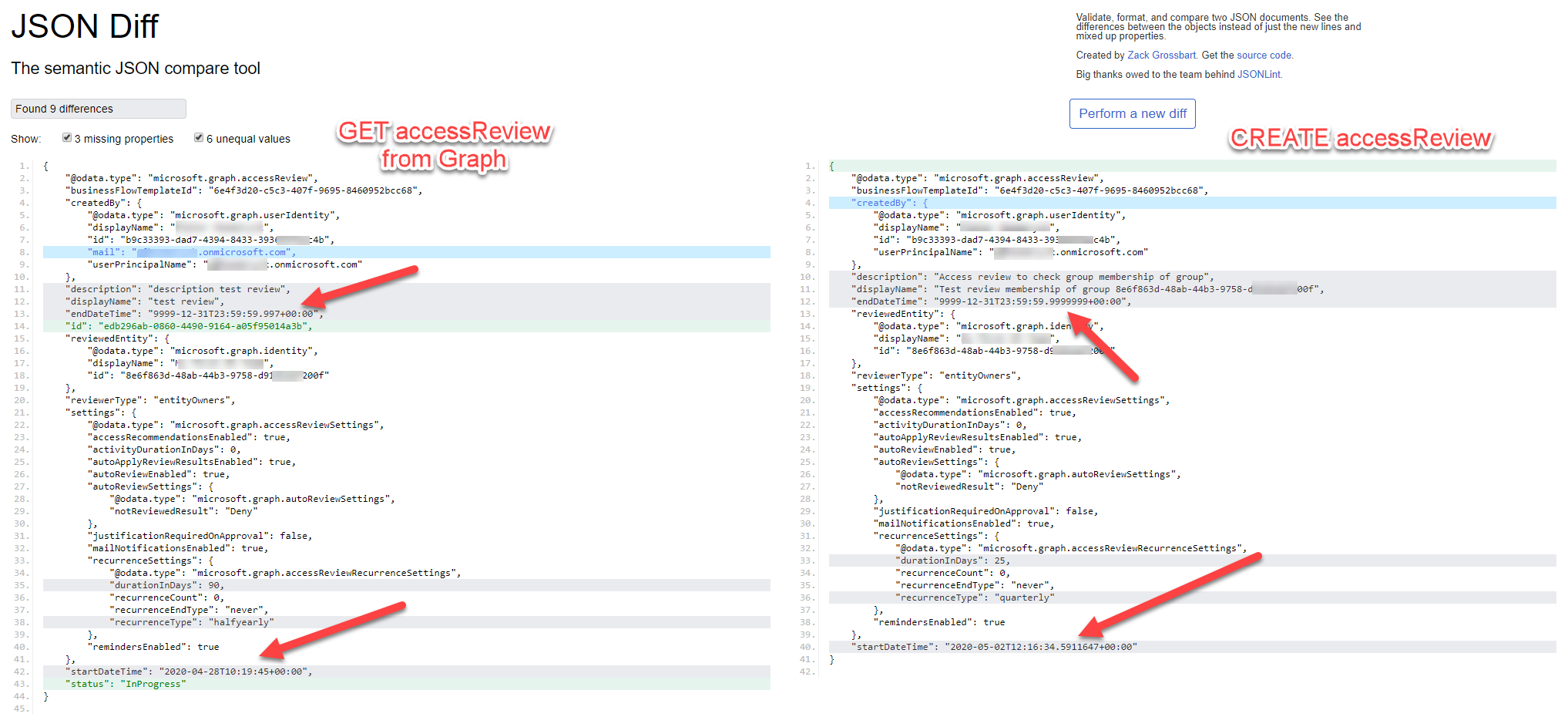
How I did this was:
- Follow the steps to use a beta Graph client
- Console application
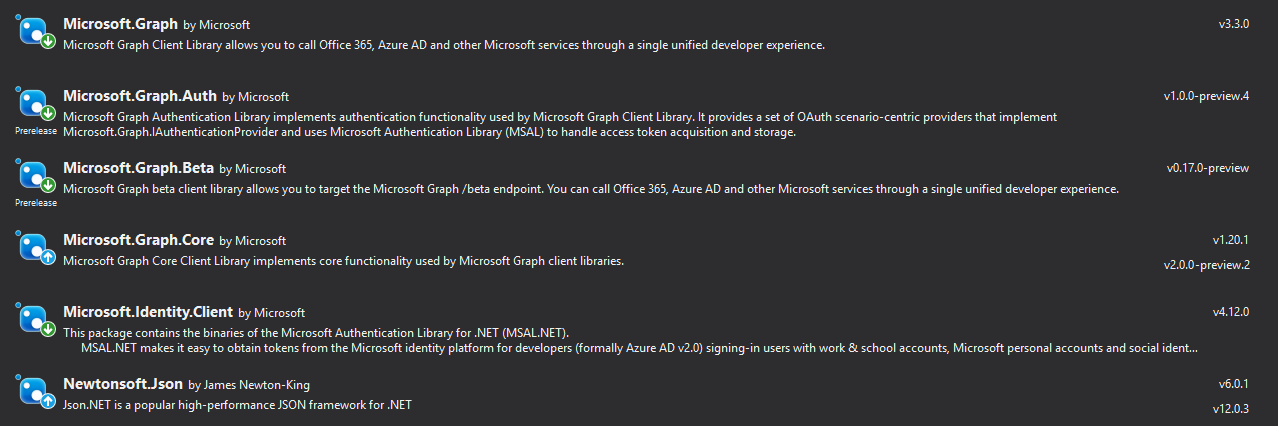
NuGet packages:
extern alias BetaLib;
using System.Linq;
using System.Threading.Tasks;
using Microsoft.Graph;
using Microsoft.Graph.Auth;
using Microsoft.Identity.Client;
using Beta = BetaLib.Microsoft.Graph;
using Newtonsoft.Json;

namespace AccessReviews.Console
    {
    class Program
    {
        static async Task Main(string[] args)
        {
            var clientId = "<guid>";
            var clientSecret = "<guid>";
            var tenantId = "<guid>";

            var confidentialClient = ConfidentialClientApplicationBuilder.CreateWithApplicationOptions(new ConfidentialClientApplicationOptions
            {
                ClientId = clientId,
                ClientSecret = clientSecret,
                TenantId = tenantId
            }).Build();
            var authProvider = new ClientCredentialProvider(confidentialClient);
            // var graphClient = new GraphServiceClient(authProvider);

            Beta.GraphServiceClient betaClient = new Beta.GraphServiceClient(authProvider);

            // var businessTemplates = await betaClient.BusinessFlowTemplates.Request().GetAsync();
            var businessFlowTemplateId = "6e4f3d20-c5c3-407f-9695-8460952bcc68"; // /beta/businessFlowTemplates (same guid across tenants - this one is: Access reviews of memberships of a group)
            var groupToBeReviewed = "<guid>";

            var accessReviews = await betaClient.AccessReviews.Request().Filter($"businessFlowTemplateId+eq+{{{businessFlowTemplateId}}}").GetAsync();
            var graphCorrectAccessReview = accessReviews.First();

            var accessReviewToCreate = new Beta.AccessReview
            {
                CreatedBy = new Beta.UserIdentity { Id = "<guid>", UserPrincipalName = "<upn>", DisplayName = "<name>"}, // Required property when using application permissions
                BusinessFlowTemplateId = businessFlowTemplateId,
                DisplayName = $"Test review membership of group {groupToBeReviewed}",
                ReviewedEntity = new Beta.Identity { Id = groupToBeReviewed, DisplayName = "<name>"},
                StartDateTime = graphCorrectAccessReview.StartDateTime, // also does not work: DateTimeOffset.UtcNow.AddDays(5),
                EndDateTime = graphCorrectAccessReview.EndDateTime, // also does not work: DateTimeOffset.MaxValue,
                Description = $"Access review to check group membership of group",
                ReviewerType = "entityOwners",
                Settings = new Beta.AccessReviewSettings
                {
                    MailNotificationsEnabled = true,
                    RemindersEnabled = true,
                    ActivityDurationInDays = 0,
                    AutoReviewEnabled = true,
                    AutoApplyReviewResultsEnabled = true,
                    AccessRecommendationsEnabled = true,
                    AutoReviewSettings = new Beta.AutoReviewSettings
                    {
                        NotReviewedResult = "Deny", // Approve, Deny or Recommendation
                        AdditionalData = null
                    },
                    RecurrenceSettings = new Beta.AccessReviewRecurrenceSettings
                    {
                        RecurrenceType = "weekly", // onetime, weekly, monthly, quarterly, or annual. Azure Portal reverse engineering suggests 'halfyearly' is also possible
                        DurationInDays = 3,
                        RecurrenceEndType = "never",
                        RecurrenceCount = 0,
                        AdditionalData = null
                    },
                    JustificationRequiredOnApproval = false,
                    AdditionalData = null
                },
                Decisions = null, // I also tried without setting all explicit null values
                Instances = null,
                MyDecisions = null,
                Reviewers = null,
                AdditionalData = null
            };

            // View JSON differences
            var s1 = JsonConvert.SerializeObject(graphCorrectAccessReview);
            var s2 = JsonConvert.SerializeObject(accessReviewToCreate);

            var response = await betaClient.AccessReviews.Request().AddAsync(accessReviewToCreate); // fails (bad request without extra info)

        }
    }
}
 PieterHeemeryck
on 27 Apr 2020
PieterHeemeryck
on 27 Apr 2020
Could you tell us what error you are receiving when trying to create the AccessReview? Is it simply invalid Request?
 darrelmiller
on 12 May 2020
darrelmiller
on 12 May 2020
Microsoft.Graph.ServiceException: 'Message: The request is invalid.
Inner error:
Message: accessReview : An error has occurred.
AdditionalData:
request-id: 0b924e0f-f2c1-4377-88ef-2d55d68cb136
date: 2020-05-13T07:01:04
ClientRequestId: 0b924e0f-f2c1-4377-88ef-2d55d68cb136
'
PieterHeemeryck
on 13 May 2020
Related issues
 fredericklin
·
3Comments
fredericklin
·
3Comments
 RobinBreman
·
4Comments
RobinBreman
·
4Comments
 bijithbalan
·
4Comments
bijithbalan
·
4Comments
 r3dh0t
·
4Comments
r3dh0t
·
4Comments
 cconrado
·
4Comments
cconrado
·
4Comments
Most helpful comment
I must say, the documentation does not state a C# method (any more?). It is obvious enough though how we would achieve this with the .NET SDK for the Graph.
I tried a lot of different input objects, to no avail. I also saw that DateTimeOffset.MaxValue adds more decimals when serializing the object (see screenshot below). I took the start and end date of an access review I created manually in Azure and used those in the object for the new access review to be created. That also did not work.
I'm going to try using plain HTTP calls now, but it's a bummer.
@davidmu1 @darrelmiller I confirm this issue. Can you or MS in general recreate the bug / investigate as to why this is?
How I did this was:
NuGet packages:
