Microsoft-graph-docs: Cannot segregate access by user mailboxes using EWS
According to this article (https://docs.microsoft.com/en-us/graph/auth-limit-mailbox-access) , there is now a way to segregate access per user for Exchange Online Mailboxes.
We have a background process (runs as a daemon without a signed-in user) that retrieves data from MS Teams in Office 365.
This process uses Client Credential Grant Flow to authenticate and then uses EWS API to retrieve the data.
We wanted to test to see how we can restrict the app to only have access to certain mailboxes and NOT all. Unfortunately, we found out that full_access_as_app permission is needed in order for the app to connect via EWS

When using this credential method and also scoping down user access to a certain set of users, it seems like scoping down (using https://docs.microsoft.com/en-us/graph/auth-limit-mailbox-access instructions) does not take affect (probably because full_access_as_app permission is a god-like permission).
When full_access_as_app permission is removed (Mail.Read permission is enabled), we get the following error from EWS:
REQUEST:
2019-09-06 17:58:29,030 [PT10] TRACE ExchangeTrace - [EwsRequest]
        <Trace Tag="EwsRequest" Tid="26" Time="2019-09-06 13:58:29Z" Version="3.0.0.0">

          <?xml version="1.0" encoding="utf-8"?>

          <soap:Envelope xmlns:xsi="http://www.w3.org/2001/XMLSchema-instance" xmlns:m="http://schemas.microsoft.com/exchange/services/2006/messages" xmlns:t="http://schemas.microsoft.com/exchange/services/2006/types" xmlns:soap="http://schemas.xmlsoap.org/soap/envelope/">

            <soap:Header>

              <t:RequestServerVersion Version="Exchange2016" />

              <t:DateTimePrecision>Milliseconds</t:DateTimePrecision>

              <t:ExchangeImpersonation>

                <t:ConnectingSID>

                  <t:SmtpAddress>[email protected]</t:SmtpAddress>

                </t:ConnectingSID>

              </t:ExchangeImpersonation>

            </soap:Header>

            <soap:Body>

              <m:GetFolder>

                <m:FolderShape>

                  <t:BaseShape>AllProperties</t:BaseShape>

                </m:FolderShape>

                <m:FolderIds>

                  <t:DistinguishedFolderId Id="conversationhistory">

                    <t:Mailbox>

                      <t:EmailAddress>[email protected]</t:EmailAddress>

                    </t:Mailbox>

                  </t:DistinguishedFolderId>

                </m:FolderIds>

              </m:GetFolder>

            </soap:Body>

          </soap:Envelope>

        </Trace>
RESPONSE:
2019-09-06 17:58:29,028 [PT5] TRACE ExchangeTrace - [EwsResponseHttpHeaders]
HTTP/1.1 **401 Unauthorized**
request-id: e5510dd0-be16-461f-8e98-b725425beecc
X-CalculatedFETarget: CY4PR18CU002.internal.outlook.com
X-BackEndHttpStatus: 401,401
X-FEProxyInfo: CY4PR18CA0046.NAMPRD18.PROD.OUTLOOK.COM
X-CalculatedBETarget: CY4PR22MB0439.namprd22.prod.outlook.com
X-RUM-Validated: 1
X-MailboxGuid: XXXXX
x-ms-diagnostics: 2000008;reason="**The token contains no permissions, or permissions can not be understood.**";error_category="**invalid_grant**"
X-BeSku: Gen9
X-DiagInfo: CY4PR22MB0439
X-BEServer: CY4PR22MB0439
X-Proxy-BackendServerStatus: 401
X-FEServer: CY4PR18CA0046,HE1P190CA0037
Content-Length: 0
Date: Fri, 06 Sep 2019 13:58:28 GMT
Set-Cookie: exchangecookie=XXXX expires=Sun, 06-Sep-2020 13:58:28 GMT; path=/; secure; HttpOnly
Server: Microsoft-IIS/10.0
WWW-Authenticate: Bearer client_id="XXXXX", trusted_issuers="XXXX@*", token_types="app_asserted_user_v1 service_asserted_app_v1", authorization_uri="https://login.windows.net/common/oauth2/authorize", error="invalid_token",Basic Realm=""X-Powered-By: ASP.NET
1) Is this expected? Or is this a bug?
2) https://docs.microsoft.com/en-us/azure/active-directory/develop/v2-oauth-ropc auth protocol, can technically be used here and then the user can be added as an impersonator in EWS, however it seems that MS does not recommend to use this flow anyway:
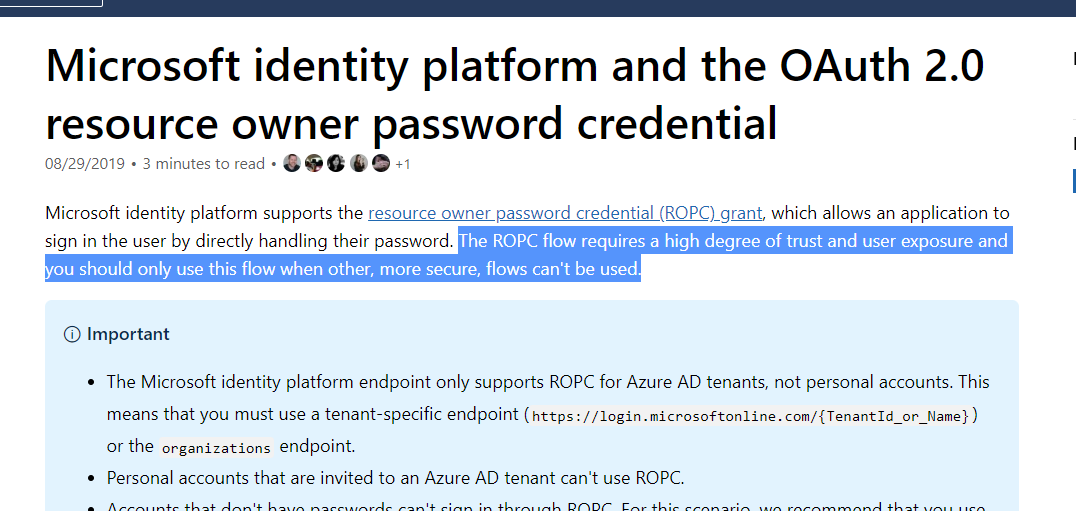
What would you recommend for us to do in this case? Our clients are asking us to give them control in Office 365 to decide which users (mailboxes) our app should have access to? I saw that there is conditional access feature (https://docs.microsoft.com/en-us/azure/active-directory/conditional-access/overview) but it does not seem to work for daemon apps (application runs as a background service without a signed-in user) like ours - this is being verified in here: https://github.com/MicrosoftDocs/azure-docs/issues/38584
This question has been repeatedly asked by our customers and we don't have a good answer at this point. Can you help?
Document Details
⚠ Do not edit this section. It is required for docs.microsoft.com ➟ GitHub issue linking.
- ID: 9ca1eed2-d0ca-11de-4f25-f09865605a0f
- Version Independent ID: 9fd423e0-86e4-b7e4-9249-1bacb51e81ad
- Content: Scoping application permissions to specific Exchange Online mailboxes - Microsoft Graph
- Content Source: concepts/auth-limit-mailbox-access.md
- Product: microsoft-identity-platform
- Technology: microsoft-graph
- GitHub Login: @svpsiva
- Microsoft Alias: MSGraphDocsVteam
 mishakogan
All 24 comments
@svpsiva - Hi any updates?
mishakogan
on 11 Sep 2019
@mishakogan the article you linked lists the supported permissions for scoping, and yes, EWS permissions are not included here. EWS is a completely different API than Graph.
Is there a reason you cannot use Graph (besides of course having to rewrite)? That would get you what you want.
If you need to stay with EWS, I haven't tested this scenario (been years since I've used EWS :)). However, the usual method of accomplishing this before OAuth was to have the app run as a dedicated service account. The admins would configure the account with impersonation rights just to the accounts they want (see https://docs.microsoft.com/exchange/client-developer/exchange-web-services/how-to-configure-impersonation). I suspect this would still work with OAuth, but as I said, I haven't tried it.
If you didn't want to use the ROPC flow for authenticating as a service account, you could use the Auth Code Flow to do an interactive login, get a token and refresh token, then save those in a secure cache or db somewhere so your app can silently get tokens for the service account. You'd need to handle scenarios where the refresh token gets invalidated (password changes, etc) and have the admin re-authenticate, but other than that it should work.
 jasonjoh
on 13 Sep 2019
jasonjoh
on 13 Sep 2019
@jasonjoh - thank you for your answers. Let me pull the list of Graph limitations that we encountered that forced us to use EWS.
I am aware of Impersonation method / scopes and can confirm that this method works to segregate access, however it is limited to Exchange Online and forces the use of Service Account and Basic Auth. In theory this should work with OAuth as well but have not tried.
mishakogan
on 13 Sep 2019
@mishakogan , i am on the same boat and exactly same implementation as yours and our client also not liking the fact that we can not limit it. Do post anything if you come across.
Seems like Microsoft would not want to implement as they are pushing more for graph API.
 chopraniitn
on 23 Sep 2019
chopraniitn
on 23 Sep 2019
@chopraniitn - great! As I am preparing the details on limitation of graph API for our use case, can you post graph limitations that you have experienced? This will help put urgency in this ask
mishakogan
on 23 Sep 2019
Hi
Thanks for sharing this feedback. We do not support ApplicationAccessPolicy based access control for EWS API's. These policies can only be used for access control when using Microsoft Graph or Outlook REST API's.
While we understand your need to have this capability in EWS, we have last year announced that EWS is in maintenance mode and will not be receiving any new features.
We would be very happy to engage with you and understand the blockers that prevent you from moving to Microsoft Graph.
Thanks
Sivaprakash
Senior PM, Microsoft
 svpsiva
on 26 Sep 2019
svpsiva
on 26 Sep 2019
Hello guys, We're
dealing with the same issue as #mishakogan.
We need to give a user / service account privilegies to manage all users mailboxes. Our app is a service app / daemon app with no user interaction (background proccess).
We understand that EWS is being deprecated, could you share with us a way to acomplish this using MS Graph?.
Thank you in advance.
 santiago-obando
on 14 Oct 2019
santiago-obando
on 14 Oct 2019
https://docs.microsoft.com/en-us/graph/auth-limit-mailbox-access has the details you need.
svpsiva
on 15 Oct 2019
Maybe this might help: https://stackoverflow.com/questions/57009837/how-to-get-oauth2-access-token-for-ews-managed-api-in-service-daemon-application/63175301#63175301
 robertmuehsig
on 30 Jul 2020
robertmuehsig
on 30 Jul 2020
Just to chip in with examples of blockers on moving to Graph API, and I know these may not be the same reasons for others:
Graph API does not support on-premises. We need both on-prem and 365 support. It is a lot of work and complexity supporting two APIs for both on-prem and 365, especially as EWS itself is very complicated.
Graph API doesn't appear to support streaming notifications, only web hooks. Web hooks are impractical for us due to having a server side application customers install and often cannot or refuse to open access to the outside world, so publishing webhook addresses isn't possible.
 tjmoore
on 8 Oct 2020
tjmoore
on 8 Oct 2020
To us the restriction with Graph is that we cannot access distribution lists.
 srudin
on 13 Nov 2020
srudin
on 13 Nov 2020
So as Graph is not allowing us to read out distribution lists (even the beta api does not support it) we have to use EWS for this. Giving full_access_as_app only for this is a significant risk that will not pass security audits.
The link posted by @svpsiva has been mentioned by OP at the very beginning already stating that it doesn't work for EWS.
The ROPC approach for using delegated access (impersonation) as linked by @robertmuehsig would work - but is not possible due to enforced two-factor-authentication. Is there a way around this? I think all our company accounts are required to use it so I cannot think of a workaround.
The approach described by @jasonjoh (interactive login + caching / refreshing access token) seems feasible but pretty complicated and rather unreliable. I would rather not want to go for this.
So running out of ideas... Any other suggestions?
srudin
on 13 Nov 2020
Seems I was wrong about 2FA being strictly enforced - we were able to create a user with disabled 2FA and so I tried the solution linked by @robertmuehsig. I did exactly as stated there but unfortunately I always get an "Unauthorized" exception when doing the EWS calls (OAuth calls succeed). Is this broken?
Also I can see that during the last few days the Exchange legacy API has disappeared from the selection on Azure when adding an API permission!!! It can still be added using Azure CLI commands but what is MS thinking here?
Once again a real head-banger what MS and Azure are offering here... and of course no response or support in any way. I guess I need to tell our customer that Microsoft is not allowing us to do what he wants - maybe moving to Google is an option? Let's see...
srudin
on 17 Nov 2020
Ok, so according to https://developer.microsoft.com/en-us/graph/blogs/upcoming-changes-to-exchange-web-services-ews-api-for-office-365/ this is no longer working. So how can I read out distribution lists from a specific mailbox without giving full access and without an interactive login?
srudin
on 17 Nov 2020
It seems that the "Exchange legacy API" is gone from the UI, but (at least with my setup) the app still works. This is the API permission from my app:
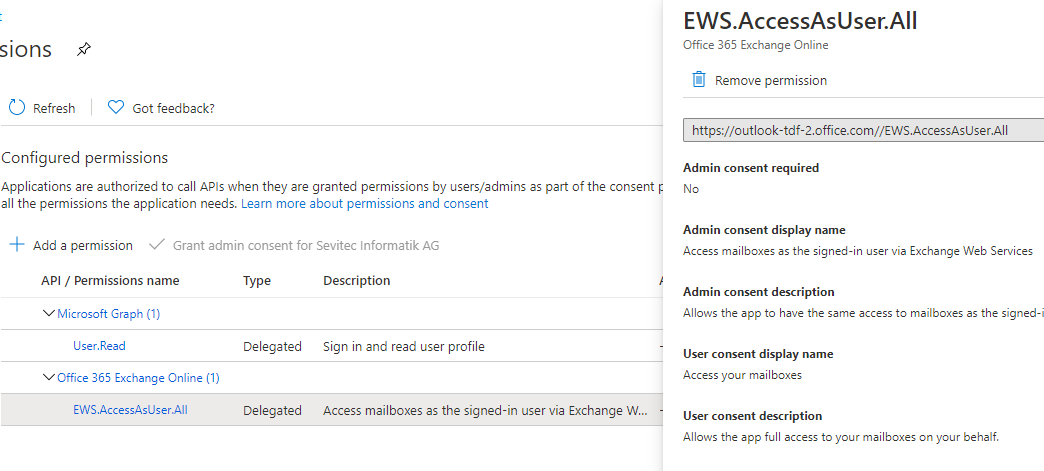
From the manifest:
    "requiredResourceAccess": [
        {
            "resourceAppId": "00000002-0000-0ff1-ce00-000000000000",
            "resourceAccess": [
                {
                    "id": "3b5f3d61-589b-4a3c-a359-5dd4b5ee5bd5",
                    "type": "Scope"
                }
            ]
        }
    ],
@srudin @robertmuehsig Hi, I lead the EXO PM team. EWS is not going away, though as mentioned we are no longer investing in adding features.
The recent change that we made in the portal removed the "Exchange" permission aligning with our Deprecation of our Outlook Rest API v2.0.
There is a path for the creation of EWS apps via the manifest that is supported. We are planning to post documentation on how to do this within the next few days.
Apologies for any confusion this caused.
 glennblock
on 19 Nov 2020
glennblock
on 19 Nov 2020
Removing the Exchange permission from the UI creates a lot of support issues for the project I work on and needs documentation updates as customers will now be calling asking where this option is.
tjmoore
on 19 Nov 2020
Agree with tjmoore, it takes time to train support on those things and now support was almost familiar with this and we have to do repeat the process. will definitely annoy our customers too.
chopraniitn
on 19 Nov 2020
Additionally, this makes this guide out of date and impossible to follow the steps to register an application - https://docs.microsoft.com/en-us/exchange/client-developer/exchange-web-services/how-to-authenticate-an-ews-application-by-using-oauth
tjmoore
on 19 Nov 2020
The guide is being updated. See https://github.com/MicrosoftDocs/office-developer-exchange-docs/pull/110
jasonjoh
on 19 Nov 2020
Thank you @tjmoore and @chopraniitn, we understand the concern and know that this will cause some pain. @jasonjoh has updated the documentation and it is now live (thank you Jason!). Is there anything else we can do to help smooth the transition?
glennblock
on 19 Nov 2020
Are resourceAppId and resourceAccess.Id fixed values as in we just copy&paste the JSON manifest in the guide or do the IDs need modifying per app registration?
Back to full_access_as_app permission though. We've had potential customers kick back on this saying this will be rejected in their IT policies as it's too wide an access. This still pushes us towards Graph, but as above there are blockers for Graph.
Is there any future intention to require OAuth with on-premises Exchange EWS in future versions or updates to Exchange Server, or could customers configure an environment that requires OAuth on-prem? Where OAuth would require the same configuration as with 365 and the full_access_as_app permission for EWS?
tjmoore
on 25 Nov 2020
So as Graph is not allowing us to read out distribution lists (even the beta api does not support it) we have to use EWS for this.
I've not investigated this far, but we use room distribution lists to get list of room mailboxes. Are these also not available via Graph API, and is there another solution?
tjmoore
on 25 Nov 2020
Just to add some notes why we are still using EWS
We are using the EWS way because MS Graph is not really a great option currently. In theory we just want to mimic the "Outlook GAL search", but with the Graph API we would need to combine the "users" and "contacts" endpoint (which is doable), but the msexchhidefromaddresslist property is missing.
@glennblock
robertmuehsig
on 25 Nov 2020
Related issues
 aaronrogers
·
3Comments
aaronrogers
·
3Comments
 tfrancois
·
3Comments
tfrancois
·
3Comments
 abhatt29
·
4Comments
abhatt29
·
4Comments
 nchdl
·
4Comments
nchdl
·
4Comments
 nilleb
·
4Comments
nilleb
·
4Comments
Most helpful comment
The guide is being updated. See https://github.com/MicrosoftDocs/office-developer-exchange-docs/pull/110