Microsoft-graph-docs: Request to add a sharepoint library linked tab in Teams : Error 500
I'm doing exactly what's described here to add a document library tab to a Teams channel (providing the link the root folder of the document library concerned, entityId set to an empty string :
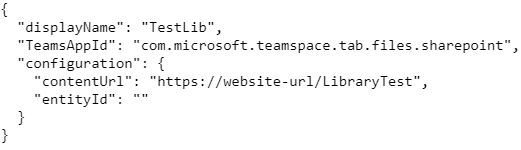
But the response is a 500 internal server error :
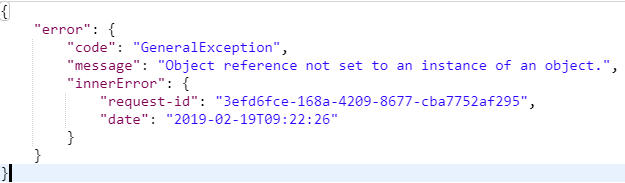
I tried several combinations with the configuration parameters, but it never works. I am thinking that it's a graph API sided problem?
EDIT: I managed to make it worked on graph explorer, but still not on Postman. Might the problem come from the fact that graph uses a user token, whereas, in postman, I want to do this via application token?
 kiefergrylls
All 10 comments
Today I tried adding a Document Library tab to a Team Channel using the v1.0 and beta endpoints using the request body below - creating Tabs of other kinds (Stream, Forms, Site etc) works fine.
_Update:_ I'm using an application-only access token to call the graph api which doesn't work, if I use a user access token, the call works and the document library tab is added correctly.
{
  "displayName": "Document%20Library%20Tab",
  "[email protected]" : "https://graph.microsoft.com/v1.0/appCatalogs/teamsApps/com.microsoft.teamspace.tab.files.sharepoint",
  "configuration": {
    "entityId": null,         // also tried "" instead of null
    "contentUrl": "https://tenant.sharepoint.com/sites/site/doclib",
    "removeUrl": null,
    "websiteUrl": null
  }
}
Which returns a GeneralException response
{
    "error": {
        "code": "GeneralException",
        "message": "Object reference not set to an instance of an object.",
        "innerError": {
            "request-id": "request guid",
            "date": "2019-03-13T12:28:04"
        }
    }
}
 phillipharding
on 13 Mar 2019
phillipharding
on 13 Mar 2019
Thanks for pointing this out, I've opened a bug for this.
 nkramer
on 13 Mar 2019
nkramer
on 13 Mar 2019
Is there any update on this?
phillipharding
on 5 Apr 2019
Any updates?
 mdissel
on 10 Apr 2019
mdissel
on 10 Apr 2019
Any news on Microsoft side ?
kiefergrylls
on 3 May 2019
@nkramer is there any progress on this issue?
phillipharding
on 23 May 2019
The fix has been deployed.
nkramer
on 12 Jul 2019
So now it's possible to use an application-only access token?
mdissel
on 14 Jul 2019
Yes.
nkramer
on 15 Jul 2019
Thanks @nkramer
Adding a SharePoint Library Tab via an App-Only access token confirmed working today on the v1.0 and beta endpoints.
phillipharding
on 16 Jul 2019
Related issues
 shyamkris
·
3Comments
shyamkris
·
3Comments
 dcnoren
·
4Comments
dcnoren
·
4Comments
 mlafleur
·
3Comments
mlafleur
·
3Comments
 RobinBreman
·
4Comments
RobinBreman
·
4Comments
 GregSpyra
·
4Comments
GregSpyra
·
4Comments
Most helpful comment
Is there any update on this?