Microsoft-graph-docs: Resource does not exist or one of its queried reference-property objects are not present.
Hello,
When I am calling the endpoint /applications/{application.id} I am getting an error message that the Resource does not exist or one of its queried reference-property objects are not present.
I have verified the URL and GET Method are correct. I have also verified the application ID is correct.
Can this document elaborate on what the reference-property is and what the request is looking for?
Document Details
⚠ Do not edit this section. It is required for docs.microsoft.com ➟ GitHub issue linking.
- ID: 919bb3aa-ba23-8410-caa8-2ce2381f4c32
- Version Independent ID: 6f8a5769-f02e-ad63-820c-d2afdf93fb93
- Content: Get application - Microsoft Graph beta
- Content Source: api-reference/beta/api/application-get.md
- GitHub Login: @jthake-msft
- Microsoft Alias: jthake-msft
 Norrch2
All 21 comments
can you provide your exact request you are making here and include the response with the request-id please?
 jthake-msft
on 3 Dec 2018
jthake-msft
on 3 Dec 2018
Sure @jthake-msft ,
here is my request:
https://graph.microsoft.com/beta/applications/a021c516-a1c9-4446-9ef7-1acc625c76e6
Here is the response:
{
"error": {
"code": "Request_ResourceNotFound",
"message": "Resource 'a021c516-a1c9-4446-9ef7-1acc625c76e6' does not exist or one of its queried reference-property objects are not present.",
"innerError": {
"request-id": "506d4473-75e3-4c33-a1c3-821cb8396ed2",
"date": "2018-12-03T18:09:14"
}
}
}
Norrch2
on 3 Dec 2018
Can you confirm when you go into portal.azure.com that the application is listed there with that guid? a021c516-a1c9-4446-9ef7-1acc625c76e6
Can you run this request in Graph Explorer signed in as the user you want to run this with?
jthake-msft
on 3 Dec 2018
@jthake-msft
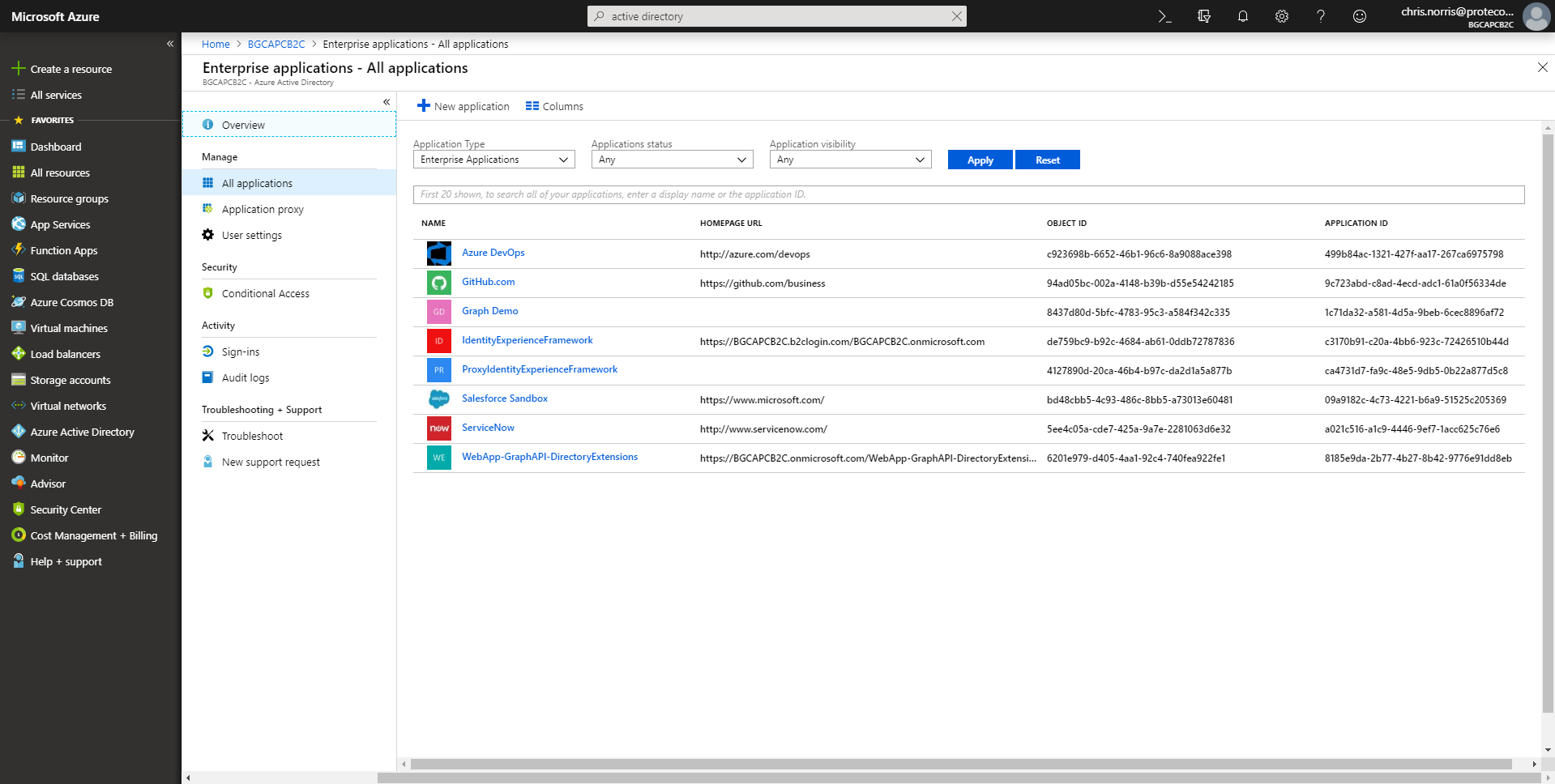
When I login to Azure Portal with GA. I am able to access Active Directory and click on Enterprise applications. There I am able to see all the apps and yes the appID is also in that list.
However, I notice that it doesn't matter which appID is plugged in there. None of them work and all return the same error "does not exist or one of its queried reference-property objects are not present."
The only app it is showing is the App I registered, but none of the enterprise apps.
Norrch2
on 3 Dec 2018
when you call the Microsoft Graph, what identity are you signed in as (e.g. access token being used)? Is it the GA?
jthake-msft
on 3 Dec 2018
I am not sure I understand your question, so let me explain the process that I am following.
My application was registered through apps.dev.microsoft.com and given the following permissions
"Application.ReadWrite.All" (Admin Only)
Application.ReadWrite.OwnedBy (Admin Only)
Directory.Read.All (Admin Only)
First, I have the user login with their member credentials (@customdomain.com). Then my REST client requests the authentication token from https://login.microsoftonline.com/Tenant.
Hopefully this answers your question.
Norrch2
on 3 Dec 2018
So the user login you are using...if they go into portal.azure.com do they see the application listed?
jthake-msft
on 3 Dec 2018
Yes, they can.
Norrch2
on 3 Dec 2018
can you confirm that you are signed into Graph Explorer with this account? can you send a screen shot, something doesn't add up here.
jthake-msft
on 4 Dec 2018
@jthake-msft
Yes, I have confirmed that I am logged in with that account.
Here are the images you have requested.

Norrch2
on 4 Dec 2018
@dkershaw10 any chance you could help here?
jthake-msft
on 6 Dec 2018
@Norrch2 What happens if you search by displayName? GET ../applications?$filter=startswith(displayName, '<whatever>') Does that find your application?
Can you also try GET ../applications?$filter=appId eq 'a021c516-a1c9-4446-9ef7-1acc625c76e6'
Did this used to work for looking up this app, or is this a regression?
 dkershaw10
on 6 Dec 2018
dkershaw10
on 6 Dec 2018
Hi @dkershaw10 ,
When I query using the filter, I am able to find the application and parse the data.
This is a new application.
Norrch2
on 7 Dec 2018
I am experiencing similar problem. I am not able to get application using appID. I am able to retrieve the application using filter, but I am not able to get extensionProperties, createdOnBehalfOf, owners, policies or synchronization.
 rogereriksen
on 10 Dec 2018
rogereriksen
on 10 Dec 2018
@Norrch2 Sorry you have run in to this. More below.
@rogereriksen Sorry about your challenges. All of those navigation properties still exist on the application entity type, it's just you aren't able to find the application entity based on appId, so the navigations fail as well. Read more below. BTW - I believe that the extensionProperties navigation will likely be removed too in the future, so I would not rely on this.
@sureshja Can you respond on this thread? It looks like we pushed a series of breaking changes to the application API preview (so it appears like a regression to developers). It looks like we exposed the new appId property and now expose the index to the collection based on an object id rather than the appId (to be consistent with how this worked in AAD Graph).
What this means @Norrch2 @rogereriksen is that when you do this:
GET ../beta/applications/{id} - the {id} is the object id for the application entity, and not the appId. These are 2 different identifiers. If you put appId in for the {id} you'll get an object not found error.
BTW When you run your filter queries above, you can see these 2 properties for yourself - the response contains an id and an appId property.
Hope this helps
dkershaw10
on 10 Dec 2018
Thank you very much for the update.
Norrch2
on 12 Dec 2018
This should be reflected in the documents here: https://docs.microsoft.com/en-us/graph/api/application-get?view=graph-rest-beta&tabs=http. 🙁
Even the Microsoft guys build the https://github.com/AzureAD/passport-azure-ad do not know about it.
 VelinGeorgiev
on 20 Nov 2019
VelinGeorgiev
on 20 Nov 2019
If I try use the filter I get Unsupported or invalid query filter clause specified for property 'appId' of resource 'Application'..
Also it still seems to not be able to query /application/{id} using the "Application ID".
So if I have an Application ID, what's the currently correct way to get the application?
 rikkuness
on 5 Feb 2020
rikkuness
on 5 Feb 2020
Something like this should work. Works in my test tenant.
GET https://graph.microsoft.com/v1.0/applications?$filter=appId eq '661f2f80-1015-4d89-b6d3-9991b37bad6d'
dkershaw10
on 5 Feb 2020
Something like this should work. Works in my test tenant.
GET https://graph.microsoft.com/v1.0/applications?$filter=appId eq '661f2f80-1015-4d89-b6d3-9991b37bad6d'
dkershaw10
on 5 Feb 2020
Oh my bad, yep, I had a space at the end of my ID that was throwing it all off!
rikkuness
on 5 Feb 2020
Related issues
 findyoucef
·
4Comments
findyoucef
·
4Comments
 Chotimir
·
3Comments
Chotimir
·
3Comments
 bijithbalan
·
4Comments
bijithbalan
·
4Comments
 tfrancois
·
3Comments
tfrancois
·
3Comments
 shyamkris
·
3Comments
shyamkris
·
3Comments
Most helpful comment
@Norrch2 Sorry you have run in to this. More below.
@rogereriksen Sorry about your challenges. All of those navigation properties still exist on the application entity type, it's just you aren't able to find the application entity based on appId, so the navigations fail as well. Read more below. BTW - I believe that the extensionProperties navigation will likely be removed too in the future, so I would not rely on this.
@sureshja Can you respond on this thread? It looks like we pushed a series of breaking changes to the application API preview (so it appears like a regression to developers). It looks like we exposed the new
appIdproperty and now expose the index to the collection based on an objectidrather than theappId(to be consistent with how this worked in AAD Graph).What this means @Norrch2 @rogereriksen is that when you do this:
GET ../beta/applications/{id}- the {id} is the object id for the application entity, and not the appId. These are 2 different identifiers. If you put appId in for the {id} you'll get an object not found error.BTW When you run your filter queries above, you can see these 2 properties for yourself - the response contains an
idand anappIdproperty.Hope this helps