Microsoft-graph-docs: Cannot store Schema Extension value as regular user
When trying to store custom data using a Schema Extension (in this example I use @wobba 's techmikael_GenericSchema) a regular user (SharePoint site owner and normal members) gets the 'Insufficient privileges' error. A tenant admin can store data correctly. I have (as far as I know) the correct permissions set both in app and for testing in the graph explorer but no luck. This is the case for the /user, /group and /organization endpoint. I haven't tested all others but I assume it's the case there as well.
When an admin sets the data, the user can correctly get it but we also need to allow users to store their settings.
Regular user in Graph, patching their own profile:
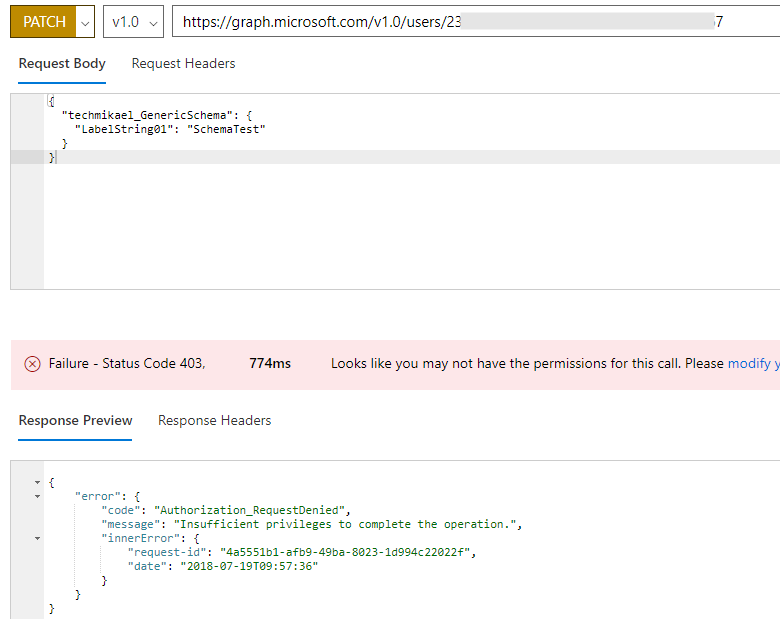
With permissions: "openid", "profile,""User.ReadWrite.All", "Directory.ReadWrite.All", "Directory.AccessAsUser.All". Admin consent has been given and is propagated according to Azure AD portal.
I also found this thread by someone else with possibly the same issue?
https://stackoverflow.com/questions/46561773/insufficient-privileges-to-write-to-schema-extensions
We would prefer to use Schema Extensions instead of switching to Open Extensions as this developer did.
 justdevelopment
All 9 comments
If you are running with delegated permissions, the user performing the operation has to be either user admin or tenant admin. If running with app only permissions, the User.ReadWrite.All with admin consent should be sufficient.
When running with delegated permission, you can not elevate permissions beyond what the user actually has.
 wobba
on 19 Jul 2018
wobba
on 19 Jul 2018
But shouldn't the user be able to save to their own groups/profile? I understand why the Organization endpoint fails, didn't read the docs on that one closely enough.
I've tested with an Open Schema and that works fine against for instance the /groups or /user one, while using a Schema Extension fails for the same user against the same endpoints with the same permissionset.
justdevelopment
on 19 Jul 2018
The object is in AAD, not the user profile, so might be why.
A group owner can update schema ext on a group, as I'm using this multiple places. Haven't tested on the user objects.
wobba
on 19 Jul 2018
I guess we could update the issue to 'user can not update schema extension on their profile'? That does seem to be a bug to me as that works with Open Extensions. The rest makes sense, regarding delegated permissions and such.
justdevelopment
on 19 Jul 2018
@dkershaw10 is this a known issue?
 jthake-msft
on 26 Jul 2018
jthake-msft
on 26 Jul 2018
I'm sorry to have to do this to you. We have a new triage process that our customer experience team are monitoring on our official channel for questions. This is StackOverflow with 'microsoft-graph' tag.
I was trying not to close these off here in the documentation GitHub issues repo and get them answered. This issues lists is specifically for documentation issues, not the underlying service, sdks or samples.
It's proving too hard for me to be single point of failure here in assigning the correct engineers to answer questions. It is best for questions to go on StackOverflow where they'll be monitored by a dedicated team and escalated internally to PMs through a defined process.
jthake-msft
on 15 Aug 2018
@jthake-msft this is fine, but SO is a place for questions, not reporting bugs, as a bug does not have a definitive answer.
wobba
on 15 Aug 2018
For now i'm just following the process that is in place now. You can raise a support ticket for your Partner Program, Azure Portal or Premiere Support also.
jthake-msft
on 15 Aug 2018
I know you are, just voicing my opinion into the void. I'll stick with SharePoint 😉
wobba
on 16 Aug 2018
Related issues
 Chotimir
·
3Comments
Chotimir
·
3Comments
 gi-joe-moto
·
3Comments
gi-joe-moto
·
3Comments
 andrewfabrizi
·
3Comments
andrewfabrizi
·
3Comments
 RobinBreman
·
4Comments
RobinBreman
·
4Comments
 climam
·
4Comments
climam
·
4Comments
Most helpful comment
I guess we could update the issue to 'user can not update schema extension on their profile'? That does seem to be a bug to me as that works with Open Extensions. The rest makes sense, regarding delegated permissions and such.