Microsoft-graph-docs: Resource could not be discovered (404)
Issue: Doing a basic request to https://graph.microsoft.com/v1.0/me/messages results in a 404 with "Resource could not be discovered"
Article: ?
I can't find anywhere else to get help on this, and there are virtually no articles on StackOverflow regarding graph/o365 API issues.
This is particularly difficult to troubleshoot because we are connecting to a customer inbox using OAuth and don't have any way to log into the mailbox on Office365.
Basically, the issue is we receive a 404 "Resource could not be discovered" response when doing a request for messages. We have more than 30 different inboxes integrated and only one of them is failing with this error message.
Unfortunately, we can't simply tell our customer to "call Microsoft". They are non-technical and wouldn't know how to begin troubleshooting API issues. Doing a search for this issue results in almost no relevant information, and certainly no clear fix.
Anyone have experience with this problem and the cause/fix?
 chundley
All 18 comments
Hi @chundley have you tried at Graph Explorer?
One case I saw before is the organization is using their own database and somehow connected with Outlook service. in that case, Microsoft Graph
GET https://graph.microsoft.com/v1.0/me/messages
cannot get those mails.
 Hongbo-Miao
on 22 Dec 2017
Hongbo-Miao
on 22 Dec 2017
Issue closed, but please let us know if you're still running into problems.
 dmahugh
on 10 Jan 2018
dmahugh
on 10 Jan 2018
I'm still seeing this issue trying to pull mail folders on about 20 different mailboxes. Get this error:
Client error: `GET https://graph.microsoft.com/v1.0/me/mailFolders?$top=100` resulted in a `404 Not Found` response:
{
  "error": {
    "code": "ResourceNotFound",
    "message": "Resource could not be discovered.",
    "innerError": (truncated...)
 lsnider
on 27 Aug 2018
lsnider
on 27 Aug 2018
Same here, sending POST https://graph.microsoft.com/v1.0/me/events
to schedule a booking in outlook results in
"code": "ResourceNotFound",
"message": "Resource could not be discovered.",
For 2 users out of 15 and we have no idea why
 wgolanka
on 24 Sep 2018
wgolanka
on 24 Sep 2018
Doing GET on /me/messages or me/people returns Resource could not be discovered in Graph Explorer. Login and consent to Graph Explorer went without issues. Visited the graph explorer to try troubleshooting why one of my Microsoft Teams bots couldn't find any "related people" by name or by email.
 dimitrijemaric
on 8 Oct 2018
dimitrijemaric
on 8 Oct 2018
Had the same issue regarding to access stuff from Mail and Calendar. Turns out that some users are using Exchange Server accounts for emails, which makes senses why Graph is returning 404.
Migrating the users into Office 365 should solve the problem.
 Saims123
on 21 Mar 2019
Saims123
on 21 Mar 2019
Any solution to this problem ?
 bismoy2013
on 11 Jun 2019
bismoy2013
on 11 Jun 2019
I am also getting same problem while trying to get profile details.
Caught exception: Client error: GET https://graph.microsoft.com/v1.0/me resulted in a 404 Not Found response: { "error": { "code": "Request_ResourceNotFound", "message":
Any help would be appreciated!!
Thanks
 krishna129
on 24 Jun 2019
krishna129
on 24 Jun 2019
I'm experiencing the same problem with 1 user in an account of 30+ people for whom it works fine, when posting to the '/me/sendMail' endpoint.
Would be happy for any help.
 shaneer
on 8 Aug 2019
shaneer
on 8 Aug 2019
Same problem with calendar scheduling api. :/ on cloud accounts so it is not a hybrid/prem issue. How can I go about diagnosing this?
 liangchr
on 21 May 2020
liangchr
on 21 May 2020
Same problem with User.Photo
My Code:
using Microsoft.Graph;
using Microsoft.IdentityModel.Clients.ActiveDirectory;
using System;
using System.IO;
using System.Net.Http.Headers;
using System.Text;

namespace testGraphClient
{
    class Program
    {
        static void Main(string[] args)
        {
            string clientID = "***";
            string clientSecret = "***";

            string graphApiResource = "https://graph.microsoft.com";
            Uri microsoftLogin = new Uri("https://login.microsoftonline.com/");
            string tenantID = "***";
            string authority = new Uri(microsoftLogin, tenantID).AbsoluteUri;
            AuthenticationContext authenticationContext = new AuthenticationContext(authority);
            ClientCredential clientCredential = new ClientCredential(clientID, clientSecret);
            AuthenticationResult authenticationResult = authenticationContext.AcquireTokenAsync(graphApiResource, clientCredential).Result;
            GraphServiceClient graphClient = new GraphServiceClient(new DelegateAuthenticationProvider(
                async (requestMessage) =>
                {
                    requestMessage.Headers.Authorization = new AuthenticationHeaderValue("bearer", authenticationResult.AccessToken);
                }));

            // This is fine:
            var user = graphClient.Users["***"].Request().GetAsync().Result;
            // This will fail:
            var Photo = graphClient.Users["***"].Photo.Content
                .Request()
                .GetAsync().Result;

            StringBuilder sb = new StringBuilder();

            using (StreamReader sr = new StreamReader(Photo))
            {
                sb.Append(sr.ReadToEnd());
            }
        }
    }
}
Exception
Unhandled exception. System.AggregateException: One or more errors occurred. (Code: ResourceNotFound
Message: Resource could not be discovered.
Inner error:
        AdditionalData:
        request-id: ***
        date: 2020-05-22T09:01:05
ClientRequestId: ***
)
 ---> Status Code: NotFound
Microsoft.Graph.ServiceException: Code: ResourceNotFound
Message: Resource could not be discovered.
Inner error:
        AdditionalData:
        request-id: ***
        date: 2020-05-22T09:01:05
ClientRequestId: ***

   at Microsoft.Graph.HttpProvider.SendAsync(HttpRequestMessage request, HttpCompletionOption completionOption, CancellationToken cancellationToken)
   at Microsoft.Graph.BaseRequest.SendRequestAsync(Object serializableObject, CancellationToken cancellationToken, HttpCompletionOption completionOption)
   at Microsoft.Graph.BaseRequest.SendStreamRequestAsync(Object serializableObject, CancellationToken cancellationToken, HttpCompletionOption completionOption)
   --- End of inner exception stack trace ---
   at System.Threading.Tasks.Task.ThrowIfExceptional(Boolean includeTaskCanceledExceptions)
   at System.Threading.Tasks.Task`1.GetResultCore(Boolean waitCompletionNotification)
   at System.Threading.Tasks.Task`1.get_Result()
 XmlmXmlmX
on 22 May 2020
XmlmXmlmX
on 22 May 2020
Same issue here:
Client error: `GET https://graph.microsoft.com/v1.0/me/calendars` resulted in a `404 Not Found` response:
{
  "error": {
    "code": "ResourceNotFound",
    "message": "Resource could not be discovered.",
...
}
Is there any solution for this?
 takeit
on 2 Jun 2020
takeit
on 2 Jun 2020
@takeit this error indicates that the user's mailbox isn't found. Typically this means they do not have an Exchange Online mailbox.
 jasonjoh
on 3 Jun 2020
jasonjoh
on 3 Jun 2020
@takeit this error indicates that the user's mailbox isn't found. Typically this means they do not have an Exchange Online mailbox.
Hi, @jasonjoh even I am facing that same issue. So can u plz help me with
 richhamseth
on 1 Jul 2020
richhamseth
on 1 Jul 2020
@richhamseth that's not an easy answer. If you're asking about say your work account, you'd need to talk with your IT department to see what can be done (maybe your company already has Exchange Online and you're not on it, etc.).
If you're asking how to get a mailbox to test with, you can get a personal account on outlook.com or sign up for a developer tenant. See Prerequisites in https://docs.microsoft.com/graph/tutorials/dotnet-core for links.
jasonjoh
on 1 Jul 2020
I have used MS Graph at work to get and send mail and it all worked fine with a corporate account using Exchange online, however, for my personal account (Hotmail, also available at outlook.com), this doesn't work (in postman requests).
There are hints at where the problem might lie. e.g. The authorize URLs can be one of a few options.
https://login.microsoftonline.com/{tenant}/oauth2/v2.0/authorize
where [tenant] can be one of
common = work/school accounts and personal
consumers = personal account only
organizations = work/school accounts only from Azure AD
actual tenant id (guid) = work or school accounts only
Organization and tenantid are not applicable to personal accounts so won't work. I can get a token but it is useless.
I tried "common" but the login window tells me that it cannot work with personal accounts (contradictory to documentation).
(You can't sign in here with a personal account. Use your work or school account instead.)
I tried "consumers" but postman baulked at this.
(_unauthorized_client: The client does not exist or is not enabled for consumers._)
When I access my account with graph explorer, I see in my office admin portal that
"Graph explorer (official site) can access info from your account"
so clearly it is possible to do what I want. I just want to do it from postman but as a user account (not a client credential, as cc cannot use "/me")
So I am pretty sure I need to use a different authorize URL, and haven't come across "consumers" before in this. What does it mean?
I had a good read through this
https://docs.microsoft.com/en-us/graph/permissions-reference
but to no avail so far.
Any suggestions on how to get graph to work with a personal account on Hotmail would be welcome.
Is it not possible in postman?
In postman, I am using the Authorize button to get the token interactively. (I don't want to use ROPC)
Grant type is Authorization code
Call back is "https://www.getpostman.com/oauth2/callback"
Auth url is https://login.microsoftonline.com/{tenant}/oauth2/v2.0/Authorize
Access token url is https://login.microsoftonline.com/{tenant}/oauth2/v2.0/Token
Client id is an app reg I created in Azure, I supplied a secret too
scope is https://graph.microsoft.com/Mail.Read
I click Authorize and get a token, and click use token
content-type header is added as application/json
request url is GET https://graph.microsoft.com/v1.0/me/messages
also tried other urls.
In Graph Explorer it is requesting from
https://graph.microsoft.com/v1.0/me/messages?$select=subject&$filter=importance eq 'high'
and getting a response
in postman, my response is...
{
"error": {
"code": "ResourceNotFound",
"message": "Resource could not be discovered.",
"innerError": {
"date": "date here",
"request-id": "guid here"
}
}
}
I must be missing something fundamental here.
 DavidBridge
on 16 Jul 2020
DavidBridge
on 16 Jul 2020
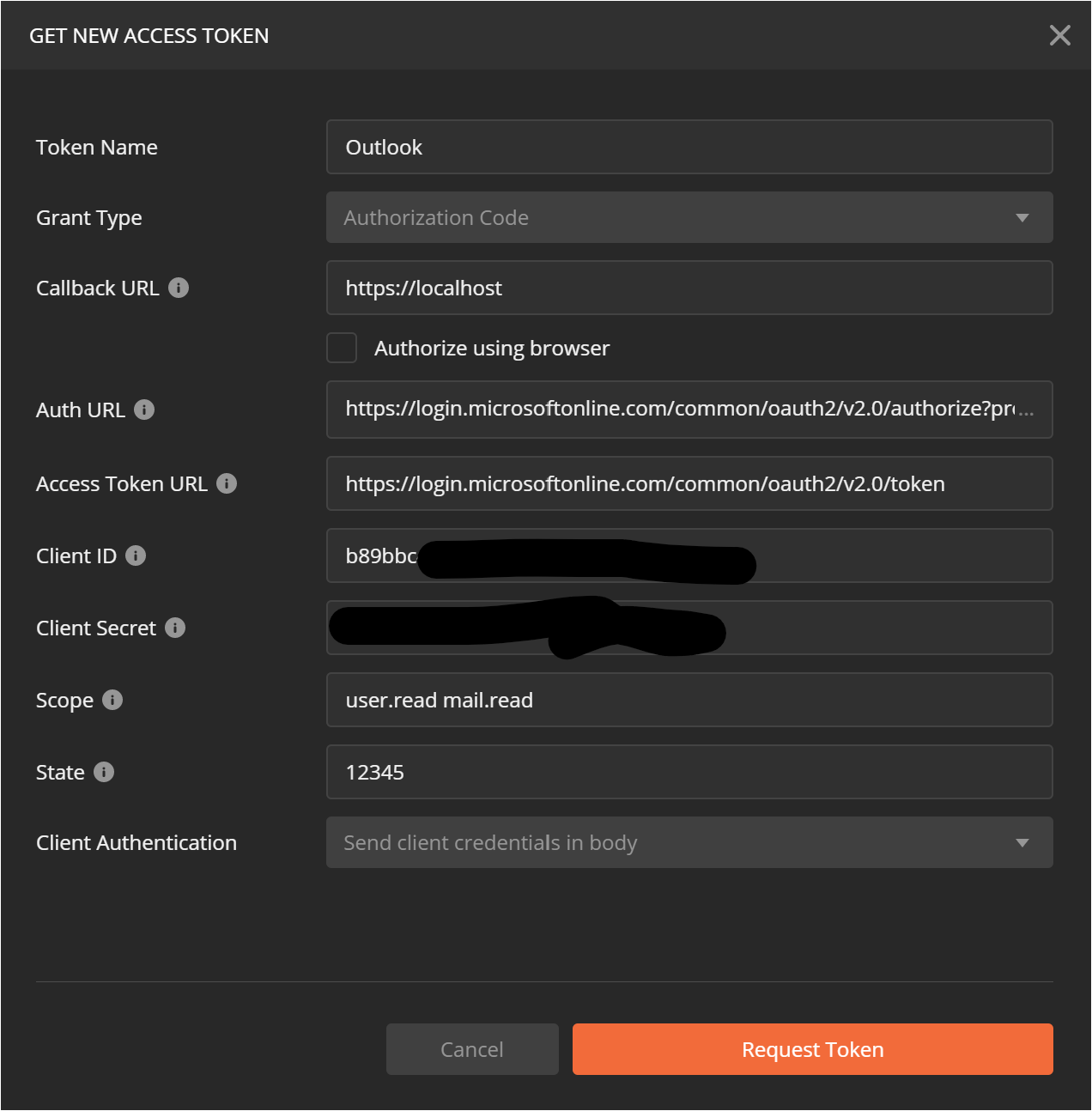
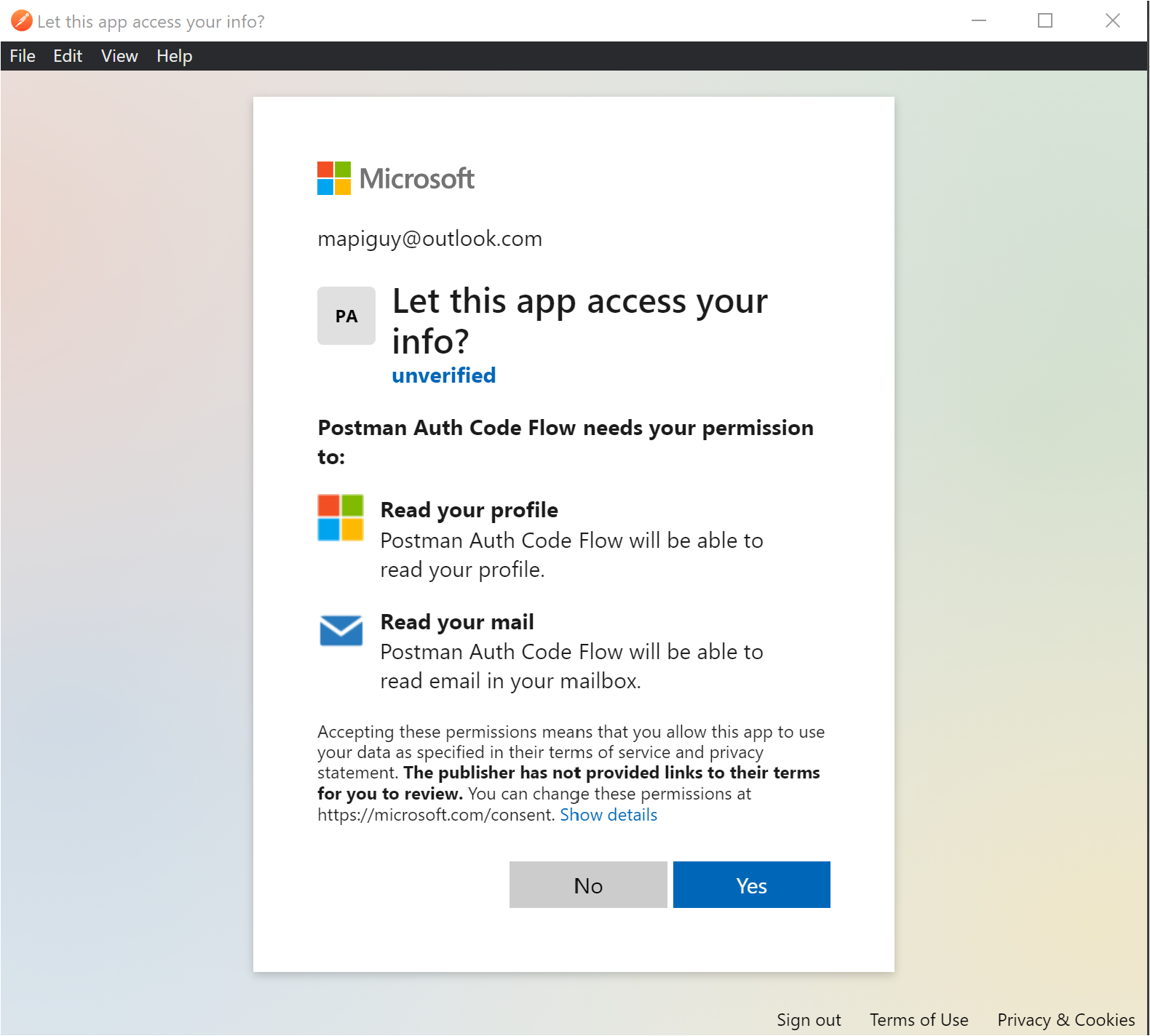
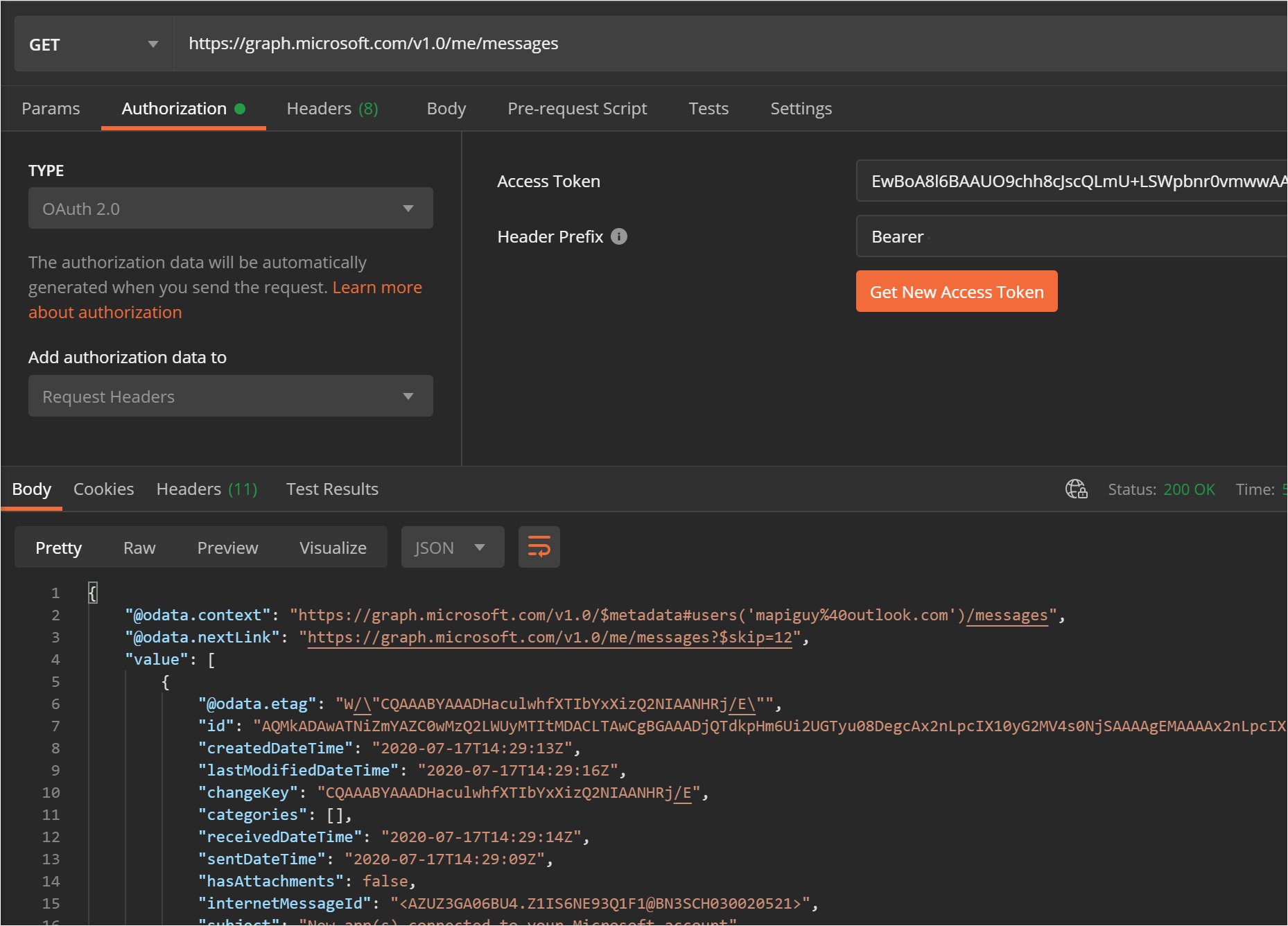
@DavidBridge it is possible with Postman. It sounds like your app registration wasn't configured to allow personal accounts. You can check this in the Authentication configuration of your app registration.
Here's how I do it in Postman, using their built-in OAuth2 flow
jasonjoh
on 17 Jul 2020
@jasonjoh Thanks for that fast reply. I hadn't set the app registration correctly and your reply helped me to notice this on the app registration site.
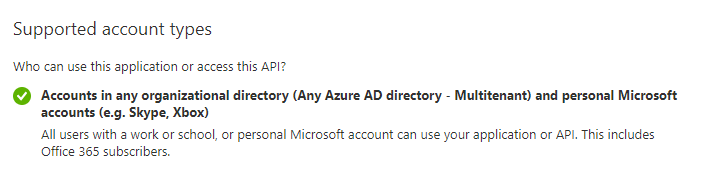
I created my original app registration a couple of years ago and at that time purposely hadn't allowed personal accounts, however, for this work I am doing, I thought I had changed it correctly when I chose to the second option (which I thought allowed personal accounts but it doesn't). The portal only shows TWO available options, not three. The personal account setting is missing. Here's what it says on the Authorization screen, with a fairly clear, albeit smallish reference to the issue.
"Supported account types
Who can use this application or access this API?
Accounts in this organizational directory only (David Bridge Technology Limited only - Single tenant)
Accounts in any organizational directory (Any Azure AD directory - Multitenant)
Help me decide...
Due to temporary differences in supported functionality, we don't recommend enabling personal Microsoft accounts for an existing registration. If you need to enable personal accounts, you can do so using the manifest editor. Learn more about these restrictions."
I have now created a new app registration with personal accounts enabled, and it works.
Seems that working on this too long and late at night were clouding my ability to read the detail.
Intrigued by the editing manifests option, I checked the differences in manifests for the new site and the old one and the key difference is
"signInAudience": "AzureADMultipleOrgs",
vs
"signInAudience": "AzureADandPersonalMicrosoftAccount",
and because it says, "you can do so using the manifest editor", I thought I would try altering this one setting.
No! You cannot simply update this one setting in the manifest to allow personal accounts, as it gives this error if you try:
_"Failed to update post_man application. Error detail: Property accessTokenAcceptedVersion is invalid. [gIYtR]"_
So I gather some of the other differences in the manifest must also be required.
There aren't many other differences between the manifests but, as there is no restriction on the number of new registrations either, I suppose I should have just done that in the first place.
Thanks again for your help. ;-)
DavidBridge
on 17 Jul 2020
Related issues
 nchdl
·
4Comments
nchdl
·
4Comments
 climam
·
4Comments
climam
·
4Comments
 dcnoren
·
4Comments
dcnoren
·
4Comments
 GregSpyra
·
4Comments
GregSpyra
·
4Comments
 findyoucef
·
4Comments
findyoucef
·
4Comments