Microsoft-graph-docs: Find meeting times problem
{
"error": {
"code": "ErrorAccessDenied",
"message": "Access is denied. Check credentials and try again.",
"innerError": {
"request-id": "ec3a5d39-5d12-4069-bb76-3a35b60ace59",
"date": "2016-10-12T12:44:12"
}
}
}
I Have added Calendars.ReadWrite.Shared & Calendars.Read.Shared permission for the app.
Is there any reason why this won't work?
 Rami-KH
All 59 comments
@Rami-KH - we're working on fixing an issue with the scopes required for findMeetingTimes. When that is fixed, the required scope remains to be Calendars.Read.Shared or Calendars.ReadWrite.Shared. We'll let you know when the fix is available. Thank you for your patience!
 angelgolfer-ms
on 12 Oct 2016
angelgolfer-ms
on 12 Oct 2016
Any updates to this fix?
 dclohman
on 17 Oct 2016
dclohman
on 17 Oct 2016
Hi @Rami-KH and @dclohman, thanks for your patience. Would you like to try one of the said scopes to access findMeetingTimes at your convenience, and let us know if you still have problems? Thanks.
angelgolfer-ms
on 21 Oct 2016
I tried, still got 403 Access Denied.
dclohman
on 21 Oct 2016
@dclohman - could you please provide request-id and timestamp for a sample 403 response? Note that your app needs to be re-consented after you add the *.Shared delegated permissions if the user consented before the change of permissions.
 marych
on 21 Oct 2016
marych
on 21 Oct 2016
{
"error": {
"code": "ErrorAccessDenied",
"message": "Access is denied. Check credentials and try again.",
"innerError": {
"request-id": "bbaf5b4d-c8f9-4666-9e0f-56b7e0045e18",
"date": "2016-10-21T11:42:48"
}
}
}
Here is the info. Has this API call changed as I was using App-only permissions. I am communicating service to service so there is no User intervention. It worked fine previous to the last changes.
dclohman
on 21 Oct 2016
Any update on this? This appears to be the only API call that is no longer working with App-only permissions. We are using the API call in a customer demonstration app, so if I can no longer authenticate this way I will need to look at different way to accomplish getting to recipients calendars for event correlation.
dclohman
on 24 Oct 2016
Still getting access denied 403
From: Angelgolfer <[email protected]notifications@github.com>
Reply-To: microsoftgraph/microsoft-graph-docs <[email protected]reply@reply.github.com>
Date: Thursday, October 20, 2016 at 7:16 PM
To: microsoftgraph/microsoft-graph-docs <[email protected]microsoft-graph-docs@noreply.github.com>
Cc: Derek Lohman
Subject: Re: [microsoftgraph/microsoft-graph-docs] Find meeting times problem (#559)
Hi @Rami-KHhttps://github.com/Rami-KH and @dclohmanhttps://github.com/dclohman, thanks for your patience. Would you like to try one of the said scopes to access findMeetingTimes at your convenience, and let us know if you still have problems? Thanks.
You are receiving this because you were mentioned.
Reply to this email directly, view it on GitHubhttps://github.com/microsoftgraph/microsoft-graph-docs/issues/559#issuecomment-255262224, or mute the threadhttps://github.com/notifications/unsubscribe-auth/ALxvwWYPpG4CvpQQYAZcqrfTkLsX1XJBks5q2ARIgaJpZM4KVBAz.
dclohman
on 25 Oct 2016
@dclohman - the fix that @angelgolfer-ms was referring to was only relevant for requests with delegated permissions. The API is not currently accessible with app-only permissions.
marych
on 26 Oct 2016
Is there a roadmap timeline? Never going to work with app-only permissions? Trying to figure out if I am waiting or start re-writing code.
dclohman
on 26 Oct 2016
Anything?
dclohman
on 4 Nov 2016
dclohman, ever got this working? I (still) have this issue now. At first I thought this was an admin-assigned permission, but it is not. So what is wrong? Is it still being fixed? Via the Graph explorer, it works fine. Via my app, it does not.
 Nickxsch
on 31 Jan 2017
Nickxsch
on 31 Jan 2017
I have the same issue, could you help us please.
 paulociencia
on 14 Feb 2017
paulociencia
on 14 Feb 2017
Hi, Do the guys get any workaround for that issue?
i've had this problem with app-only.
have you had any updates for that?
paulociencia
on 25 Feb 2017
I have the same issue. Haven't fond a workaround for it.
 nthjelme
on 1 Mar 2017
nthjelme
on 1 Mar 2017
Same in my app... But I have another question. How is that working in Azure Graph API Explorer while in mobile (or desktop) it doesn't?
 mmierzwa
on 20 Mar 2017
mmierzwa
on 20 Mar 2017
@mmierzwa you can set permissions for delegated permissions which you use in Azure Graph API Explorer but not for the Application at least at the moment...
 tpaivaa
on 28 Mar 2017
tpaivaa
on 28 Mar 2017
Thx for update. Any timeline for resolving the issue?
mmierzwa
on 28 Mar 2017
Looking forward for a solution here
 NielsGregers
on 2 May 2017
NielsGregers
on 2 May 2017
Any update on this?
 sergio-domingues
on 19 May 2017
sergio-domingues
on 19 May 2017
Any updates? I'm still getting this issue. Thanks.
 darrenparkinson
on 4 Jul 2017
darrenparkinson
on 4 Jul 2017
Has there been any update on it? I get a HTTP 401 error when I try calling the API.
 BinduPriyaKalathuru
on 5 Jul 2017
BinduPriyaKalathuru
on 5 Jul 2017
The same thing here.
 Kaapiii
on 6 Jul 2017
Kaapiii
on 6 Jul 2017
Could we please get an update on this issue? Is it ever going to work? Some kind of timeline? We can then all decide if we should wait or get on with our lives. Many thanks.
darrenparkinson
on 14 Jul 2017
Sorry about the delay in getting this resolved. We are now actively investigating the issue with the goal of pushing out a fix in the next few weeks. I'll post updates regularly on our progress. Thanks for your patience and support.
 arunv-msft
on 17 Jul 2017
arunv-msft
on 17 Jul 2017
Any updates? And where will you post updates on your progress?
nthjelme
on 11 Aug 2017
@arunv-msft Are you posting regular updates somewhere other than this thread?
 MarkusBrun
on 14 Aug 2017
MarkusBrun
on 14 Aug 2017
@arunv-msft Any updates? It's been a few weeks since you suggested it would be a few weeks? Thanks.
darrenparkinson
on 4 Sep 2017
@arunv-msft Any plan to make this work?
 dborstelmann
on 12 Oct 2017
dborstelmann
on 12 Oct 2017
We attempted to resolve the issue a few weeks back but ran into some unforeseen issues. We are still actively looking into this issue but don't have an ETA yet. Sorry this is taking us to longer to resolve this issue.
 ArunMSFT
on 12 Oct 2017
ArunMSFT
on 12 Oct 2017
For what its wroth here, I can make the same POST https://graph.microsoft.com/v1.0/me/findMeetingTimes call in Graph Explorer (where it works), and the Microsoft sample Rails app (where it gives me the 403 error). The authentication credentials are the same in both.
What is unique in the Graph Explorer https://developer.microsoft.com/en-us/graph/graph-explorer# app, vs the Microsoft sample Rails app https://developer.microsoft.com/en-us/graph/docs/concepts/ruby?
Please note that the SendMail example works in the sample app, but a POST call to https://graph.microsoft.com/v1.0/me/findMeetingTimes gives a 403 error.
 mjsommer
on 20 Nov 2017
mjsommer
on 20 Nov 2017
Got it! Needed to expand the privs in /config/environment.rb to include Calendars:
ENV['OAUTH_SCOPE'] = "openid email profile \
  https://graph.microsoft.com/User.Read \
  https://graph.microsoft.com/Mail.Send \
  https://graph.microsoft.com/Calendars.Read.Shared \
  https://graph.microsoft.com/Calendars.ReadWrite.Shared"
Before EOY?
 aherrick
on 21 Nov 2017
aherrick
on 21 Nov 2017
Issue reported 2016, now it's 2018, still no progress.
And i spent few hours to check my code & permissions, before hit this thread in google.
P.S. Looks like issues is with outlook API itself. To View Calendars, you need to add Mail.Send permission. Fixed in my code.
Sorry for commenting outlook API bug ( or feature ? ) here.
 zdravkoggeorgiev
on 3 Jan 2018
zdravkoggeorgiev
on 3 Jan 2018
@dmahugh @ArunMSFT - can someone from Microsoft post a summary of the status of this issue with specific details as this thread has a number of conflicting and confusing notes.
- Is this call currently supported for Application permissions only - i.e. no delegated permissions?
- If not, when will it be?
- If there is a workaround using delegated permissions, what are the exact permissions and scopes required?
Thanks
 mtnrbq
on 19 Mar 2018
mtnrbq
on 19 Mar 2018
Yes, can you please add (soon..) support for Application permissions only when using findMeetingTimes.
@yinaa @ArunMSFT
Thanks
 petterkjeilen
on 19 Mar 2018
petterkjeilen
on 19 Mar 2018
So with application permissions I can:
Find a person.
Read their email.
Delete their email.
But I can't:
FindMeetingTimes
Please fix this...
 JV256
on 10 Apr 2018
JV256
on 10 Apr 2018
Update?
 jnlkds
on 11 Apr 2018
jnlkds
on 11 Apr 2018
Would be nice to know if this is something that will be fixed and when we can expect progress on this isssue.
@ArunMSFT @crchung-MSFT
 fhusoy
on 4 May 2018
fhusoy
on 4 May 2018
any workaround folks?
 turbowars
on 9 Jun 2018
turbowars
on 9 Jun 2018
Anything here @ArunMSFT @crchung-MSFT ?
 sebastianzolg
on 15 Jun 2018
sebastianzolg
on 15 Jun 2018
@BenAffleckIsBatman We realised that we were not sending the correct scope during the first authorization call.
Would suggest you to decrypt your token here (http://jwt.calebb.net/) and find the difference between the tokens. (generated using https://developer.microsoft.com/en-us/graph/graph-explorer and your local api call.)
We got it fixed by add needful scopes in the first api call. https://login.microsoftonline.com/common/oauth2/v2.0/authorize?client_id=xxxxxxx&response_type=code&redirect_uri=https://localhost:8080&response_mode=query&scope= openid%20profile%20User.ReadWrite%20User.ReadBasic.All%20Sites.ReadWrite.All%20Contacts.ReadWrite%20People.Read%20Notes.ReadWrite.All%20Tasks.ReadWrite%20Mail.ReadWrite%20Files.ReadWrite.All%20Calendars.ReadWrite
turbowars
on 19 Jun 2018
@dmahugh @ArunMSFT @jthake @angelgolfer-ms - can someone from Microsoft post a summary of the status of this issue with specific details as this thread has a number of conflicting and confusing notes.
Is this call currently supported for Application permissions only - i.e. no delegated permissions?
If not, when or will it be?
I do not want to have to give an app delegated permissions - as per earlier note from @angelgolfer-ms , the application scope needed was going to be Calendars.Read.Shared or Calendars.ReadWrite.Shared from what I can understand.
Thanks
mtnrbq
on 20 Jun 2018
- Issue - FindMeetingTimes API is not available in the App only scenario, today it works only in the delegated permissions scenario.
- Workaround - Currently there are no workarounds available for pure app-only scenarios. You could get access to the API with user-delegated flow
- Future plans - Our goal is to support this API in the app only scenario. @crchung-MSFT can add more details on timing.
Thanks,
Arun
ArunMSFT
on 20 Jun 2018
Hi @turbowars, i tried following ur instructions. the app is working in https://developer.microsoft.com/en-us/graph/graph-explorer but when i try the same using postman using the access token im getting Access is denied. Check credentials and try again. Can u please help me in resolving it or share your inputs did you try getting the result in postman.?
Thanks,
Suneet
 SuneetPatil
on 22 Jun 2018
SuneetPatil
on 22 Jun 2018
Hi all , This is working for me well. only thing i have done is, provided delegate permission to the APP which i have created in azure AD. make calendar.shared and write permissions as delegate. If anyone want more about the working scenario, I can explain. please let me know.
 ramseen
on 25 Jun 2018
ramseen
on 25 Jun 2018
Hi @ramseen, Thank for your reply and happy to know its working for you. My requirement is accessing the find meeting times API directly using my java back end code to get check the availability. I need to access it using app only and i'm integrating with Alexa device and we wont have any UI to delegate the access from user end.
Can u please explain your user case or in brief how did you achieve or is ur scenario matches my requirement? Thanks in advance for your response.
SuneetPatil
on 26 Jun 2018
In our institution we have an immediate need to know what conference room is "immediately" available such that we can have a meeting. Taking the time to open outlook, look for attendees and then find out what resources (i.e rooms) takes too long. Hence FAR is supposedly report back to the user what rooms are available "right now", allow them to book and folks will meet.
Unfortunately, I am finding that FindMeetingTimes DOES NOT yield a long list of rooms and provide their availability, it provides a short list and want for call to provide some means to extend or filter the list.
From: Suneet Patil notifications@github.com
Sent: Monday, June 25, 2018 10:17 PM
To: microsoftgraph/microsoft-graph-docs
Cc: Andres, Jeff (HQP); Comment
Subject: Re: [microsoftgraph/microsoft-graph-docs] Find meeting times problem (#559)
Hi @ramseenhttps://na01.safelinks.protection.outlook.com/?url=https%3A%2F%2Fgithub.com%2Framseen&data=02%7C01%7Cjeff.andres%40roberthalf.com%7C98aa63913f7f4a4b965408d5db2418e9%7C16532572d5674d678727f12f7bb6aed3%7C0%7C0%7C636655870441591080&sdata=GP4R%2FkNwkuNDlKGadjllVqXoMgSnH3JuMickHlBUNno%3D&reserved=0, Thank for your reply and happy to know its working for you. My requirement is accessing the find meeting times API directly using my java back end code to get check the availability. I need to access it using app only and i'm integrating with Alexa device and we wont have any UI to delegate the access from user end.
Can u please explain your user case or in brief how did you achieve or is ur scenario matches my requirement? Thanks in advance for your response.
—
You are receiving this because you commented.
Reply to this email directly, view it on GitHubhttps://na01.safelinks.protection.outlook.com/?url=https%3A%2F%2Fgithub.com%2Fmicrosoftgraph%2Fmicrosoft-graph-docs%2Fissues%2F559%23issuecomment-400181556&data=02%7C01%7Cjeff.andres%40roberthalf.com%7C98aa63913f7f4a4b965408d5db2418e9%7C16532572d5674d678727f12f7bb6aed3%7C0%7C0%7C636655870441601084&sdata=Za8P47e2JB3jE9NqsQnbJzKQ18cBKe13gMwTP2kMMIM%3D&reserved=0, or mute the threadhttps://na01.safelinks.protection.outlook.com/?url=https%3A%2F%2Fgithub.com%2Fnotifications%2Funsubscribe-auth%2FAjQTpEGE0PSYDqDYNYxgf24kT4mBnY4Fks5uAcPhgaJpZM4KVBAz&data=02%7C01%7Cjeff.andres%40roberthalf.com%7C98aa63913f7f4a4b965408d5db2418e9%7C16532572d5674d678727f12f7bb6aed3%7C0%7C0%7C636655870441611097&sdata=V7iN6MURFRjIOYJ9eB7ZewoVo8Mbii1aLXTdFv3OMjE%3D&reserved=0.
jnlkds
on 26 Jun 2018
Any updates to this issue? Facing the same problem: Acces denied for application based permission type.
What about the more details @crchung-MSFT?
@ArunMSFT linked you to this issue. :)
 sGaster
on 9 Jul 2018
sGaster
on 9 Jul 2018
@SuneetPatil Hi Suneet , As per my understanding it wont work with app only permission. You have to prompt the user to be signed in against the azure ad app which has permission to read all calendars. in my case the scenario is different We are trying to develop a meeting scheduler in chat bot level. there user can prompt for signed in. So easily we will get the bearer token after sign on.
ramseen
on 10 Jul 2018
@ramseen same scenario for me. For the moment we think to throw out our own authentication and use microsoft 365 authentication for our chat-bot as workaround. But if microsoft enables us to do this with app scope based permissions this would be the better solution for everyone.
sGaster
on 11 Jul 2018
Seriously, any further update on this. It's been TWO YEARS! Just be honest. If you're not going to fix it, please just tell us that. Thanks.
darrenparkinson
on 1 Aug 2018
Any updates on this issue? I got the same error with graph explorer.
Here is my decoded token:
{
  "aud": "https://graph.microsoft.com",
  "iss": "https://sts.windows.net/81e24fe6-fe2d-40d2-9739-126e5b569b6a/",
  "iat": 1533716870,
  "nbf": 1533716870,
  "exp": 1533720770,
  "acct": 0,
  "acr": "1",
  "aio": "AUQAu/8IAAAAIKXVBC07EXKw/QcXg0c5h+SYpc2iShyuSffv7FeeVxbmHWLekJqkxoEBM0xcjfkQkQtIKKKQv8ua7yUt9qqKuQ==",
  "amr": [
    "wia",
    "mfa"
  ],
  "app_displayname": "Graph explorer",
  "appid": "de8bc8b5-d9f9-48b1-a8ad-b748da725064",
  "appidacr": "0",
  "family_name": "Family Name",
  "given_name": "Given Name",
  "name": "Full Name",
  "oid": "e13a5ed9-007b-4976-9450-fb711ac5d932",
  "onprem_sid": "S-1-5-21-1999991193-4164165691-3874356750-43550",
  "platf": "3",
  "puid": "10030000A0BCC435",
  "scp": "Bookings.Read.All Bookings.ReadWrite.All BookingsAppointment.ReadWrite.All Calendars.Read Calendars.Read.Shared Calendars.ReadWrite Calendars.ReadWrite.Shared Contacts.Read Contacts.Read.Shared Contacts.ReadWrite Contacts.ReadWrite.Shared Device.Command Device.Read Files.Read Files.Read.All Files.Read.Selected Files.ReadWrite Files.ReadWrite.All Files.ReadWrite.AppFolder Files.ReadWrite.Selected Financials.ReadWrite.All Mail.Read Mail.Read.Shared Mail.ReadWrite Mail.ReadWrite.Shared Mail.Send Mail.Send.Shared MailboxSettings.ReadWrite Notes.Create Notes.Read Notes.Read.All Notes.ReadWrite Notes.ReadWrite.All openid People.Read profile Sites.Read.All Sites.ReadWrite.All Tasks.Read Tasks.Read.Shared Tasks.ReadWrite Tasks.ReadWrite.Shared User.Read User.ReadBasic.All User.ReadWrite email UserActivity.ReadWrite.CreatedByApp",
  "sub": "kBKIRjRJQZZU5LBAdZQypnCsRtHmlaivlA9tnjSea0M",
  "tid": "81e24fe6-fe2d-40d2-9739-126e5b569b6a",
  "unique_name": "[email protected]",
  "upn": "[email protected]",
  "uti": "w592kVp4UUW907TLDnAdAA",
  "ver": "1.0",
  "xms_st": {
    "sub": "B6ic6OYhO4ab1B3TD5asnUaMk_vdfqyA3dF6gVMtBT0"
  }
}
And Here is a preview of the permissions list:
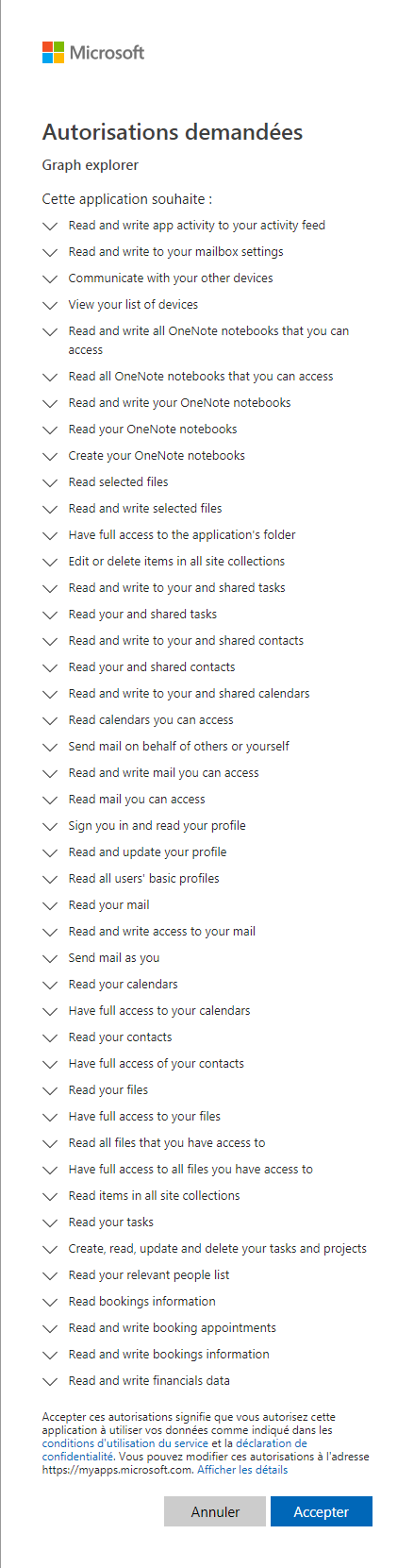
Everytime I run the requet, I get this:
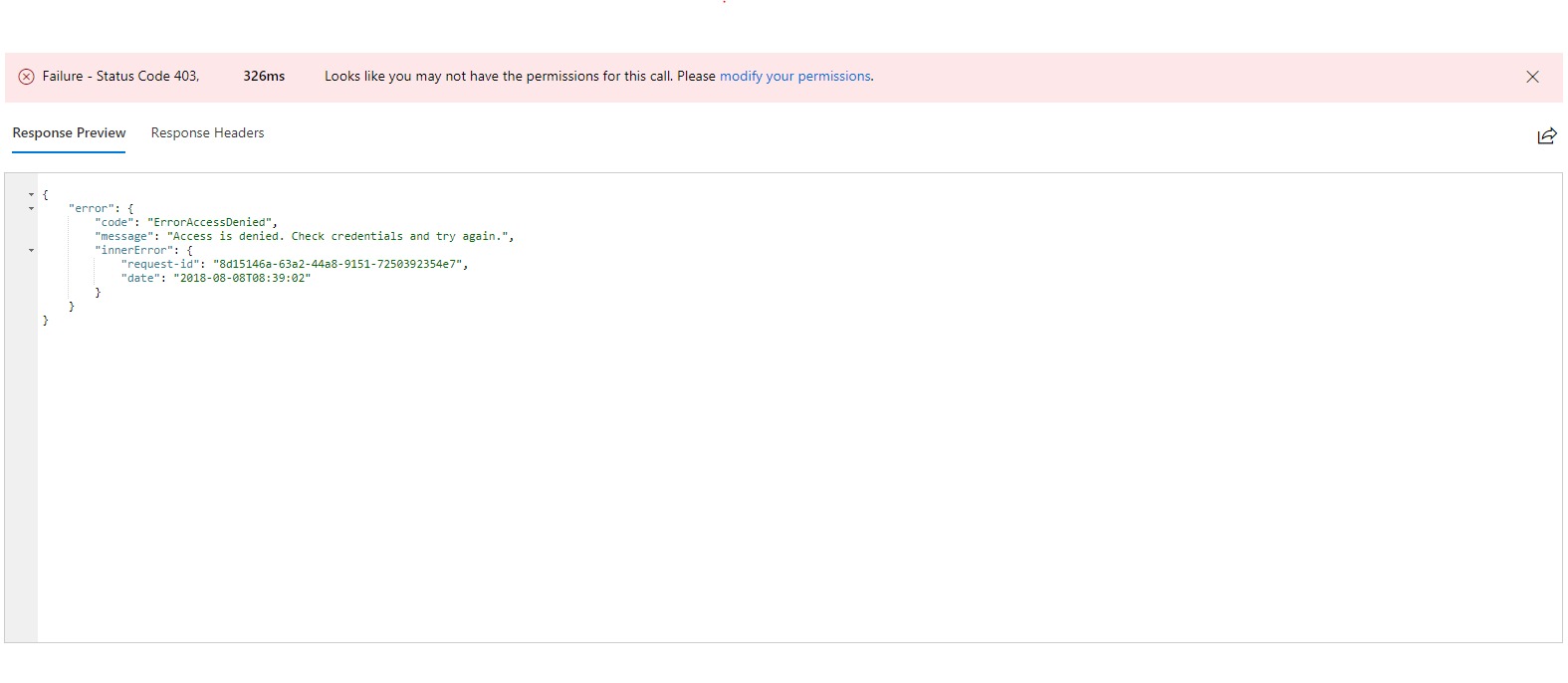
Any help?
Thanks
 midrissi
on 8 Aug 2018
midrissi
on 8 Aug 2018
Any updates on this issue? I'm getting the same 403 error in Graph Explorer.
Thanks.
 mufsir
on 13 Aug 2018
mufsir
on 13 Aug 2018
as per earlier update from @ArunMSFT (June 20) @crchung-MSFT
Issue - FindMeetingTimes API is not available in the App only scenario, today it works only in the delegated permissions scenario.
Workaround - Currently there are no workarounds available for pure app-only scenarios. You could get access to the API with user-delegated flow
Future plans - Our goal is to support this API in the app only scenario. @crchung-MSFT can add more details on timing.
Thanks,
Arun
mtnrbq
on 13 Aug 2018
@mtnrbq, Can you please provide more context on the alternatives that are available to make the API work? How can we access the API through delegated permissions or through user-delegate flow? Please provide some additional guidance. Thanks
 venkatatholetinextdc
on 16 Aug 2018
venkatatholetinextdc
on 16 Aug 2018
@venkatatholetinextdc - Hi, I was only re-surfacing the last update I could find, as the thread is a little muddled. - I do not have any additional insight or guidance, apologies for any confusion
mtnrbq
on 19 Aug 2018
At this moment, we do not have plans to support App-Only token. Only user delegated token are supported. We will work to support this in future ( no timeline yet).
This issues lists is specifically for documentation issues, not the underlying service, sdks or samples. I will close this issue so our documentation team can focus on content issues.
The official channel for questions is StackOverflow with 'microsoft-graph' tag.
For issues, you can raise a support ticket on the Azure Portal where you registered your application. This simple video shows how to file it properly by visiting here.
Feature requests should be added to UserVoice. https://developer.microsoft.com/en-us/graph/support
 theakc
on 22 Aug 2018
theakc
on 22 Aug 2018
@Rami-KH - we're working on fixing an issue with the scopes required for findMeetingTimes. When that is fixed, the required scope remains to be Calendars.Read.Shared or Calendars.ReadWrite.Shared. We'll let you know when the fix is available. Thank you for your patience!
Could we please get an update on this issue? Is it ever going to work? Some kind of timeline? We can then all decide if we should wait or get on with our lives. Many thanks.
if we call this api https://graph.microsoft.com/beta/me/people then solve you issue because currently Microsoft working on this functionality.
 abhaythaku
on 24 Nov 2018
abhaythaku
on 24 Nov 2018
Related issues
 nchdl
·
4Comments
nchdl
·
4Comments
 shyamkris
·
3Comments
shyamkris
·
3Comments
 mlafleur
·
3Comments
mlafleur
·
3Comments
 joostvdlinden
·
4Comments
joostvdlinden
·
4Comments
 r3dh0t
·
4Comments
r3dh0t
·
4Comments
Most helpful comment
So with application permissions I can:
Find a person.
Read their email.
Delete their email.
But I can't:
FindMeetingTimes
Please fix this...