Microsoft-authentication-library-for-js: Calling two backend APIs not possible with interceptor => "The cache contains multiple tokens satisfying the requirements"
Library
- [x ]
[email protected] - [ x]
@azure/[email protected]
Framework
Angular 10.1.4
Description
If I try to call two different APIs from my Angular application, msal throws an error that the token cache contains multiple tokens satisfying the requirements.
In both cases I have the same client id and authority. Only the scopes are different as you can see in my configuration.
If I delete the token cache and reload my page, it works for a single time. After reloading the page the error message appears again.
I am using the http interceptor to protect my API calls.
Error Message
ClientAuthError: Cache error for scope openid,profile: The cache contains multiple tokens satisfying the requirements. Call AcquireToken again providing more requirements like authority..
ClientAuthError: Cache error for scope openid,profile: The cache contains multiple tokens satisfying the requirements. Call AcquireToken again providing more requirements like authority..
MSAL Configuration
MsalModule.forRoot({
      auth: {
        clientId: 'd51ec65d-21a3-4859-ac1c-dd833e524d85',
        authority: 'https://login.microsoftonline.com/organizations/',
        redirectUri: 'http://localhost:4200',
        validateAuthority: true,
        postLogoutRedirectUri: "http://localhost:4200/",
        navigateToLoginRequestUrl: true,
      },
      cache: {
        cacheLocation: 'localStorage',
        storeAuthStateInCookie: isIE, // set to true for IE 11
      },
    },
    {
      popUp: isIE,
      consentScopes: [
        'user.read',
        'openid',
        'profile',
        'api://d51ec65d-21a3-4859-ac1c-dd833e524d85/areas.read.all'
      ],
      unprotectedResources: [],
      protectedResourceMap: [
        ['https://graph.microsoft.com/v1.0', ['user.read', 'user.read.all', 'openid']],
        ['https://localhost:5001', ['api://d51ec65d-21a3-4859-ac1c-dd833e524d85/areas.read.all']],
      ],
      extraQueryParameters: {}
    })
```js
// Provide configuration values here.
// For Azure B2C issues, please include your policies.
Reproduction steps
Try to call graph API and your own API within one angular project with msal configured.
Expected behavior
The token for my own API is used for calls to localhast... the graph token for calling the graph. This should work OOTB.
Browsers/Environment
- [x ] Chrome
 web265p3
All 27 comments
im having the exact same problem rn.
previous version which worked:
"msal": "1.3.0",
"@azure/msal-angular": "^1.0.0-beta.5",
ClientAuthError: Cache error for scope openid,profile: The cache contains multiple tokens satisfying the requirements. Call AcquireToken again providing more requirements like authority.
fyi
 Venipa
on 9 Oct 2020
Venipa
on 9 Oct 2020
I am having the same problem. I think it has something to do with this commit: https://github.com/AzureAD/microsoft-authentication-library-for-js/commit/23ddd4ab6632d932a8fd4dd276b39c7c8202ff6c#diff-a7db5bdfe2343db691caf7a7c5ad8671
In this commit a change was made in UserAgentApplication.cs (method getCachedAccessToken()) to filter the correct cached token. But this incorrectly adds both tokens.
This only happens when using MsalGuard in routing configuration. This is because in that case clientId is added as scope to acquireTokenSilent() which is stripped off and replaced by openid,profile. And those scopes are default and are again stripped off when matching the right accesss token.
Code where both access tokens are added:
            const searchScopes = ScopeSet.removeDefaultScopes(scopes);
            if (searchScopes.length === 0 && ScopeSet.containsScope(cachedScopes, scopes)) {
                filteredItems.push(cacheItem);
            } else if (ScopeSet.containsScope(cachedScopes, searchScopes)) {
                filteredItems.push(cacheItem);
            }
When searchScopes is empty, it will always be added to the list.
Hopefully @hectormmg and @jasonnutter can confirm this.
 jdmiedema
on 9 Oct 2020
jdmiedema
on 9 Oct 2020
Previous version that worked for me:
"@azure/msal-angular": "^1.1.1",
"msal": "^1.4.0",
Yes, same for me! 1.4.0 works fine
web265p3
on 9 Oct 2020
@hectormmg Is this an issue you are currently working on? This could be a bug introduced between 1.4.0 and 1.4.1 from what I see above.
 sameerag
on 9 Oct 2020
sameerag
on 9 Oct 2020
Hi everyone. There is a related bug in 1.4.1 which I have a fix for in #2376 pending some refactoring (it affects both access and ID token lookup). I need to investigate a bit further to confirm if it's the same issue, but either way this should be fixed in 1.4.2
 hectormmg
on 9 Oct 2020
hectormmg
on 9 Oct 2020
Waiting for 1.4.2 also... :)
web265p3
on 13 Oct 2020
Same issue here.
 tschmidt01
on 13 Oct 2020
tschmidt01
on 13 Oct 2020
Same
 pedoe
on 15 Oct 2020
pedoe
on 15 Oct 2020
same problem
 lgadola
on 15 Oct 2020
lgadola
on 15 Oct 2020
Same issue - does anyone have a way around it? Use 1.4.0?
 fagerli93
on 20 Oct 2020
fagerli93
on 20 Oct 2020
Same issue - does anyone have a way around it? Use 1.4.0?
Yes, using 1.4.0 will do the job.
tschmidt01
on 20 Oct 2020
I have the same error with version "msal": "^1.4.1" and "msal": "^1.4.2"
Version "msal": "^1.4.0", work for me.
 harolpg17
on 21 Oct 2020
harolpg17
on 21 Oct 2020
I also still have the same error with 1.4.2:
global-error-handler.ts:23 Error: Uncaught (in promise): ClientAuthError: Cache error for scope openid,profile: The cache contains multiple tokens satisfying the requirements. Call AcquireToken again providing more requirements like authority..
ClientAuthError: Cache error for scope openid,profile: The cache contains multiple tokens satisfying the requirements. Call AcquireToken again providing more requirements like authority..
 tcochran64
on 21 Oct 2020
tcochran64
on 21 Oct 2020
I downgraded to MSAL 1.4.0 and even lower and am still getting it....
downgrading to 1.3.0 helped.
lgadola
on 21 Oct 2020
I downgraded to MSAL 1.4.0 and even lower and am still getting it....
Maybe something in Azure AD has changed?
We have our own organisational tenant.
When I went back to 1.4.0, mine started working again.
tcochran64
on 21 Oct 2020
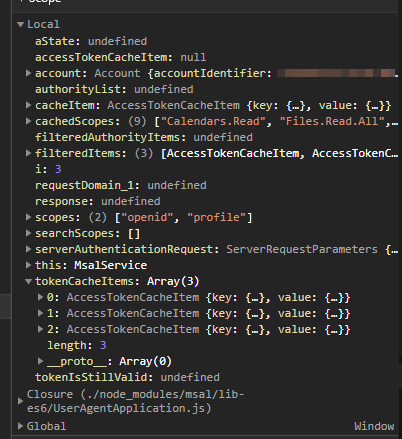
Hi everyone. It seems the problem you are all experiencing may be unrelated to the fix in 1.4.2. I'm having trouble reproducing this specific scenario, so I would really appreciate it if someone could post a screenshot or snapshot of what the keys in the cache look like when this error comes up. If anyone could reproduce this with one of our samples that would also be very helpful.
@web265p3 could you confirm whether or not 1.4.2 fixed this issue for you? I'd like to make sure we're all discussing the same issue here.
hectormmg
on 21 Oct 2020
I have attached token cache and requested scopes.
Interesting: openid, profile & mail were not specified in my scopes. Maybe attached by MSAL?
lgadola
on 22 Oct 2020
I have also attached the token cache and scopes (with actual token values removed). I didn't think you needed the actual values.
msal.txt
tcochran64
on 22 Oct 2020
I have implemented it in angular:
delete package-lock.json adn execute the following commands if you are using these npm:
npm i @azure/[email protected]
npm i [email protected]
npm i @microsoft/[email protected]
npm i
With the above versions it is working fine.
if the versions of these packages are above and beyond this causing the issue.
 nagulapallinaveen
on 23 Oct 2020
nagulapallinaveen
on 23 Oct 2020
I have implemented it in angular:
delete package-lock.json adn execute the following commands if you are using these npm:
npm i @azure/[email protected]
npm i [email protected]
npm i @microsoft/[email protected]
npm iWith the above versions it is working fine.
if the versions of these packages are above and beyond this causing the issue.
can confirm downgrading to msal 1.3.0 it starts working again
lgadola
on 23 Oct 2020
Downgrading to [email protected] with @azure/[email protected] allows the usage calling of 2 APIs. I encountered this problem on the msal-angular. The msal-browser implementation for angular doesn't have this problem.
 roddev-v
on 6 Nov 2020
roddev-v
on 6 Nov 2020
For our project, reverting to [email protected] was also enough (we kept @azure/[email protected]).
 miroslav-staffa
on 10 Nov 2020
miroslav-staffa
on 10 Nov 2020
Hi, I'm getting the same error when calling our backend API and the MS Graph API we're using msal 1.4.3 and msal-angular 1.1.1. The app works initially and when calls are made to each API we get an access token for each added to local storage the keys vary only in scopes. The problem occurs when we navigate routes or refresh the page, this results in the following:
MsalGuard.canActivate()is called andacquireTokenSilent()is called with the client id as the scope. https://github.com/AzureAD/microsoft-authentication-library-for-js/blob/55d41e6cd550561d1aa983ea395e6d2abfbf03ef/lib/msal-angular/src/msal-guard.service.ts#L88-L90- Then
RequestUtils.validateRequest()callsScopeSet.translateClientIdIfSingleScope()which replaces the client id scope with theopenidandprofilescopes. https://github.com/AzureAD/microsoft-authentication-library-for-js/blob/55d41e6cd550561d1aa983ea395e6d2abfbf03ef/lib/msal-core/src/utils/RequestUtils.ts#L51 - Eventually
UserAgentApplication.getCachedAccessToken()callsAuthCacheUtils.filterTokenCacheItemsByScope()and when filtering the cached tokensScopeSet.removeDefaultScopes()is called to populatesearchScopesthis results in an empty array returned as only the default scopes are present. https://github.com/AzureAD/microsoft-authentication-library-for-js/blob/f013c0410bf21825b9fec6704d897b3347848159/lib/msal-core/src/utils/AuthCacheUtils.ts#L17 - This results in an empty array being passed to
ScopeSet.containsScope()andArray.every()being called on an empty array which will always return true. https://github.com/AzureAD/microsoft-authentication-library-for-js/blob/f013c0410bf21825b9fec6704d897b3347848159/lib/msal-core/src/ScopeSet.ts#L38 - The return condition for the cached token
filter()inAuthCacheUtils.filterTokenCacheItemsByScope()is therefore always true for all cached tokens due to the return statement doing anorcomparison. https://github.com/AzureAD/microsoft-authentication-library-for-js/blob/f013c0410bf21825b9fec6704d897b3347848159/lib/msal-core/src/utils/AuthCacheUtils.ts#L17-L22
 AquilaSands
on 10 Nov 2020
AquilaSands
on 10 Nov 2020
@AquilaSands Thanks for the detailed explanation of what's going on here. I've linked a PR which should address this, if you or anyone else can build this branch locally and confirm whether or not it fixes this issue it would be much appreciated! We'll aim to include this in the next patch release
 tnorling
on 10 Nov 2020
tnorling
on 10 Nov 2020
@tnorling I've tested the dev branch with this fix locally and it has solved the issue I was experiencing.
AquilaSands
on 11 Nov 2020
installed 1.4.4 and it works again!
Thanks for this swift reaction and bugfixing, folks!
lgadola
on 16 Nov 2020
Related issues
 Calamari
·
3Comments
Calamari
·
3Comments
 adriannasui
·
3Comments
adriannasui
·
3Comments
 AbhaysinghBhosale
·
3Comments
AbhaysinghBhosale
·
3Comments
 ed-ilyin
·
4Comments
ed-ilyin
·
4Comments
 Anees-Raja
·
3Comments
Anees-Raja
·
3Comments
Most helpful comment
Yes, same for me! 1.4.0 works fine