Microsoft-authentication-library-for-js: B2C Token endpoint CORS
Please follow the issue template below. Failure to do so will result in a delay in answering your question.
Library
- [ ]
[email protected]or@azure/[email protected] - [x]
@azure/[email protected] - [ ]
@azure/[email protected] - [ ]
@azure/[email protected] - [ ]
@azure/[email protected]
Important: Please fill in your exact version number above, e.g. [email protected].
Framework
React 16.13.1
Description
As noted in https://github.com/AzureAD/microsoft-authentication-library-for-js/issues/1683, there currently is an issue with the knownAuthorities property in the config for msal-browser. It was mentioned that this has since been fixed in the dev branch.
While waiting for 2.0.0-beta.3 to be released, i built the package from dev branch and published it on npm.
The authorization request now goes thru, but i'm hit with a CORS issue from the token endpoint in my Azure B2C tenant.
Error Message
Access to fetch at 'https://tenant.b2clogin.com/tenant.onmicrosoft.com/policy/oauth2/v2.0/token' from origin 'http://localhost:3000' has been blocked by CORS policy: Response to preflight request doesn't pass access control check: No 'Access-Control-Allow-Origin' header is present on the requested resource. If an opaque response serves your needs, set the request's mode to 'no-cors' to fetch the resource with CORS disabled.
Security
- [ ] Is this issue security related?
Regression
- [ ] Did this behavior work before?
Version:
MSAL Configuration
// Provide configuration values here.
// For Azure B2C issues, please include your policies.
const config = {
 auth: {
  clientId: 'xxx',
  authority: 'https://tenant.b2clogin.com/tenant.onmicrosoft.com/policy',
  knownAuthorities: [ 'tenant.b2clogin.com ']
 }
}
Reproduction steps
// Provide relevant code snippets here.
// For Azure B2C issues, please include your policies.
Instead of using @azure/msal-browser, use msal-browser-dev-build ( this is published on my personal npm and is built from the current dev branch 2020-06-18 )
import * as msal from 'msal-browser-dev-build';
Expected behavior
The token request should go through when using code pkce in SPA apps.
Browsers/Environment
- [ ] Chrome
- [ ] Firefox
- [ ] Edge (
- [ ] Safari
- [ ] IE
- [x] Other - Edge Beta
 judedaryl
All 73 comments
The exact same issue is preventing us from using Auth Code PKCE flow in our SPA (react).
The issue comes from the B2C endpoints (well-known, authorize, token,...) returning 404 for preflight (OPTIONS) requests.
We would love to hear feedback from MS about this.
 known-as-bmf
on 18 Jun 2020
known-as-bmf
on 18 Jun 2020
Same, I would really like to use pkce instead of implicit.
judedaryl
on 18 Jun 2020
It should be noted that msal 1.3.2 also breaks with B2C because it tries to call well-known and falls into the same issue (OPTIONS, CORS, 404...).
One possible way to circumvent the issue in msal 1.3.2 is to manually provide authorityMetadata in the user agent configuration.
known-as-bmf
on 18 Jun 2020
@judedaryl You need to set your redirectUri type to "Spa" on the App registration. More information in the readme here
@known-as-bmf This should not be happening in 1.x, check that your redirectUri is type "Web" in the app registration and that it is configured for the implicit grant. Note that all versions call the well-known endpoint by default, this is not specific to 1.3.2
 tnorling
on 18 Jun 2020
tnorling
on 18 Jun 2020
Update: This was determined to be an issue with the b2c service. They are aware of the issue and are working on it. Will keep this issue open and provide an update when I hear back.
tnorling
on 19 Jun 2020
@tnorling - did the service team provide an expectation of when this would be fixed?
 autodomme
on 21 Jun 2020
autodomme
on 21 Jun 2020
I unfortunately do not have an ETA at the moment but will update as soon as I hear something. For now as a workaround to unblock development/testing you can set the no-cors flag in your browser
tnorling
on 22 Jun 2020
Update: This was determined to be an issue with the b2c service. They are aware of the issue and are working on it. Will keep this issue open and provide an update when I hear back.
@tnorling, what are the details of the issue with the b2c service? Is it intended to reply to HTTP OPTIONS requests? Do you have an issue reference?
 ArneMancofi
on 25 Jun 2020
ArneMancofi
on 25 Jun 2020
@tnorling slr, yeah was also thinking this was more of an issue for the service rather than the client
judedaryl
on 25 Jun 2020
Hi @tnorling Any idea of when this will be fixed or an issue reference, if public? This would help us decide between 1.3 and 2.0
 rnarayana
on 7 Jul 2020
rnarayana
on 7 Jul 2020
@rnarayana We don't have a public issue reference but we're expecting this to be resolved by the end of the week, I will update if that changes.
tnorling
on 7 Jul 2020
Unfortunately, this fix has been pushed back due to a regression found during deployment. This is a high priority item for us and we're working with the service team to get this out asap. Thank you all for your patience!
tnorling
on 10 Jul 2020
Thanks for the update on this @tnorling, in the meantime we'll be using the implicit flow.
judedaryl
on 12 Jul 2020
Thanks, implicit flow in B2C can still work with MSAL 2.0 right?
rnarayana
on 12 Jul 2020
Only seems to work for me if I don't use a custom policy @rnarayana.
autodomme
on 13 Jul 2020
@rnarayana MSAL.js v2.0 uses the Auth Code flow. To use the implicit flow you would need to use version 1.x, the latest versions are 1.3.2 and 1.3.3-beta.0
tnorling
on 13 Jul 2020
@tnorling Any estimates on when the regression fix will be going out?
 obfu5c8
on 13 Jul 2020
obfu5c8
on 13 Jul 2020
Is there any update on an ETA for this release?
 Jernik
on 13 Jul 2020
Jernik
on 13 Jul 2020
Any further updates?
Do you know if ADB2C a supported option in the future, or is it going to be deprecated. The lack of support coming out of MSFT on this is concerning. It feels like a second class citizen.
autodomme
on 17 Jul 2020
Apologies for the delay. We absolutely support B2C, and a fix for the token endpoint CORS issue is currently being rolled out to AAD. We're waiting confirmation from the server team, we'll follow up when we know more. Thanks!
 jasonnutter
on 17 Jul 2020
jasonnutter
on 17 Jul 2020
So - I just got this update from a support call I raised...
"We have just received confirmation from our Technical Advisors that this is a known issue with some libraries. We believe that the client library has been updated and is now making an ajax call that doesn’t meet the criteria to be allowed by the browser and so ends up with an options call, that is blocked by design.
We have involved our Product Group to investigate and provide a fix for this issue but it could take some time to make all the necessary changes on the back end, since the source of the issue is a lot more complicated than originally thought."
So if this is by design - should I create a PULL request to remove the OPTIONS preflight @tnorling?
autodomme
on 21 Jul 2020
@autodomme No, that statement is not entirely accurate. This is not by design and unfortunately the fix that was deployed last week only fixed part of the problem. The service team is working on another fix which may take another week or two to roll out. We will update here when we have more information. Please know this is a high priority item for us and we are doing everything we can to expedite things but it may still take some time. We understand the frustration and very much appreciate everyone's patience while we work through some of the growing pains of putting out a brand new library.
tnorling
on 21 Jul 2020
Is there a rollback to a different version? I'm on 1.3.2 and it's happening there too.
autodomme
on 23 Jul 2020
@autodomme Msal version 1.x does not make CORS requests. If you are getting this error in a 1.x version you should take a look and see if anything else in your app may be adding headers to network requests. There's a great comment by another user on a different issue which details how he debugged this in his app. You can read that here
tnorling
on 23 Jul 2020
Thanks @tnorling - exactly the same issue. Application insights adding headers to the request!
autodomme
on 24 Jul 2020
I have mentioned this issue due to receiving this error with the latest version 2.0.0 of msal 2 (msal-browser). Please see my initial comment in:
https://github.com/MicrosoftDocs/azure-docs/issues/59656
Workaround of turning off CORS in browser does not work.
Do we have a development build based off 2.0.0 that does work with an SPA, Auth flow, using B2C tenant, with localhost as the redirect URI please?
Thanks
 vaughanh1
on 24 Jul 2020
vaughanh1
on 24 Jul 2020
@vaughanh1 Unfortunately as this is an issue with the service, there is no workaround except to disable CORS in your browser. One way to do this is to create a new Chrome shortcut and add the following flags to the end of the target field --disable-web-security --disable-gpu --user-data-dir=~/chromeTemp This workaround is working fine for me using the latest release. Please open a separate issue if you are having issues other than the CORS issue.
tnorling
on 24 Jul 2020
Hi @tnorling, thanks for replying. Perhaps my issues are to do with the overall configuration of things. I have tried both Chrome (with those exact same arguments and also ran Firefox with security.fileuri.strict_origin_policy set to false.
Please can you share your configuration steps to ensure my configuration is correct?
Here is what I did:
- Created my B2C tenant
- Registered a Webapp in B2C, with http://localhost:3000 and https://jwt.ms, enabled Implicit flow grants
- Added a userflow for signinsignup, tested in B2C portal, confirmed working
Confirmed all working with MSAL v1.x, using both redirect and popup. Happy days.
Deleted this webapp.
Registered a SPA in B2C, with http://localhost:3000 and https://jwt.ms. To take advantage of Auth. flow PKCE.
- Added a userflow for signinsignup, tested in B2C portal, confirmed NOT working. It seems I have an endpoint, https://[tenantname].b2clogin.com/[tenantname].onmicrosoft.com/v2.0/.well-known/openid-configuration?p=B2C_1_Test. Reply URL field is blank, Run user flow endpoint field is blank, pressing "Run user flow" does nothing.
- Followed the guide, found here: https://www.npmjs.com/package/@azure/msal-browser#migrating-from-previous-msal-versions which led me to here: https://github.com/AzureAD/microsoft-authentication-library-for-js/blob/dev/lib/msal-browser/docs/v1-migration.md
- With the same correct app fields and tenant id, ran with this config...
auth: {
clientId: '[myapplicationid]',
authority: 'https://[tenantname].b2clogin.com/tfp/[tenantname].onmicrosoft.com/B2C_1_Test/',
knownAuthorities: ['https://[tenantname].b2clogin.com'],
cloudDiscoveryMetadata: '',
redirectUri: 'http://localhost:3000',
postLogoutRedirectUri: 'http://localhost:3000',
navigateToLoginRequestUrl: true,
},
My first issue is that I will receive the errors outlined in https://github.com/AzureAD/microsoft-authentication-library-for-js/issues/1683. This ticket says it is closed so I assumed the issue possibly is here.
I have tried many settings in the knownAuthorities, but no luck.
I see this is an item of great interest to get working and fully appreciate you taking the time out to answer me.
If you see anything I missed, please let me know as I would love to get this working :-)
Many thanks
Vaughan
vaughanh1
on 24 Jul 2020
@vaughanh1 Your knownAuthorities value should be changed slightly to be just the domain like so: knownAuthorities: ['tenantname.b2clogin.com'], I suspect that's why you're getting the Invalid Authority error. Apologies for the confusion, I know there's documentation in the pipeline for this but unsure if it's been merged yet, I'll be sure to follow up on that.
tnorling
on 24 Jul 2020
@tnorling No way! I cannot believe it, that setting for knownAuthorities was exactly it. Would not have guessed to drop the 'https://'. I can confirm that using the CORS override setting in the browser now works. Hopefully, the team on the B2C side can now get it fixed ASAP.
Looking forward to getting that update when it drops.
Many thanks again,
Vaughan
vaughanh1
on 24 Jul 2020
(Specifically for testing) can confirm that, overriding the token URL with a proxy as a workaround for this, B2C otherwise works fine -- that let us check and confirm the flow works on iOS 13 (iPhone 6s), so this should be the final blocker for iPhones & B2C.
 philtweir
on 24 Jul 2020
philtweir
on 24 Jul 2020
Colleagues, if there any updates when the token endpoint will support CORS for B2C?
 dsosunov
on 25 Jul 2020
dsosunov
on 25 Jul 2020
@philtweir Thanks for that workaround, it works for us to create a proxy endpoint as well.
Jernik
on 27 Jul 2020
(Specifically for testing) can confirm that, overriding the token URL with a proxy as a workaround for this, B2C otherwise works fine -- that let us check and confirm the flow works on iOS 13 (iPhone 6s), so this should be the final blocker for iPhones & B2C.
@philtweir can you please provide more detail on this?
 AndriiBoiko1
on 3 Aug 2020
AndriiBoiko1
on 3 Aug 2020
In support of @AndriiBoiko1 how can make it works with proxy?
dsosunov
on 3 Aug 2020
@AndriiBoiko1 @dsosunov I copied philtweir's code from his PR here to override the location that MSAL.js goes to get the token. Then, on my API service, I created a proxy endpoint that just called the original B2C endpoint with the form values provided to me by MSAL. Pseudocode for that looks like:
formData = request.formData
requestUrl = {tenantName}.onmicrosoft.com/{userFlowName}/oath2/v2.0/token
return makeFormRequest(requestUrl, formData)
Then I took that proxy endpoint and set it in my MSAL configuration as configuration.authOptions.authority.tenantDiscoveryResponse.token_endpoint (as shown in the PR referenced)
Jernik
on 3 Aug 2020
Thanks Jernik, just beat me to it :D Not much to add but like I say, this is a pretty rough-and-ready workaround for testing, it certainly isn't within the intended flow. At least for us, I needed it primarily to make sure we didn't have any other lurking Safari / MSAL2 issues with vue-msal.
Specific workaround commit here: https://github.com/mvertopoulos/vue-msal/commit/9c66e2bc32fc128fe46ba6085c37407250280319
To emphasize, this sidesteps the MSAL library's intended method visibility to force a separate endpoint, so liable to breakage and only a stop-gap given the delays on this issue -- the other end, as Jernik showed, is running a simple CORS proxy that can take the auth-code to give to B2C and return the resulting token, but with acceptable CORS headers (again, far from ideal, but hopefully this'll be fixed very soon).
philtweir
on 3 Aug 2020
I'm also having this same issue but not using B2C, this is for a first party application
Error
Access to fetch at 'https://login.microsoftonline.com/organizations/oauth2/v2.0/token' from origin 'XXXXXX' has been blocked by CORS policy: No 'Access-Control-Allow-Origin' header is present on the requested resource. If an opaque response serves your needs, set the request's mode to 'no-cors' to fetch the resource with CORS disabled.
Is it also a known issue that https://login.microsoftonline.com/organizations/oauth2/v2.0/token is failing CORS as well?
I looked at the OPTIONS request and it looked fine to me, it returned 200 and "Access-Control-Allow-Origin: *"
 thoo1
on 10 Aug 2020
thoo1
on 10 Aug 2020
@thoo1 If you are getting this in AAD scenarios, it likely means your app registration is not configured for the new "SPA" type. Please make sure your App registration has the redirectUri configured as type "SPA" and you do not have any "Web" type redirectUris. See the migration guide if you need help updating your app registration
tnorling
on 10 Aug 2020
@tnorling you're right, I didn't change it to type: SPA, that resolved it for me, thanks!
thoo1
on 10 Aug 2020
@tnorling just curious is there any new update from the service team?
 sidecus
on 14 Aug 2020
sidecus
on 14 Aug 2020
@sidecus They are currently testing a solution and if all goes well the current expectation is to have it deployed by the end of the month. Thanks for your patience!
tnorling
on 17 Aug 2020
@tnorling thank you for facilitating this! can't wait to switch to pkce!
judedaryl
on 18 Aug 2020
Having the same issue using custom policies in AADB2C when testing locally:
Access to fetch at 'https://tenant.b2clogin.com/tenant.onmicrosoft.com/b2c_1a_signup_signin/oauth2/v2.0/token' from origin 'http://localhost:3000' has been blocked by CORS policy: Response to preflight request doesn't pass access control check: No 'Access-Control-Allow-Origin' header is present on the requested resource. If an opaque response serves your needs, set the request's mode to 'no-cors' to fetch the resource with CORS disabled.
To enable the custom policies I have an "IdentityExperienceFramework" and an "ProxyIdentityExperienceFramework" (as described here).
I have set the IdentityExperienceFramework | Authentication to SPA and added there the redirects to
https://devswisstchb2c.b2clogin.com/devswisstchb2c.onmicrosoft.com
http://localhost:3000
I haven't changed the ProxyIdentityExperienceFramework | Authentication. This means it's still set to "Mobile and desktop applications".
And in my own AADB2C app I've set it to SPA:
But still doesn't work...
 copiltembel
on 19 Aug 2020
copiltembel
on 19 Aug 2020
@copiltembel as mentioned in the discussion of this issue, the B2C team is currently working on a fix and a deployment of the fix can be expected by the end of this month per @tnorling.
I am also facing those issues using IdentityExperienceFramework with custom policies, but I guess the token endpoint, which has CORS blocked, is the same, regardless if you use custom policies or default user flows.
 eimerreis
on 19 Aug 2020
eimerreis
on 19 Aug 2020
Any updates yet on this team? we are waiting for this, along with a documentation update, Thanks.
 kid101
on 23 Aug 2020
kid101
on 23 Aug 2020
I've an open support ticket and was told on Friday, that the deployment is still on track for end of this month.
 olcaybuyan
on 23 Aug 2020
olcaybuyan
on 23 Aug 2020
Hopefully we will be getting an early gift for the weekend? I wonder if there is also a public list of B2C issues and features that are going to be provided at the same time please? Thanks in advance and fingers crossed.
vaughanh1
on 26 Aug 2020
@tnorling any official ETA? thanks
 CerosDev
on 27 Aug 2020
CerosDev
on 27 Aug 2020
So today is the last day of the month. Any news? Can we expect a release this week?
 pawlikowski-michal
on 31 Aug 2020
pawlikowski-michal
on 31 Aug 2020
Please give us an ETA on when B2C will be supported by msal 2.0. Along with any other known issues for using msal 2.0 with B2C.
 toddfsnyder
on 31 Aug 2020
toddfsnyder
on 31 Aug 2020
We appreciate everyone's patience, I certainly understand the frustration. I know it has taken a while and we've now reached the date that was previously communicated but we're in the home stretch! I've been told the CORS fix started deployment late last week and is expected to be completed this week. You will not need to update MSAL when it completes as long as you are on a stable release of the library.
There is one other issue to keep an eye on before you deploy an app to production, please see #1999 for that issue. The service team is currently working on a fix for that as well and is expecting to complete that work very soon after the CORS fix.
Additionally, we have PR #2148 open to add a B2C specific sample to our repo. We are waiting to merge until these two issues are resolved. Once this PR is merged you can take that as a sign that we consider B2C GA'ed and ready to support in [email protected]
tnorling
on 31 Aug 2020
@tnorling We are fast approaching the end of the working week. May we all have a quick update please. Is it likely going to land today or tomorrow? Thanks ☺️
vaughanh1
on 3 Sep 2020
Hi @tnorling , we have to deliver a very big project to our client. We are currently blocked by this cors issue. We have a very hard deadline very very soon. Any timeline when this cors issue will be solved? Thanks
 sunny-ranjan-accenture
on 3 Sep 2020
sunny-ranjan-accenture
on 3 Sep 2020
Update: The CORS fix will complete rollout sometime today. I just tried on my own B2C tenant and the issue seems to be resolved. Please give it try and if it's still giving you an error try it again tomorrow as it may take some time to roll out to all users. I will leave this issue open for a few days in case some of you are still experiencing issues after tomorrow.
Please do keep in mind that B2C still has one pending issue (#1999) before we consider this supported and can recommend anyone use B2C with msal-browser in production apps. That issue is currently being worked on and is expected to be completed as early as next week, pending testing and deployment.
tnorling
on 3 Sep 2020
@tnorling I can confirm, I see it working from my B2C tenant. I will give it a good test tomorrow and will report back if we run into issues. A big thanks to you and your team for getting this over the line, most appreciated.
vaughanh1
on 3 Sep 2020
@tnorling I'm also not seeing the CORS issue on my tenant as well.
 GabrielFerrarini
on 4 Sep 2020
GabrielFerrarini
on 4 Sep 2020
Hi @tnorling , the Cors problem has disappeared but i am getting this error :
AADB2C90079: Clients must send a client_secret when redeeming a confidential grant.
Correlation ID: c6a1b789-39e8-4789-9c67-14d1d52b85f0
We have a gatsby frontend application using @azure/msal-browser
How this problem can be solved?
By setting redirectUri type to "spa" in application manifest in azure b2c?
Thanks
sunny-ranjan-accenture
on 4 Sep 2020
Looking good guys!
 dfibuch
on 4 Sep 2020
dfibuch
on 4 Sep 2020
UPDATE 05/Sep/2020 => It turns out I had to set some fields to the user flow and now I can see the username as the selected email
======================================
@tnorling Not sure if this is related or if it's a known issue, but I'm able to login, and I don't get the CORS error, but I can't see the username anywehere. And tentantId is undefined in the localstorage.
This is what I get with the getAllAccounts() function

This is what I have in my localStorage:
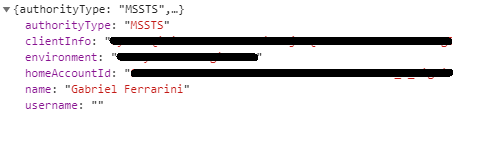

These are my msal and login request config objects
{
  "clientId":"app id",
  "redirectUri":"http://localhost:5555/auth",
  "authority":"https://tenant.b2clogin.com/tenant.onmicrosoft.com/B2C_1_SignIn",
  "knownAuthorities":["tenant.b2clogin.com"]
}
{
  "responseMode":"query",
  "scopes":["openid","profile","email"]
}
App is set as a SPA:

Implicit flow is disabled

GabrielFerrarini
on 4 Sep 2020
It works for me as well ! Thank you for the update
 prooli22
on 4 Sep 2020
prooli22
on 4 Sep 2020
Can someone clarify what the authority in MsalConfig should be set to for ADB2C scenario?
I have it set to https://tenantName.b2clogin.com/tenantName.onmicrosoft.com/b2c_1_sign_in and it's working, but this feels wrong and setting it to anything else gives me CORS error.
dfibuch
on 6 Sep 2020
@dfibuch that's how it should be. Check out the docs for more.
 derisen
on 6 Sep 2020
derisen
on 6 Sep 2020
@dfibuch that's how it should be. Check out the docs for more.
Oh perfect, thank you for that link. There are so many variants of these settings that it was confusing the hell out of me. The reason I asked is I was getting a error in my console on a POST to
https://tenantName.b2clogin.com/tenantName.onmicrosoft.com/b2c_1_sign_in/oauth2/v2.0/token
Error: AADB2C90205: This application does not have sufficient permissions against this web resource to perform the operation
but it seems to be OK now.
I've been following this example to setup my front end SPA with MSAL 2.1 and this to configure my .NET Core backend but don't know if there are more up to date examples.
I got the thing working, but can't get rid of this thought on the back of my mind that I'm missing something.
(Sorry to hijack this thread, if I need to open a separate question and move the conversation there please tell me).
dfibuch
on 7 Sep 2020
@dfibuch glad you got it solved : ) If you followed the samples you should be fine. The first sample you point to uses MSAL.js 1.x, but a more up to date 2.x sample will be out soon.
derisen
on 7 Sep 2020
Is there a working example with B2C tenant, using MSAL.js 2.0 (msal-browser) and the Authorization Code Flow with PKCE?
Does anybody try that?
I tried this example: MSAL.js 2.x Sample - Authorization Code Flow in Single-Page Applications
https://github.com/AzureAD/microsoft-authentication-library-for-js/tree/dev/samples/msal-browser-samples/VanillaJSTestApp2.0
But seems it's not working with B2C.
 Georgeoak
on 9 Sep 2020
Georgeoak
on 9 Sep 2020
Also have tried several times to get this working with the examples and otherwise. Will be sticking with ADAL for now!
 blip2
on 9 Sep 2020
blip2
on 9 Sep 2020
@Georgeoak I've recently upgraded to msal-browser to connect to B2C via the new protocol.
The thing which got me puzzled personally is setting knownAuthorities to an array of your tenant names, e.g. ['myb2c.b2clogin.com']. Note, there is no 'https' in these strings!
Other than that and changing to awaiting on handleRedirectPromise() it's pretty much the same.
 MaximBalaganskiy
on 9 Sep 2020
MaximBalaganskiy
on 9 Sep 2020
@Georgeoak @blip2 samples in this repository are meant for internal use and testing -apologies for the difficulty. A new set of samples with a friendly setup will be out in a few days. If you've run into a particular problem please feel free to open an issue.
derisen
on 9 Sep 2020
@derisen Thank you for the heads up.
I just tried the latest version msal-browser v2.1.0, it works well with my B2C tenant.
Previously I had problem with msal-browser v2.0.1, got an error "_Cannot read property 'interactionType' of null at PublicClientApplication.getRedirectResponseHash_" when sign in to B2C.
Since 2.1.0 is working, I'm good with that.
Thanks.
Georgeoak
on 9 Sep 2020
Mine is working as well. Thanks team for the hard work.
However when the acquireTokenSilent call is made (after signing in), I am always seeing 3 calls to the token endpoint, and one of them ended with HTTP 400.
- scope: [openid offline_access profile], grant_type: authorization_code, HTTP 200
- scope: [my_api_scope], grant_type: refresh_token, HTTP 400
- scope: [my_api_scope, openid, profile], grant_type: authorization_code, HTTP 200
Anybody else seeing the same issue or it's just me?
sidecus
on 10 Sep 2020
@sidecus Ye I've noticed this too, this is the call that gets made:
HTTP POST: https://myTenant.b2clogin.com/myTenant.onmicrosoft.com/my_b2c_1_sign_in_policy/oauth2/v2.0/token
and I get back a:
HTTP 400: {"error":"invalid_grant","error_description":"AADB2C90205: This application does not have sufficient permissions against this web resource to perform the operation.
However, not always. It eventually goes through on subsequent calls and it doesn't prevent the actual flow from working or my user from accessing the site.
dfibuch
on 10 Sep 2020
Closing as this has been resolved. For any issues unrelated to CORS please open a new issue so that we can have a more focused discussion. Thanks!
tnorling
on 10 Sep 2020
Related issues
 ed-ilyin
·
4Comments
ed-ilyin
·
4Comments
 lecaillon
·
3Comments
lecaillon
·
3Comments
 baltuonis
·
4Comments
baltuonis
·
4Comments
 jviney
·
3Comments
ArneMancofi
·
3Comments
jviney
·
3Comments
ArneMancofi
·
3Comments
Most helpful comment
We appreciate everyone's patience, I certainly understand the frustration. I know it has taken a while and we've now reached the date that was previously communicated but we're in the home stretch! I've been told the CORS fix started deployment late last week and is expected to be completed this week. You will not need to update MSAL when it completes as long as you are on a stable release of the library.
There is one other issue to keep an eye on before you deploy an app to production, please see #1999 for that issue. The service team is currently working on a fix for that as well and is expecting to complete that work very soon after the CORS fix.
Additionally, we have PR #2148 open to add a B2C specific sample to our repo. We are waiting to merge until these two issues are resolved. Once this PR is merged you can take that as a sign that we consider B2C GA'ed and ready to support in
[email protected]