Microsoft-authentication-library-for-js: acquireTokenSilent only works in Incognito window
Library
[email protected] (Same issue with [email protected])
Description
In a SPA, trying to login with gmail account using Azure B2C.
- Works ok when in Incognito window.
- When I try to login into my registered app, in a window where I am already logged in my gmail account(in a different tab in the same browser window, on https://mail.google.com/), the acquireTokeSilent fails. I get the error
Refused to display 'https://accounts.google.com/signin/oauth?client_id=4...` in a frame because it set 'X-Frame-Options' to 'deny'.
Scopes used : myRegisteredAppUri/user_impersonation
I know about this : https://github.com/AzureAD/microsoft-authentication-library-for-js/wiki/FAQ#i-get-this-error-refused-to-display--in-a-frame-because-it-set-x-frame-options-to-deny , but this is taken care off in the code, my issue seems to be caused by something else given that it works in an Incognito window. Any ideas?
Framework
Js + LitElement
Configuration
const authOptions = {
auth: {
clientId: this.config.client_id, authority: this.config.authority,
validateAuthority: false,
redirectUri: this.config.user_agent_app_config.redirectUri
},
cache: {
cacheLocation: 'localStorage' as CacheLocation
}
};
return new Msal.UserAgentApplication(authOptions);
// For Azure B2C issues, please include your policies.
B2C_1_signup_signin
Browsers
Not browser specific
 acory
acory
All 6 comments
@acory To clarify, you are trying to sign in with a different account other than your gmail account?
 jasonnutter
on 19 May 2020
jasonnutter
on 19 May 2020
@jasonnutter With the same account in both situations, my gmail account. (I updated the description)
acory
on 19 May 2020
Extra Info:
- If I sign out of my gmail account(which is opened in another tab) and after this, I retry the login and acquireTokenSilent in my app, it works ok.
acory
on 19 May 2020
Extra Info :
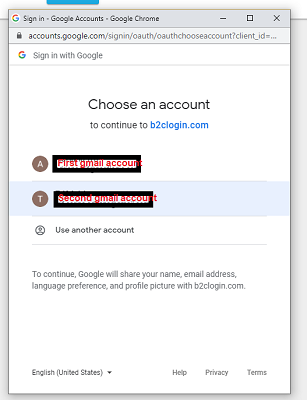
- Apparently the X-Frame-Options error happens only when I'm logged into more than one gmail accounts in the same browser window. This situation:
acory
on 19 May 2020
I will try this: https://github.com/AzureAD/microsoft-authentication-library-for-js/issues/609#issuecomment-520738294
acory
on 19 May 2020
@acory This is a known issue when you have multiple Google accounts logged in. Unfortunately this is a service issue and not something msal can fix. Generally we recommend you call acquireTokenRedirect or acquireTokenPopup if the silent acquisition fails. You can track #842 for updates on this particular issue and if you like, you can also open a ticket with the b2c service. Instructions are in this comment
 tnorling
on 5 Jun 2020
tnorling
on 5 Jun 2020
Related issues
 ssuvorov
·
3Comments
ssuvorov
·
3Comments
 atvoid
·
3Comments
atvoid
·
3Comments
 baltuonis
·
4Comments
baltuonis
·
4Comments
 ed-ilyin
·
4Comments
ed-ilyin
·
4Comments
 ArneMancofi
·
3Comments
ArneMancofi
·
3Comments