Microsoft-authentication-library-for-js: Infinite redirects after updating to MSAL 1.2.2
Library
Important: Please fill in your exact version number above, e.g. [email protected].
Framework
Angular
Description
After updating to version 1.2.2 from version 1.2.1 acquiring token via redirects flow is broken (this flow is the only possible for Safari/iOS).
Security
No
Regression
Yes
I've investigated further and found that this bug can be related to this changes:
https://github.com/AzureAD/microsoft-authentication-library-for-js/commit/d492c3569b69525ca6e820472ddd7b68554e23a6
I see that after each redirect this code deletes msal.acquireTokenAccount|... key from the store which causes further problems.
Configuration
Please provide your MSAL configuration options.
{
    auth: {
        clientId: '{{my-app-id}}',
        authority: 'https://login.microsoftonline.com/{{tenant-id}}.onmicrosoft.com',
        redirectUri: `{{application-login-page}}`,
        navigateToLoginRequestUrl: false
    },
    cache: {
        cacheLocation: 'localStorage',
        storeAuthStateInCookie: true
    },
        system: {
            loadFrameTimeout: 15000
        }
    }
}
Reproduction steps
- Call
acquireTokenRedirect - Receive token (I can see it in the hash)
- Try to call
acquireTokenSilientlyto get value from cache - Token is not in cache. Acquire token silent fails in browsers which disallow third-party cookies
- Fallback to
acquireTokenRedirect, getting infinite loop.
Expected behavior
A token should be returned after redirects.
Browsers
Safari or any other browsers with block third-party cookies flag enabled.
 anton-gorbikov
All 9 comments
@anton-gorbikov Can you first try upgrading to [email protected]? We made some changes to the way msal handles redirects and this update fixed redirect loops other users were experiencing.
If this doesn't fix your issue, can you clarify in step 2 are you saying that the hash is not being stripped from the URL?
 tnorling
on 16 Apr 2020
tnorling
on 16 Apr 2020
We've tried [email protected] and the issues is still there.
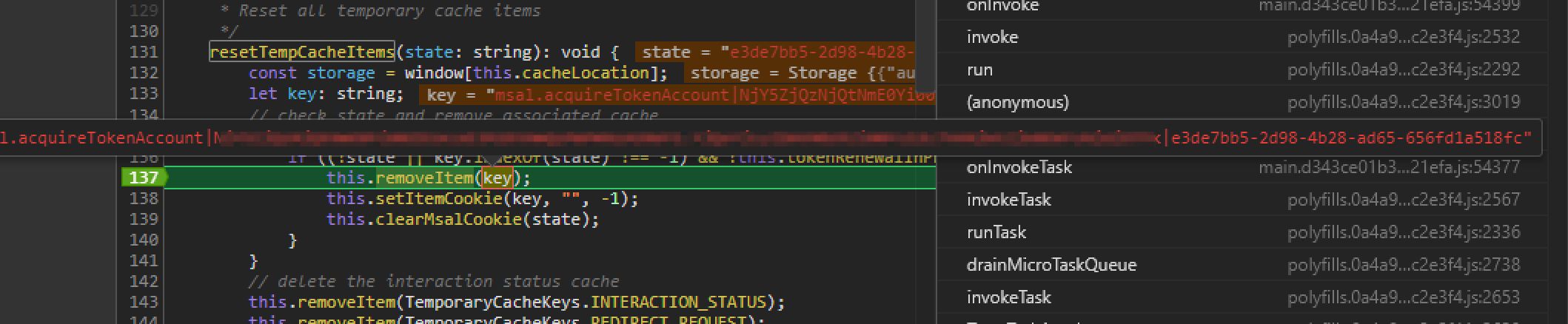
It looks like an issue in new resetTempCacheItems function.
- First
acquireTokenRedirectworks correctly, authenticate current user and setmsal|AquireTokenAccountin local storage - Then we request auth token for MS Graph and call
acquireTokenSiliently, it fails because cookies are blocked, so we have to fall-back toacquireTokenRedirectto request send token. - But here it calls
resetTempCacheItemsand remove user tokenmsal|AquireTokenAccount, then we have to request it again and jump into infinity loop.
 sergey-tihon
on 16 Apr 2020
sergey-tihon
on 16 Apr 2020
@sergey-tihon Thanks for the additional info. The resetTempCacheItems is necessary and expected. I am more interested in why acquireTokenSilent is not picking up the cached token from the first acquireTokenRedirect call. Can you confirm that msal|AcquireTokenAccount is being set in local storage after the first redirect call and before the silent call? #1509 seems to be having a similar issue and I think these issues may be related
tnorling
on 17 Apr 2020
I reproduced the same behavior in the Edge (new now) with disabled 3rd party cookies

Here is MSAL console logs between redirects
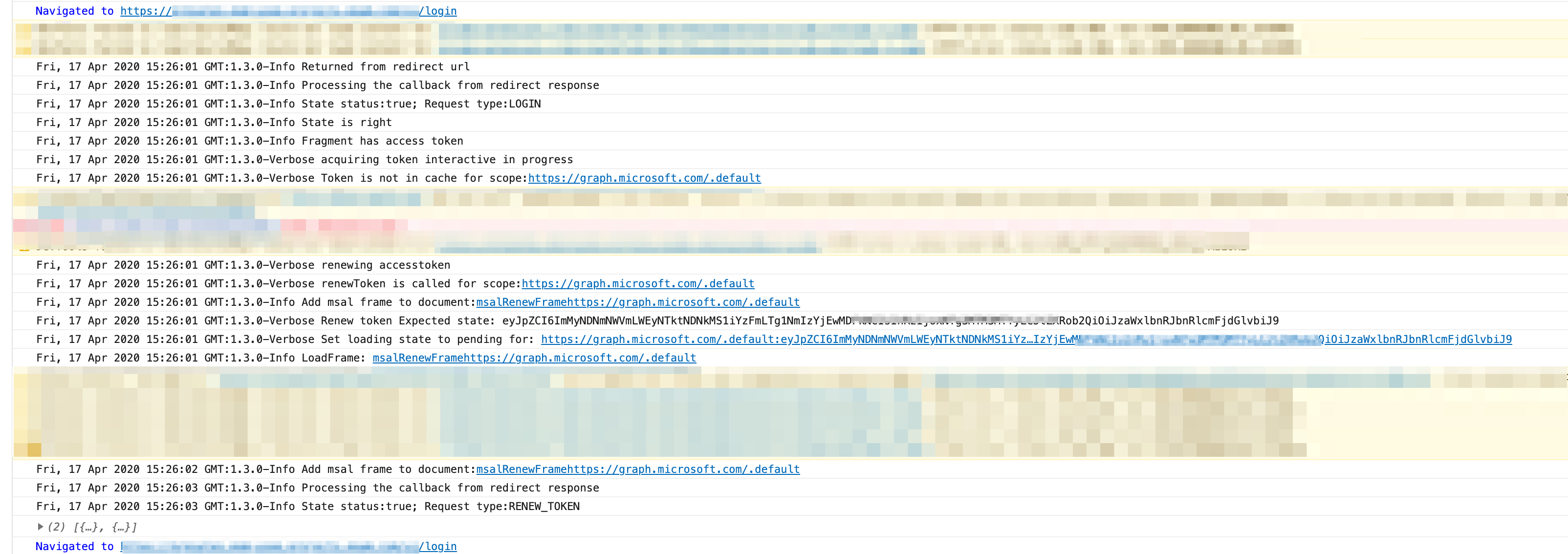
and here is video that shows what happens in local storage (I've removed everything from local storage before the recording)
https://youtu.be/wv5iGU7tZbA
sergey-tihon
on 17 Apr 2020
@sergey-tihon It is a known issue that acquireTokenSilent will fail with 3rd party cookies disabled. Unfortunately this is not something we are able to fix at this time. It looks like what is happening here is that the acquireTokenRedirect call is not caching the token and because of this, in combination with the 3rd party cookies disabled, acquireTokenSilent is failing, causing your loop.
acquireTokenRedirect failing to cache the token is something we should look into but in the meantime a potential workaround for you would be not to call acquireTokenSilent and instead implement your handleRedirectCallback method to pull the token from the response of calling acquireTokenRedirect. Let me know if you need help with this.
tnorling
on 17 Apr 2020
Is it known issues of msal 1.2.2+ ?
Out implementation works as expected with [email protected] (in Safari and in Edge with disables 3rd party cookies) but goes into infinite loop when we upgrade to [email protected] or [email protected].
sergey-tihon
on 17 Apr 2020
It has always been an issue. You can read an explanation here
I suspect the reason it was working in a previous version was because your acquireTokenSilent call was merely returning the token acquired from the previous acquireTokenRedirect call. From the information you have given me it sounds like something changed in 1.2.2 that is preventing acquireTokenRedirect from caching the token. You can get around this with the workaround I mentioned above. I will also discuss with the team and see if we can figure out what changed and if we can get a patch out. Thanks for bringing this to our attention.
tnorling
on 17 Apr 2020
Here are some behaviors I noticed when Azure redirects back to your site:
1> Local website: msal.id token is set to cookie since storeAuthStateInCookie: true
this.cookieService.get('msal.idtoken') = id token value
2> Https: msal.idtoken is not set to cookie , please fix msal library so that cookie get set
:tthis.cookieService.get('msal.idtoken') = null
work around to get token:
public getToken(): any {
if (this.cookieService.check('msal.idtoken')) {
return this.cookieService.get('msal.idtoken');
} else {
let sessionidToken = window.sessionStorage.getItem('msal.idtoken');
if(sessionidToken == null)
{
let clientId = environment.tenantConfig.clientID;
let msalSessionName = 'msal.' + clientId + '.idtoken';
sessionidToken = window.sessionStorage.getItem(msalSessionName);
}
        return sessionidToken;
      }
    }
//For some reason, I am able to retrieve token using sessionStorage.getItam('msal.clientId.idtoken');
//However this should be fixed so that idtoken should be saved in the cookie
 HanhNguyenAtChubb
on 20 Apr 2020
HanhNguyenAtChubb
on 20 Apr 2020
@anton-gorbikov @sergey-tihon A fix for this was just merged into dev. It will be included in the next release. Thanks again for bringing this to our attention
tnorling
on 21 Apr 2020
Related issues
 adriannasui
·
3Comments
adriannasui
·
3Comments
 AbhaysinghBhosale
·
3Comments
AbhaysinghBhosale
·
3Comments
 baltuonis
·
4Comments
baltuonis
·
4Comments
 exequeryphil
·
3Comments
exequeryphil
·
3Comments
 atvoid
·
3Comments
atvoid
·
3Comments
Most helpful comment
We've tried
[email protected]and the issues is still there.It looks like an issue in new
resetTempCacheItemsfunction.acquireTokenRedirectworks correctly, authenticate current user and setmsal|AquireTokenAccountin local storageacquireTokenSiliently, it fails because cookies are blocked, so we have to fall-back toacquireTokenRedirectto request send token.resetTempCacheItemsand remove user tokenmsal|AquireTokenAccount, then we have to request it again and jump into infinity loop.