Microsoft-authentication-library-for-js: New users unable to login the first time after redeeming Azure AD invite (msal.interaction_status=inProgress)
Library
Framework
Angular v8
Description
We allow users to sign-up for a new user account in Azure AD using an e-mail invite. When the user completes the invite flow in the same browser window as they have our application open in the user is unable to sign-in.
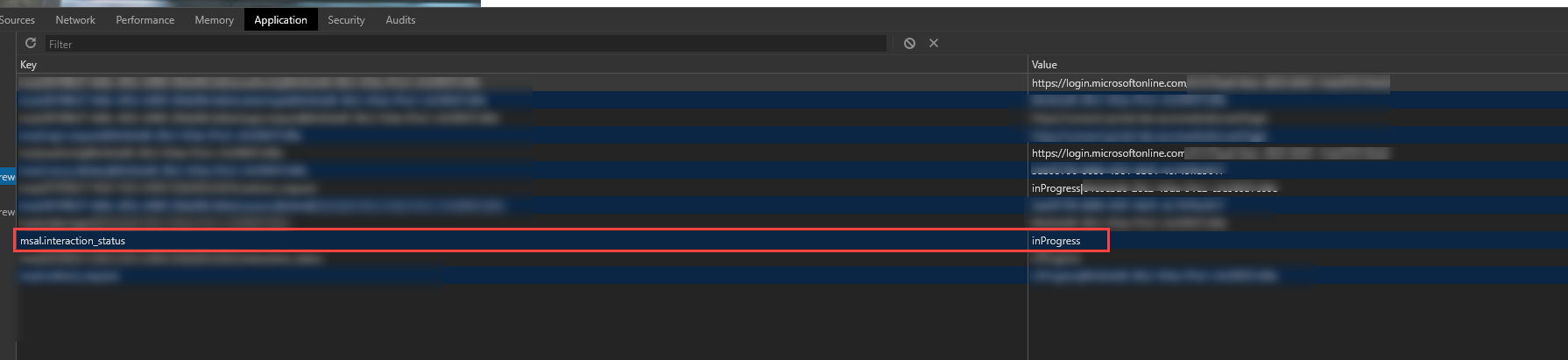
When we call the loginRedirect method the user is immediately redirected back to our application and in localStorage we see that the msal.interaction_status is inProgress.
This only happens when the user completes the Azure AD invitation flow in the same browser window.
Security
No
Regression
No, before (msal 1.1.x) we got invalid state "null". See this issue: https://github.com/AzureAD/microsoft-authentication-library-for-js/issues/960
Configuration
var msalConfig: Msal.Configuration = {
      auth: {
        clientId: environment.adClientId,
        authority: this.authority,
        redirectUri: environment.authRedirectUrl,
        validateAuthority: true,
        postLogoutRedirectUri: environment.authRedirectUrl
      },
      cache: {
        cacheLocation: "localStorage"
      }
    };
Reproduction steps
- Create a new user
- Open the redeem invite link (from Azure AD e-mail) in the same browser window
- Complete the registration
- Login to our application
Workaround
I discovered that either closing the browser window and opening a new one or signing the user out using the logout() method in the SDK allows the user to log in afterward.
Clearing local storage, session storage and/or cookies does not help.
Expected behavior
I would expect the new user to be signed in to our application after clicking login without having to specify his/her username and password because they are already signed into Azure AD as part of the invite flow
Browsers
No
 sanderaernouts
All 9 comments
@pkanher617 do you know what this could be caused by?
 DarylThayil
on 4 Feb 2020
DarylThayil
on 4 Feb 2020
@sanderaernouts Have you found workaround?
 vadimblv
on 19 Feb 2020
vadimblv
on 19 Feb 2020
@vadimblv yes, we detect that login is in progress using app.getLoginInProgress(), show a model with an error message and then invoke app.logOut when the user dismisses the modal.
The behavior is a bit strange because the user tries to log in, fails, and is then forced to logout and try again. But, in our case, it does get the user out of this situation.
sanderaernouts
on 19 Feb 2020
@DarylThayil @pkanher617 any ideas what is causing this? As mentioned in my previous comment we do have a workaround but it feels like a last resort and is not really a good user experience :(
sanderaernouts
on 19 Feb 2020
Sorry just to refresh this, is the problem that application state (local storage) is not taking into account that the user is already logged in with the identity provider or is the problem that the identity provider is no aware the user is logged in?
DarylThayil
on 19 Feb 2020
@pkanher617 pinging this could this be a case where inProgress in not turned off because of a special login case returning a different hash?
DarylThayil
on 19 Feb 2020
Sorry just to refresh this, is the problem that application state (local storage) is not taking into account that the user is already logged in with the identity provider or is the problem that the identity provider is no aware the user is logged in?
@DarylThayil the identity provider is not aware that the user is already logged in or at least that is my guess. Clearing the cache, local storage, and cookies does not help. If the user closes the browser and opens a new one then this problem does not occur anymore as far as I know.
As mentioned in the issue this only started happening after upgrading to MSAL 1.2.x.
sanderaernouts
on 20 Feb 2020
@sanderaernouts Apologies for the delayed response on this issue. If you are still having this issue with the latest version of MSAL, could you please post a snippet of the code you are using to create the msal object and call loginRedirect?
I suspect this has something to do with the handleRedirectCallback function not being called, but I would need to see the code to be sure.
 pkanher617
on 13 May 2020
pkanher617
on 13 May 2020
This issue has not seen activity in 14 days. It may be closed if it remains stale.
![github-actions[bot] picture](https://avatars.githubusercontent.com/in/15368?v=4&s=40) github-actions[bot]
on 27 May 2020
github-actions[bot]
on 27 May 2020
Related issues
 jfbloom22
·
3Comments
jfbloom22
·
3Comments
 ssuvorov
·
3Comments
ssuvorov
·
3Comments
 ArneMancofi
·
3Comments
ArneMancofi
·
3Comments
 spottedmahn
·
3Comments
spottedmahn
·
3Comments
 DarkLite1
·
3Comments
DarkLite1
·
3Comments