Microsoft-authentication-library-for-js: Intermittent acquireTokenSilent timeout issue
Please follow the issue template below. Failure to do so will result in a delay in answering your question.
Library
- [ ]
[email protected]or@azure/[email protected] - [ ]
@azure/[email protected] - [x ]
@azure/[email protected] - [ ]
@azure/[email protected]
Description
Version: "@azure/msal-angular": "^1.0.0-alpha.1" ,"msal": "^1.2.1-beta.1"
We are experiencing intermittent acquireTokenSilent Token renewal operation failed due to timeout issue. We observed that we have block_token_requests error as well, but the timeout issue sometimes disappears sometimes doesn't, although the block_token_requests error is always there. I've included a detailed verbose log (with sensitive info stripped out) below for both working and non-working cases. I've observed that the block_token_requests error is when acquireTokenSilent's callback redirects to a route that's guarded by MsalGuard. All of our routes are guarded by MsalGuard and we would like it to work this way.
Question
We think the timeout error is not related to block_token_requests, because we've tried to create our own guard to not activate the redirect route in hidden iframe, however the timeout issue still occurs although block_token_requests is not observed anymore. We've tried to increase the timeout to 30s with no luck.
What's the reason for this timeout error? We've not observed this in older versions. We recently updated to the alpha version due to SSO requirement.
Details of the app:
For our app, we have all of our routes guarded with MsalGuard, and the default callback from login/acquireToken redirects to one of the guarded Home route. Our APIs have interceptors to make sure acquireToken is successful before making an API call.
Verbose Logs:
The one that's not working:
msal client logging: Fri, 17 Jan 2020 20:31:44 GMT:1234-1.2.0-Verbose location change event from old url to new url
main.js:1081 msal client logging: Fri, 17 Jan 2020 20:31:44 GMT:1234-1.2.0-Info Navigate to:https://xxx/oauth2/v2.0/authorize?response_type=id_token&response_mode=fragment
msal client logging: Fri, 17 Jan 2020 20:31:51 GMT:1234-1.2.0-Info Returned from redirect url
msal client logging: Fri, 17 Jan 2020 20:31:51 GMT:1234-1.2.0-Info Processing the callback from redirect response
msal client logging: Fri, 17 Jan 2020 20:31:51 GMT:1234-1.2.0-Info State status:true; Request type:LOGIN
msal client logging: Fri, 17 Jan 2020 20:31:51 GMT:1234-1.2.0-Info State is right
msal client logging: Fri, 17 Jan 2020 20:31:51 GMT:1234-1.2.0-Info Fragment has id token
VM11 main.js:680 LOGIN SUCCESS
msal client logging: Fri, 17 Jan 2020 20:31:51 GMT:1234-1.2.0-Verbose location change event from old url to new url
msal client logging: Fri, 17 Jan 2020 20:31:51 GMT:1234-1.2.0-Info Token is already in cache for scope:f7de192f-f705-4194-83a8-d49228fa3e6c
msal client logging: Fri, 17 Jan 2020 20:31:55 GMT:1234-1.2.0-Verbose renewing accesstoken
msal client logging: Fri, 17 Jan 2020 20:31:55 GMT:1234-1.2.0-Verbose renewToken is called for scope:xxx
msal client logging: Fri, 17 Jan 2020 20:31:55 GMT:1234-1.2.0-Info Add msal frame to document:msalRenewFramehttps://scopexxx
msal client logging: Fri, 17 Jan 2020 20:31:55 GMT:1234-1.2.0-Verbose Renew token Expected state: 8920e54e-7a8a-48a3-bf26-d9139f211458
msal client logging: Fri, 17 Jan 2020 20:31:55 GMT:1234-1.2.0-Info Navigate to:https://xxx/oauth2/v2.0/authorize?response_type=token&client_info=1&x-client-SKU=MSAL.JS&x-client-Ver=1.2.0&domain_hint=organizations&client-request-id=16f1e18a-fcad-4513-a10a-7d9d1e8f79b3&prompt=none&response_mode=fragment
msal client logging: Fri, 17 Jan 2020 20:31:55 GMT:1234-1.2.0-Verbose Set loading state to pending for: scopexxx
msal client logging: Fri, 17 Jan 2020 20:31:55 GMT:1234-1.2.0-Info LoadFrame: msalRenewFramehttps:/xxx.onmicrosoft.com/api/user_impersonation
msal client logging: Fri, 17 Jan 2020 20:31:55 GMT:1234-1.2.0-Info Add msal frame to
msal client logging: Fri, 17 Jan 2020 20:31:55 GMT:1234-1.2.0-Info Frame Name : msalRenewFramehttps:// Navigated to: https://xxx.onmicrosoft.com/oauth2/v2.0/authorize?response_type=token&scope=&client_info=1&x-client-SKU=MSAL.JS&x-client-Ver=1.2.0&domain_hint=organizations&client-request-id=16f1e18a-fcad-4513-a10a-7d9d1e8f79b3&prompt=none&response_mode=fragment
acquire token failure {"errorCode":"block_token_requests","errorMessage":"Token calls are blocked in hidden iframes","name":"ClientAuthError"}
msal client logging: Fri, 17 Jan 2020 20:31:58 GMT:1234-1.2.0-Error Error when acquiring token for scopes: ClientAuthError: Token calls are blocked in hidden iframes
msal client logging: Fri, 17 Jan 2020 20:32:28 GMT:1234-1.2.0-Verbose Loading frame has timed out after: 30 seconds for scope
app.component.ts:181 acquire token failure {"errorCode":"token_renewal_error","errorMessage":"URL navigated to is https://xxx.b2clogin.com/xxx.onmicrosoft.com/policy/oauth2/v2.0/authorize?response_type=token&client_info=1&x-client-SKU=MSAL.JS&x-client-Ver=1.2.0&domain_hint=organizations&client-request-id=16f1e18a-fcad-4513-a10a-7d9d1e8f79b3&prompt=none&response_mode=fragment, Token renewal operation failed due to timeout.","name":"ClientAuthError"}
app.module.ts:79 msal client logging: Fri, 17 Jan 2020 20:32:28 GMT:1234-1.2.0-Error Error when acquiring token for scope Token renewal operation failed due to timeout.
The one that works:
msal client logging: Fri, 17 Jan 2020 20:26:03 GMT:1234-1.2.0-Verbose location change event from old url to new url
msal client logging: Fri, 17 Jan 2020 20:26:03 GMT:1234-1.2.0-Info Token is already in cache for scope:f7de192f-f705-4194-83a8-d49228fa3e6c
app.component.ts:146 LOGIN SUCCESS
msal client logging: Fri, 17 Jan 2020 20:26:03 GMT:1234-1.2.0-Verbose renewing accesstoken
msal client logging: Fri, 17 Jan 2020 20:26:03 GMT:1234-1.2.0-Verbose renewToken is called for scope
msal client logging: Fri, 17 Jan 2020 20:26:03 GMT:1234-1.2.0-Info Add msal frame to document:msalRenewFramehttps://
msal client logging: Fri, 17 Jan 2020 20:26:03 GMT:1234-1.2.0-Verbose Renew token Expected state:
msal client logging: Fri, 17 Jan 2020 20:26:03 GMT:1234-1.2.0-Info Navigate to:https://xxx.b2clogin.com/xxx.onmicrosoft.com&client_info=1&x-client-SKU=MSAL.JS&x-client-Ver=1.2.0&domain_hint=organizations&client-request-id=e41c5916-dab0-4394-beb3-305aad9c4f5b&prompt=none&response_mode=fragment
msal client logging: Fri, 17 Jan 2020 20:26:03 GMT:1234-1.2.0-Verbose Set loading state to pending for: scope
msal client logging: Fri, 17 Jan 2020 20:26:03 GMT:1234-1.2.0-Info LoadFrame: msalRenewFramehttps://
msal client logging: Fri, 17 Jan 2020 20:26:04 GMT:1234-1.2.0-Info Add msal frame to document:msalRenewFramehttps://
msal client logging: Fri, 17 Jan 2020 20:26:04 GMT:1234-1.2.0-Info Frame Name : msalRenewFramehttps:// Navigated to: https://xxx.b2clogin.com/xxx.onmicrosoft.com/policy/oauth2/v2.0/authorize?response_type=token&client_info=1&x-client-SKU=MSAL.JS&x-client-Ver=1.2.0&domain_hint=organizations&client-request-id=e41c5916-dab0-4394-beb3-305aad9c4f5b&prompt=none&response_mode=fragment
msal client logging: Fri, 17 Jan 2020 20:26:04 GMT:1234-1.2.0-Info Returned from redirect url
msal client logging: Fri, 17 Jan 2020 20:26:04 GMT:1234-1.2.0-Info Processing the callback from redirect response
msal client logging: Fri, 17 Jan 2020 20:26:04 GMT:1234-1.2.0-Info State status:true; Request type:RENEW_TOKEN
msal client logging: Fri, 17 Jan 2020 20:26:04 GMT:1234-1.2.0-Info State is right
msal client logging: Fri, 17 Jan 2020 20:26:04 GMT:1234-1.2.0-Info Fragment has access token
msal client logging: Fri, 17 Jan 2020 20:26:04 GMT:1234-1.2.0-Info The user object received in the response is the same as the one passed in the acquireToken request
msal client logging: Fri, 17 Jan 2020 20:26:04 GMT:1234-1.2.0-Verbose acquiring token interactive in progress
acquireTokenSuccess
msal client logging: Fri, 17 Jan 2020 20:26:07 GMT:1234-1.2.0-Verbose location change event from old url to new url
app.component.ts:181 acquire token failure {"errorCode":"block_token_requests","errorMessage":"Token calls are blocked in hidden iframes","name":"ClientAuthError"}
msal client logging: Fri, 17 Jan 2020 20:26:07 GMT:1234-1.2.0-Error Error when acquiring token for scopes: ClientAuthError: Token calls are blocked in hidden iframes
 pasanenl
All 45 comments
@pasanenl When we time out for acquireTokenSilent, what are you seeing when you click the URI listed in the error?
Note: As you already concluded block_token_requests is not an error, it is only messaging from msal js informing that we cannot make silent calls from hidden iframes. Please check #1194 or #1156 for more details on this if you do not want to see this error. I am tagging this issue as documentation to add this in the wiki for better guidance in the future.
 sameerag
on 20 Jan 2020
sameerag
on 20 Jan 2020
@sameerag If you mean the URL navigated to I clicked on in in my local environment and it brought me to my SPA. This timeout error occurs intermittently. It may work successfully once but then the next time it times out.
pasanenl
on 21 Jan 2020
@sameerag The timeout issue is still a problem in msal-angular 1.0.0-beta.1. To reproduce clear the browser cache and start a fresh login. Login to the Angular SPA. The first time the application tries to acquireTokenSilent() it times out. Eventually it may acquire the token successfully. Subsequent acquireTokenSilent() succeed with Info Token is already in cache for scope:.
I thought it may have to do with our http interceptor. I see the issue with MsalInterceptor. It appears the issue is with the first acquireTokenSilent(). It times out intermittently.
pasanenl
on 24 Jan 2020
@sameerag Do you know if this issue is being addressed as a bug? We've hit this issue on every version of MSAL for Angular 1.0.0. We see this error ClientAuthError: URL navigated to is https://xxxx, Token renewal operation failed due to timeout. We've used the previous versions of MSAL for Angular without hitting this issue.
To reproduce: Have an http interceptor or code that retrieves a token using aquireTokenSilent() after a successful login. Clear the browser cache and do a fresh login to the Angular SPA. Repeat this until you hit the error. It often happens the first try or it could happen the 4th time.
app.module.ts:79 msal client logging: Mon, 27 Jan 2020 15:46:27 GMT:1234-1.2.1-Verbose Loading frame has timed out after: 60 seconds for scope xxxx
app.module.ts:79 msal client logging: Mon, 27 Jan 2020 15:46:27 GMT:1234-1.2.1-Error Error when acquiring token for scopes: xxxx ClientAuthError: URL navigated to is https://xxxx, Token renewal operation failed due to timeout.
business-home.component.ts:266 ClientAuthError: URL navigated to is https://xxxx, Token renewal operation failed due to timeout.
at ClientAuthError.AuthError [as constructor] (http://localhost:4210/vendor.js:142133:28)
at new ClientAuthError (http://localhost:4210/vendor.js:142271:28)
at Function.push../node_modules/msal/lib-es6/error/ClientAuthError.js.ClientAuthError.createTokenRenewalTimeoutError (http://localhost:4210/vendor.js:142298:16)
at http://localhost:4210/vendor.js:144136:99
at ZoneDelegate.push../node_modules/zone.js/dist/zone.js.ZoneDelegate.invokeTask (http://localhost:4210/polyfills.js:10297:31)
at Object.onInvokeTask (http://localhost:4210/vendor.js:72450:33)
at ZoneDelegate.push../node_modules/zone.js/dist/zone.js.ZoneDelegate.invokeTask (http://localhost:4210/polyfills.js:10296:36)
at Zone.push../node_modules/zone.js/dist/zone.js.Zone.runTask (http://localhost:4210/polyfills.js:10064:47)
at push../node_modules/zone.js/dist/zone.js.ZoneTask.invokeTask (http://localhost:4210/polyfills.js:10372:34)
at ZoneTask.invoke (http://localhost:4210/polyfills.js:10361:48)
at timer (http://localhost:4210/polyfills.js:11930:29)
zone.js:2052 [Violation] 'setInterval' handler took 74ms
pasanenl
on 27 Jan 2020
cc @jasonnutter who is working on Angular.
sameerag
on 28 Jan 2020
In our production app - without angular - this also happens form time to time. I couldn't find a way to reproduce it now, but it happens so often, that in our error log we have like ~ 10 entries of this per day.
When it happend to me I basically just refreshed the page again and it worked.....However it's obviously annoying, because an error is shown on the first page load.
The error looks like this:
URL navigated to is https://login.microsoftonline.com/<clientId>/oauth2/v2.0/authorize?response_type=token&scope=api%3A%2F%2F<whatever>%2Faccess_as_user%20openid%20profile&client_id=<clientid>&redirect_uri=https%3A%2F%2Fmy.app.com%2Flogin-complete&state=<guid>&nonce=<guid>&client_info=1&x-client-SKU=MSAL.JS&x-client-Ver=1.2.1&login_hint=<mail>&login_req=<guid>&domain_req=<guid>&domain_hint=organizations&client-request-id=<guid>&prompt=none&response_mode=fragment, Token renewal operation failed due to timeout. at t [as constructor]
 at Function.t.createTokenRenewalTimeoutError
Here also a screenshto when it happened to me, don't think it will reveal more information though:

I don't know if I should somehow try to prevent this and do a retry or whatever when this happens. However it's strange that it happens so often....
 Nasicus
on 30 Jan 2020
Nasicus
on 30 Jan 2020
@pasanenl @Nasicus What happens when you open the login.microsoftonline.com url in its own tab?
 jasonnutter
on 30 Jan 2020
jasonnutter
on 30 Jan 2020
do you mean now or when it happens? Because now it just immediately back to the app. The next time it happens to me I will try it.
Nasicus
on 31 Jan 2020
@Nasicus When it happaens, specifically. And if you could share one of those urls with us, that would also be helpful. (Email is on my profile page). Thanks!
jasonnutter
on 31 Jan 2020
I can now successfully reproduce this!
I'm not sure if there are also other scenarios, but this one is for sure one.
Reproduce:
- Use Chrome (may also work with other browsers)
- Open "any" site (e.g. github) in a tab
- Open another tab and navigate to your site which uses MSAL (note: ensure that a token has to be acquired via the hidden iframe => i.e. 1 hour passed since you last accessed it)
- As soon as you open the site in the new tab, start switching between the gitbhub tab and the site-with-msal tab (it may even be enough to simply switch away immediately and only come back after 1 min or so => but I didn't test this)
- If you switch often enough / at the wrong times, you will get the timeout
=> this may sound a little hard to reproduce, but it actually isn't, it happens for me almost always when you do that
=> this happens because Chrome seems to pause script execution (maybe even http requests?) in inactive tabs
I already informed @jasonnutter via E-Mail, so he is informed.
Nasicus
on 7 Feb 2020
I seem to have the same issue - await msal.acquireTokenSilent(req) never completes. I can see the iframe and it seems to have received the token. FWIW I'm redirecting to a blank page.
In my case/setup, it's reproducible every time.
 mbrevda
on 18 Feb 2020
mbrevda
on 18 Feb 2020
I noticed that the timeout seems to only happen when the blank redirect page is not on sameorigin. Is there any reason same origin should be necessary?
mbrevda
on 18 Feb 2020
@mbrevda Yes, in order for MSAL.js to read the url of the iframe (which includes the response), the redirect uri needs to be on the same origin as the application. Otherwise, we have no way to read the response, which would result in a timeout.
jasonnutter
on 18 Feb 2020
Thanks. I guess what threw me off was that the src isn't set to the same origin:

Might want to document this requirement somewhere!
mbrevda
on 18 Feb 2020
@mbrevda Initially, we set the src to a location on your authority (e.g. login.microsoftonline.com), and then when the operation is complete, the authority redirects that response (and thus the iframe) to the provided redirect uri, which allows us to parse it.
You can read more about the implementation of the implicit flow here: https://docs.microsoft.com/en-us/azure/active-directory/develop/v2-oauth2-implicit-grant-flow
jasonnutter
on 18 Feb 2020
@pasanenl Is this still an issue with the latest versions of MSAL Angular and MSAL?
jasonnutter
on 27 Mar 2020
@jasonnutter We no longer use MSAL for Angular.
pasanenl
on 31 Mar 2020
Hello
I'm using msal-angular 1.0.0-beta.4 and I am having the same problem. I don't know how to reproduced it and as described above it seems to be intermittent. When clearing the cache and refreshing the app, it works again but obviously this is not a fix. Is this bug being investigated ?
Also it is worth mentionning that just before getting the error, there is a warning in the console :
Warning redirectUri set to page with MSAL Guard. It is recommended to not set redirectUri to a page that requires authentication
I use the guard on my homepage.
Another point worth mentionning (I don't know if it makes any difference) but I have two redirect URLs. One is the homepage of my live website, the other is localhost:4200 for development on my local machine. Azure AD allows for this, but how does msal cope with it ?
 graphicsxp
on 4 Apr 2020
graphicsxp
on 4 Apr 2020
@jasonnutter We no longer use MSAL for Angular.
out of curiosity, what do you use to authenticate your Angular app to Azure AD then ?
graphicsxp
on 4 Apr 2020
@graphicsxp We wrote our own authentication service using MSAL v1.2.1 JS directly.
pasanenl
on 6 Apr 2020
@jasonnutter, yes this is still an issue with the latest MSAL Angular and MSAL version.
Browser: Chrome / Firefox (latest versions)
MSAL: 1.3.0-beta.1
MSAL Angular: 1.0.0-beta.5
Our routes are protected by MsalGuard and whenever they try to renew the token silently, the same issue as already mentioned can be observed. Right now the only way for us to "resolve" it is by clearing the browser cache / local-storage.
Our setup is pretty much the same as it is used by the angular 9 samples, with some mitigation tactics suggested by the FAQ in order to prevent CORS issues.
- MSAL config
``function MSALConfigFactory(): Configuration {
return {
auth: {
clientId: 'xxxxxxxxxx',
authority: 'https://login.microsoftonline.com/xxxxxxxx',
validateAuthority: true,
navigateToLoginRequestUrl: true,
redirectUri:${window.location.origin}`,
},
cache: {
cacheLocation: 'localStorage',
storeAuthStateInCookie: isIE
},
};
}
function MSALAngularConfigFactory(): MsalAngularConfiguration {
return {
popUp: !isIE,
consentScopes: ['openid', 'profile'],
extraQueryParameters: {}
};
}
- app-routing.module
const routes: Routes = [
{
path: 'station', component: StationComponent, canActivate: [MsalGuard],
children: [
{
path: ':id', component: StationDetailComponent, canActivate: [MsalGuard]
}
]
},
{path: '', pathMatch: 'full', redirectTo: 'station'},
{path: '**', redirectTo: 'station'},
];
- app.module
],
entryComponents: [
    AppComponent,
    MsalComponent
]
})
export class AppModule {
constructor() {
console.log('APP Module Constructor!');
}
ngDoBootstrap(ref: ApplicationRef) {
    if (window !== window.parent && !window.opener) {
        console.log('Bootstrap: MSAL');
        ref.bootstrap(MsalComponent);
    } else {
        //this.router.resetConfig(RouterModule);
        console.log('Bootstrap: App');
        ref.bootstrap(AppComponent);
    }
}
}
```
- Error:

 captain-clean
on 17 Apr 2020
captain-clean
on 17 Apr 2020
@captain-clean What happens when you open the login.microsoftonline.com url in its own tab? Also, if you share the client-request-id with me, I can look up server logs for the request.
jasonnutter
on 18 Apr 2020
Opening the login.microsoftonline.com url in its own tab redirects to our site with the id_token as part of the request parameters. Though it doesn't seem to be parsed by the msal library.
The client-request-id for the most recent, unsuccessful request is: 28e1d54b-004a-4239-a77c-b108706daee7
captain-clean
on 18 Apr 2020
Opening the
login.microsoftonline.comurl in its own tab redirects to our site with theid_tokenas part of the request parameters. Though it doesn't seem to be parsed by the msal library.The
client-request-idfor the most recent, unsuccessful request is:28e1d54b-004a-4239-a77c-b108706daee7
@captain-clean Thanks. Can you try setting system.loadFrameTimeout in your configuration to an artificially high number, e.g. 20000 (20 seconds). Do requests still timeout?
jasonnutter
on 20 Apr 2020
I've tried increasingsystem.loadFrameTimeout to 35 seconds, but had no immediate success resolving the issue.
core.js:6189 ERROR Error: Uncaught (in promise): ClientAuthError: URL navigated to is https://login.microsoftonline.com/XXXXXXXXXXXXXXXXXXXXXXXXXXXXXXXXX/oauth2/v2.0/authorize?response_type=id_token&scope=openid%20profile&client_id=XXXXXXXXXXXXXXXXXXXXXXXXX&redirect_uri=http%3A%2F%2Flocalhost%3A4200&state=eyJpZCI6IjAzNGQwZGEyLWY0OGItNDJiOS05MzQ1LTY4MDIxZWQwZjM4ZSIsInRzIjoxNTg3NDQ3MDY1LCJtZXRob2QiOiJzaWxlbnRJbnRlcmFjdGlvbiJ9&nonce=6436f939-2a7f-4fed-ac28-bfc9c4eb87a5&client_info=1&x-client-SKU=MSAL.JS&x-client-Ver=1.3.0&login_hint=XXXXXXXXXXXXXXXX&client-request-id=17bfbb91-7cbc-4b49-b4f6-0fc2a7fbb4c9&prompt=none&response_mode=fragment, Token renewal operation failed due to timeout.
ClientAuthError: URL navigated to is https://login.microsoftonline.com/XXXXXXXXXXXXXXXXXXXXXXXXXXXXXXXXX/oauth2/v2.0/authorize?response_type=id_token&scope=openid%20profile&client_id=XXXXXXXXXXXXXXXXXXXXXXXXX2&redirect_uri=http%3A%2F%2Flocalhost%3A4200&state=eyJpZCI6IjAzNGQwZGEyLWY0OGItNDJiOS05MzQ1LTY4MDIxZWQwZjM4ZSIsInRzIjoxNTg3NDQ3MDY1LCJtZXRob2QiOiJzaWxlbnRJbnRlcmFjdGlvbiJ9&nonce=6436f939-2a7f-4fed-ac28-bfc9c4eb87a5&client_info=1&x-client-SKU=MSAL.JS&x-client-Ver=1.3.0&login_hint=XXXXXXXXXXXXXXXX&client-request-id=17bfbb91-7cbc-4b49-b4f6-0fc2a7fbb4c9&prompt=none&response_mode=fragment, Token renewal operation failed due to timeout.
    at ClientAuthError.AuthError [as constructor] (AuthError.js:22)
    at new ClientAuthError (ClientAuthError.js:105)
    at Function.push../node_modules/msal/lib-es6/error/ClientAuthError.js.ClientAuthError.createTokenRenewalTimeoutError (ClientAuthError.js:132)
    at WindowUtils.js:73
    at ZoneDelegate.invokeTask (zone-evergreen.js:399)
client-request-id: 17bfbb91-7cbc-4b49-b4f6-0fc2a7fbb4c9
I noticed that after increasing the timeout to 35 seconds, the token seems to be present after I refresh my browser tab even though the initial token renewal request failed due to a timeout. But, this is only seems to be the case on Google Chrome (v 81.0.4044.113). Firefox (v 75.0) on the other hand, never seems to be able to recover after the initial, failed request.
captain-clean
on 21 Apr 2020
@captain-clean Thanks! In that request, it looks like you are setting the redirect URI to http://localhost:4200, and that page appears to setup to redirect away to the station route. I believe this is causing the problem, as the page you use for the redirectUri should not invoke a redirect of its own, as that can prevent MSAL from parsing the response in the iframe (which can result in a timeout). The simplest solution would be to set the redirectUri to a dedicated redirect page that does not perform any redirects or require authorization.
jasonnutter
on 21 Apr 2020
@jasonnutter I'm having this issue across my entire team, and don't have the MsalGuard applied to our root route, nor do we redirect to a different route from the route that we specify as the redirectUri.
When I click on the link in the error message, our app opens in a new tab, and we are logging in successfully, but if I refresh the page, the error returns.
I also get the this error at the same time (usually)
Unsafe JavaScript attempt to initiate navigation for frame with origin 'http://localhost:4200' from frame with URL 'https://login.microsoftonline.com/...'. The frame attempting navigation of the top-level window is sandboxed, but the flag of 'allow-top-navigation' or 'allow-top-navigation-by-user-activation' is not set
 jakehockey10
on 26 Apr 2020
jakehockey10
on 26 Apr 2020
@jasonnutter Sorry for the late reply. I gave your suggestion a try, but did not succeed fixing my problem.
When setting the redirectUri to a page not requiring authentication I experience the same issue. Also, I've noticed that when allowing X-Frame-Options: SAMEORIGIN rather than X-Frame-Options: DENY the request is more likely to succeed.
Thanks for the help.
captain-clean
on 26 Apr 2020
@jakehockey10 If you can share a Fiddler trace, that would be helpful.
@captain-clean A Fiddler trace would also be helpful here.
Also, I've noticed that when allowing X-Frame-Options: SAMEORIGIN rather than X-Frame-Options: DENY the request is more likely to succeed.
When silently acquiring tokens, MSAL will load your redirect URI inside an iframe. If you have your server setup to return the X-Frame-Options: DENY header, your app will be unable to load in the hidden iframe, which results in the library being unable to read the response, which will result in a timeout. Make sure that X-Frame-Options is set to SAMEORIGIN, if set at all.
jasonnutter
on 27 Apr 2020
I hope this is what you were after. I haven't used Fiddler before:
#   Result  Protocol    Host    URL Body    Caching Content-Type    Process Comments    Custom
1   200 HTTPS   www.fiddler2.com    /UpdateCheck.aspx?isBeta=False  785 private text/plain; charset=utf-8
2   200 HTTP    Tunnel to   www.googleapis.com:443  0           chrome:15792
3   200 HTTP    Tunnel to   oauthaccountmanager.googleapis.com:443  0           chrome:15792
4   200 HTTP    Tunnel to   teams.microsoft.com:443 0           teams:10100
5   200 HTTP    Tunnel to   docs.google.com:443 0           chrome:15792
6   200 HTTP    Tunnel to   teaminc.visualstudio.com:443    0           gitkraken:5736
7   200 HTTP    Tunnel to   teaminc.visualstudio.com:443    0           gitkraken:5736
8   200 HTTP    Tunnel to   dev.azure.com:443   0           gitkraken:28020
9   200 HTTP    Tunnel to   southcentralus.notifications.teams.microsoft.com:443    0           teams:10100
10  200 HTTP    fiddler2.com    /content/GetArticles?clientId=1B72D59DF7D0D15D518DDEE26CECBB116C1DC5CF8F8C7EB030832824FE10848B  874 no-cache; Expires: -1   application/json; charset=utf-8 fiddler:32620
11  200 HTTP    fiddler2.com    /content/GetBanner?clientId=1B72D59DF7D0D15D518DDEE26CECBB116C1DC5CF8F8C7EB030832824FE10848B    144,183 no-cache; Expires: -1   application/json; charset=utf-8 fiddler:32620
12  200 HTTP    Tunnel to   ssl.gstatic.com:443 0           chrome:15792
13  200 HTTP    Tunnel to   www.google-analytics.com:443    0           chrome:15792
14  200 HTTP    Tunnel to   www.google-analytics.com:443    0           chrome:15792
15  200 HTTP    Tunnel to   www.googletagmanager.com:443    0           chrome:15792
16  200 HTTP    Tunnel to   stats.g.doubleclick.net:443 0           chrome:15792
17  200 HTTP    Tunnel to   stats.g.doubleclick.net:443 0           chrome:15792
18  200 HTTP    Tunnel to   www.google.com:443  0           chrome:15792
19  200 HTTP    Tunnel to   www.google.com:443  0           chrome:15792
20  200 HTTP    Tunnel to   www.google.com:443  0           chrome:15792
21  200 HTTP    Tunnel to   cloudsearch.googleapis.com:443  0           chrome:15792
22  200 HTTP    Tunnel to   digitaldev.teaminc.com:443  0           chrome:15792
23  200 HTTP    Tunnel to   digitaldev.teaminc.com:443  0           chrome:15792
24  200 HTTP    Tunnel to   bat.bing.com:443    0           chrome:15792
25  200 HTTP    Tunnel to   digitaldev.teaminc.com:443  0           chrome:15792
26  200 HTTP    Tunnel to   clients4.google.com:443 0           chrome:15792
27  200 HTTP    Tunnel to   digitaldev.teaminc.com:443  0           chrome:15792
28  200 HTTP    Tunnel to   login.microsoftonline.com:443   0           chrome:15792
29  200 HTTP    Tunnel to   login.microsoftonline.com:443   0           chrome:15792
30  200 HTTP    Tunnel to   teamdigitalclientportalapi-dev.azurewebsites.net:443    0           chrome:15792
31  200 HTTP    Tunnel to   teamdigitalclientportalapi-dev.azurewebsites.net:443    0           chrome:15792
32  200 HTTP    Tunnel to   browser.pipe.aria.microsoft.com:443 0           teams:10100
33  200 HTTP    Tunnel to   graph.microsoft.com:443 0           chrome:15792
34  200 HTTP    Tunnel to   graph.microsoft.com:443 0           chrome:15792
35  200 HTTP    Tunnel to   18.client-channel.google.com:443    0           chrome:15792
36  200 HTTP    Tunnel to   outlook.office365.com:443   0           chrome:15792
37  200 HTTP    Tunnel to   outlook.office365.com:443   0           chrome:15792
38  200 HTTP    Tunnel to   browser.pipe.aria.microsoft.com:443 0           chrome:15792
39  200 HTTP    Tunnel to   aadcdn.msauth.net:443   0           chrome:15792
40  200 HTTP    Tunnel to   aadcdn.msauth.net:443   0           chrome:15792
41  200 HTTP    Tunnel to   login.live.com:443  0           chrome:15792
42  200 HTTP    Tunnel to   logincdn.msauth.net:443 0           chrome:15792
43  200 HTTP    Tunnel to   aadcdn.msauthimages.net:443 0           chrome:15792
44  200 HTTP    Tunnel to   webshell.suite.office.com:443   0           chrome:15792
45  200 HTTP    Tunnel to   outlook.office.com:443  0           chrome:15792
46  200 HTTP    Tunnel to   aadcdn.msauthimages.net:443 0           chrome:15792
47  200 HTTP    Tunnel to   play.google.com:443 0           chrome:15792
48  200 HTTP    Tunnel to   shellprod.msocdn.com:443    0           chrome:15792
49  200 HTTP    Tunnel to   autologon.microsoftazuread-sso.com:443  0           chrome:15792
50  200 HTTP    Tunnel to   loglogin.lastpass.com:443   0           chrome:15792
51  200 HTTP    Tunnel to   teaminc.visualstudio.com:443    0           gitkraken:5736
52  200 HTTP    Tunnel to   teaminc.visualstudio.com:443    0           gitkraken:5736
53  200 HTTP    Tunnel to   passwordsleakcheck-pa.googleapis.com:443    0           chrome:15792
54  200 HTTP    Tunnel to   lastpass.com:443    0           chrome:15792
55  200 HTTP    Tunnel to   lastpass.com:443    0           chrome:15792
56  200 HTTP    Tunnel to   outlook.office365.com:443   0           chrome:15792
57  200 HTTP    Tunnel to   outlook.office365.com:443   0           chrome:15792
58  200 HTTP    Tunnel to   outlook.office365.com:443   0           chrome:15792
59  200 HTTP    Tunnel to   presence.teams.microsoft.com:443    0           teams:10100
60  200 HTTP    Tunnel to   config.fp.measure.office.com:443    0           chrome:15792
61  200 HTTP    Tunnel to   browser.pipe.aria.microsoft.com:443 0           chrome:15792
62  200 HTTP    Tunnel to   outlook.office365.com:443   0           chrome:15792
63  200 HTTP    Tunnel to   outlook.office365.com:443   0           chrome:15792
64  200 HTTP    Tunnel to   lpcres.delve.office.com:443 0           chrome:15792
65  200 HTTP    Tunnel to   a.config.skype.com:443  0           chrome:15792
66  200 HTTP    Tunnel to   outlook-1.cdn.office.net:443    0           chrome:15792
67  200 HTTP    Tunnel to   browser.pipe.aria.microsoft.com:443 0           chrome:15792
68  200 HTTP    Tunnel to   outlook-1.cdn.office.net:443    0           chrome:15792
69  200 HTTP    Tunnel to   outlook-1.cdn.office.net:443    0           chrome:15792
70  200 HTTP    Tunnel to   outlook-1.cdn.office.net:443    0           chrome:15792
71  200 HTTP    Tunnel to   outlook-1.cdn.office.net:443    0           chrome:15792
72  200 HTTP    Tunnel to   outlook-1.cdn.office.net:443    0           chrome:15792
73  200 HTTP    Tunnel to   webdir.online.lync.com:443  0           chrome:15792
74  200 HTTP    Tunnel to   outlook.office365.com:443   0           chrome:15792
75  200 HTTP    Tunnel to   outlook.office365.com:443   0           chrome:15792
76  200 HTTP    Tunnel to   outlook.office365.com:443   0           chrome:15792
77  200 HTTP    Tunnel to   outlook.office365.com:443   0           chrome:15792
78  200 HTTP    Tunnel to   browser.pipe.aria.microsoft.com:443 0           chrome:15792
79  200 HTTP    Tunnel to   swx.cdn.skype.com:443   0           chrome:15792
80  200 HTTP    Tunnel to   clients4.google.com:443 0           chrome:15792
81  200 HTTP    Tunnel to   login.windows.net:443   0           chrome:15792
82  200 HTTP    Tunnel to   outlook.office365.com:443   0           chrome:15792
83  200 HTTP    Tunnel to   outlook.office365.com:443   0           chrome:15792
84  200 HTTP    Tunnel to   login.microsoftonline.com:443   0           chrome:15792
85  200 HTTP    Tunnel to   webdir4a.online.lync.com:443    0           chrome:15792
86  200 HTTP    Tunnel to   webdir0b.online.lync.com:443    0           chrome:15792
87  200 HTTP    Tunnel to   bf4f13b4b68c4decad058f50ccb73154.fp.measure.office.com:443  0           chrome:15792
88  200 HTTP    Tunnel to   waconafd.officeapps.live.com:443    0           chrome:15792
89  200 HTTP    Tunnel to   outlook.office.com:443  0           chrome:15792
90  200 HTTP    Tunnel to   upload.fp.measure.office.com:443    0           chrome:15792
91  200 HTTP    Tunnel to   webpooldm10b05.infra.lync.com:443   0           chrome:15792
92  200 HTTP    Tunnel to   outlook.office.com:443  0           teams:10100
93  200 HTTP    Tunnel to   teaminc.visualstudio.com:443    0           gitkraken:5736
94  200 HTTP    Tunnel to   teaminc.visualstudio.com:443    0           gitkraken:5736
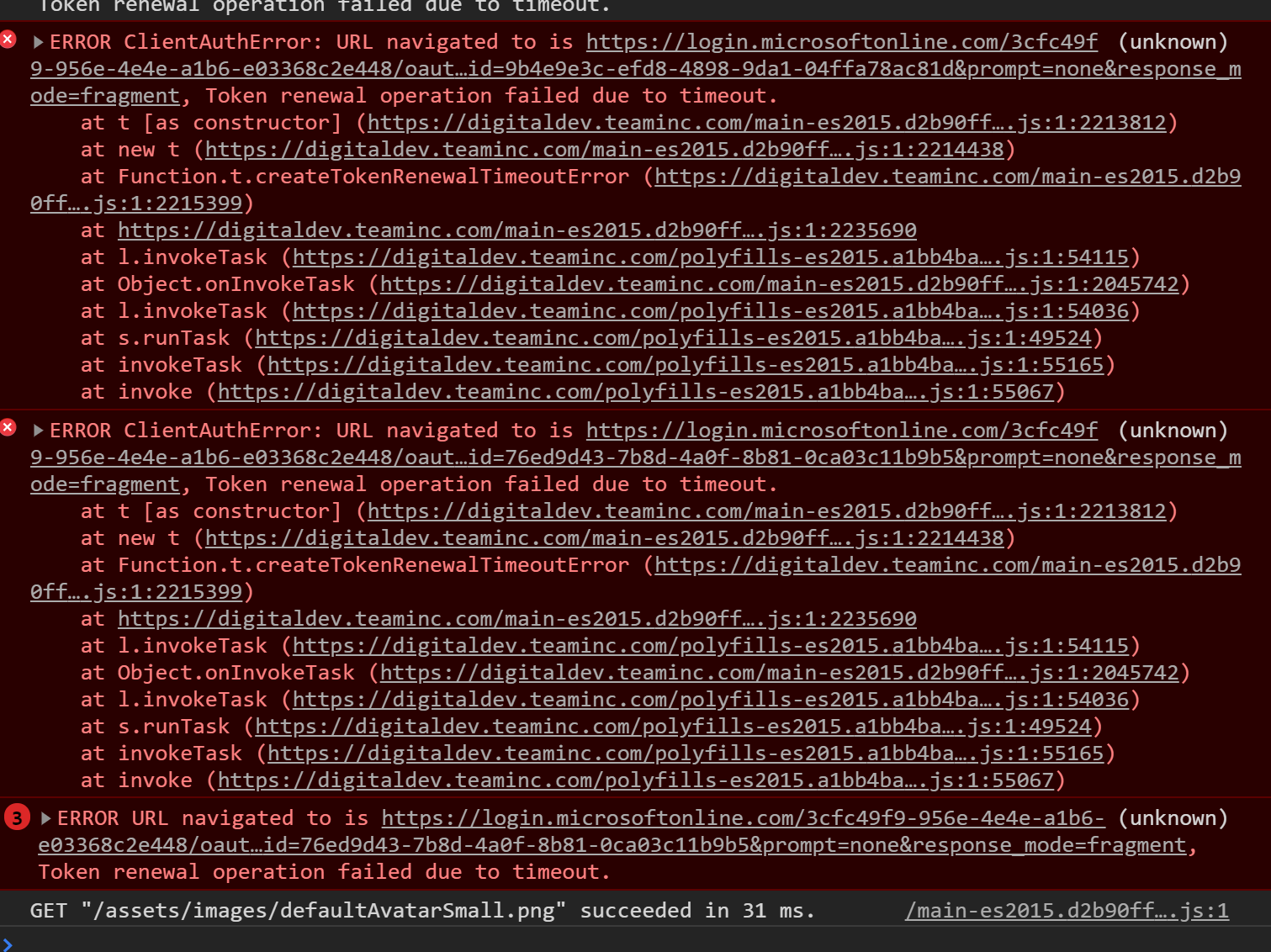
I didn't see anything that jumped out at me in the traces, but I did receive this in my console window at the same time:
jakehockey10
on 28 Apr 2020
@jakehockey10 Fiddler can generate .saz file, can you try doing that and email it to me (email in my profile)? Thanks!
jasonnutter
on 28 Apr 2020
Finally found time to send it over. Should be in your inbox shortly
jakehockey10
on 28 Apr 2020
@jakehockey10 Haven't received it yet, try again?
jasonnutter
on 29 Apr 2020
Here is a screenshot of it in my sent folder. I forwarded it to you again just now.
jakehockey10
on 29 Apr 2020
@jasonnutter I tried again, sending from my personal email. Thanks for your patience
jakehockey10
on 30 Apr 2020
Seeing this intermittently as well. We're using Msal v1.3.0 & azure/msal-angular v1.0.0.
 RobARichardson
on 20 May 2020
RobARichardson
on 20 May 2020
This issue has not seen activity in 14 days. It may be closed if it remains stale.
![github-actions[bot] picture](https://avatars.githubusercontent.com/in/15368?v=4&s=40) github-actions[bot]
on 4 Jun 2020
github-actions[bot]
on 4 Jun 2020
@jasonnutter We no longer use MSAL for Angular.
respect!, track how many issues for it, it's a mess, it doesn't sit well with IOS and MAC os at all.
One more 'solution' from Microsoft:(
 kemins
on 15 Jun 2020
kemins
on 15 Jun 2020
This issue has not seen activity in 14 days. It may be closed if it remains stale.
github-actions[bot]
on 30 Jun 2020
Hi everyone,
I faced the same problem in production application and we have discovered 2 problems :
- we were passing the graph scope to every acquireTokenSilent. using only our custom scope for custom api resources access fixed part of the issue by stopping retrieving a new token for every request. This means we removed
openid profilefrom our scope resources and we are using it only for signin. - we implemented a retry strategy in angular interceptor based on https://www.learnrxjs.io/learn-rxjs/operators/error_handling/retrywhen
return defer(() => this._msalService.msalService.acquireTokenSilent({ scopes, redirectUri: '' }).then((response: AuthResponse) => {
        token = response.tokenType === ServerHashParamKeys.ID_TOKEN ? response.idToken.rawIdToken : response.accessToken;
        if (token) {
          req = req.clone({ headers: req.headers.set('Authorization', `Bearer ${token}`) });
        }
        return req;
      }))
      .pipe(
        retryWhen(genericRetryStrategy()),
        mergeMap(nextReq => next.handle(nextReq))
      );
Hope it can help
 vlafranca
on 10 Jul 2020
vlafranca
on 10 Jul 2020
This issue has not seen activity in 14 days. It may be closed if it remains stale.
github-actions[bot]
on 25 Jul 2020
We have the same issue here after upgrading to MSAL Angular version 1.x.x.
When will this be fixed?
 alexandermainz
on 28 Jul 2020
alexandermainz
on 28 Jul 2020
@alexandermainz Timeouts can happen for many reasons. Are there errors in the browser console or in the MSAL logs? Are you using hash routing?
jasonnutter
on 28 Jul 2020
This issue has not seen activity in 14 days. It may be closed if it remains stale.
github-actions[bot]
on 12 Aug 2020
Closing. If you are having problems with timeouts, please open a new issue, thanks!
jasonnutter
on 24 Aug 2020
Related issues
 spottedmahn
·
3Comments
spottedmahn
·
3Comments
 ed-ilyin
·
4Comments
ed-ilyin
·
4Comments
 adriannasui
·
3Comments
adriannasui
·
3Comments
 ninio
·
3Comments
spottedmahn
·
4Comments
ninio
·
3Comments
spottedmahn
·
4Comments