Microsoft-authentication-library-for-js: The frame attempting navigation of the top-level window is sandboxed, but the flag of 'allow-top-navigation' or 'allow-top-navigation-by-user-activation' is not set.
Please follow the issue template below. Failure to do so will result in a delay in answering your question.
Library
- [x]
[email protected]or@azure/[email protected] - [ ]
@azure/[email protected] - [ ]
@azure/[email protected] - [ ]
@azure/[email protected]
Important: Please fill in your exact version number above, e.g. [email protected].
Framework
If you are using a framework, please provide the framework and version (e.g. Angular v8, React v16, etc).
Description
On each API request I call acquireTokenSilent to get an access token (as I understood from the documentation, this call retrieves the value from cache or calls Azure AD to generate a new token. So it's not a cache related problem. And I have one instance of Msal in my react application).
After some requests (3-4, inconsistent behavior) I get the following error in Chrome.
authorize?response_type=token&scope=openid api%3A%2F%2F97374b48-cf6a-4799-a635-0ee27c9abc1a%2Fapi profile&client_id={}&redirect_uri=http%3A%2F%2Flocalhost%2Flocal&state=d80df44d-f75e-4c06-87e3-659eceaec2e9&nonce=f43a42b1-c35e-4d18-a93f-13e5bd325f39&client_info=1&x-client-SKU=MSAL.JS&x-client-Ver=1.2.0&login_hint={}&login_req=299a6a66-f86c-4e17-9dc1-90efac82241a&domain_req=598e09b7-4cb7-4728-a5c0-6ae7395f428d&domain_hint=organizations&client-request-id=615f2fec-f9c5-4553-8636-6eb8793f938a&prompt=none&response_mode=fragment:80 Unsafe JavaScript attempt to initiate navigation for frame with origin 'http://localhost' from frame with URL
The frame attempting navigation of the top-level window is sandboxed, but the flag of 'allow-top-navigation' or 'allow-top-navigation-by-user-activation' is not set.Uncaught DOMException: Failed to set the 'href' property on 'Location': The current window does not have permission to navigate the target frame to 'https://login.microsoftonline.com/
A clear and concise description of the bug. If you receive specific error codes, please include them.
Security
Is this issue security related?
Regression
Did this behavior work before?
Configuration
Please provide your MSAL configuration options.
export const MsalApp = new UserAgentApplication({
    auth: {
        clientId: "{clientId}",
        authority: "https://login.microsoftonline.com/{tenantId}",
    },
    cache: {
        cacheLocation: "localStorage",
        storeAuthStateInCookie: true
    }
});
Reproduction steps
- Login using
loginRedirectoption - Call
acquireTokenSilenton every API request that required authorization with
this.authenticationParameters = {
            scopes: ['openid', 'api://' + clientId + '/api']
        };
Browsers
Is this issue browser-specific? If so, please detail which browsers are impacted (e.g. IE 11, Safari).
Chrome
 arabelaa
All 26 comments
@arabelaa This is intentional. While fetching tokens, there are certain error cases (such as a missing reply url) that AAD will attempt to perform a full page redirect from within the iFrame. This behavior will result in pages redirecting to AAD without user interaction which is unacceptable for some apps.
Also Google Chrome has already implemented a feature that blocks this behavior. Hence msal js disabled the Allow-Top-Navigation attribute to prevent iFrames from performing full page redirects.
Now I have couple questions:
- Are you using
loginRedirect()in an iframe? Currentmsal jsdoes not supportredirectflow in iframes yet, #1169 is tracking this and will resolve this issue, albeit with a different design. - Is
redirectworking for you in a non-iframe scenario?
 sameerag
on 12 Jan 2020
sameerag
on 12 Jan 2020
On a side note: We have introduced issue templates and would love for feedback + removal of template messages when filing an issue will be very helpful :)
sameerag
on 12 Jan 2020
I am not using loginRedirectinside an iframe.(and I also have a redirect url)
And redirect is working for me if I am not logged in.
Not sure why after some calls this fails.
Is there a way I can find out what error happens when there is a full page redirect?
Bellow my code
 public async getAccessToken(): Promise<string|undefined>{
        try {
            if(this.userAgentApplication.isCallback(window.location.hash)){
                console.log("inside renewal callback");
                return;
            }
            const response = await this.userAgentApplication.acquireTokenSilent(this.authenticationParameters);
            return response.accessToken;
        }
        catch (error) {
            if (error instanceof ClientAuthError && error.errorMessage.indexOf("interaction_required") !== -1) {
                console.log(error.errorMessage);
                this.userAgentApplication.acquireTokenRedirect(this.authenticationParameters);
            } else if (error instanceof ClientAuthError && error.errorCode === "block_token_requests") {
                console.log(error.errorMessage);
            } else if (error instanceof ClientAuthError && error.errorCode === "user_cancelled") {
                console.log(error.errorMessage);
            } else if (error instanceof ClientAuthError && error.errorCode === "login_progress_error") {
                console.log(error.errorMessage);
            } else {
                throw error;
            }
        }
        return undefined;
    }

    public async login(): Promise<void> {
        if (!this.account) {
            await this.userAgentApplication.loginRedirect(this.authenticationParameters);
        }
        await this.getAccessToken();
    }
@arabelaa -- I experienced this issue as well and after substantial troubleshooting came to realize that, depsite what this error was saying, the actual error was that the token redirect uri was not configured as a redirect uri in the AAD app registration (App Registrations --> Authentication --> Redirect URIs).
I would have expected the error to say the normal "the reply url is not valid" error, but instead received the exact error you mention. I wonder if checking that configuration resolves your issue? I experienced the issue the same way you did -- initial login was fine and I am using redirect -- the error only manifested after the auth expired and msal attempted to acquire a new token silently.
@sameerag -- Any way to improve/correct this error response? Really tough to troubleshoot because it seems like a library issue when it was just a reply/redirect uri config issue in AAD.
 thisisbrianstewart
on 16 Jan 2020
thisisbrianstewart
on 16 Jan 2020
@thisisbrianstewart @arabelaa Yes. Short answer: We have a way to help users get a better error messaging already. I am trying to create a FAQ section on how we communicate these types of errors, will update the link here soon.
sameerag
on 16 Jan 2020
@thisisbrianstewart @arabelaa could any of you elaborate a bit more on this? i am really into trouble trying to get past this error, which I have seen already reported here and on react-aad-msal repo in the last few days, and I am really clueless about how to move forward. Redirect URIs are set as the screens show below. Tested both locally and with an static website in blob storage.
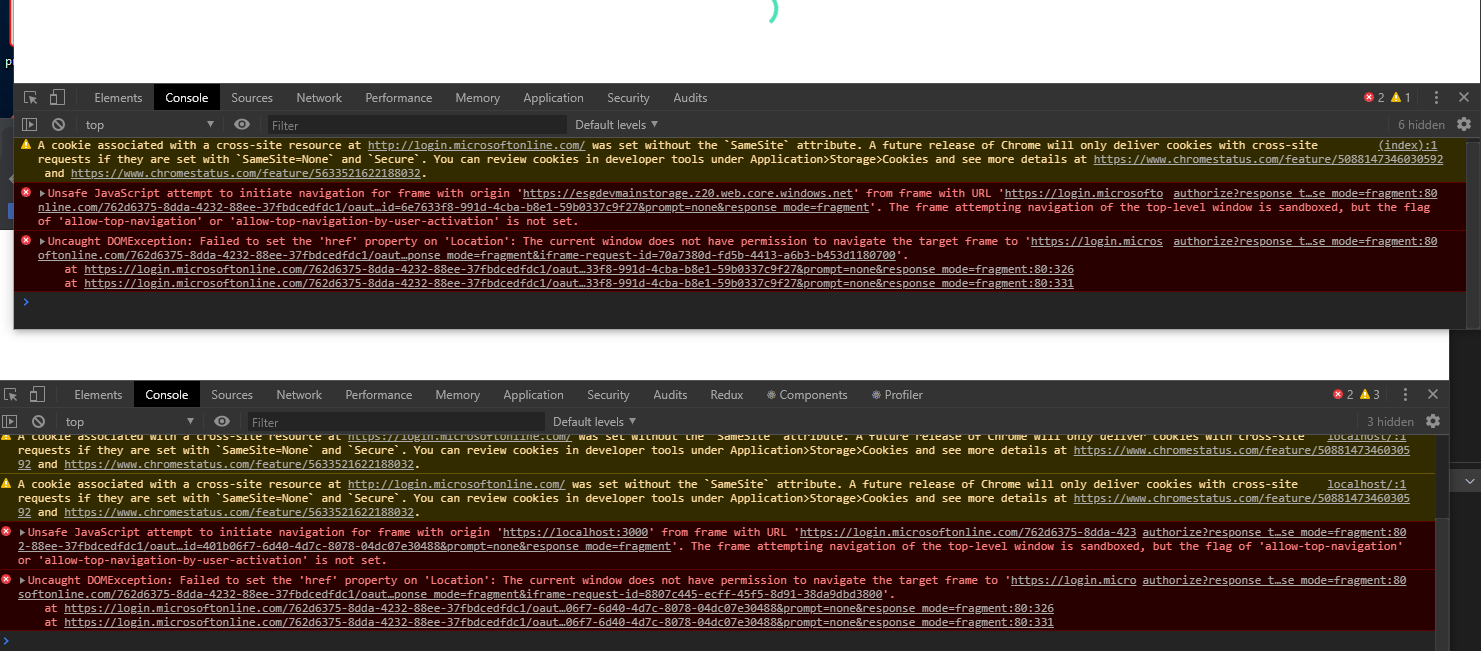
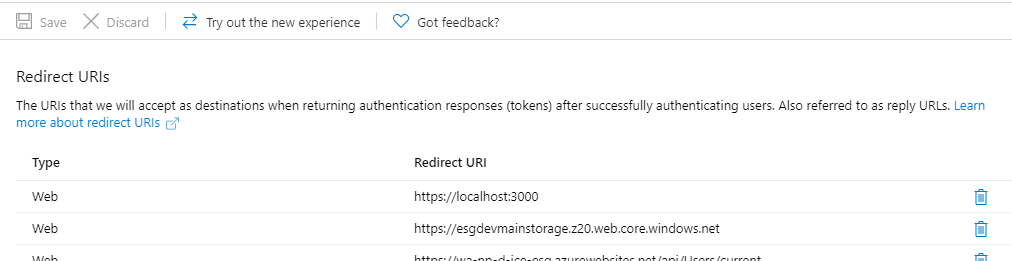
 davidramos13
on 17 Jan 2020
davidramos13
on 17 Jan 2020
@davidramos13 Can you try opening the login.microsoftonline.com url given in the error message directly in its own tab? What happens when you do that?
 jasonnutter
on 17 Jan 2020
jasonnutter
on 17 Jan 2020
thanks, that is something..
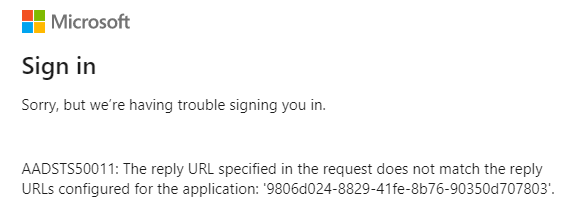
but i still can't see to which url it is referring to, since i have the two previous ones there. they are set as redirectUri in the authProvider I created with react-aad-msal
davidramos13
on 17 Jan 2020
@davidramos13 -- That is where I had left off as well. You can use a tool like Fiddler to see what url is provided as the redirect uri (it will be a query string param in the request / response to login.microsoftonline.com. )
My solution is also using react-aad-msal, and following the best practice (https://www.npmjs.com/package/react-aad-msal#options) of using a blank html page for token refresh to prevent scripts from running amok while middleware was attempting the silent auth roundtrip. So, I have an 'auth.html' file in the public directory that is empty and use that as the tokenRefreshUri in options config for the auth provider. Then, added that to the redirect Uris in app registration (e.g. http://localhost:3000/auth.html). All worked as expected after that.
If that doesn't solve your issue, send over your react-aad-msal auth provider config and if possible the redirect uri via fiddler/other tool, and I'll see if I can help further!
thisisbrianstewart
on 17 Jan 2020
yeah thanks! i just found it was because of that, i needed to add https://localhost:3000/auth.html
davidramos13
on 17 Jan 2020
I am seeing the same error as @davidramos13.
I wrap my component with the AzureAD component from react-aad-msal library. If a user is not logged in the popup dialog appears as it should and closes when the user has entered username and password. If the user is logged in my component is visable. I even see the AAD_LOGIN_SUCCESS redux action with an IdToken. So all this works as expected.
The problem appears when I try to acces the Microsoft Graph API or when I use my authProvider.getAccessToken. Then I see the same error message as @davidramos13. Below is my own error message from the browser.
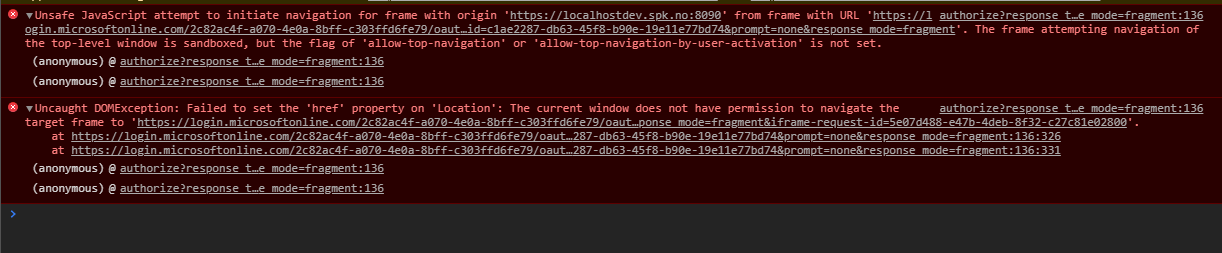
 bertin
on 20 Jan 2020
bertin
on 20 Jan 2020
@bertin -- I commented on the other issue that had more details as your error is a little different. Hope that helps!
thisisbrianstewart
on 20 Jan 2020
Thanks @thisisbrianstewart for your contribution in detailing these error types for the community.
To generalize these class of errors and why msal js cannot handle them better, I will try to summarize the root cause and discuss current/future mitigations:
implicit flowauthorization grant's security relies on the fact that the set ofredirect uris registered during app creation/elsewhere are accessed independently by the AAD service. Once any authorization application (in this casemsal js) requests atokenwithimplicit flow, theservicevalidates the URI and redirects the response to that URI.Errors that happen before the redirect URI validation or due to an invalid redirect URI, . The service cannot redirect in this case and displays an error message in the frame/page it is loaded. For silent use cases, since it is handled in a hidden iframe, the user cannot see the message. Since
msal jsmonitors the iframe for a hash, in this use cases, it handles the error by timing out and displaying an error message which contains the URL, giving the user a choice to click it and find out the error message. For non-silent cases, the user should have a window that displays the error. I understand that this use case is tricky as the user may be programmatically expecting an error type andmsal jsneeds to improve here.All these happen for any reason AAD cannot respond with an error-code to the hidden iframe; invalid URIs, or errors like sending
prompt=?twice etc.
_Current mitigation:_
- Please click the failed URI detailed in the error messaging in all use cases
_Future action plan from our end to lessen this confusion:_
- Document these use cases better, I already tagged this as a documentation issue and we will try to add as much detail as we can in the wiki soon.
- Better messaging for silent/interactive cases where the user understands he should click on the URI
Some use cases do not see a time out (as inferred from above) and only the iframe blocking allow-top-navigation. I will work next week to reproduce this issue and improve the messaging for these use cases too.
sameerag
on 20 Jan 2020
Everyone: this error will be received when some kind of error occurs on the target acquire token silent page which is not handled by redirection. This thread is discussing only one possible reason for such an error, which is using an invalid reply URL. But you can encounter this for other errors as well, and here is how to debug them.
First, a simplified example which will induce this error:
````html
<script>
    'use strict';
    $(document).ready(function (e) {

        const msal = new Msal.UserAgentApplication({
            auth: {
                clientId: 'a963b646-fa01-4c06-b302-42c6ed1b2774',
                authority: 'https://login.microsoftonline.com/common'
            }
        });

        msal.handleRedirectCallback(function (error, response) {
            console.log('MSAL redirect callback: ', { error: error, response: response });
        });

        if (msal.isCallback(window.location.hash)) {
            return;
        }

        if (!msal.getAccount()) {
            msal.loginRedirect({
                scopes: ['openid'],
                prompt: 'select_account'
            });
            return;
        }

        msal.acquireTokenSilent({ scopes: ['openid', 'test/test'] })
            .then(console.log.bind(console))
            .catch(console.error.bind(console));
    });
</script>
````
Notice the bogus scope of "test/test"? If you run above code, you will see this in the developer console:
````
Navigated to https://localhost:3000/
Unsafe JavaScript attempt to initiate navigation for frame with origin 'https://localhost:3000' from frame with URL '[REDACTED]'. The frame attempting navigation of the top-level window is sandboxed, but the flag of 'allow-top-navigation' or 'allow-top-navigation-by-user-activation' is not set.
Uncaught DOMException: Failed to set the 'href' property on 'Location': The current window does not have permission to navigate the target frame to '[REDACTED]'.
````
If you manually browse to the link articulated in that developer console window, you will see a better description of the error:
````
Sign in
Sorry, but we’re having trouble signing you in.
AADSTS70011: The provided request must include a 'scope' input parameter. The provided value for the input parameter 'scope' is not valid. The scope openid test/test profile is not valid. The scope format is invalid. Scope must be in a valid URI form https://example/scope or a valid Guid
````
Above process can be used to debug why you are seeing this behavior. In this case, it was the use of a spurious scope value used in the request. The AAD authorization page is attempting to redirect the host page to render a description of the error to the user. Note in this case, I would consider this to be a bug with the AAD authorization page, since this error should just be redirect like other errors back to the target application for it to render the problem to the user (if running in a iframe). Because the authorization page can be used with user redirection, when the page is not loaded in a iframe, it can perhaps continue with the current behavior.
 keystroke
on 21 Jan 2020
keystroke
on 21 Jan 2020
Adding Implicit Grant flow and using the correct reply uri fixed the issue for me.
I now use the readt-aad-msal recommendation about a separate empty auth.html file for my redirectUri and tokenRefreshUri.
Thank you guys for quick answers.
bertin
on 21 Jan 2020
I added an empty auth.htmlpage as a redirectUri (as suggested in the msal documentation).
And I have a new error:
Sorry, but we’re having trouble signing you in.

AADSTS50196: The server terminated an operation because it encountered a client request loop. Please contact your app vendor.
After some google searches, I found out that one of the causes of this error is the fact that I am not using caching capabilities.
What I noticed (using Fiddler) is that for each call to this.userAgentApplication.acquireTokenSilent a new request is done to retrieve an access token. I thought this shouldn't happen (because of msal library caching capabilities). What am I missing?
arabelaa
on 22 Jan 2020
@arabelaa One way to debug this is to take a look in local/session storage right before you make an acquireTokenSilent call. If there are access tokens in cache, you will see them cached by a composite key that is composed of a few different values, such as scopes and authority. Make sure your acquireTokenSilent calls match those values. For example, if you have tokens from multiple resources (e.g. MS Graph and a custom Web API), those will be cached separately (as tokens are issued per resource), so you will need to make separate acquireTokenSilent calls for each of those tokens.
If you can share the scopes you are using for your acquireTokenSilent requests, that would be helpful.
jasonnutter
on 22 Jan 2020
@jasonnutter Indeed, I made a call to acquireTokenSilentwith a list of scopes. I followed your suggestion and the problem was fixed.
Thanks for the hint.
arabelaa
on 23 Jan 2020
@thisisbrianstewart Thanks for your support so far. I was wondering if you could clarify an issue I am still having. Even after adding the empty auth.html to my public folder and changing the tokenRefreshUri AND updating the redirectURI in the Azure portal too to use http://localhost:3000/auth.html, this error is still happening when the token is attempting a silent refresh (usually the next day).
AADSTS50011: The reply URL specified in the request does not match the reply URLs configured for the application: '<clientid>'.
Just to clarify, are we also meant to add the /auth.html to the redirectUri in the code too? Just for reference, I am also using react-aad-msal and here is my config:
export const authProvider = new MsalAuthProvider(
    {
      auth: {
        authority: "https://login.microsoftonline.com/<tenantid>",
        clientId: "<clientid>",
        // After being redirected to the "redirectUri" page, should user
        // be redirected back to the Url where their login originated from?
        navigateToLoginRequestUrl: false,
        postLogoutRedirectUri: window.location.origin,
        redirectUri: window.location.origin, // SHOULD '+ /auth.html' BE ADDED HERE?
      },
      cache: {
        cacheLocation: "localStorage",
        storeAuthStateInCookie: true
      },
      // Enable logging of MSAL events for easier troubleshooting.
      // This should be disabled in production builds.
      system: {
        logger: new Logger(
          (logLevel, message, containsPii) => {
            console.log("[MSAL]", message);
          },
          {
            level: LogLevel.Verbose,
            piiLoggingEnabled: false
          }
        )
      },

    },
    {
      scopes: ["openid"]
    },
    {
      loginType: LoginType.Redirect,
      // When a token is refreshed it will be done by loading a page in an iframe.
      // Rather than reloading the same page, we can point to an empty html file which will prevent
      // site resources from being loaded twice.
      tokenRefreshUri: window.location.origin + "/auth.html"
    }
  );
In the Azure AD portal, should the URLs contain /auth.html (or /auth without .html)? At the moment I have them removed. Here is my portal details for reference:
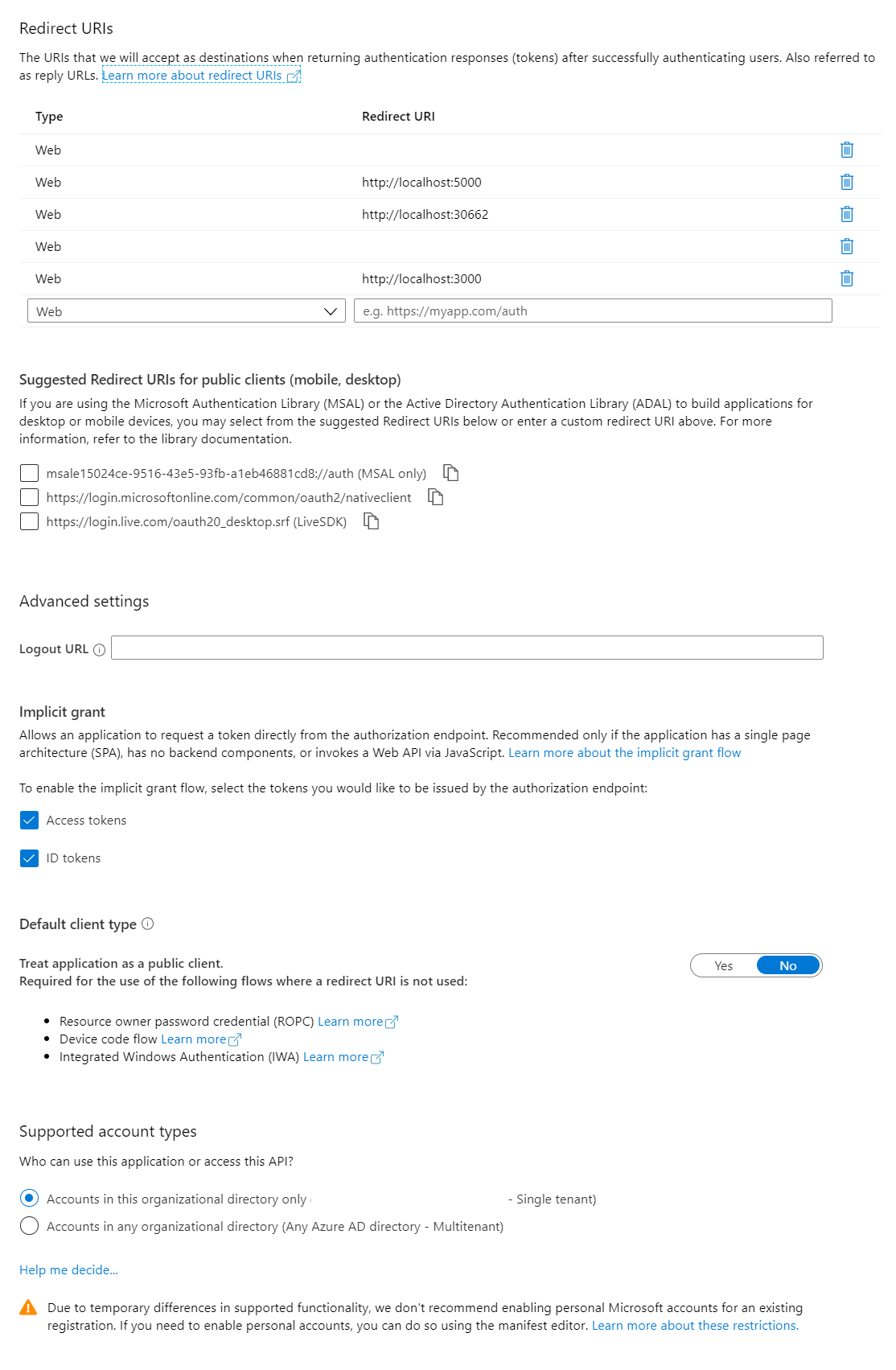
Some days it works with /auth.html tagged on the URLs (i.e. http://localhost:3000/auth.html) in Azure AD portal, and some days the error pops up again... So I wanted to fully clarify what the matching solution is in both the code and the portal before another random change of configuration just gives another false positive.
Presumably once this has been changed, we'll need to clear browser data, cache etc?
Thanks!
 don1989
on 29 Jan 2020
don1989
on 29 Jan 2020
Hi @don1989 -- answering the questions you've asked below, but in general, you will need to setup the Azure AD App Registration to have _both_ http://localhost:3000/auth.html and http://localhost:3000 as Redirect URIs. The silent token refresh loads an iframe using that empty auth.html file, and that same auth.html file needs to receive the response back, so the acquire token silent flow provides the /auth.html endpoint as the redirect uri. This is different from the user-facing flow because there is no iframe that the middleware loads into the page, redirecting back to auth.html will not hook into react or msal and auth would halt -- it must redirect back to your react app in the user-facing flow. More details and responses below.
Just to clarify, are we also meant to add the /auth.html to the redirectUri in the code too?
You should leave this as is, without adding /auth.html. The redirect for a user login needs to redirect back to your react app so that the response is received by the msal middleware configured.
In the Azure AD portal, should the URLs contain /auth.html (or /auth without .html)?
As noted above, you will need both http://localhost:3000 and http://localhost:3000/auth.html. When a _user_ authenticates, they will flow through the auth mechanism that provides http://localhost:3000 as the redirect uri. Since you've added auth.html and configured tokenRefreshUri to use that, the silent auth will flow through the auth mechanism that provides http://localhost:3000/auth.html as the redirect uri. So, both need to be setup as redirect URIs in Azure AD.
Here is my config if that is a helpful reference.

import { MsalAuthProvider, LoginType } from 'react-aad-msal';
import '../config';

const config = {
  auth: global.AUTH,
  cache: {
    cacheLocation: "localStorage",
    storeAuthStateInCookie: true
  }
};

const authenticationParameters = {
  scopes: global.SCOPES
}

const options = {
  loginType: LoginType.Redirect,
  tokenRefreshUri: window.location.origin + '/auth.html'
};

export const AuthService = new MsalAuthProvider(config, authenticationParameters, options)
Awesome @thisisbrianstewart thanks a lot for your assistance and taking your time out to explain so thoroughly! It is very much appreciated! :)
don1989
on 29 Jan 2020
When the token expires I get an InteractionRequiredAuthErrorwith errorCode "login_required".
As mentioned in the documentation I call acquireTokenRedirect with the scope parameter.
My redirectUri in Azure AD is http://localhost/local.
But when calling acquireTokenRedirectI get the new accessToken but the redirect is done to http://localhost - a non existing page, having into account the app resides at http://locahost/local.
To avoid this behavior I called loginRedirectwhen the token expires, but this is not the recommended practice.
What am I missing?
arabelaa
on 30 Jan 2020
@arabelaa You can set redirect URIs per request, so when you call acquireTokenRedirect, you can set the redirectUri on that request to a url that is different from the redirectUri you set in the configuration of UserAgentApplication.
jasonnutter
on 30 Jan 2020
Since the original issue is addressed and we have the documentation needed for this in draft now, I am closing this issue. Feel free to ask us any open questions though.
sameerag
on 31 Jan 2020
Thanks for all these details.
For those using Vue.js having the issue, I had it working well before using the router of Vue.
Enabling the router adds the default /#/ route that needs to be taken into account in the redirect URLs.
 Glideh
on 12 Mar 2020
Glideh
on 12 Mar 2020
Hi guys, I was also facing this issue and my problem was with the chrome extension of Ghostery which messed up my redirect. I found it by opening the error-message url which was trying to redirect to login.microsoft.com/ghostery/...
By trusting the website in ghostery, the problem was solved 😄
 lennartquerter
on 3 Apr 2020
lennartquerter
on 3 Apr 2020
Related issues
 exequeryphil
·
3Comments
exequeryphil
·
3Comments
 ssuvorov
·
3Comments
ssuvorov
·
3Comments
 ArneMancofi
·
3Comments
ArneMancofi
·
3Comments
 ninio
·
3Comments
ninio
·
3Comments
 adriannasui
·
3Comments
adriannasui
·
3Comments
Most helpful comment
@arabelaa -- I experienced this issue as well and after substantial troubleshooting came to realize that, depsite what this error was saying, the actual error was that the token redirect uri was not configured as a redirect uri in the AAD app registration (App Registrations --> Authentication --> Redirect URIs).
I would have expected the error to say the normal "the reply url is not valid" error, but instead received the exact error you mention. I wonder if checking that configuration resolves your issue? I experienced the issue the same way you did -- initial login was fine and I am using redirect -- the error only manifested after the auth expired and msal attempted to acquire a new token silently.
@sameerag -- Any way to improve/correct this error response? Really tough to troubleshoot because it seems like a library issue when it was just a reply/redirect uri config issue in AAD.