Microsoft-authentication-library-for-js: Angular: MSAL Guard doesn't implement CanLoad, CanActivateChild, only CanActivate
I'm submitting a...
[ ] Regression (a behavior that used to work and stopped working in a new release)
[ ] Bug report
[ ] Performance issue
[x] Feature request
[ ] Documentation issue or request
[ ] Other... Please describe:
Browser:
- [ ] Chrome version XX
- [ ] Firefox version XX
- [ ] IE version XX
- [ ] Edge version XX
- [ ] Safari version XX
- [x] All
Library version
Library version: 0.1.4
Current behavior
The following modules are imported only once in app.module.ts: MsalModule and HttpClientModule. The MsalInterceptor is mentioned in the providers for app.module.ts and only there as well.
Requests made to our ASP.NET Core 3 Web API from within the AppModule correctly attach the tokens for authentication via the MsalInterceptor. However, all other requests to our API via HttpClient in Feature modules are not getting intercepted for token to be attached to the request.
Expected behavior
The interceptor should work for Feature modules as well.
Minimal reproduction of the problem with instructions
- Use
HttpClientin Feature module - Use
HttpClientin AppModule (or module that has theMsalInterceptoras aprovider) - Observe only requests coming from module that uses
MsalInterceptorasproviderintercept the request to attach the token, whereas requests coming from Feature modules do NOT get intercepted.
 jakehockey10
All 32 comments
@jakehockey10 Can you please provide the code you are using for each module?
 jasonnutter
on 18 Dec 2019
jasonnutter
on 18 Dec 2019
@jasonnutter
Here is how my AppModule is defined:
export function loggerCallback(logLevel, message, piiEnabled) {
console.log('client logging: ' + message);
}
const isIE =
window.navigator.userAgent.indexOf('MSIE ') > -1 ||
window.navigator.userAgent.indexOf('Trident/') > -1;
export const protectedResourceMap: [string, string[]][] = [
[environment.api.url, [`api://${environment.msal.clientID}/api-access`]],
[
environment.AD.graphUrl,
['user.read', 'openid', 'profile', 'email', 'offline_access'],
],
];
@NgModule({
imports: [
BrowserModule,
FormsModule,
CoreModule,
SharedModule,
AppRoutes,
HttpClientModule, // <-- only place this is imported
BrowserAnimationsModule,
ReactiveFormsModule,
MsalModule.forRoot({
clientID: environment.msal.clientID,
authority: environment.msal.authority,
validateAuthority: true,
redirectUri: environment.msal.redirectUri,
cacheLocation: 'localStorage',
storeAuthStateInCookie: isIE, // set to true for IE 11
postLogoutRedirectUri: environment.msal.postLogoutRedirectUri,
navigateToLoginRequestUrl: true,
popUp: false,
consentScopes: [
'api://.../api-access/.default',
'user.read',
'openid',
'profile',
'email',
'offline_access',
],
unprotectedResources: ['https://www.microsoft.com/en-us/'],
protectedResourceMap,
logger: loggerCallback,
correlationId: '...',
piiLoggingEnabled: true,
level: LogLevel.Verbose,
}),
QuestionnairesModule,
],
declarations: [
AppComponent,
...
],
providers: [
{ provide: LocationStrategy, useClass: HashLocationStrategy },
{ provide: HTTP_INTERCEPTORS, useClass: MsalInterceptor, multi: true }, // <-- Only place interceptor is provided
],
bootstrap: [AppComponent],
})
export class AppModule {}
Here is the Feature module that I need the interceptor to work in:
@NgModule({
declarations: [QuestionnairesComponent, NewQuestionnaireComponent],
imports: [
CommonModule,
QuestionnairesRoutingModule,
SharedModule,
ReactiveFormsModule,
],
})
export class QuestionnairesModule {}
My assumption with the way this should work is based on this ticket: https://github.com/angular/angular/issues/20575
jakehockey10
on 18 Dec 2019
@jakehockey10 Gotya, thanks for the info. Which Angular version are you using? The library is built with Angular 4, and we're working now to upgrade it, I wonder if this is fixed in a newer version.
jasonnutter
on 19 Dec 2019
It might be. Here is my Angular version:
$ ng version
_ _ ____ _ ___
/ \ _ __ __ _ _ _| | __ _ _ __ / ___| | |_ _|
/ △ \ | '_ \ / _` | | | | |/ _` | '__| | | | | | |
/ ___ \| | | | (_| | |_| | | (_| | | | |___| |___ | |
/_/ \_\_| |_|\__, |\__,_|_|\__,_|_| \____|_____|___|
|___/
Angular CLI: 8.3.20
Node: 12.10.0
OS: win32 x64
Angular: 8.2.14
... animations, common, compiler, compiler-cli, core, forms
... language-service, platform-browser, platform-browser-dynamic
... router
Package Version
-----------------------------------------------------------
@angular-devkit/architect 0.803.20
@angular-devkit/build-angular 0.803.20
@angular-devkit/build-optimizer 0.803.20
@angular-devkit/build-webpack 0.803.20
@angular-devkit/core 8.3.20
@angular-devkit/schematics 8.3.20
@angular/cdk 8.2.3
@angular/cli 8.3.20
@ngtools/webpack 8.3.20
@schematics/angular 8.3.20
@schematics/update 0.803.20
rxjs 6.5.3
typescript 3.5.3
webpack 4.39.2
I'm trying to stay on the latest of Angular as much as I can with this application. What is the time table for updating the angular dependency to latest on this library?
Does @azure/msal-angular import HttpClientModule itself?
jakehockey10
on 19 Dec 2019
@jakehockey10 Thanks. We're working on this now, and will have a version you can try this month. I'll take a look into this issue as part of that.
And no, it does not import HttpClientModule.
jasonnutter
on 20 Dec 2019
@jasonnutter that sounds great! Thanks for being so helpful! I look forward to trying it out this month! I'm curious to find out what ends up being the issue for this in particular
jakehockey10
on 21 Dec 2019
@jasonnutter just wanted to follow up with you. We wanted to take a look and see how things might be changing for us when upgrading to the new version once it is released and tried it the alpha yesterday. It did not fix the msalinterceptor not working in the feature module but it was good to get a preview for some of the changes will need to make during the upgrade process. I'll attempt to investigate the interceptor more on our end and keep you posted of anything we learn
jakehockey10
on 31 Dec 2019
@jasonnutter I've tested and confirmed that interceptors I have written in my project are working in Feature modules despite being provided in the same spot as MsalInterceptor. Here is an update to my structure:
import { CommonModule } from '@angular/common';
import { HTTP_INTERCEPTORS, HttpClientModule } from '@angular/common/http';
import { NgModule, Optional, SkipSelf } from '@angular/core';
import { MsalInterceptor, MsalModule } from '@azure/msal-angular';
import { LogLevel } from 'msal';
import { MessageService } from 'primeng/api';
import { environment } from '../../environments/environment';
import { ProfilerInterceptor, UnauthorizedInterceptor } from './interceptors';
export function loggerCallback(logLevel, message, piiEnabled) {
console.log('client logging: ' + message);
}
const isIE =
window.navigator.userAgent.indexOf('MSIE ') > -1 ||
window.navigator.userAgent.indexOf('Trident/') > -1;
export const protectedResourceMap: [string, string[]][] = [
[environment.api.url, [`api://${environment.msal.clientID}/api-access`]],
[
environment.AD.graphUrl,
['user.read', 'openid', 'profile', 'email', 'offline_access'],
],
];
@NgModule({
declarations: [],
imports: [
CommonModule,
HttpClientModule,
MsalModule.forRoot({
clientID: environment.msal.clientID,
authority: environment.msal.authority,
validateAuthority: true,
redirectUri: environment.msal.redirectUri,
cacheLocation: 'localStorage',
storeAuthStateInCookie: isIE, // set to true for IE 11
postLogoutRedirectUri: environment.msal.postLogoutRedirectUri,
navigateToLoginRequestUrl: true,
popUp: false,
consentScopes: [
'api://.../api-access/.default',
'user.read',
'openid',
'profile',
'email',
'offline_access',
],
unprotectedResources: ['https://www.microsoft.com/en-us/'],
protectedResourceMap,
logger: loggerCallback,
correlationId: '1234',
piiLoggingEnabled: true,
level: LogLevel.Info,
}),
],
providers: [
{ provide: HTTP_INTERCEPTORS, useClass: MsalInterceptor, multi: true },
{
provide: HTTP_INTERCEPTORS,
useClass: UnauthorizedInterceptor,
multi: true,
},
{
provide: HTTP_INTERCEPTORS,
useClass: ProfilerInterceptor,
multi: true,
},
MessageService,
],
})
export class CoreModule {
constructor(@Optional() @SkipSelf() parentModule: CoreModule) {
if (parentModule) {
throw new Error(
'CoreModule has already been loaded. You should only import Core modules in the AppModule only.'
);
}
}
}
My UnauthorizedInterceptor and ProfilerInterceptor are both invoked, whereas the MsalInterceptor is either not invoked or is exiting early, like here. It would seem to me that if the other two interceptors being provided in the CoreModule declaration are being invoked, then maybe the MsalInterceptor is too, it just isn't going down the right code path for me.
What could be some causes for not having the scopes available in a feature module?
jakehockey10
on 1 Jan 2020
I looked into this further and the getScopesForEndpoint is called three times:
- once for a Microsoft Graph endpoint,
- one for one of my Web API endpoints that is getting the correct headers attached to the request via the
MsalInterceptor, and - then a third time when it is attempting to get the scopes from the Endpoint. However, when I step into this, the
_unprotectedResourcesarray has changed since the last time.
Basically when the first two requests go, the _unprotectedResources has only one element in it, the one I added in the config. But when the third request is intercepted, the _unprotectedResources have four elements (the same one as before, 'id_token', 'access_token', and then it also consists of 'questionnaires', the end of the endpoint I'm trying to make a request to.
I'm not sure how _unprotectedResources is changing because I searched the source code for usages of that variable, and it doesn't seem to get updated more than once.
jakehockey10
on 2 Jan 2020
I have solved the issue! And I have a suggestion related to the MsalGuard. First,
Solution
The MsalService forces the assumption that a route that appears in the Angular Router's events observable that does not use canActivate will be considered an unprotectedResource. I had forgotten to put canActivate on my parent route in my feature module's router module (but I also wonder if I should need it since I'm not rendering a component for that route). My routing module looked like:
const routes: Routes = [
    {
        path: 'questionnaires',
        // canActivate: [MsalGuard], // <-- fixes the issue
        // canActivateChild: [MsalGuard], // <-- throws an error!
        children: [
            {
                path: 'all',
                component: QuestionnairesComponent,
                canActivate: [MsalGuard],
            },
            {
                path: 'new',
                component: NewQuestionnaireComponent,
                canActivate: [MsalGuard],
            },
            {
                path: '',
                pathMatch: 'full',
                redirectTo: 'all',
            },
        ],
    },
];

@NgModule({
    imports: [RouterModule.forChild(routes)],
    exports: [RouterModule],
})
export class QuestionnairesRoutingModule {}
Suggestion
Could we make the MsalGuard implement more than just CanActivate? For instance, CanActivateChild and CanLoad would be really useful ones for me as well as other (I'm assuming).
jakehockey10
on 2 Jan 2020
@jakehockey10 Thanks for the update! Yeah, that seems like a reasonable request. I'll create a new ticket to track that work, which I'll add to the next Angular release.
jasonnutter
on 2 Jan 2020
On second thought, I'll reopen and rename this issue, since it has the full context.
jasonnutter
on 2 Jan 2020
Solution
The
MsalServiceforces the assumption that a route that appears in the Angular Router'seventsobservable that does not usecanActivatewill be considered an unprotectedResource. I had forgotten to putcanActivateon my parent route in my feature module's router module (but I also wonder if I should need it since I'm not rendering a component for that route).
I don't quite get it....What was the solution? Adding canActivate to your parent route?
I have canActivate: [MsalGuard] on my parent route and all its children. But my HTTP requests still aren't getting an Authorization header.
Was there more you had to do?
 eeskildsen
on 1 Apr 2020
eeskildsen
on 1 Apr 2020
MsalGuard isn't what puts the header in your requests. The library comes with an http interceptor that you'll want to register and use for putting the auth header in for you.
jakehockey10
on 1 Apr 2020
MsalGuard isn't what puts the header in your requests. The library comes with an http interceptor that you'll want to register and use for putting the auth header in for you.
Thanks for the reply. I did register the interceptor, following the instructions on NPM. My app.module.ts looks pretty similar to yours except for the structure of the config object, which I'm guessing is just due to different MSAL versions.
I was trying to figure out if your original issue was that you were missing guards, and if adding them solved it. I have guards on all routes now, so if that was it, it must be something else in my case. Maybe I messed up my config somehow....I'll keep tinkering and report back if I figure it out.
eeskildsen
on 1 Apr 2020
@eeskildsen If I remember correctly, the issue was that by not using the guard on the parent route, the MsalService was considering the parent route of my feature module to be an unprotected resource, and think that's when the HttpInterceptor decided not to put headers in. I believe the HttpInterceptor puts the headers in for protected resources
jakehockey10
on 2 Apr 2020
@eeskildsen If I remember correctly, the issue was that by not using the guard on the parent route, the
MsalServicewas considering the parent route of my feature module to be an unprotected resource, and think that's when the HttpInterceptor decided not to put headers in. I believe the HttpInterceptor puts the headers in for protected resources
@jakehockey10 It started adding the header when I moved the MsalInterceptor provider into my feature module today. Now all HTTP requests have the header, but they're all getting canceled. Ah...I'm probably doing something weird. I'll keep playing with it. Thanks again.
eeskildsen
on 2 Apr 2020
@eeskildsen I've been having a lot of trouble getting this library to work with any modularization. As soon as I start grouping functionality into feature modules, everything just falls apart. I don't understand, at all, how to keep my project organized and have this library continue to facilitate my authorization needs across multiple modules. Sounds like you've had some success though
jakehockey10
on 3 Apr 2020
@jakehockey10 I'd love to hear any feedback you have, feel free to email (on my profile), thanks!
jasonnutter
on 6 Apr 2020
@jasonnutter thanks for reaching out. I have been trying to organize our app into lazily loaded feature modules, but I wasn't convinced that my troubles were not self inflicted yet.
Essentially, I import all msal config and interceptor registration in a core module that I import into app module. But it sounds like lazily loaded modules get a new instance of httpclient service and the interceptor for my token doesn't get used in them. I was going to keep looking at it as more versions came out and know that you have your hands full right now.
Do you want me to open a new issue for it?
jakehockey10
on 7 Apr 2020
@jasonnutter this is where my investigation hits a road block. I'm having trouble finding out if anything else is importing httpclientmodule , but from what I can tell, it isn't msal-angular that's doing it.
jakehockey10
on 7 Apr 2020
@jakehockey10 For me, there did end up being a problem module: Ng2SmartTableModule. I had to remove it. Then the interceptor did fire in feature modules, even without adding it to those modules. So maybe Ng2SmartTableModule re-imports HttpClientModule, and that's what broke it.
That said...MsalInterceptor still isn't really working for me. All my HTTP requests get canceled as soon as I enable it. The authorization header gets inserted now that the problem module is gone, but Chrome's DevTools shows that all requests have status "(canceled)." I'll search for/open a separate issue about that.
eeskildsen
on 7 Apr 2020
@eeskildsen
I completely missed this response, my apologies!
Here are my dependencies:
    "@angular/animations": "~9.1.1",
    "@angular/cdk": "~9.2.0",
    "@angular/common": "~9.1.1",
    "@angular/compiler": "~9.1.1",
    "@angular/core": "~9.1.1",
    "@angular/forms": "~9.1.1",
    "@angular/platform-browser": "~9.1.1",
    "@angular/platform-browser-dynamic": "~9.1.1",
    "@angular/router": "~9.1.1",
    "@azure/msal-angular": "^1.0.0-beta.4",
    "@azure/storage-blob": "^12.1.0",
    "devextreme": "latest",
    "devextreme-angular": "latest",
    "devextreme-schematics": "latest",
    "font-awesome": "^4.7.0",
    "intl": "1.2.5",
    "msal": "^1.2.1",
    "pluralize": "^8.0.0",
    "rxjs": "6.5.5",
    "tslib": "^1.10.0",
    "web-animations-js": "2.3.2",
    "zone.js": "0.10.3"
Since we are using the latest Angular, I can't use Augury to find out which one of these is doing it. DevExtreme is the biggest dependency we have, but I can't fathom why they'd be using the HttpClientModule since they are a UI framework. But I'm trying to find a way to not have to look at each one of these's source code repositories in search of the use of HttpClientModule.
How'd you discover this?
jakehockey10
on 15 Apr 2020
@eeskildsen This was the best I could do in trying to find what might be injecting HttpClient in their library that is 3rd party to me:
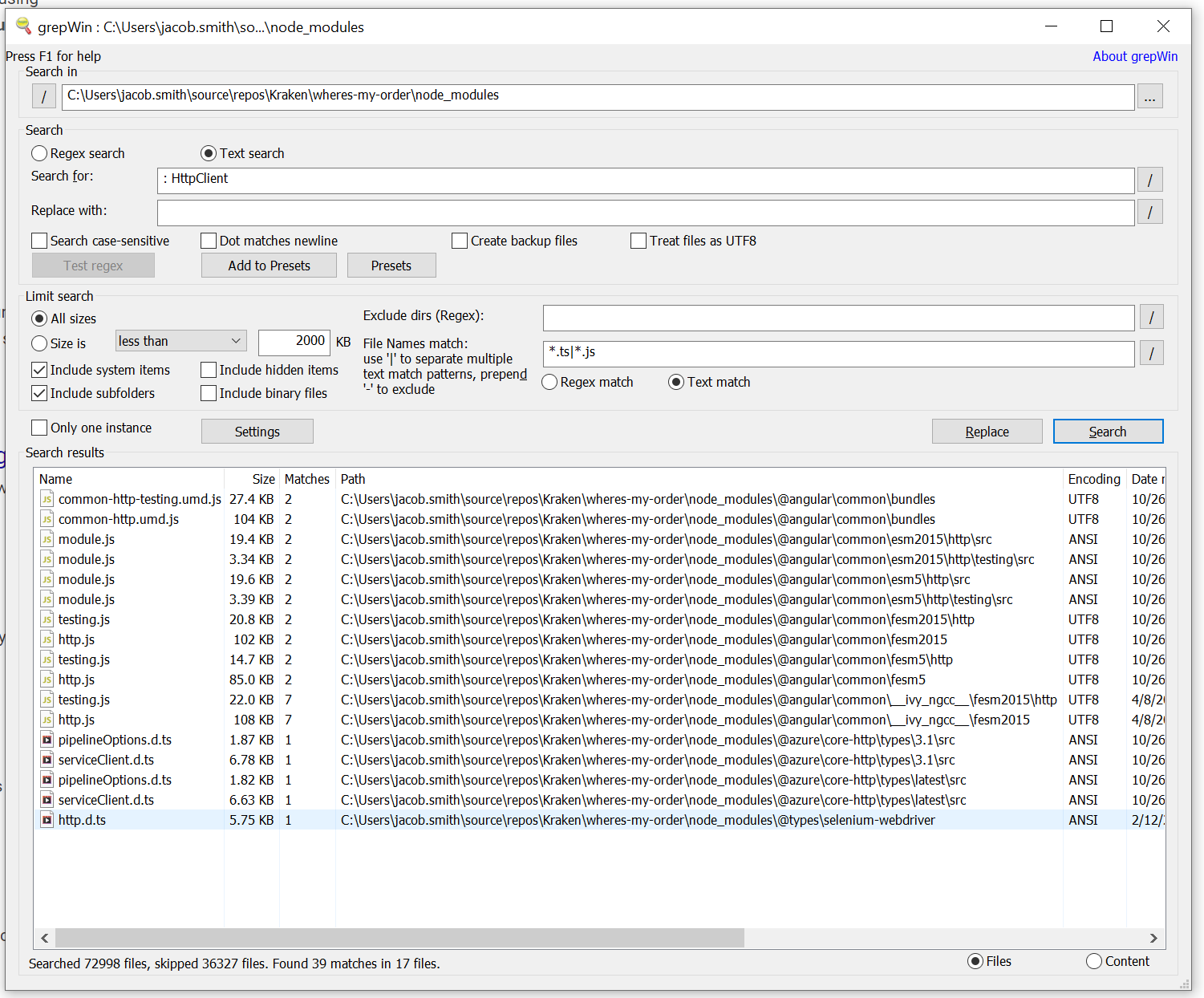
jakehockey10
on 16 Apr 2020
@jakehockey10 Trial and error unfortunately. I literally commented out each module import, commented out the relevant HTML elements, rebuilt, and tested until it worked. Ugh.
Here's the weird part....The module that was the root cause for me, Ng2SmartTable, doesn't even import HttpClientModule. No results in their repo. No results in node_modules when I install ng2-smart-table. I have no clue what's going on there.
Edit: Okay, it doesn't import
HttpClientModule, but I do get hits forHttpClient. So maybe that's it.
Anyway, the remaining issue for me is that all HTTP calls keep showing as "(canceled)" in Chrome DevTools as soon as I flip on MsalInterceptor. I'm thiiiis close to using another library. At the same time, I'm pretty sure it's my project's fault because I can't repro outside it (it Just Works in a fresh project).
Wish I had a simpler answer, but I'm probably going to go the "comment out-build-test" route again for a few hours, then switch libraries if I can't get it working....
eeskildsen
on 16 Apr 2020
@jakehockey10 I ended up solving this the hard way. I created a new project and migrated 100+ files over one by one.
As best as I can tell, my second problem—besides Ng2SmartTableModule—was that I was importing HttpClient wrong in one of my own components. As I was migrating, I ran across this import:
import { HttpClient } from '../../../../../../../node_modules/@angular/common/http';
When I declared that component in a module, MsalInterceptor broke. It started working again once I changed the import to:
import { HttpClient } from '@angular/common/http';
I wouldn't have intentionally imported it with a relative path, so I wonder if that import was a bad Quick Fix from VS Code. Anyway, it looks like there's a lot that can go wrong here ... especially for someone like me who's still grokking the ecosystem and can easily shoot himself in the foot ... so I don't know if this is at all related to your issue, but hope it helps.
eeskildsen
on 23 Apr 2020
@jasonnutter thanks for reaching out. I have been trying to organize our app into lazily loaded feature modules, but I wasn't convinced that my troubles were not self inflicted yet.
Essentially, I import all msal config and interceptor registration in a core module that I import into app module. But it sounds like lazily loaded modules get a new instance of httpclient service and the interceptor for my token doesn't get used in them. I was going to keep looking at it as more versions came out and know that you have your hands full right now.
Do you want me to open a new issue for it?
I had this same problem too, in addition to 3rd-party module importing HttpClientModule this can also be caused by forgetting to add MsalGuard to your route (as was my problem). As other's have already suggested, if you forget this then MsalService considers your resource unprotected and won't attach the tokens.
 rmorrin
on 1 May 2020
rmorrin
on 1 May 2020
Found an additional bug...
Some of my routes are setup as follows:
const routes: Routes = [
    {
        path: 'meetings',
        children: [
            { path: '', component: MeetingsComponent, pathMatch: 'full', canActivate: [MsalGuard] },
            { path: 'actions/:id', component: MeetingActionsComponent, canActivate: [MsalGuard] },
            { path: 'edit/:id', component: MeetingEditComponent, canActivate: [MsalGuard] }
        ]
    },
    {
        path: 'rooms',
        children: [
            { path: '', component: RoomsComponent, pathMatch: 'full', canActivate: [MsalGuard] }
        ]
    }
]
Since MsalGuard doesn't implement CanActivateChildren, I have to protect them manually... By doing this, the 'parent routes': "meeting" & "rooms" are left unprotected, except they aren't if you look at the first child route.
The problem is that MsalGuard adds these routes to the unproctectedresources map.
And my backend API defines the following routes: ".../api/meetings" and ".../api/rooms".
You can probably see where this is headed: When I make a call to these api routes, the method
private isUnprotectedResource(url: string): boolean
in MsalService.ts marks these as unprotected, thus doesn't add the Auth headers
I haven't tested whether this problem happens in production where the backend is located on another url, but now it's impossible to debug locally with this setup:
Angular host: 'localhost:4200'
ASP Backend host: 'localhost:5001'
I hope what I've written is readable/understandable 😅
A simple workaround of course is to ALSO add the guard to the parent routes, but I hope this general issue is quickly fixed!
 QuickScoP3s
on 12 May 2020
QuickScoP3s
on 12 May 2020
@QuickScoP3s Great, thanks for the feedback!
jasonnutter
on 12 May 2020
I've implemented CanActivate, CanActivateChild and CanLoad in #1593
 snebjorn
on 3 Nov 2020
snebjorn
on 3 Nov 2020
CanActivateChild and CanLoad have been added to MSAL Angular v2, and will be available in the next release. Thanks for all your feedback!
 jo-arroyo
on 17 Dec 2020
jo-arroyo
on 17 Dec 2020
Related issues
 atvoid
·
3Comments
atvoid
·
3Comments
 AbhaysinghBhosale
·
3Comments
AbhaysinghBhosale
·
3Comments
 sameerag
·
3Comments
sameerag
·
3Comments
 jfbloom22
·
3Comments
jfbloom22
·
3Comments
 spottedmahn
·
3Comments
spottedmahn
·
3Comments
Most helpful comment
I have solved the issue! And I have a suggestion related to the
MsalGuard. First,Solution
The
MsalServiceforces the assumption that a route that appears in the Angular Router'seventsobservable that does not usecanActivatewill be considered an unprotectedResource. I had forgotten to putcanActivateon my parent route in my feature module's router module (but I also wonder if I should need it since I'm not rendering a component for that route). My routing module looked like:Suggestion
Could we make the
MsalGuardimplement more than justCanActivate? For instance,CanActivateChildandCanLoadwould be really useful ones for me as well as other (I'm assuming).