Microsoft-authentication-library-for-js: acquireTokenSilent times out with X-Frame-Error when signing in with MFA enabled B2C policy
Similar issue to #699 and #1088 that is manifested when signing in to an app using Multi Factor Authentication in B2C.
I'm submitting a...
[ ] Regression (a behavior that used to work and stopped working in a new release)
[X] Bug report
[ ] Performance issue
[ ] Feature request
[ ] Documentation issue or request
[ ] Other... Please describe:
Browser:
- [ ] Firefox version XX
- [X] Chrome version 79.0.3945.79
- [ ] IE version XX
- [X] Edge version 80.0.355.1
- [ ] Safari version XX
Library version
Library version: 1.1.3 and 1.2.0
Current behavior
When signing in through an MFA-enabled AAD B2C policy, acquireTokenSilent() hangs for a few seconds and throws the following errors:
Refused to display 'https://tenant.b2clogin.com/tenant.onmicrosoft.com/b2c_1a_signup_signin_kmsi/oauth2/v2.0/authorize?response_type=token&scope=https%3A%2F%2Ftenant.onmicrosoft.com%2FEriksDemoApp%2Fuser_impersonation%20openid%20profile&client_id=72c6bf96-fdbf-41ee-8daa-15bcf5ee052e&redirect_uri=http%3A%2F%2Flocalhost%3A6420%2F&state=7d0e7841-abe9-4e5c-9502-263da9c0fa49&nonce=e21ba0b8-5b32-4ac1-ad45-3037a8c4a707&client_info=1&x-client-SKU=MSAL.JS&x-client-Ver=1.2.0&login_req=93344b3b-d101-4e25-a72a-83532edf7bd7-b2c_1a_signup_signin_kmsi&domain_req=a4fc66a2-4cb6-4adfdce9&domain_hint=organizations&client-request-id=6c302f4c90dc-0e32f6681077&prompt=none&response_mode=fragment' in a frame because it set 'X-Frame-Options' to 'deny'.ClientAuthError: Token renewal operation failed due to timeout.
It works if we are using acquireTokenPopup(), but not desired since user has already performed MFA.
Expected behavior
Since the user has already performed interactive MFA via B2C during sign-in, it is expected that acquireTokenSilent() should be able to get a token just as it does when not using MFA.
Minimal reproduction of the problem with instructions
The quickest way to reproduce the issue is to use https://github.com/Azure-Samples/active-directory-b2c-javascript-msal-singlepageapp and use a MFA-enabled B2C Policy.
 daltondhcp
All 16 comments
@daltondhcp Unfortunately, my understanding is that if you have a B2C policy that may require interaction, it will not work with acuireTokenSilent, and the workaround is to always call acquireTokenPopup or acquireTokenRedirect. As noted in the error message, the page that needs to be displayed does not allow itself to be rendered in an iframe (even a hidden one), which is done for security purposes.
@pkanher617 Can you confirm?
 jasonnutter
on 17 Dec 2019
jasonnutter
on 17 Dec 2019
@jasonnutter - since the user has logged in and performed MFA through B2C at loginPopup, a valid token is available and thus acquiretokensilent should work.
Doing acquireTokenPopup after sign-in means means that the user have to perform MFA twice which definitely cannot be right. I also do not see this behavior if I use other MSAL libraries, e.g. MSAL .NET with the very same B2C policies.
We know that we can and should handle the exception from acquiretokensilentand trigger an interactive call, but in this case, since the user already performed an MFA at sign-in it gives a really poor user experience.
daltondhcp
on 17 Dec 2019
@daltondhcp What scopes are you using for login?
jasonnutter
on 18 Dec 2019
@jasonnutter I’ve only used user_impersonation in my tests.
daltondhcp
on 18 Dec 2019
@daltondhcp Ah, in AAD, user_impersonation is a deprecated scope in AAD v2. Can you try using <resource>/.default instead?
@valnav Are you able to provide any insight here? Thanks!
jasonnutter
on 19 Dec 2019
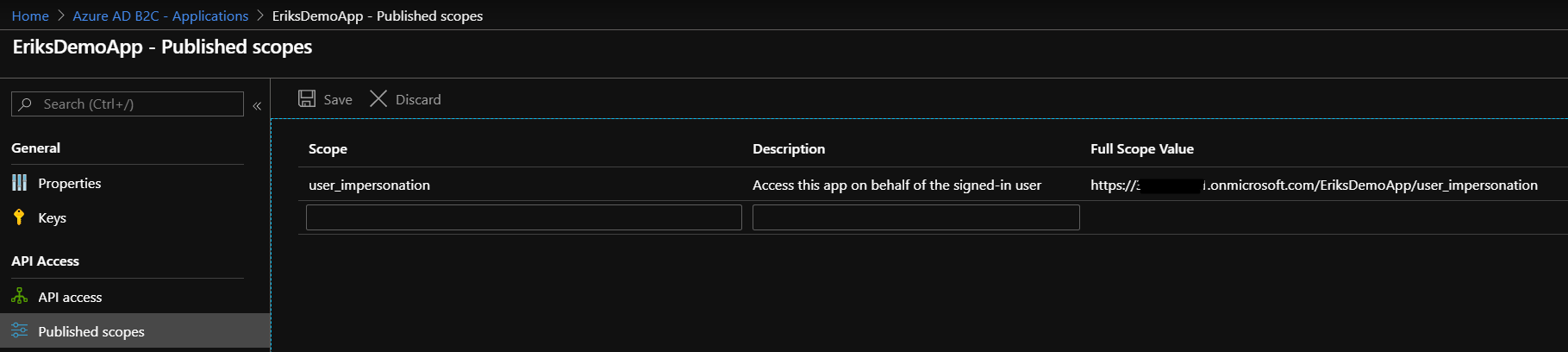
@jasonnutter The user_impersonation scope I am requesting is from my custom app, which is the default one you get when enabling custom scopes for a B2C app. I’ve tried to create/use another scope that I call read and that makes no difference with regards to this issue. https://docs.microsoft.com/en-us/azure/active-directory-b2c/active-directory-b2c-access-tokens#prerequisites

daltondhcp
on 19 Dec 2019
Do we have an update on this issue?
daltondhcp
on 28 Jan 2020
@daltondhcp This could be unrelated to scopes. Can you describe the steps to repro this and we can debug? I suspect that there is some service API expecting interaction in this use case, I can have the B2C dev team help us understand if this is a supported scenario. cc @ktsakas
@jennyf19 does this use case work for .Net?
 sameerag
on 30 Jan 2020
sameerag
on 30 Jan 2020
@sameerag i read through the issue from @daltondhcp and if it's regarding MFA + user flow, we do not have this issue in .NET. The set up of MFA happens in the portal on a per user flow basis, and is outside of the control of MSAL.NET. Let me know if you need anything else from us.
 jennyf19
on 30 Jan 2020
jennyf19
on 30 Jan 2020
Hi everyone, I'm curious if this extends beyond MFA and into custom policies in general. We employ an Azure B2C custom policy for "forgot password" in addition to two other proprietary experiences - in any of these three scenarios we are unable to use acquireTokenSilent() to obtain an access token after a successful interactive flow for the initial ID token.
When I would expect acquireTokenSilent() to ultimately cause Azure B2C to respond with a 302 status and redirect to our registered URI, it's returning a 200 status instead, with what appears to be the original interactive policy form instead (and fails to load in the browser due to the IFRAME-blocking header).
Two additional notes:
- The issue only occurs on implicit flows; our companion native apps using auth code flow are able to obtain access tokens with these policies.
- This is not an issue with the standard policies (login or sign up, for example).
 jake-brandt
on 26 Mar 2020
jake-brandt
on 26 Mar 2020
I am getting same issue, 'acquireTokenSilent' fails with 'X-Frame-Options' to 'deny'
Problem: when using custom policy with azure aad login (mfa enabled), login fails every time, login works ok when using other sign in options (email/google)
Browser: Chrome and Edge

 kiranbhadani
on 21 May 2020
kiranbhadani
on 21 May 2020
@derisen related to the other issue I tagged you in.
jennyf19
on 21 May 2020
kiranbhadani
on 27 May 2020
This issue has not seen activity in 14 days. It may be closed if it remains stale.
![github-actions[bot] picture](https://avatars.githubusercontent.com/in/15368?v=4&s=40) github-actions[bot]
on 11 Jun 2020
github-actions[bot]
on 11 Jun 2020
Any updates here?
daltondhcp
on 13 Jul 2020
@daltondhcp This is unfortunately, not something Msal.js can fix. The X-Frame Options Deny error happens when you call acquireTokenSilent and the service is trying to display something in the hidden iframe, such as an error or expecting some interaction. Additionally there are some flows that are expected not to work with acquireTokenSilent, you can read more about that here.
You can open the url shown in the error in a new tab to see what is causing this and interrupting the flow. If the service is throwing an error that may clue you into the solution. But if it is expecting an interaction when you don't think it should be, you'll need to open a ticket with the B2C service team. You can file a support ticket by following the instructions here: https://docs.microsoft.com/en-us/azure/active-directory-b2c/support-options
They may ask for a public repro link or additional data. You can also link this Github issue in the support request.
Closing as there is no further action needed from msal.js at this time. If you determine that this is an issue with the library, please open a new issue or leave a comment here and I would be happy to reopen.
 tnorling
on 13 Jul 2020
tnorling
on 13 Jul 2020
Related issues
 exequeryphil
·
3Comments
exequeryphil
·
3Comments
 ArneMancofi
·
3Comments
ArneMancofi
·
3Comments
 atvoid
·
3Comments
atvoid
·
3Comments
 spottedmahn
·
4Comments
spottedmahn
·
4Comments
 ninio
·
3Comments
ninio
·
3Comments
Most helpful comment
Hi everyone, I'm curious if this extends beyond MFA and into custom policies in general. We employ an Azure B2C custom policy for "forgot password" in addition to two other proprietary experiences - in any of these three scenarios we are unable to use
acquireTokenSilent()to obtain an access token after a successful interactive flow for the initial ID token.When I would expect
acquireTokenSilent()to ultimately cause Azure B2C to respond with a 302 status and redirect to our registered URI, it's returning a 200 status instead, with what appears to be the original interactive policy form instead (and fails to load in the browser due to the IFRAME-blocking header).Two additional notes: