Microsoft-authentication-library-for-js: Performance issues after acquireTokenSilent
I'm submitting a...
[x] Performance issue
[x] Feature request
[x] Documentation issue or request
Browser:
- [x] Chrome version XX
Library version
1.1.3
Library version: 1.1.3
Current behavior
In my React based SPA I use userAgentApplication.acquireTokenSilent to get an new access token. This works fine, but I came across an issue:
The token is acquired in a hidden iframe, which is quit common and also done by other libs. After some time I relized bad performance and memory usage, which is caused by the fact, that our application is mounted also in the iframe completly. This is not a good idea, because our SPA is setting up some expensive stuff like SignalR connections and so on.
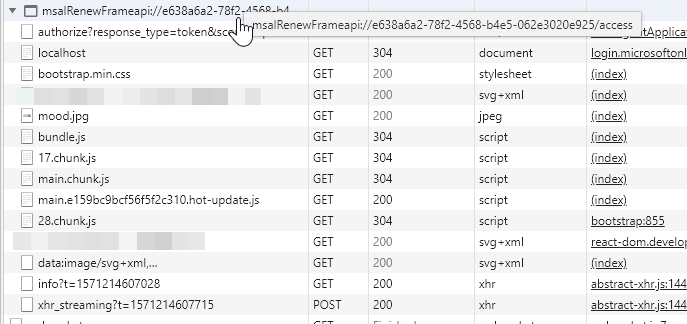
To avoid this, I would like to set a redirectUri which is used just for acquireTokenSilent calls. A second solution could be to detect that a acquireTokenSilent request is ongoing and I can avoid mounting the whole SPA.
Please see https://github.com/IdentityModel/oidc-client-js/wiki#other-optional-settings silent_redirect_uri setting.
Expected behavior
There should be
- a separated redirectUri which is used by userAgentApplication.acquireTokenSilent
- or a function to detect that an userAgentApplication.acquireTokenSilent request is ongoing or not
Minimal reproduction of the problem with instructions
See above
 MariuszKogut
All 9 comments
@MariuszKogut We are working on a new version of the library that sandboxes the app loaded in the iframe (which prevents the JS in the frame from loading) and allows you to set a redirect page that doesn't include any content or have MSAL included (i.e. a simple/blank page). Please try it out and let us know how it works for you: [email protected]
Update: we have discovered some issues with this beta, and will have a new version soon. Will keep you updated.
 jasonnutter
on 16 Oct 2019
jasonnutter
on 16 Oct 2019
@MariuszKogut we had a similar performance concerns in our application. And currently as a quick workaround which works perfectly in our case I can suggest you to not bootstrap the application in the iframe if it's possible in your case.
To do that you need to find the entry point in your application (I'm not a React expert, we are developing an Angular app), but I assume it should be something like this:
ReactDOM.render(
  App,
  document.getElementById('root')
);
Now you need to determine whether you in the iframe or not and based on this information decide whether to bootstrap the application or not:
if (window.parent === window) {
    // The entry point to your application
} else {
    let config = {
        // Your MSAL config
    };

    let context = new Msal.UserAgentApplication(config);

    context.handleRedirectCallback((error) => {
        console.error(`MSAL Frame error: ${error}`);
    });
}
 anton-gorbikov
on 22 Oct 2019
anton-gorbikov
on 22 Oct 2019
@MariuszKogut A new version of the beta has been released: [email protected]
Unfortunately, we had to disable the sandboxing of the iframe, but this version still allows you to use a redirect page that is dedicated to MSAL (and it doesn't have to include MSAL or any other content on it).
Please let us know if you have any feedback!
jasonnutter
on 22 Oct 2019
@anton-gorbikov
Now you need to determine whether you in the
iframeor not and based on this information decide whether to bootstrap the application or not:
Thanks - this works for me to reduce the "pain" of our problem.
@jasonnutter
Unfortunately, we had to disable the sandboxing of the iframe, but this version still allows you to use a redirect page that is dedicated to MSAL (and it doesn't have to include MSAL or any other content on it).
Is there a documentation that describes how I can use a dedicated page to MSAL? As I understood so far, I have to initialize MSAL to process the callback by Azure Ad.
MariuszKogut
on 25 Oct 2019
@mariuszkogut Not yet, we'll have that posted soon.
jasonnutter
on 25 Oct 2019
@jasonnutter currently I am seeing full app reloads (in the iframe) on every single acquireTokenSilent call. Is this the default behavior or should this just happen occasionally (i.e. if a new token is acquired)?
 jannikbuschke
on 4 Nov 2019
jannikbuschke
on 4 Nov 2019
@jannikbuschke This should only happen when a new token is acquired, and should not happen every time. Can you please open a separate issue detailing your usage? Thanks!
jasonnutter
on 4 Nov 2019
Closing this issue, as it's been some time and I'm assuming the issue has been resolved. Feel free to open a new issue if you have further questions.
 jmckennon
on 3 Dec 2019
jmckennon
on 3 Dec 2019
This should be resolved with the latest beta.4 release in npm. Please test it and let us know how it works. In case the issue still persists, please open a new issue.
 sameerag
on 4 Dec 2019
sameerag
on 4 Dec 2019
Related issues
 ssuvorov
·
3Comments
ssuvorov
·
3Comments
 ninio
·
3Comments
ninio
·
3Comments
 AbhaysinghBhosale
·
3Comments
AbhaysinghBhosale
·
3Comments
 ed-ilyin
·
4Comments
ed-ilyin
·
4Comments
 DarkLite1
·
3Comments
DarkLite1
·
3Comments
Most helpful comment
@mariuszkogut Not yet, we'll have that posted soon.