Microsoft-authentication-library-for-js: AcquireTokenSilent returns V1 token for wrong issuer
I'm submitting a...
[x] Regression (a behavior that used to work and stopped working in a new release)
[x] Bug report
[ ] Performance issue
[ ] Feature request
[ ] Documentation issue or request
[ ] Other... Please describe:
Browser:
- [x] Chrome version XX
- [ ] Firefox version XX
- [ ] IE version XX
- [ ] Edge version XX
- [ ] Safari version XX
Library version
Library version: 1.1.3 & 1.2.0-beta.0
Current behavior
I'm using msal in a react application. Please see my initialization code:
  const result = new UserAgentApplication({
    auth: {
      clientId: "581f879d-6f91-4f8c-b451-7b65775b500d",
      authority: "https://login.microsoftonline.com/a229a421-8b0d-4db7-b60c-1ead709ce039",
      redirectUri: config.authentication.redirectUri,
      navigateToLoginRequestUrl: false
    },
    cache: {
      cacheLocation: "sessionStorage",
      storeAuthStateInCookie: true
    },
    framework: {
      isAngular: false
    }
  });
To start the login process, I use loginRedirect:
        await userAgentApplication.loginRedirect({
          authority: "https://login.microsoftonline.com/a229a421-8b0d-4db7-b60c-1ead709ce039",
          scopes: ["openid", "profile"]
        });
After login redirect, I get an correct ID Token, issued for my tenant:
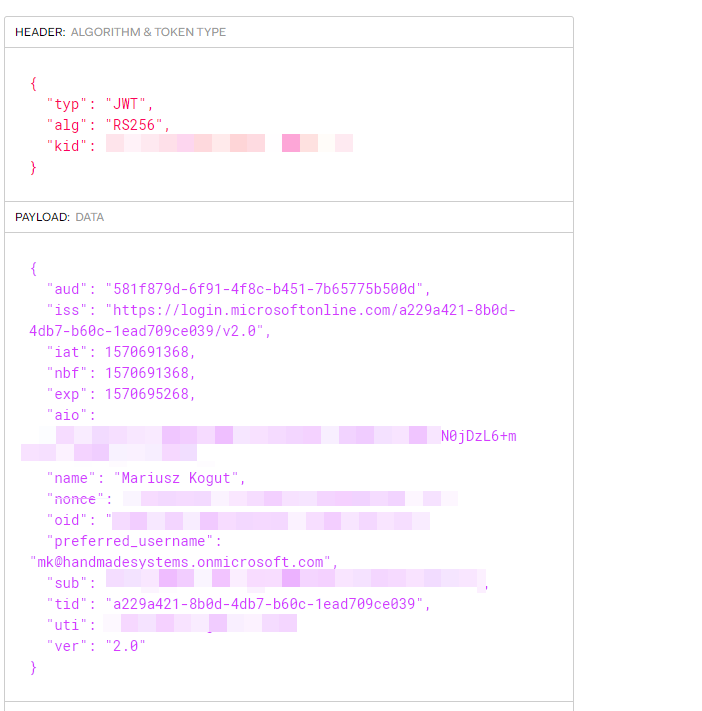
To get an access token, I use acquireTokenSilent:
    const account = userAgentApplication.getAccount();

    const silentToken = await userAgentApplication.acquireTokenSilent({
      scopes: ["openid", "profile"]
      authority: "https://login.microsoftonline.com/a229a421-8b0d-4db7-b60c-1ead709ce039",
      account: account
    });
As you can see, the returned token is a V1 token and was not issued for my tenant:

App manifest is already set to V2:
    "id": "d0399b40-7776-44a4-888f-fb21f35abbab",
    "acceptMappedClaims": null,
    "accessTokenAcceptedVersion": 2,
Expected behavior
V2 token should be returned for correct issuer.
Minimal reproduction of the problem with instructions
Described above.
 MariuszKogut
All 4 comments
@MariuszKogut Are you seeing any problematic behavior with these access tokens? Because generally speaking, you should treat access tokens as opaque and not worry about individual claims, as STS will add information for itself that you do not need to necessarily be concerned about.
 jasonnutter
on 10 Oct 2019
jasonnutter
on 10 Oct 2019
@jasonnutter Please notice that I'm using the access token as a bearer token to access my custom build WebApi. In our case, it's a multi tenant application, which stores data based on the AzureAd Tenant Id. So it's crucial to validate the access token on the backend using both Audience & Issuer, to make sure, that we can "trust" this access token and the tenant id.
Please notice our JwtBearer configuration inside our WebApi:
c#
services
.AddAuthentication(options =>
{
options.DefaultScheme = JwtBearerDefaults.AuthenticationScheme;
})
.AddJwtBearer(o =>
{
o.Authority = configuration["AzureAd:Authority"];
o.TokenValidationParameters = new TokenValidationParameters
{
ValidAudiences = new List<string> { configuration["AzureAd:ClientId"], },
IssuerValidator = ValidateIssuer(configuration["AzureAd:AllowedIssuer"]),
};
o.Events = new JwtBearerEvents
{
OnTokenValidated = async context =>
{
...
},
};
});
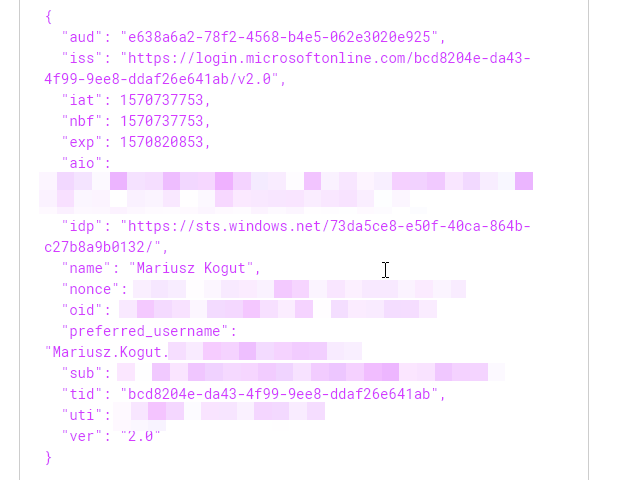
msal 0.2.4 is working fine and both Id Token and Access Token has the correct Audience & Issuer:
MariuszKogut
on 10 Oct 2019
@MariuszKogut If you need to protect a custom web api with one of our tokens, you need to configure and receive consent from the user for a custom scope for that resource. In your example, you made a request for ["openid", "profile"], which are MS graph scopes, so you were only issued a token that can be used for MS Graph.
You can find information on creating custom scopes here: https://docs.microsoft.com/en-us/azure/active-directory/develop/scenario-protected-web-api-app-registration#expose-an-api
Once you have done so, you can add the custom scope to your login request, and the user will be asked to consent to it.
await userAgentApplication.loginRedirect({
     authority: "https://login.microsoftonline.com/a229a421-8b0d-4db7-b60c-1ead709ce039",
     extraScopesToConsent: ["openid", "profile", "user.read", "custom_scope"]
});
When that is complete, you should be issued two access tokens, one for Graph and one for your resource. To retrieve the token for your resource, call acquireTokenSilent but only provide the scope for your resource.
    const graphAccessToken = await userAgentApplication.acquireTokenSilent({
      scopes: ["openid", "profile", "user.read"]
      authority: "https://login.microsoftonline.com/a229a421-8b0d-4db7-b60c-1ead709ce039"
    });

    const customAccessToken = await userAgentApplication.acquireTokenSilent({
      scopes: ["custom_scope"]
      authority: "https://login.microsoftonline.com/a229a421-8b0d-4db7-b60c-1ead709ce039"
    });
This is because access tokens are issued per resource (i.e. a single access token can't be used for multiple resources), and we cache tokens accordingly, so you need to make separate acquireTokenSilent requests to retrieve the access token for each resource.
jasonnutter
on 10 Oct 2019
@jasonnutter Thanks Jason for figuring this out! Works like a charm now. :-)
MariuszKogut
on 11 Oct 2019
Related issues
 Calamari
·
3Comments
Calamari
·
3Comments
 sameerag
·
3Comments
sameerag
·
3Comments
 jviney
·
3Comments
jviney
·
3Comments
 atvoid
·
3Comments
atvoid
·
3Comments
 DarkLite1
·
3Comments
DarkLite1
·
3Comments
Most helpful comment
@MariuszKogut If you need to protect a custom web api with one of our tokens, you need to configure and receive consent from the user for a custom scope for that resource. In your example, you made a request for
["openid", "profile"], which are MS graph scopes, so you were only issued a token that can be used for MS Graph.You can find information on creating custom scopes here: https://docs.microsoft.com/en-us/azure/active-directory/develop/scenario-protected-web-api-app-registration#expose-an-api
Once you have done so, you can add the custom scope to your login request, and the user will be asked to consent to it.
When that is complete, you should be issued two access tokens, one for Graph and one for your resource. To retrieve the token for your resource, call
acquireTokenSilentbut only provide the scope for your resource.This is because access tokens are issued per resource (i.e. a single access token can't be used for multiple resources), and we cache tokens accordingly, so you need to make separate
acquireTokenSilentrequests to retrieve the access token for each resource.