Microsoft-authentication-library-for-js: MSAL returns Token Renewal operation failed in Chrome, how to resolve this?
I'm submitting an issue regarding the token acquiring after login. I am using ReactJS and MSAL 1.1.3 for Azure AD authentication. I frequently get the "Token Renewal Operation failed" error. I have cleared the cache, and still it appears.
Browser:
- [ ] Firefox
- [ ] IE 9 and 10
- [ ] Edge
- [ ] Opera
Library version
MSAL: 1.1.3
React: 16.8.6
Current behavior
I also tried using it in incognito, it sometimes let me login but most of the times it would return the error. The procedure is working perfectly fine in Chrome, and it does not work properly in IE, Edge, Firefox and Opera. Any help would be highly appreciated.
Expected behavior
As in chrome it works perfectly, it should work the same in other browsers as well, at least in updated browsers such as Edge, Firefox, Opera.
Minimal reproduction of the problem with instructions
const msalConfig = {
auth: {
clientId: my_client_id,
authority: 'https://login.microsoftonline.com/tenant_id',
scopes: [${websiteURL}/user_impersonation],
redirectUri: ${websiteURL}/,
postLogoutRedirectUri: ${websiteURL}/,
loadFrameTimeout: 10000,
},
cache: {
cacheLocation: "sessionStorage",
},
navigateToLoginRequestURL: false,
storeAuthStateInCookie: true,
};
msalInstance = new Msal.UserAgentApplication(msalConfig);
const loginRequest = {
scopes: [${websiteURL}/user_impersonation],
authority: 'https://login.microsoftonline.com/tenant_id',
};
msalInstance.loginPopup(loginRequest)
.then(response => {
msalInstance.acquireTokenSilent(loginRequest)
.then(responseToken => {
this.setState({
redirect: true
})
})
.catch(err => {
console.log(err);
})
})
.catch(err => {
console.log(err);
})
I have added the loadFrameTimeout too, but it won't work. Following is my configuration that I used to create msalInstace and the login procedure:
 MubashirEbad
All 31 comments
@MubashirEbad After you login, inspect localStorage for your app. You should see an access token that is the value for an entry that has a key made up of scopes and the authority. Does that the key for that localStorage entry match the authority and scopes for your login request?
 jasonnutter
on 25 Sep 2019
jasonnutter
on 25 Sep 2019
@MubashirEbad After you login, inspect
localStoragefor your app. You should see an access token that is the value for an entry that has a key made up of scopes and the authority. Does that the key for thatlocalStorageentry match the authority and scopes for your login request?
@jasonnutter After login, as I have defined in my code, the _sessionStorage_, it contains the information returned from MSAL. So the access token there is not a valid token I guess because when I decode that access token on jwt.io, it won't show the scopes and some other details.
MubashirEbad
on 25 Sep 2019
@jasonnutter Any update on the issue?
MubashirEbad
on 30 Sep 2019
@MubashirEbad It is expected that ID tokens returned from login requests do not contain scopes.
To restate my original question, in sessionStorage you should see one or more entries that have a key that looks like this:
{"authority":"https://login.microsoftonline.com/tenant_id","clientId":"my_client_id","scopes":"scope1 scope 2","homeAccountIdentifier":"MmU...."}
Does the keys for those values look like this? Do they match the scopes you are using for acquireTokenSilent?
jasonnutter
on 30 Sep 2019
@jasonnutter It is supposed to work like that, like in google chrome it would do the same process and yes it includes that.
But sometimes in Firefox, Edge, Opera, Internet Explorer, it would return the same details but won't redirect. It is not a redirection issue, I have used both Browser Router and Hash Router.
MubashirEbad
on 1 Oct 2019
Our production site hit this issue today for some users. Interestingly enough, in Chrome, this timeout occurs a few seconds after login and the user gets redirected to the login page. It causes an endless loop for the user. However, on Edge and IE they won't be redirected to the login page because they get redirected to [sitename].com/null which doesn't exist, so they get a 404 page.
I managed to collect console logs and network traces from the user who reported it today. I've also referenced an issue above from another person facing the issue.
https://microsoft-my.sharepoint.com/:f:/p/andcra/EijAahwNZu5LvKYa2_OTS_gBL5zauYsI2l9eumei4rc2vw?e=yG2o9N
Is there any suggestion for handling these timeout issues gracefully? This represents a breaking issue for users.
 AndrewCraswell
on 17 Oct 2019
AndrewCraswell
on 17 Oct 2019
We also have this issue. This happens with google account but Microsoft account works fine. Also, when I hit this error there is another error logged related to IFrame origin with google

 rajarameshvarma
on 18 Oct 2019
rajarameshvarma
on 18 Oct 2019
@AndrewCraswell Thanks, that information is helpful. We're aware of the issues related to timeouts, but don't have a workaround at the moment, as we are still investigating.
jasonnutter
on 18 Oct 2019
@jasonnutter I see that this is In Progress, but just curios to know if there is a timeline for this fix to be available? Thank you
rajarameshvarma
on 29 Oct 2019
@rajarameshvarma This is a very high priority bug for us right now, and were hoping to have a fix released soon. No exact timeline yet, unfortunately.
jasonnutter
on 29 Oct 2019
@MubashirEbad can you please try the latest beta version, we believe this is fixed
 DarylThayil
on 7 Nov 2019
DarylThayil
on 7 Nov 2019
@MubashirEbad can you please try the latest beta version, we believe this is fixed
Sure I would check it out and let you know
MubashirEbad
on 7 Nov 2019
@DarylThayil The issue is still there. after login it has to redirect to the specified url, instead it display the Token Renewal Operation failed error
MubashirEbad
on 8 Nov 2019
@jasonnutter is this error understood / tracked?
DarylThayil
on 8 Nov 2019
Yes, its tracked.
jasonnutter
on 11 Nov 2019
I am still facing issues with IFrame and timeout.. I am using react-aad-msal in my react project. This package now has msal as peer dependency. So I did some testing with various msal releases.
with [email protected]
Both google and microsoft account are throwing errors.
Microsoft account:

Google account:

with [email protected]
Google works fine.
Microsoft account fails
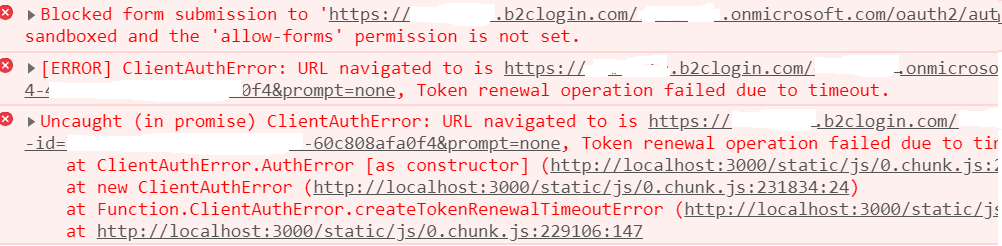
with [email protected]
This is the real surprise. Both accounts are working fine now :). Google was not working when posted the issue earlier. Only difference is I do not have my domain added to google authorized javascript origins earlier.
So with all this, not sure what is going on.
rajarameshvarma
on 27 Nov 2019
@pkanher617 Are you familiar with what b2c uses form submissions for? Sounds like we may need to add it to the sandbox white list. @sameerag
jasonnutter
on 28 Nov 2019
This is started to get complicated.. even with [email protected], google account works sometime and fails other times but in incognito mode it works every single time.
@jasonnutter Can you please point me to documentation how msal or b2c uses iframes for token renewal, especially IFrame pointing to google or MS instaed of B2C?
This issue is blocking us from going live. Is this something very isolated issue? any workarounds for this?
rajarameshvarma
on 2 Dec 2019
@rajarameshvarma Can you try using acquireTokenPopup instead of acquireTokenSilent? That should help avoid the iframe-related errors.
(Unfortunately, we don't have public documentation on how MSAL uses iframes, as it is considered an implementation detail of the library.)
jasonnutter
on 2 Dec 2019
@rajarameshvarma For any policy that would need form submission, I suppose it will be an interaction_request. As suggested above, can you try acquireTokenPopup() for those policies?
 sameerag
on 4 Dec 2019
sameerag
on 4 Dec 2019
Please open a new issue with steps to reproduce to track this @rajarameshvarma ? The original issue diverged into a multiple issues and some of them are resolved in [email protected] . If this isn't case for any of your use cases, we would appreciate it to be tracked with a new ticket.
sameerag
on 14 Dec 2019
I'm using msal 1.2.1 and the error persists: token_renewal_error, Token renewal operation failed due to timeout., you should re-open the issue, please.
 brayanL
on 11 Feb 2020
brayanL
on 11 Feb 2020
@brayanL I see you commented on #1260. Can we please track your issue with #1260 instead of this thread?
sameerag
on 12 Feb 2020
I am also facing same issue in 1.2.1 in react project. Is this issue resolved ?
 suresh777
on 19 Feb 2020
suresh777
on 19 Feb 2020
@jasonnutter I am using msal 1.1.3 now, and its not working properly in Safari now. It was working fine on Safari earlier in msal 1.1.2 but now its the same token renewal operation failed issue on Safari.
MubashirEbad
on 21 Feb 2020
Right now i am using 1.1.3, it is working fine in all browsers. But if i try with latest version 1.2.1 i am getting token renewal operation failed
suresh777
on 21 Feb 2020
@sameerag i like the several previous comments are having issues with MSAL 1.2.0, 1.2.1, and 1.2.2. These versions cause the problem described in this thread: token_renewal_error, Token renewal operation failed due to timeout. It works maybe 35% of the time, making it inconsistent. Simply downgrading to 1.1.3 resolves this problem. At least for me, my redirect URLs are correct so it is unrelated to #1260.
It is unfortunate the original post describes the inverse problem because I believe that is #1260, while many people are unable to use anything newer than 1.1.3 because of token_renewal_error...
 Agendum
on 6 Apr 2020
Agendum
on 6 Apr 2020
@sameerag Please consider reopening this issue as the error still occurs.
 DavidChristiansen
on 30 Apr 2020
DavidChristiansen
on 30 Apr 2020
Looking at the code it appears that the configuration loadFrameTimeout is in the wrong configuration section in the code that was initially posted on this issue. You need to set it in the system object. See example below:
const msalConfig = {
auth: {
clientId: my_client_id,
authority: 'https://login.microsoftonline.com/tenant_id',
scopes: [${websiteURL}/user_impersonation],
redirectUri: ${websiteURL}/,
postLogoutRedirectUri: ${websiteURL}/,
loadFrameTimeout: 10000,
},
system: {
loadFrameTimeout: 10000
},
cache: {
cacheLocation: "sessionStorage",
},
navigateToLoginRequestURL: false,
storeAuthStateInCookie: true,
};
Lacking code ninja formatting skills sorry.
Here is a link to the source: https://github.com/AzureAD/microsoft-authentication-library-for-js/blob/920911e14f2bc5b146e1229162929f9ae1324860/lib/msal-core/src/Configuration.ts#L156
 conkman
on 30 Apr 2020
conkman
on 30 Apr 2020
I am also getting a timeout failure that is caused by attempting to renew a token from within my app but not at the root. I am hoping that a workaround will be to test for timeout and then route to the root , renew and then return to the page in question to fetch data.
If there is some reason why this solution will not work could someone please respond to this message. It is a royal pain to freeze processing in order to artificially re-route and return so that a bug in the msal library or the authorization code itself can be avoided.
I cannot think of any legitimate reason to decline a renwal of a token from within the same url but with a deeper suffix than the root. in other words url:port/ works but not url:port/home or url:port/admin... this is at best an unfortunate limitation and at worst and absurd one.
Any guidance would be appreciated
 reijam
on 13 Jul 2020
reijam
on 13 Jul 2020
I am still facing the issue,
has anyone managed to solve it
 ashokbugude
on 27 Aug 2020
ashokbugude
on 27 Aug 2020
Related issues
 atvoid
·
3Comments
atvoid
·
3Comments
 jviney
·
3Comments
jviney
·
3Comments
 lecaillon
·
3Comments
lecaillon
·
3Comments
 spottedmahn
·
3Comments
spottedmahn
·
3Comments
 DarkLite1
·
3Comments
DarkLite1
·
3Comments