Microsoft-authentication-library-for-js: MSAL does not return the new token after an acquireSilent()
I'm submitting a...
[ ] Regression (a behavior that used to work and stopped working in a new release)
[x] Bug report
[ ] Performance issue
[ ] Feature request
[ ] Documentation issue or request
[ ] Other... Please describe:
Browser:
- [x] Chromium version 74 (with Brave)
- [ ] Firefox version XX
- [ ] IE version XX
- [ ] Edge version XX
- [ ] Safari version XX
Library version
Library version: 1.0.1
Current behavior
- I'm using MSAL with VueJS
- I use the localStorage (and not the sessionStorage)
- I use axios to intercept outgoing requests to my API, and inject the
accessTokenfromacquireTokenSilent()as a bearer token
When the token expires, MSAL fetches a new one (using acquireTokenSilent()), updates the localStorage accordingly, but still returns the old one. As a result, when I call my API, I have 401 errors.
- When I refresh the page,
acquireTokenSilent()returns the new token. - When I open a new tab from the same app, the new tab
acquireTokenSilent()returns the new token. However, the old tab still uses the old token
The localStorage just after a login:

After a token refresh:

The new token is present (in green), while the old one is still there in red. MSAL still returns the old one when calling acquireTokenSilent()
Expected behavior
MSAL should use the new token
Minimal reproduction of the problem with instructions
The ajax interceptor:
    axios.interceptors.request.use(
      async request => {
        await setToken(request)
        return request
      },
      error => {
        return Promise.reject(error)
      }
    )

    const setToken = async (request: any) => {
      const res = await authService.getAuthResponse() as Msal.AuthResponse
      request.headers.common['Authorization'] = `Bearer ${res.accessToken}` // This fails if MSAL requested a new token
    }
The authService:
  public async getAuthResponse(): Promise<null | Msal.AuthResponse> {
    const tokenRequest = {
      scopes: this.graphScopes
    }

    try {
      return await this.userAgentApp.acquireTokenSilent(tokenRequest)
    }
    catch (e) {
      this.userAgentApp.acquireTokenRedirect(tokenRequest)
      return null
    }
  }
UPDATED WORKAROUND:
To manually retrieve the correct token:
function extractMSALToken() {
  const timestamp = Math.floor((new Date()).getTime() / 1000)
  let token = null

  for (const key of Object.keys(localStorage)) {
    if (key.includes('"authority":')) {
      const val: any = JSON.parse(localStorage.getItem(key)!)

      if (val.expiresIn) {
        // We have a (possibly expired) token

        if (val.expiresIn > timestamp && val.idToken === val.accessToken) {
          console.log(key)
          // Found the correct token
          token = val.idToken
        }
        else {
          console.log('will remove ' + key)
          // Clear old data
          localStorage.removeItem(key)
        }
      }
    }
  }
  if (token) return token
  throw new Error('No valid token found')
}
Old workaround (invalid):
    const setToken = async (request: any) => {
      // Make sure that MSAL token is up-to-date
      const res = await authService.getAuthResponse() as Msal.AuthResponse
      // DIRTY FIX : directly fetch the token from the localStorage
      request.headers.common['Authorization'] = `Bearer ${localStorage.getItem('msal.idtoken')}`
      // request.headers.common['Authorization'] = `Bearer ${res.accessToken}` // This doesn't work
    }
 scambier
All 33 comments
This is really interesting, thanks for sharing!
@pkanher617 can you take a look at this?
Looks like we may be fumbling something in the cache of refreshed tokens
 DarylThayil
on 13 Jun 2019
DarylThayil
on 13 Jun 2019
+1. I get this as well.
Question for @scambier if I may: In your 'workaround', I noticed this line:
request.headers.common['Authorization'] = `Bearer ${localStorage.getItem('msal.idtoken')}`
Is there any specific reason why the id token is getting injected into your Authorization header and not the access token? The workaround seems succinct, apart from this one line.
Cheers! 👍
 tylerjwatson
on 17 Jun 2019
tylerjwatson
on 17 Jun 2019
Team, I also noticed something of particular interest:
In the localStorage container, tokens acquired on initial boot have the expiredIn property set to a number:
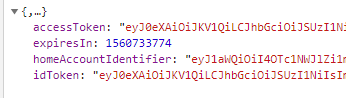
whereas subsequents (or tokens requested by acquireTokenSilent) are strings:
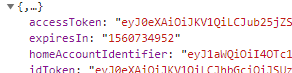
This may be breaking some of your comparison logic for clearing expired stuff and may be part of the reason why erroneous tokens are being returned from these calls.
Cheers
tylerjwatson
on 17 Jun 2019
Is there any specific reason why the id token is getting injected into your Authorization header and not the access token? The workaround seems succinct, apart from this one line.
Cheers!
@tylerjwatson I have two objects containing an access_token in the localStorage (cf. my second screenshot), and their keys (that are also objects) don't make them easy to retrieve and compare, so I'm just picking the msal.idtoken value. Since it's a workaround, I didn't give it much thought and went with the first "it seems to work" solution
scambier
on 17 Jun 2019
Updated workaround: getting msal.idtoken from the localStorage does not work reliably, as the value is sometimes (often) not correctly updated by msal.
This function seems to get the correct, up-to-date token more reliably:
function extractMSALToken() {
  const timestamp = Math.floor((new Date()).getTime() / 1000)
  let token = null

  for (const key of Object.keys(localStorage)) {
    if (key.includes('"authority":')) {
      const val: any = JSON.parse(localStorage.getItem(key)!)

      if (val.expiresIn) {
        // We have a (possibly expired) token

        if (val.expiresIn > timestamp && val.idToken === val.accessToken) {
          // Found the correct token
          token = val.idToken
        }
        else {
          // Clear old data
          localStorage.removeItem(key)
        }
      }
    }
  }
  if (token) return token
  throw new Error('No valid token found')
}
Guys,
This is a severe issue with a Microsoft product. Can we please get an update and an ETA to fix?
Cheers
tylerjwatson
on 8 Jul 2019
@pkanher617 Will your PR #799 solve some of the issues above?
 sameerag
on 10 Jul 2019
sameerag
on 10 Jul 2019
I'm experiencing the same issue, which is causing my app to stop working every 24 hours (when token expires).
As a workaround I have to manage token expiration and clearing localstorage with dedicated code, which is far from ideal (and duplicates what MSAL should be doing) - the workaround could stop working anytime MSAL decides to use different storage keys, ie. I would prefer not knowing how the lib use localstorage and not deal with internal implementation details.
Could you provide an ETA for the fix?
 dluc
on 11 Jul 2019
dluc
on 11 Jul 2019
Adding this bug to our October 2019 miletsone
DarylThayil
on 9 Sep 2019
@scambier Is this still an issue with the latest version (1.1.3)?
 jasonnutter
on 25 Sep 2019
jasonnutter
on 25 Sep 2019
@jasonnutter yes this is still a problem with 1.1.3
 bjornicus
on 27 Sep 2019
bjornicus
on 27 Sep 2019
@scambier We pushed up some cache fixes(nonce clearance) in the recent msal beta releases. Can you please try msal 1.2.0-beta.2 and report to us if the issue is still seen? The package is available in npm for download.
sameerag
on 24 Oct 2019
@sameerag I've updated a few hours ago, and so far the token seems to refresh itself correctly, thanks.
scambier
on 24 Oct 2019
Thanks @scambier. Closing this issue.
sameerag
on 29 Oct 2019
@sameerag actually, it seems to still not work as expected, but maybe I'm misunderstanding. My setup is still the one described in the first post, but MSAL still often fails to refresh the token by itself.
Basicall, each ajax request I do is preceded by a call to this function:
  public async getAuthResponse(): Promise<Msal.AuthResponse> {
    try {
      return await this.userAgentApp.acquireTokenSilent(this.tokenRequest)
    }
    catch (e) {
      try {
        return await this.userAgentApp.acquireTokenPopup(this.tokenRequest)
      }
      catch (e) {
        console.error('Cannot retrieve token')
        throw e
      }
    }
  }
So, 401 responses shouldn't happen, right? Because they still happen. I have to intercept those responses, call acquireTokenSilent/Popup() once more, inject that new token, and replay the request.
Edit: it's almost like the acquireSilent() is sending a false positive "your token is still fresh", when actually it should have caught an error to subsequently call acquirePopup() or acquireRedirect()
Edit 2: the minimal code for my axios response interceptor:
    axios.interceptors.response.use(
      response => response,
      async (error) => {
        if (error.config && error.response && error.response.status === 401) {
          const res = await authService.getAuthResponse()
          error.config.headers['Authorization'] = `Bearer ${res.accessToken}`
          return axios.request(error.config)
        }
      })
I tested it on beta 1.2.0-4 but still not working.
 mbondoso
on 25 Nov 2019
mbondoso
on 25 Nov 2019
@scambier How frequent are the 401 errors? Ideally a token is valid for an hour and acquireTokenSilent if called within an hour will be able to refresh the token silently before the token expires as long as the session is valid. If the AAD session is invalid, that is when the user is prompted for interaction and may need to call acquireTokenPopup.
Can you paste the response you are seeing in the catch when acquireTokenSilent fails? What is the error thrown?
sameerag
on 26 Nov 2019
@sameerag
How frequent are the 401 errors?
They're infrequent, but they happen. I had 1 between 8am and 1pm today, for example. That's why I thought the issue was fixed in https://github.com/AzureAD/microsoft-authentication-library-for-js/issues/759#issuecomment-545877042
if called within an hour will be able to refresh the token silently before the token expires as long as the session is valid.
Yes, and that works most of the time. Just once in a while, it doesn't.
Can you paste the response you are seeing in the catch when acquireTokenSilent fails? What is the error thrown?
It does not fail per se. Like I said in my previous post https://github.com/AzureAD/microsoft-authentication-library-for-js/issues/759#issuecomment-548260376, it's almost like the acquireTokenSilent() is sending a false positive "your token is still fresh", when it should have been renewed. So when I call my API, it responds with a 401.
To circumvent this, I had to write an interceptor to catch the 401 responses. All it does is call acquireTokenSilent _again_, then retry my API call.
scambier
on 26 Nov 2019
@scambier I wonder if you are encountering some sort of edge case, where MSAL thinks the token is still valid, but the API does not. Would you be able to share the access token (privately) with us next time this happens (along with the exact timestamp of the request)? Email is on my profile. Thanks!
jasonnutter
on 27 Nov 2019
@jasonnutter I was wrong on my assumptions: the accessToken is not invalid, it's null. So yeah, it's normal to have a 401 response, since I'm sending "Bearer null" as my Authorization. But I guess it's not normal to have a null accessToken
However, everything else in the acquireToken() response is valid, even the idToken.rawIdToken. So when I re-query acquireToken(), the accessToken is correctly filled, and is identical to the previous idToken.rawIdToken.
This was the response I got today at 09:48 GMT. The expiration value is good (valid until 10:41 GMT)
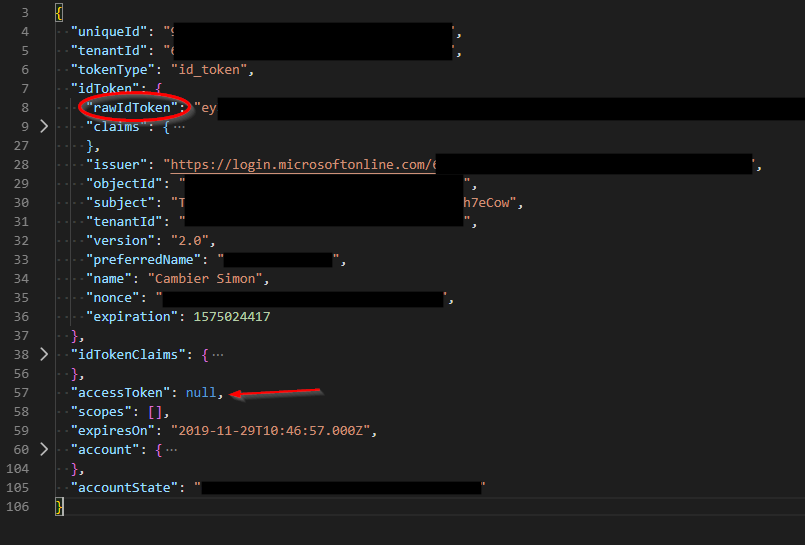
Edit: what's the role of idToken.rawIdToken?
scambier
on 29 Nov 2019
@scambier Ah, I see. Note, that acquireTokenSilent can be used to retrieve access tokens and ID tokens, and it looks like the first time you call acquireTokenSilent in this scenario, you are returned an ID token, not an access token. I assume you are using the same scopes for both requests? Might be a bug if you are getting back an ID token the first time you make the call for a set of scopes and then an access token token the second time (with the same set of scopes). cc: @sameerag
jasonnutter
on 2 Dec 2019
@jasonnutter
Note, that acquireTokenSilent can be used to retrieve access tokens and ID tokens, and it looks like the first time you call acquireTokenSilent in this scenario, you are returned an ID token, not an access token
It looks like it. There are some differences in the "Id Token" :
uniqueIdis filled (empty string in the Access Token)tenantIdis filled (empty string in the Access Token)accessTokenis null (filled in the Access Token)scopesare empty (filled in the Access token)accountStateis different
If you still need them, I can send you both responses (id token and access token) privately by e-mail.
I assume you are using the same scopes for both requests?
Indeed.
Thank you for your help :)
scambier
on 3 Dec 2019
@scambier Which scopes are you passing to acquireTokenSilent?
jasonnutter
on 5 Dec 2019
@jasonnutter only our ClientId (application Id), in the form of xxxxxxxx-xxxx-xxxx-xxxx-xxxxxxxxxxxx
scambier
on 5 Dec 2019
@scambier Ah, that would explain why you are getting back an ID token. To properly protect a custom web API using AAD access tokens, you need to register a custom scope in the Azure Portal, and then pass that custom scope to your login call as well as acquireTokenSilent. Your web API will need to use one of our middlewares to verify the access token.
See this comment for more info: https://github.com/AzureAD/microsoft-authentication-library-for-js/issues/1040#issuecomment-540810355
jasonnutter
on 5 Dec 2019
Closing, as no further action at this time.
jasonnutter
on 9 Jan 2020
@jasonnutter @sameerag Is the issue fixed for Angular Wrapper Library as well ?
 arunprasathv
on 26 Mar 2020
arunprasathv
on 26 Mar 2020
@arunprasathv This issue ended up being a usage problem. Any bugs that are fixed in the latest version of msal are fixed for MSAL Angular if you use the latest version of both msal and @azure/msal-angular.
If you are encountering behavior you believe is a bug, please open a new issue, thanks!
jasonnutter
on 26 Mar 2020
@jasonnutter I see auth pop showing once the token expires when the user is in middle of something it pops up for auth which bad user experience. Any examples would be great.
arunprasathv
on 26 Mar 2020
@arunprasathv Please open a new issue, thanks!
jasonnutter
on 27 Mar 2020
@jasonnutter I need to create a custom scope also if I'm using Azure Function Apps?
Because like scambier I'm passing only our ClientId
 mxswat
on 25 Apr 2020
mxswat
on 25 Apr 2020
@mxswat Yes, if you are using access tokens for a custom API (e.g. an Azure Function), you should create a custom scope.
jasonnutter
on 27 Apr 2020
Hi, I'm having this problem using azure-msal in angular
"msal": "^1.3.2",
"@azure/msal-angular": "^1.0.0",
I have this custom checker if msal.idtoken is expired then i called this function to get new idtoken

- when it is success the existing msal.idtoken coming from your first login doesn't refresh. (not that i was not using the msalInterceptor because i made a custom httpinceptor)
- it also added a new key the one that is highlighted in yellow.
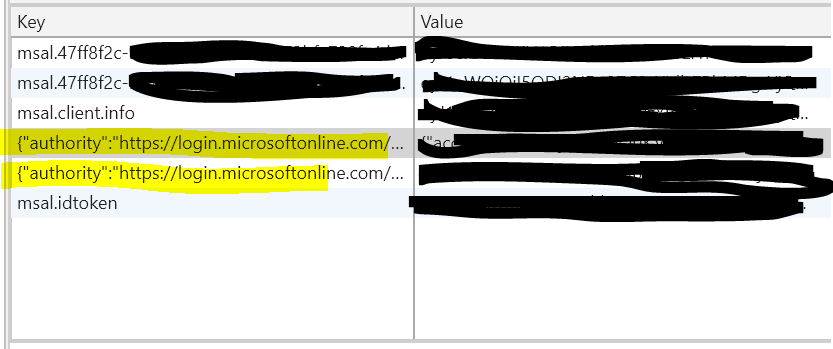
may i know someone who encountered this and found workaround? or any suggestions?
 rosiejaneenomar
on 4 Jul 2020
rosiejaneenomar
on 4 Jul 2020
Related issues
 jfbloom22
·
3Comments
jfbloom22
·
3Comments
 spottedmahn
·
3Comments
spottedmahn
·
3Comments
 atvoid
·
3Comments
atvoid
·
3Comments
 ssuvorov
·
3Comments
ssuvorov
·
3Comments
 DarkLite1
·
3Comments
DarkLite1
·
3Comments
Most helpful comment
Guys,
This is a severe issue with a Microsoft product. Can we please get an update and an ETA to fix?
Cheers